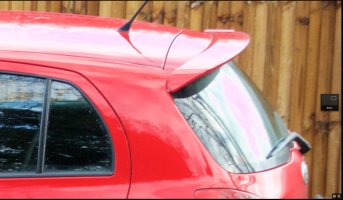
Highlights showing up as pink on 7dii

I've been using a 7dii for a while now and while I am very happy with its performance I have noticed an issue with highlights showing up pink during post-processing in Aperture... have I got a duff camera or is it a software issue with Aperture (my 40d shots never had any pink in them)

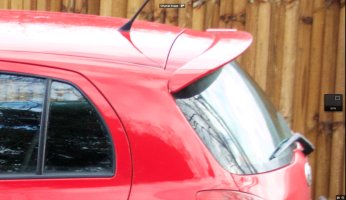
I have attached a before and after shot showing the pink on the glass and roof of the car

Ashley
 

Attachments

  • 1.jpg
    1.jpg
    247.3 KB · Views: 236
  • 2.jpg
    2.jpg
    269.4 KB · Views: 221
mackguyver said:
PC guy here, but I wonder if Aperture has any sort of highlight clipping warnings like other RAW software. If so, it may be indicating clipped highlights in false color, in this case, pink.

No, its not that. The highlight colour is red (blue when too dark) and I can toggle this on/off easily. I have had some success with turning Highlight Tone Priority on in camera, but it still comes in with very bright highlights

I don't think its software induced (Aperture) as my 40d highlights could be sorted without turning pink.

Ashley
 
Upvote 0
neuroanatomist said:
mackguyver said:
Have you tried a different RAW converter - like DPP from Canon? Also, how about in-camera RAW to JPEG?

Related question - in the 'before and after' pair, what is the 'before' image?

Both images are screenshots from Aperture, the top image is without any adjustments eing applied, the bottom image (with the pink on the glass and roof) has had adjustments applied (exposure, contrast, reducing highlights - where the pink comes in)
 
Upvote 0
ashley said:
I don't think its software induced (Aperture) as my 40d highlights could be sorted without turning pink.

ashley said:
Both images are screenshots from Aperture, the top image is without any adjustments eing applied, the bottom image (with the pink on the glass and roof) has had adjustments applied (exposure, contrast, reducing highlights - where the pink comes in)

I'd say that quite clearly indicates the problem is Aperture, and I'd recommend reporting it as a bug to Apple.
 
Upvote 0
neuroanatomist said:
ashley said:
I don't think its software induced (Aperture) as my 40d highlights could be sorted without turning pink.

ashley said:
Both images are screenshots from Aperture, the top image is without any adjustments eing applied, the bottom image (with the pink on the glass and roof) has had adjustments applied (exposure, contrast, reducing highlights - where the pink comes in)

I'd say that quite clearly indicates the problem is Aperture, and I'd recommend reporting it as a bug to Apple.

I'm with you neuro. I think it has something to do with Aperture. You could try to adjust another photo from the same session that isn't of a red car to be sure though. I'm thinking it might be the way aperture is dealing with reds that is causing the problem. Maybe it thinks that the red is reflected in those surfaces and when you turn down the highlights you are allowing the color reflection to be more obvious. I can sort of see pink in the before image as well but it's extremely muted. If you have a picture of something green or blue and reduce the highlights are they still pink? Or you could try to do the same adjustments to this photo in dpp.

I know you said that you turned highlight tone priority on and had no pink but where those photos of the same subject and lighting conditions as the photo you are showing us from the beginning of this thread? Maybe take a couple photos of a group of differently colored objects in controlled light that gives you excessive highlights and then try reducing them and see what you get and check them out in dpp to compare results. Do this with highlight tone priority turned back off.
 
Upvote 0
neuroanatomist said:
ashley said:
I don't think its software induced (Aperture) as my 40d highlights could be sorted without turning pink.

ashley said:
Both images are screenshots from Aperture, the top image is without any adjustments eing applied, the bottom image (with the pink on the glass and roof) has had adjustments applied (exposure, contrast, reducing highlights - where the pink comes in)

I'd say that quite clearly indicates the problem is Aperture, and I'd recommend reporting it as a bug to Apple.

Aperture isn't being updated by Apple any more, I replaced mine yesterday with the their new free editor, Photos...its in the App Store. Aperture hasn't been updated in a while now, could be the issue with new camera models....
 
Upvote 0
'Pink' highlights (actually magenta) are caused when the raw processing software gets the black compensation values wrong during debayering. It's not a camera fault, just shows your software's out of date and doesn't understand the CR2s created by the 7DII.
 
Upvote 0
neuroanatomist said:
ashley said:
I don't think its software induced (Aperture) as my 40d highlights could be sorted without turning pink.

ashley said:
Both images are screenshots from Aperture, the top image is without any adjustments eing applied, the bottom image (with the pink on the glass and roof) has had adjustments applied (exposure, contrast, reducing highlights - where the pink comes in)

I'd say that quite clearly indicates the problem is Aperture, and I'd recommend reporting it as a bug to Apple.

Yet OP's first "impulse" is to finger the 7D II in the title. Which is why I said baloney is pink too.
 
Upvote 0
YuengLinger said:
neuroanatomist said:
ashley said:
I don't think its software induced (Aperture) as my 40d highlights could be sorted without turning pink.

ashley said:
Both images are screenshots from Aperture, the top image is without any adjustments eing applied, the bottom image (with the pink on the glass and roof) has had adjustments applied (exposure, contrast, reducing highlights - where the pink comes in)

I'd say that quite clearly indicates the problem is Aperture, and I'd recommend reporting it as a bug to Apple.

Yet OP's first "impulse" is to finger the 7D II in the title. Which is why I said baloney is pink too.

Thanks for all your suggestions, opened the file in Photoshop and couldn't replicate the pink in the highlights so does appear to be Aperture (which Apple have abandoned). I thought it was camera related becouse I couldn't get the problem on my 40d... don't know why a newer camera should be such a problem for it.

Oh well, will have to get Lightroom at some stage !!

PS - what is baloney?
 
Upvote 0
ashley said:
Thanks for all your suggestions, opened the file in Photoshop and couldn't replicate the pink in the highlights so does appear to be Aperture (which Apple have abandoned). I thought it was camera related becouse I couldn't get the problem on my 40d... don't know why a newer camera should be such a problem for it.

Because the RAW files differ in some way - this is why RAW converter updates are needed for new models

ashley said:
PS - what is baloney?

Poor quality 'luncheon meat' type of sausage, the name being a corruption of Bologna. Has become a slang word for 'nonsense'.
 
Upvote 0