B Briand Guest Sep 5, 2012 #1 Sep 5, 2012 #1 Is there a setting I have on by default that is disabling this feature?
L Loswr Guest Sep 5, 2012 #2 Sep 5, 2012 #2 Yes, you need to enable the expanded ISOs, they're off by default. Upvote 0
keithfullermusic Sep 8, 2011 461 0 7,771 42 Glasgow, Scotland k2focus.com Sep 5, 2012 #3 Sep 5, 2012 #3 Expanded ISO in the menu. It will show up as "L" when you select it. Upvote 0
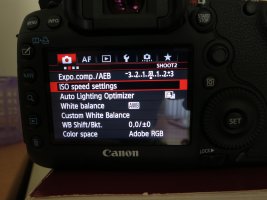
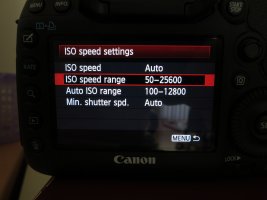
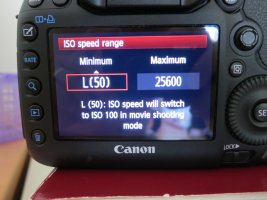
Dylan777 Nov 17, 2011 5,514 20 37,996 Sep 5, 2012 #4 Sep 5, 2012 #4 Step by step: 1. Under "Menu" - select "ISO Speed Setting" 2. Select "ISO Speed Range" 3. Set "Minimum" ISO to 50 - click "OK" Attachments 1 Menu.JPG 896.4 KB · Views: 885 2 Set ISO Range.JPG 771.2 KB · Views: 885 3 Set Minimum ISO.JPG 1.1 MB · Views: 871 Upvote 0
Step by step: 1. Under "Menu" - select "ISO Speed Setting" 2. Select "ISO Speed Range" 3. Set "Minimum" ISO to 50 - click "OK"
B Briand Guest Sep 6, 2012 #5 Sep 6, 2012 #5 Great thanks for all your help, much appreciated. Upvote 0