Need help - photographs on dull days

I need help....
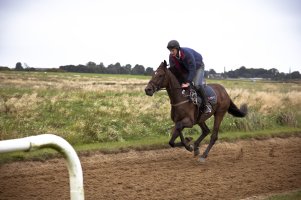
For work I have to take photos and can't choose the weather
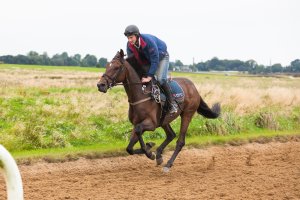
I was wondering how to make the best of photos taken in flat light like the example I attached

I find the areas of the picture where the subject is against the sky particularly problematic

Any advice on post-processing or exposure (preferably without flash) would be gratefully received

RAW is here:
https://dl.dropbox.com/u/61771147/Exercising%20ECG%20Gallop.CR2

5D2 24-105 @105mm 1/800 f4.5 ISO800
Shot Raw - curves and black point in PP
 

Attachments

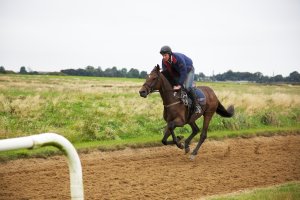
  • Exercising ECG Gallop.jpg
    Exercising ECG Gallop.jpg
    247.4 KB · Views: 2,106
Narcolepsy said:
I need help....
For work I have to take photos and can't choose the weather
I was wondering how to make the best of photos taken in flat light like the example I attached

I find the areas of the picture where the subject is against the sky particularly problematic

Any advice on post-processing or exposure (preferably without flash) would be gratefully received

RAW is here:
https://dl.dropbox.com/u/61771147/Exercising%20ECG%20Gallop.CR2

5D2 24-105 @105mm 1/800 f4.5 ISO800
Shot Raw - curves and black point in PP

You could get lower to the ground and use the sky as a giant White seamless. I've used that many times before.
 
Upvote 0
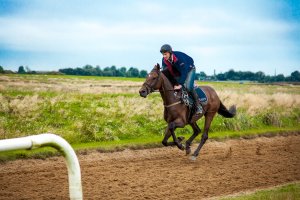
+1 on lightroom 4, it really is a quick way of turning around images like this. I had a crack at it, maybe took me 30 seconds.
As for exposure, it was bang on for something to play with in lightroom. If i was shooting straight out of the camera, I might look at a different colour space. Attached is my first crack at it.
I might have gone a little overboard on the vibrancy slider, but literally took me about 20 clicks to do this.
I applied a little cropping, lens correction and a touch on curves, vibrancy and contrast
 

Attachments

  • exercising ecg gallop ewinter edit.jpg
    exercising ecg gallop ewinter edit.jpg
    1.3 MB · Views: 2,125
Upvote 0
Probably a bit too extreme in my example (only spent a minute in LR4), but for dull sky's I usually lower exposure, lighten the shadows, add a bit of clarity, and then raise the blues, and lower the luminosity for the blues. Play with colour temperatures and vibrance til i get what I like.
 

Attachments

  • Exercising ECG Gallop.jpg
    Exercising ECG Gallop.jpg
    1.1 MB · Views: 1,861
Upvote 0
Thanks to everyone who has answered so far... and I am beginning to think I need to invest in Lightroom or perhaps learn to use what I have better? (I have Aperture, NikSoft - full suite, Photoshop CS3)...

I am afraid that flash is out of the question for this (could scare horse and rider....)
Also need a color image if at all possible

Thanks again - and be glad to hear any more advice
 
Upvote 0
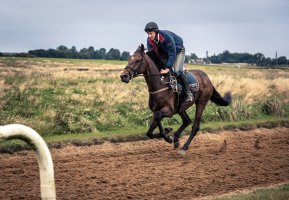
With flat light I sometimes use split toning in LR4. On your pic I gave highlights a yellow cast and shadows a blue cast. I also cranked the clarity slider up to 70, darkened the sky and added a blue cast, turned down the green and yellow channels and added some vignetting. It probably took 5 min. Clearly all these things can be done with the software you have but maybe not as quickly.

It's too bad you can't do monochrome. It sounds like you have Nik Silver Efex Pro. I'll bet you could do good things with this image using that!

Good luck!
 

Attachments

  • Exercising ECG Gallop.jpg
    Exercising ECG Gallop.jpg
    918 KB · Views: 1,632
Upvote 0
+ 1 on Lightroom 4 - especially since the huge price drop for version 4 (slightly more than Photoshop Elements).

It is extremely easy to use, and very quick to use - times of 5 minutes on an image means some one was taking their time to get it right ;)

If you're shooting in RAW, then i'd say you've already covered the main option...
 
Upvote 0
fotofool said:
With flat light I sometimes use split toning in LR4. On your pic I gave highlights a yellow cast and shadows a blue cast. I also cranked the clarity slider up to 70, darkened the sky and added a blue cast, turned down the green and yellow channels and added some vignetting. It probably took 5 min. Clearly all these things can be done with the software you have but maybe not as quickly.

I like many of the renditions - but I really like this one

Thank you to everyone for their advice and excellent manipulations of my image
 
Upvote 0
I have Aperture and spent a few minutes on your .jpg file. You probably know you can always do more with a raw file . . . No doubt you can do more in LR but are you sure you've pushed the limits with Aperture? I use it alone 95% of the time and the other 5% I use Photoshop Elements . . .
 

Attachments

  • 2012-09-07-Horse-.jpg
    2012-09-07-Horse-.jpg
    1 MB · Views: 1,274
Upvote 0
In LR4 I applied brushstrokes as follows:

To the sky: Temp -21, exp -.6, contrast +55, shadows -50

To the horse & rider: Exp +.1, shadows +25, saturation +20, sharpness +30, noise +50.

Globally, temp 5200, tint +2, clarity/vibrance/saturation +5, sharpening +30, NR luminance +20, enable lens correction.

The sky/tree interface looks a little rough because I used the auto-mask for the sake of speed.

Jim - Long time listener, first time caller.
 

Attachments

  • Horse_Rider_Retouched_2.jpg
    Horse_Rider_Retouched_2.jpg
    1.7 MB · Views: 1,465
Upvote 0
Personally I would like to see how this image would have come out with a polarising filter over the lens. Yes you need to speed things up due to the light loss but it doesn't look like lack of light would be a problem in this case. It's not actually a bad image considering the bright background and dark colours of the subject - it needs straightening and cropping more than anything. Try a polariser next time?

All the editing seems to do is render the sky unnaturally.
 
Upvote 0
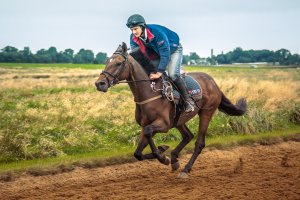
I was a big fan of fotofool's version, but here is my own.


In Camera Raw 6.6 via PS CS5

Temp: 5000 Tint +10
Dropped the exposure a touch
Increased the blacks and brightness
Dropped the contrast
Increased the clarity (+25)
Dropped the vibrance a tad (-2)

Cranked the highlights (+100)
Adjusted the remainig sliders a tiny bit

Dropped green saturation to -30

Applied a vignette -18 amount with a midpoint at 75 and roundness at -35

Other than that I didn't do anything! lol

Really it only took ~7 minutes which is about 5 minutes over what I typically do, however, I really enjoyed playing with this one.

Shout out to fotofool for inspiration to dropped the greens, I really like that effect for this type of photo.

Hope this helps,
-Tabor
 

Attachments

  • ECG20120325.JPG
    ECG20120325.JPG
    3.4 MB · Views: 1,468
Upvote 0