
PetaPixel poops on the 6D2 sensor

YuengLinger said:
Again you're playing ping-pong with the topic. We try to talk about a baseline comparison of sensor IQ, and you go back to how you can salvage a poorly exposed image. Misdirection?

I thought your point was that we can't use the same editor to judge what lifting shadows looks like. I guess you can't mean we can't use the same editor unless we somehow massage the Canon image until get inky blacks without details, while simply adding +5EV to a Nikon image?

Jeesh! Some people just want to argue.

I think the point is that most people are trying to take pictures, not run sensor tests. I really don't give a rat's behind about esoteric sensor tests unless they have some real world meaning. If a perceived "flaw" in a sensor can be addressed with the most basic post-processing techniques, that everyone should be able to do and ought to be doing, then that "flaw" becomes meaningless for anyone but internet arguments.
 
Upvote 0
unfocused said:
Actually, it would be nice if some of the more skilled folks on this forum (PBD, etc.) would start a thread providing some tips and guidance on their workflow in Lightroom/Camera Raw. I've been using Camera Raw for almost a decade (and Photoshop long before that) and still learn new things all the time.

I suspect that a lot of the people who worry obsessively over Dynamic Range just are very good at post processing. Too many people have this idea that images should be perfect coming right off the camera. In the film days, no one would have expected that (Well, yeah, you had to have it pretty much perfect if you were shooting transparencies, but that just meant you had to do a lot more work before you took the exposure and accept that under certain conditions, you weren't going to be able get acceptable results).

1) Typo above? (Seems like an "aren't" might have been intended there.)

2) I use ACR and the highlight/shadow sliders are my close friends. I try not to ask too much of them. ::) Sometimes, however, with my insistence to shoot handheld with available light, I get stuck in losing exposure battles. This leads me to overcook things in ACR and cross over to the painful 'one-shot HDR' territory -- huge highlight pull, big shadow push -- that we all so often cringe when we see. Example below.
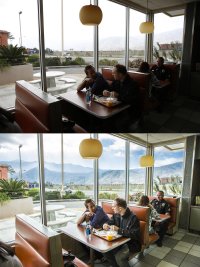
In general, if I'm rocking (in ACR) -50 or greater highlights while simultaneously +50 or higher shadows, I should have waited for better light, brought a tripod to allow ISO 100, etc. But sometimes I still have to capture that moment and I take the shot despite these sort of results.

- A
 

Attachments

  • RAW3.jpg
    RAW3.jpg
    975.3 KB · Views: 169
Upvote 0
YuengLinger said:
Again you're playing ping-pong with the topic. We try to talk about a baseline comparison of sensor IQ, and you go back to how you can salvage a poorly exposed image. Misdirection?

I thought your point was that we can't use the same editor to judge what lifting shadows looks like. Now I guess you mean we can't use the same editor unless we somehow massage the Canon image, while simply adding +5EV to a Nikon image?

No I'm not, you are just being argumentative and/or deliberately obtuse.

There is a fundamental difference on how the information within the RAW files is stored. Open them both in ACR/LR and one is analogous to a car facing backwards, all moving the Blacks slider does for the Canon file is the heavy lifting of turning that car around so both are closer to an equal starting point.

Effectively, what you are looking at in the Canon RAW is a file that has already had a negative exposure setting applied (not quite but for simplicities sake analogous), is that a fair starting point? No. So what is wrong or complicated about the concept that to have an actual comparison you need to place them both at the same starting point?
 
Upvote 0
ahsanford said:
unfocused said:
Actually, it would be nice if some of the more skilled folks on this forum (PBD, etc.) would start a thread providing some tips and guidance on their workflow in Lightroom/Camera Raw. I've been using Camera Raw for almost a decade (and Photoshop long before that) and still learn new things all the time.

I suspect that a lot of the people who worry obsessively over Dynamic Range just are very good at post processing. Too many people have this idea that images should be perfect coming right off the camera. In the film days, no one would have expected that (Well, yeah, you had to have it pretty much perfect if you were shooting transparencies, but that just meant you had to do a lot more work before you took the exposure and accept that under certain conditions, you weren't going to be able get acceptable results).

1) Typo above? (Seems like an "aren't" might have been intended there.)

2) I use ACR and the highlight/shadow sliders are my close friends. I try not to ask too much of them. ::) Sometimes, however, with my insistence to shoot handheld with available light, I get stuck in losing exposure battles. This leads me to overcook things in ACR and cross over to the painful 'one-shot HDR' territory -- huge highlight pull, big shadow push -- that we all so often cringe when we see. Example below.

In general, if I'm rocking (in ACR) -50 or greater highlights while simultaneously +50 or higher shadows, I should have waited for better light, brought a tripod to allow ISO 100, etc. But sometimes I still have to capture that moment and I take the shot despite these sort of results.

- A

Very nicely done.
 
Upvote 0
YuengLinger said:
Again you're playing ping-pong with the topic. We try to talk about a baseline comparison of sensor IQ, and you go back to how you can salvage a poorly exposed image. Misdirection?

What you fail to understand is that the only baseline is the 1s and 0s coming off the sensor. But we cannot 'see' 1s and 0s so we have to process the data to create a visible image. The image you see is processed which means [drum roll]... it is not baseline - it is manipulated data.
What you are saying is that you believe the way to manipulate SoNikon data is correct but the way to manipulate Canon data is not.
 
Upvote 0
Mikehit said:
YuengLinger said:
Again you're playing ping-pong with the topic. We try to talk about a baseline comparison of sensor IQ, and you go back to how you can salvage a poorly exposed image. Misdirection?

What you fail to understand is that the only baseline is the 1s and 0s coming off the sensor. But we cannot 'see' 1s and 0s so we have to process the data to create a visible image. The image you see is processed which means [drum roll]... it is not baseline - it is manipulated data.
What you are saying is that you believe the way to manipulate SoNikon data is correct but the way to manipulate Canon data is not.

So, if you put a Nikon image and a Canon image into LR CC, both shot in camera underexposed, it's unfair to simply use the same slider on both images to lift shadows and compare noise? If this is so, say so, because I will admit that with cars going forward and backwards, and floating black points, I'm trying hard not to think of used car salesmen pushing a zero interest loan that has an APR of 5.99%...
 
Upvote 0
ahsanford said:
unfocused said:
Actually, it would be nice if some of the more skilled folks on this forum (PBD, etc.) would start a thread providing some tips and guidance on their workflow in Lightroom/Camera Raw. I've been using Camera Raw for almost a decade (and Photoshop long before that) and still learn new things all the time.

I suspect that a lot of the people who worry obsessively over Dynamic Range just are very good at post processing. Too many people have this idea that images should be perfect coming right off the camera. In the film days, no one would have expected that (Well, yeah, you had to have it pretty much perfect if you were shooting transparencies, but that just meant you had to do a lot more work before you took the exposure and accept that under certain conditions, you weren't going to be able get acceptable results).

1) Typo above? (Seems like an "aren't" might have been intended there.)

Yes. I have fixed it in the original post. Sorry about that. Should have proofed the post.
 
Upvote 0
ahsanford said:
...I use ACR and the highlight/shadow sliders are my close friends. I try not to ask too much of them. ::) Sometimes, however, with my insistence to shoot handheld with available light, I get stuck in losing exposure battles. This leads me to overcook things in ACR and cross over to the painful 'one-shot HDR' territory -- huge highlight pull, big shadow push -- that we all so often cringe when we see. Example below.

In general, if I'm rocking (in ACR) -50 or greater highlights while simultaneously +50 or higher shadows, I should have waited for better light, brought a tripod to allow ISO 100, etc. But sometimes I still have to capture that moment and I take the shot despite these sort of results.

Certainly nothing wrong with that shot. Nice. BTW, I am a heavy user of smart objects. Just different workflows, but I tend to focus on optimizing the main subject in ACR, import it into PS as a smart object then immediately make a duplicate smart object and reopen that in ACR to adjust other areas of the scene. Go back to Photoshop, add a mask and paint in or out areas that I want to save.It's all about personal preference, but I do this because I don't like to boost shadows or crush highlights globally in an image -- prefer to adjust locally.

I'm sure others can do the same with different techniques, but it is one of the fantastic things about the often underutilized smart object.
 
Upvote 0
YuengLinger said:
Mikehit said:
YuengLinger said:
Again you're playing ping-pong with the topic. We try to talk about a baseline comparison of sensor IQ, and you go back to how you can salvage a poorly exposed image. Misdirection?

What you fail to understand is that the only baseline is the 1s and 0s coming off the sensor. But we cannot 'see' 1s and 0s so we have to process the data to create a visible image. The image you see is processed which means [drum roll]... it is not baseline - it is manipulated data.
What you are saying is that you believe the way to manipulate SoNikon data is correct but the way to manipulate Canon data is not.

So, if you put a Nikon image and a Canon image into LR CC, both shot in camera underexposed, it's unfair to simply use the same slider on both images to lift shadows and compare noise? If this is so, say so, because I will admit that with cars going forward and backwards, and floating black points, I'm trying hard not to think of used car salesmen pushing a zero interest loan that has an APR of 5.99%...

As an analogy, imagine that one of the raw files already had noise-reduction applied before it was opened in LR. Would it be fair to say that sensor had lower noise? Or if one file had been sharpened before it was opened in LR, would it be fair to believe that sensor was sharper? No, the correct approach would be two steps:

1. Expose each optimally

2. Process each optimally

A better sensor should produce files that respond better to processing, not merely look good SOOC. I have no trouble believing that a Sony sensor would win this contest at low ISO; the goal, however, is to do the test fairly.
 
Upvote 0
YuengLinger said:
Mikehit said:
YuengLinger said:
Again you're playing ping-pong with the topic. We try to talk about a baseline comparison of sensor IQ, and you go back to how you can salvage a poorly exposed image. Misdirection?

What you fail to understand is that the only baseline is the 1s and 0s coming off the sensor. But we cannot 'see' 1s and 0s so we have to process the data to create a visible image. The image you see is processed which means [drum roll]... it is not baseline - it is manipulated data.
What you are saying is that you believe the way to manipulate SoNikon data is correct but the way to manipulate Canon data is not.

So, if you put a Nikon image and a Canon image into LR CC, both shot in camera underexposed, it's unfair to simply use the same slider on both images to lift shadows and compare noise? If this is so, say so, because I will admit that with cars going forward and backwards, and floating black points, I'm trying hard not to think of used car salesmen pushing a zero interest loan that has an APR of 5.99%...

You can do whatever you want. If you believe that +10 clarity, 109 amount, radius 1.5 and detail 30 is optimum and always apply the same criterion to process very image irrespective of situation and camera model than who am I to argue.
Me? I prefer to process each image to produce maximum effect and find that different cameras need different settings. Noise rendition differs between cameras (even within the same marque) and as such they need different processing.

I don't give a flying toss if at a fixed setting one camera has more or less noise than another.
 
Upvote 0
YuengLinger said:
Very nicely done.

Appreciate that, but I see that shot being painfully overworked, IMHO.

However, I am glad that a very fond memory of a roadtrip with some lifelong friends was captured with at least some context in the background instead of a blown out sheet of glass. So sometimes, in some Machiavellian way, I tell myself it's okay to go wild with the sliders. ;)

- A
 
Upvote 0
unfocused said:
ahsanford said:
...I use ACR and the highlight/shadow sliders are my close friends. I try not to ask too much of them. ::) Sometimes, however, with my insistence to shoot handheld with available light, I get stuck in losing exposure battles. This leads me to overcook things in ACR and cross over to the painful 'one-shot HDR' territory -- huge highlight pull, big shadow push -- that we all so often cringe when we see. Example below.

In general, if I'm rocking (in ACR) -50 or greater highlights while simultaneously +50 or higher shadows, I should have waited for better light, brought a tripod to allow ISO 100, etc. But sometimes I still have to capture that moment and I take the shot despite these sort of results.

Certainly nothing wrong with that shot. Nice. BTW, I am a heavy user of smart objects. Just different workflows, but I tend to focus on optimizing the main subject in ACR, import it into PS as a smart object then immediately make a duplicate smart object and reopen that in ACR to adjust other areas of the scene. Go back to Photoshop, add a mask and paint in or out areas that I want to save.It's all about personal preference, but I do this because I don't like to boost shadows or crush highlights globally in an image -- prefer to adjust locally.

I'm sure others can do the same with different techniques, but it is one of the fantastic things about the often underutilized smart object.

I'd happily post new threads if you tell me what you like and preferably send me a problem file or ten.

My workflow varies enormously by image so I don't have a 'set' workflow. The other major thing is software, despite the Adobe bashing, is constantly improving, not only the actual software but peoples understanding of how it works so they can use tools in new and effective ways previously not commonly know.

I do make camera profiles for all my camera bodies and lenses and lights. On initial import I apply a basic import preset that removes default NR and Sharpening, applies the relevant custom camera profile and the Adobe lens profile for distortion, vignetting and CA. This tends to make the image pretty flat and unsharp.

Depending on the job I then.....

I'll start another thread ;)
 
Upvote 0
ahsanford said:
YuengLinger said:
Very nicely done.

Appreciate that, but I see that shot being painfully overworked, IMHO.

However, I am glad that a very fond memory of a roadtrip with some lifelong friends was captured with at least some context in the background instead of a blown out sheet of glass. So sometimes, in some Machiavellian way, I tell myself it's okay to go wild with the sliders. ;)

- A

I actually thought it might have been shot for a client. I imagine the restaurant owner would be thrilled with that shot, showing off the interior very nicely and also showcasing the setting. A commercial client wouldn't notice the HDR effect, they'd just be happy that you got their restaurant and the mountains.
 
Upvote 0
ahsanford said:
YuengLinger said:
Very nicely done.

Appreciate that, but I see that shot being painfully overworked, IMHO.

However, I am glad that a very fond memory of a roadtrip with some lifelong friends was captured with at least some context in the background instead of a blown out sheet of glass. So sometimes, in some Machiavellian way, I tell myself it's okay to go wild with the sliders. ;)

- A

Of course it is. And if you'd had spot metering linked to AF point you'd have completely lost any hope of getting that scenery back. Not having a dig, honestly.

If i had to work it I'd process the RAW file twice then blend them as layers in PS. In theory there shouldn't be much difference, in practice there is. But I think you have done a great job and the image iOS perfectly exposed to enable you to get detail at both ends of the luminance range.
 
Upvote 0
privatebydesign said:
Of course it is. And if you'd had spot metering linked to AF point you'd have completely lost any hope of getting that scenery back. Not having a dig, honestly.

If i had to work it I'd process the RAW file twice then blend them as layers in PS. In theory there shouldn't be much difference, in practice there is. But I think you have done a great job and the image iOS perfectly exposed to enable you to get detail at both ends of the luminance range.

I need to learn better skills in PS, honestly. A friend is a professional photographer who loves editing/retouching and such and he thinks I'm a caveman for taking 2-3 minutes in ACR to wash my file through a very simple workflow. I don't do anything in PS of any difficulty or nuance. Honestly, the four most common PS moves I make are:

1) Saving directly to JPG after ACR import (not kidding)
2) Resizing output for web/e-mailing purposes
3) Making funny infographics for CR Forums
4) Stitching the occasional pano (just with Photomerge scripts, nothing manual)

"I ran into a luminosity mask once but I wasn't sure how to put it on my face." -- Me, just now :P

- A
 
Upvote 0
ahsanford said:
privatebydesign said:
Of course it is. And if you'd had spot metering linked to AF point you'd have completely lost any hope of getting that scenery back. Not having a dig, honestly.

If i had to work it I'd process the RAW file twice then blend them as layers in PS. In theory there shouldn't be much difference, in practice there is. But I think you have done a great job and the image iOS perfectly exposed to enable you to get detail at both ends of the luminance range.

I need to learn better skills in PS, honestly. A friend is a professional photographer who loves editing/retouching and such and he thinks I'm a caveman for taking 2-3 minutes in ACR to wash my file through a very simple workflow. I don't do anything in PS of any difficulty or nuance. Honestly, the four most common PS moves I make are:

1) Saving directly to JPG after ACR import (not kidding)
2) Resizing output for web/e-mailing purposes
3) Making funny infographics for CR Forums
4) Stitching the occasional pano (just with Photomerge scripts, nothing manual)

"I ran into a luminosity mask once but I wasn't sure how to put it on my face." -- Me, just now :P

- A

Jimmy McIntyre (creator of Raya Pro) has amazing videos of luminosity mask blending. Also f64 channel has very comprehensive videos about general blending in PS. And tutvids or Wex are good sources for photographers in PS in general.
 
Upvote 0
Khalai said:
Jimmy McIntyre (creator of Raya Pro) has amazing videos of luminosity mask blending. Also f64 channel has very comprehensive videos about general blending in PS. And tutvids or Wex are good sources for photographers in PS in general.

That's the sad bit -- it's not like the internet isn't burying me in educational riches. 10-20 years ago, this would have required a course, a lucky connection to a pro, or (for me, most likely) grabbing a book and fighting through tutorials.

Now it's all on YouTube. I have no more excuses not to learn it.

This is the whole 'I won't replace my 5D3 until I've surpassed its limits' vow I've made -- it speaks to making a commitment to growing as a photographer and not just shooting what I like to shoot and processing how I like to process. I need to work harder at this, especially with tripod work. Merging 3-5 shots at the mercy of some HDR tool is madness, and I should strive to do better.

- A
 
Upvote 0
ahsanford said:
Khalai said:
Jimmy McIntyre (creator of Raya Pro) has amazing videos of luminosity mask blending. Also f64 channel has very comprehensive videos about general blending in PS. And tutvids or Wex are good sources for photographers in PS in general.

That's the sad bit -- it's not like the internet isn't burying me in educational riches. 10-20 years ago, this would have required a course, a lucky connection to a pro, or (for me, most likely) grabbing a book and fighting through tutorials.

Now it's all on YouTube. I have no more excuses not to learn it.

This is the whole 'I won't replace my 5D3 until I've surpassed its limits' vow I've made -- it speaks to making a commitment to growing as a photographer and not just shooting what I like to shoot and processing how I like to process. I need to work harder at this, especially with tripod work. Merging 3-5 shots at the mercy of some HDR tool is madness, and I should strive to do better.

- A

I understand that. I've recently purchased two Zeiss lenses to challenge myself. Needless to say that manual focusing 85/1.4 without EVF is hell unleashed. Even with Eg-S superprecision screen. I'd love to have oldschool split-image with microprism collar, but current DSLRs are not much MF friendly anymore. I'm using LiveView with Magic Lantern and it's doable but not perfect. Currently contemplating getting some LCD loupe from Zacuto, which unfortunately isn't exactly cheap. Chioices choices :)
 
Upvote 0
Khalai said:
I understand that. I've recently purchased two Zeiss lenses to challenge myself. Needless to say that manual focusing 85/1.4 without EVF is hell unleashed. Even with Eg-S superprecision screen. I'd love to have oldschool split-image with microprism collar, but current DSLRs are not much MF friendly anymore. I'm using LiveView with Magic Lantern and it's doable but not perfect. Currently contemplating getting some LCD loupe from Zacuto, which unfortunately isn't exactly cheap. Chioices choices :)

FF mirrorless opens doors for me, personally -- I want to shoot large aperture manual focus lenses through the viewfinder. Until mirrorless happens, Zeiss/Samyang/etc. are dead to me unless they are for landscape/macro work on a tripod.

- A
 
Upvote 0