Hi!
I have a problem with my newly bought R3 I can’t figure out.
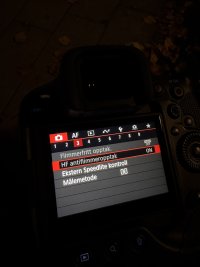
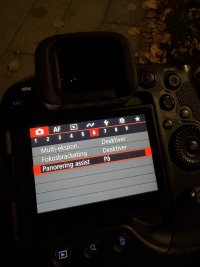
I was going to try the Panning Assist feature and enabled it. I didn’t get the right symbol that it was active so I was just going to turn it off for now. But, when I try to turn it off it says I can’t because HF anti flicker is on. So, I then go turn off HF Antiflicker and I get a message saying I need to turn off Panning Assist to access it, so now they’re both greyed out and one block the other … how do I get out of it?
I have a problem with my newly bought R3 I can’t figure out.
I was going to try the Panning Assist feature and enabled it. I didn’t get the right symbol that it was active so I was just going to turn it off for now. But, when I try to turn it off it says I can’t because HF anti flicker is on. So, I then go turn off HF Antiflicker and I get a message saying I need to turn off Panning Assist to access it, so now they’re both greyed out and one block the other … how do I get out of it?