Rokinon 14mm f/2.8

Status
Not open for further replies.
Mt Spokane Photography said:
joshmurrah said:
I dug through the forums here, and I didn't see a dedicated thread (there was some good info in the 12-24mm thread tho).
You did not find anything, because Rokinon does not make lenses, they rebrand other makes. Search for Samyang.

Point taken!

I did search for Samyang 14mm as well, there's nothing here for that either.

I labeled this thread as such, because Rokinon is by far the most popular brand name this hardware is being sold under, but I was/am aware that this is just a reseller brand.

Thanks for everyone's contributions.
 
Upvote 0
I was recently at the Houston Arcade Expo this past weekend....and a guy there I met shooting it, and we got to talking.
He had the Bower version of it...so, we swapped lens for awhile walking around, I tried out the 14mm....and I think I either let him work with my Canon 17-35mm or it was my Canon 85mm 1.4....

Anyway, I was really liking what I was getting with the Bower 14mm on my 5D3...I've not had a chance to see them off the camera yet, but when I can get to it...I'll see if I can post a couple that might have come out good with it.

I'm definitely wanting to get one...I'd originally been looking at saving for the Canon 14mm...but I think I might get one of these Bower/Samyan/Name of the month.......and start playing with it.

I liked the rectilinear look of it...having it not be fisheye.

I will likely get a really wide fish eye some day...but I think some form of 16mm will do me for now...

C
 
Upvote 0
Just keep in mind that software that corrects distortion lowers the resolution. At least this is what I have seen reported even for the superb Zeiss 21mm f/2.8 (which by the way has a mustache distortion).
 
Upvote 0
I use this lens quite a bit at night.

It's easy to focus at infinity since it's hyperfocal at something like 8'. Just focus it roughly there and it's tack sharp at infinity.

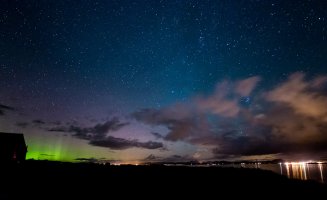
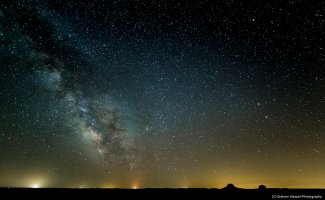
Here are a couple of samples. Both use a lightroom lens profile to remove the mustache distortion, the first one also has some perspective correction applied.
 

Attachments

  • nl.jpg
    nl.jpg
    355.7 KB · Views: 2,777
  • milkyway.jpg
    milkyway.jpg
    492 KB · Views: 5,897
Upvote 0
grahamsz said:
I use this lens quite a bit at night.

It's easy to focus at infinity since it's hyperfocal at something like 8'. Just focus it roughly there and it's tack sharp at infinity.

Here are a couple of samples. Both use a lightroom lens profile to remove the mustache distortion, the first one also has some perspective correction applied.

Wow...absolutely beautiful!!

Might I ask your camera settings for those images?

Thanks in advance,

cayenne
 
Upvote 0
cayenne said:
Wow...absolutely beautiful!!

Might I ask your camera settings for those images?

Thank you!

The Northern Lights shot was a 13s exposure at ISO 10,000
The Milky Way shot was a 30s exposure at ISO 16,000

Both were shot on a 5D Mk3, and were probably at either f/2.8 or f/4. Unfortunately I'm lazy about taking notes these days
 
Upvote 0
grahamsz said:
cayenne said:
Wow...absolutely beautiful!!

Might I ask your camera settings for those images?

Thank you!

The Northern Lights shot was a 13s exposure at ISO 10,000
The Milky Way shot was a 30s exposure at ISO 16,000

Both were shot on a 5D Mk3, and were probably at either f/2.8 or f/4. Unfortunately I'm lazy about taking notes these days

Isn't it chipped or something so it provides the correct EXIF info? Or is it completely dumb like the old vintage lenses in a simple adapter without any electronics?
 
Upvote 0
I just received my Rokinon 14mm today from Amazon and I wondering if someone could help me figure out how to use this lens. I've never had a manual lens and I guess I thought that live view would help me figure out what shutter speed to use while I am in M mode. I guess I was wrong and that makes sense given that my 5d Mark ii doesn't know what aperture the lens is at.

I am wondering if their is a more accurate way to get the exposure right besides trial and error. Also, what is the best way to test this lens and make sure I got a copy that is sharp corner to corner? One last thing, how can I tell when I am at infinity (I have heard that the markings on this lens aren't always the most accurate).

Thanks in advance!
 
Upvote 0
bgran8 said:
I just received my Rokinon 14mm today from Amazon and I wondering if someone could help me figure out how to use this lens. I've never had a manual lens and I guess I thought that live view would help me figure out what shutter speed to use while I am in M mode. I guess I was wrong and that makes sense given that my 5d Mark ii doesn't know what aperture the lens is at.

I am wondering if their is a more accurate way to get the exposure right besides trial and error. Also, what is the best way to test this lens and make sure I got a copy that is sharp corner to corner? One last thing, how can I tell when I am at infinity (I have heard that the markings on this lens aren't always the most accurate).

Thanks in advance!

I just ordered mine.

I borrowed one of these at an arcade fest in Houston a few weeks ago...was pretty fun and my first time using a manual lens like this too.

I rarely use live view (I've not actually figured out all the controls on it yet, will do that over xmas holidays)...but I just would set the 14mm to an aperture I wanted...experimented with different ones, but this was dark and no flash so mostly wide open.

I would then look through the view finder and click half way to see the meter, and then adjust my shutter speed till the meter showed a correct exposure, and most all of what I took was just fine.

I've just started looking at them in Aperture 3 to do a little PP..and they look great so far, exposure was pretty spot on, not much adjustments there. I've not tried to get any programs to adjust the distortion, but from what I'm seeing and what I was shooting..not really seeing any bad distortion, not like if you were shooting a brick wall where it is more apparent.

But like I said, I would just set the aperture, and most of my shots with it, I got the focus set to infinity, and then just metered through the viewfinder, adjusted the shutter speed (I set ISO to whatever seemed right)...and clicked away, just using the meter in the viewfinder.

HTH,

cayenne
 
Upvote 0
the camera will not know what fstop you are using, nor will it stop down the lens during exposure. you can either use it in M mode and use the force(as i do with my film cams) or set your aperture value on the lens itself, then while in a mode set it to the same, and use your camera's meter.
while i like to use the force, i'd probably go the "a" mode route.
 
Upvote 0
It's really easy: Put the camera on 'Aperture' mode, it will read '0.0'. Focus on your subject (wide open to get the smallest DOF for MF accuracy* and so you can actually see the DOF - an EF-S schreen really helps here). Stop down on the aperture ring to the desired aperture, half-press the shutter button to automatically meter. Shutter speed too long? Select a larger aperture or higher iso. By the way, exposure compensation also works like it should in A-mode.

I've quickly added an AF confirmation chip to mine as I've found it difficult/too slow to judge the focus/dof even with the EF-S matte screen in the viewfinder. The short focal length comes into play here - with longer focal lengths it's a lot easier to see the DOF.

I AFMA'd the chip itself (it's programmable) to give the correct AF confirmation at f/5.6. I also programmed the focal length and max aperture so these are reported in the exif. Note that when I first calibrated it for f/2.8 I found the stopped down pictures were OOF. Reason: *This lens has a focus shift when stopped down so beware of that...
 
Upvote 0
cayenne said:
I've just started looking at them in Aperture 3 to do a little PP..and they look great so far, exposure was pretty spot on, not much adjustments there. I've not tried to get any programs to adjust the distortion, but from what I'm seeing and what I was shooting..not really seeing any bad distortion, not like if you were shooting a brick wall where it is more apparent.

The PTLens plugin makes it really simple. Simple right-click. Only issue is it doubles the size as the result i a TIFF file.

A recent shot using mine:


282A1278 by Brand B, on Flickr
 
Upvote 0
Just a quick add-on:
the rokinon/bowen/samyang cannot use circular filters...but, actually it can.
by accident/experiment with my IR camera - canon 40D, I was playing with different WA and settings to get diffeent results, when I decided to hanheld a filter just in front, just by the hood. Well, happen to be a 82mm filter, and for my surprise - and a small adjustment, was able to remain by itself , grasped by the lens hood.
I am sure some difraction and reflections issues may become very visible on a regular camera, but as last resource, it might be a 'trick" worth to consider.
I think it may even take the 77mm and maybe 72's

Other big advantage of this lens, is not having such a heavy "comma' effect as the Canon's 14mm counterpart
 
Upvote 0
I've used homemade magnetic filter foils which goes on the back of the lens mount. But after some use, I find that there isn't a need to filter it at all. An alternative method to filters is to use "black card technique."
 
Upvote 0
Status
Not open for further replies.