
You are using an out of date browser. It may not display this or other websites correctly.
You should upgrade or use an alternative browser.
You should upgrade or use an alternative browser.
Show your Bird Portraits
- Thread starter 1982chris911
- Start date

Thanks, Click.
Click said:7DmkI said:Taken while hiking in the Kananaskis area (near Calgary, Alberta, Canada). I believe they are grouse.
I agree with clbayley for the bird's ID, those are Spruce Grouses.
Nice pictures, 7DmkI.
Upvote
0

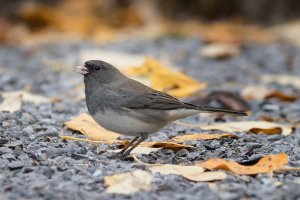
Some Juncos have been hanging around picking some seeds I spilled in my crushed gravel. I set up my 80D on a tripod and connected it to my phone for remote shooting from inside. Turns out that is kind of fun!
Got me thinking about more sophisticated remote shooting systems, does anybody use something that you would recommend? Appreciated!
Got me thinking about more sophisticated remote shooting systems, does anybody use something that you would recommend? Appreciated!
Attachments
Upvote
0

I like CamRanger.
-r
-r
clbayley said:Some Juncos have been hanging around picking some seeds I spilled in my crushed gravel. I set up my 80D on a tripod and connected it to my phone for remote shooting from inside. Turns out that is kind of fun!
Got me thinking about more sophisticated remote shooting systems, does anybody use something that you would recommend? Appreciated!
Upvote
0

lion rock said:I like CamRanger.
-r
clbayley said:Some Juncos have been hanging around picking some seeds I spilled in my crushed gravel. I set up my 80D on a tripod and connected it to my phone for remote shooting from inside. Turns out that is kind of fun!
Got me thinking about more sophisticated remote shooting systems, does anybody use something that you would recommend? Appreciated!
Tell us more ... about the whole setup and process briefly if you don't mind.
I tried using my computer to 6D a few years ago and some operations were too slow and my range was borderline, maybe not 100'.Jack
Upvote
0
Jack,
2 points first:
1) I've not been able to have CamRanger transfer just JPG and not RAW to my connected iPad. RAW slows down alot.
2) Get an extra USB battery to power up CamRanger, the included battery of CamRanger doesn't give a very long service time, especially if it is a few years old.
So, the basic set up is to connect CamRanger to the camera via USB. Then the CamRanger can be connected to an iPad (or and Android device) over WiFi. Of course, all the misgivings of USB protocol fall into play, like connection distance (less than 100 meters direct line of sight --- in reality, somewhat less), and the data transfer rate, thus, avoid RAW files transfer.
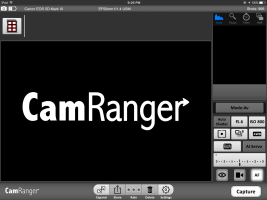
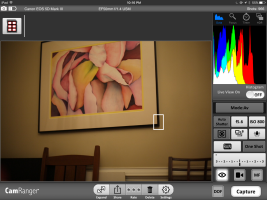
What you can do, see screen (iPad) capture: The main portion where CamRanger logo is located is the viewing portion. In live view (careful here, camera battery drains much faster because the sensor is powered up) the display is what the camera sees. When a shot is taken and the image is completely transferred, the image is displayed here, too.
Above the main viewing area, the thumbnails of previously taken photos are displayed here. You can select a photo to be displayed from here.
The right panel are the controls: You can select focus (course and fine focus closer and further), timed shutter release and HDR, as the photo shows.
The empty space below is for display of histogram, focus direction select, timing, etc.
Here's where the strength come in is the controls from CamRanger to the camera. Those are self explanatory from the photo.
Below these, are life-view select --- the eye; movie select; and to select manual- or auto-focus. The important one is the shutter release --- "capture."
I had use it to shoot intervalometer mode of a flower opening, which CamRanger can do.
If you want to show off to clients of shots taken, there is a companion app to display to another (bigger) display.
You may go to their website to get more info on CamRanger.
When I was shooting the solar eclipse, I used it to help with all the controls including timed shots and intervalometer. It was helpful to see what the camera was pointing at because my tripod was not tall enough and I would have to contort myself to see with the camera viewer. Even more helpful, I didn't have to squint to see up when focusing and tracking to compensate for the rotation of the earth.
For you, it is helpful to set up you camera in a protected area outside to shoot birds and capture in the comfort of the house, and to avoid disturbing your avian friends. This is also what I do, too.
A week ago, B&H had a sale down to $200 from $300. Sadly, that sale is gone.
Jack, if you have more question, please ask. I'll try to answer.
riley
2 points first:
1) I've not been able to have CamRanger transfer just JPG and not RAW to my connected iPad. RAW slows down alot.
2) Get an extra USB battery to power up CamRanger, the included battery of CamRanger doesn't give a very long service time, especially if it is a few years old.
So, the basic set up is to connect CamRanger to the camera via USB. Then the CamRanger can be connected to an iPad (or and Android device) over WiFi. Of course, all the misgivings of USB protocol fall into play, like connection distance (less than 100 meters direct line of sight --- in reality, somewhat less), and the data transfer rate, thus, avoid RAW files transfer.
What you can do, see screen (iPad) capture: The main portion where CamRanger logo is located is the viewing portion. In live view (careful here, camera battery drains much faster because the sensor is powered up) the display is what the camera sees. When a shot is taken and the image is completely transferred, the image is displayed here, too.
Above the main viewing area, the thumbnails of previously taken photos are displayed here. You can select a photo to be displayed from here.
The right panel are the controls: You can select focus (course and fine focus closer and further), timed shutter release and HDR, as the photo shows.
The empty space below is for display of histogram, focus direction select, timing, etc.
Here's where the strength come in is the controls from CamRanger to the camera. Those are self explanatory from the photo.
Below these, are life-view select --- the eye; movie select; and to select manual- or auto-focus. The important one is the shutter release --- "capture."
I had use it to shoot intervalometer mode of a flower opening, which CamRanger can do.
If you want to show off to clients of shots taken, there is a companion app to display to another (bigger) display.
You may go to their website to get more info on CamRanger.
When I was shooting the solar eclipse, I used it to help with all the controls including timed shots and intervalometer. It was helpful to see what the camera was pointing at because my tripod was not tall enough and I would have to contort myself to see with the camera viewer. Even more helpful, I didn't have to squint to see up when focusing and tracking to compensate for the rotation of the earth.
For you, it is helpful to set up you camera in a protected area outside to shoot birds and capture in the comfort of the house, and to avoid disturbing your avian friends. This is also what I do, too.
A week ago, B&H had a sale down to $200 from $300. Sadly, that sale is gone.
Jack, if you have more question, please ask. I'll try to answer.
riley
Jack Douglas said:lion rock said:I like CamRanger.
-r
clbayley said:Some Juncos have been hanging around picking some seeds I spilled in my crushed gravel. I set up my 80D on a tripod and connected it to my phone for remote shooting from inside. Turns out that is kind of fun!
Got me thinking about more sophisticated remote shooting systems, does anybody use something that you would recommend? Appreciated!
Tell us more ... about the whole setup and process briefly if you don't mind.
Jack
Attachments
Upvote
0
Jack,
One last pic.
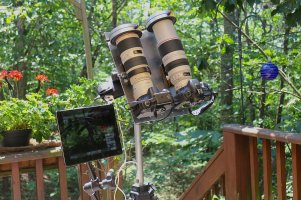
This was the set up for my solar eclipse shoot (posted before, apology). One camera was connected via "CASE AIR," a less expensive unit with similar functionality, to an iPad, and another camera was connected with CamRanger to another iPad, shown in photo. The white corner just behind the mounting plate above the right upper corner of the iPad is the CamRanger.
-r
One last pic.
This was the set up for my solar eclipse shoot (posted before, apology). One camera was connected via "CASE AIR," a less expensive unit with similar functionality, to an iPad, and another camera was connected with CamRanger to another iPad, shown in photo. The white corner just behind the mounting plate above the right upper corner of the iPad is the CamRanger.
-r
Attachments
Upvote
0

Nice shot, looks great full screen.dpc said:I believe this to be a juvenile northern goshawk, but I stand to be corrected. It looks a bit like a female harrier, too. If anyone can be more specific, let me know.
Not a Harrier - they have an Owl like face.
Upvote
0
WOW Riley, I'll have to study this a bit before I can relate. Thanks!
That's one serious setup kind of beyond me at the moment.
Jack
That's one serious setup kind of beyond me at the moment.
Jack
Upvote
0
IslanderMV said:Nice shot, looks great full screen.dpc said:I believe this to be a juvenile northern goshawk, but I stand to be corrected. It looks a bit like a female harrier, too. If anyone can be more specific, let me know.
Not a Harrier - they have an Owl like face.
Thanks!
Upvote
0

Jack Douglas said:@ CL - doesn't the yellow breast kind of make you wonder? I'll try to locate web samples of your bird to see if I can find the yellow. Update - it does seem to be a pretty good fit but couldn't find any with the same breast.
Jack
Jack,
My vote is for either a Le Conte's or a Nelson's Sparrow. Both occur in Western Canada. Another, very similar candidate is Saltmarsh Sparrow, but seems this guy is East Coast (American). From the photos you show I can't tell which one. This is my 5 minutes' reading of National Geographic's field guide. I'm sure more experienced birders can tell you more. Best of luck!
Upvote
0
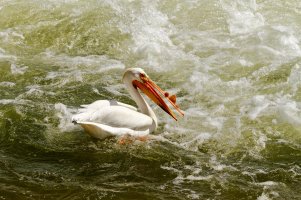
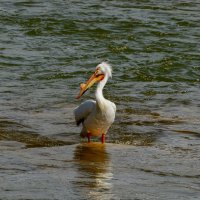
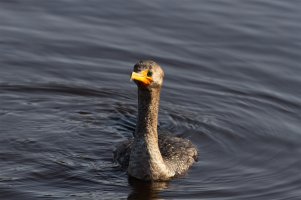
I had originally tried this at 400mm but couldnt get the whole head in the frame. I ended up using 200mm
 7DII5184 by Stuart Edwards, on Flickr
7DII5184 by Stuart Edwards, on Flickr
Upvote
0
Similar threads

- Replies
- 118
- Views
- 99K
