The first 1DXIIs are out

Jack Douglas said:
East Wind Photography said:
dslrdummy said:
I was worried about having only one battery for use at games, but shouldn't have been. Got 3,500 shots on one battery charge on the weekend and still some juice left. Shooting only Jpeg and with limited chimping, image review time set to lowest (2sec), but very happy with that.

I bought a 2nd battery mainly because i couldnt find any specs that would tell me how long i could record 4k video on one battery. So far, i fill up the card long before the battery runs out.

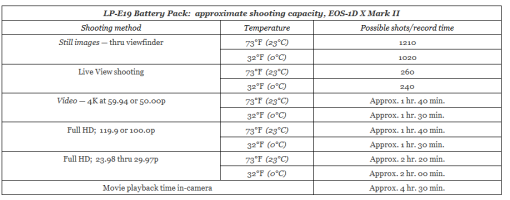
If you don't mind, how much video at what speed and what card? Also when you know, how much video per charge? Thanks.

Jack

Jack

Hi Jack,

This may be of interest to you regarding battery consumption while shooting video -

http://learn.usa.canon.com/resources/articles/2016/eos1dx_mkii/eos1dx-mkii-battery.shtml

For immediate reference though -
 

Attachments
  • Untitled.png
    Untitled.png
    19.4 KB · Views: 134
Upvote 0
J.R. thanks for that. Is the charger bigger than the 1DX? The battery usage as listed seems fairly good and yes a second battery always makes a lot of sense. For a hobbyist with limited cash every item is a challenge but it doesn't make sense to buy a great camera and then handicap yourself.

Jack
 
Upvote 0
J.R. said:
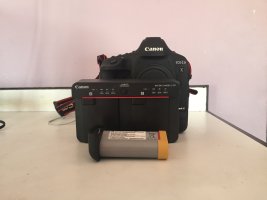
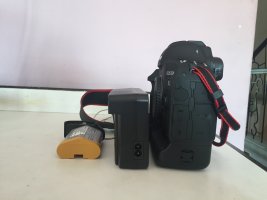
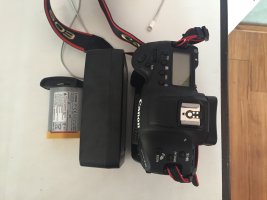
I bought a second battery so as to avoid lugging the charger around for short 2-3 day trips. The charger is HUGE and takes us a lot of space - it's much easier carrying a fully charged second battery.

Yea, I just did 1 week vacation with 1DX, and I brought 2 batteries only. Was getting bit on the low end towards the last days, bit it got through. Did lot of shooting, tried to minimize chimping.
 
Upvote 0
Jack Douglas said:
J.R. thanks for that. Is the charger bigger than the 1DX? The battery usage as listed seems fairly good and yes a second battery always makes a lot of sense. For a hobbyist with limited cash every item is a challenge but it doesn't make sense to buy a great camera and then handicap yourself.

Jack

Hi Jack,

I guess 'Huge' and 'Large' are subjective terms, so I'm posting pictures for you to make your own conclusions ;). Hope this helps.
 

Attachments

  • IMG_2554.JPG
    IMG_2554.JPG
    1.2 MB · Views: 144
  • IMG_2555.JPG
    IMG_2555.JPG
    1.3 MB · Views: 151
  • IMG_2556.JPG
    IMG_2556.JPG
    1,021.7 KB · Views: 161
Upvote 0
J.R. said:
Jack Douglas said:
J.R. thanks for that. Is the charger bigger than the 1DX? The battery usage as listed seems fairly good and yes a second battery always makes a lot of sense. For a hobbyist with limited cash every item is a challenge but it doesn't make sense to buy a great camera and then handicap yourself.

Jack

Hi Jack,

I guess 'Huge' and 'Large' are subjective terms, so I'm posting pictures for you to make your own conclusions ;). Hope this helps.

Thanks JR. Looks pretty similar to the 1DX charger I had for the 1D4. Bulky by other camera charger standards for sure. If I wasn't so overloaded with unfinished jobs I think I'd be out getting the camera right now, but I shall wait a bit!

Jack

Jack
 
Upvote 0
Jack Douglas said:
J.R. said:
Jack Douglas said:
J.R. thanks for that. Is the charger bigger than the 1DX? The battery usage as listed seems fairly good and yes a second battery always makes a lot of sense. For a hobbyist with limited cash every item is a challenge but it doesn't make sense to buy a great camera and then handicap yourself.

Jack

Hi Jack,

I guess 'Huge' and 'Large' are subjective terms, so I'm posting pictures for you to make your own conclusions ;). Hope this helps.

Thanks JR. Looks pretty similar to the 1DX charger I had for the 1D4. Bulky by other camera charger standards for sure. If I wasn't so overloaded with unfinished jobs I think I'd be out getting the camera right now, but I shall wait a bit!

Jack

Jack

Yes but it does charge two batteries..though not at the same time. When i use my 7d2 on travel I usually carry two E6 chargers and so this is only slightly larger compared to two of them. Sigh but now i have to carry three chargers when i take both bodies with me. Would be rather cool for someone to make an adapter to charge E6 batteries in the 1dx charger.
 
Upvote 0
I'm curious if anyone knows what exactly is in a Canon charger that would make it unique or difficult to do such a thing as handle another smaller camera's battery. Retired and slightly out of date as an EE but in principal I would have thought this should be feasible. Alternately, maybe Canon should be pressed on this; if there is enough interest maybe they would do it (for a high price no doubt).

Jack
 
Upvote 0
Is anyone but me having problems with RAW files on the new 1DX Mark II? I am getting these strange rectangles of garbage in the lower right hand corner at random. I have not been able to determine when this will happen. Canon support was of no use - they just said I could send the camera in if I want.

You can download RAW files here: https://www.dropbox.com/sh/as5ckrbveigaj3o/AACjwRe8IcI5Ug5CW_2ntmYHa?dl=0

What is peculiar is that the built in preview file is fine. It looks good on the back of the camera, even when you zoom in. You do see the problem on the camera if you go into RAW Processing to create a JPG. You don't have to DO anything, you just need to go into that menu option.

I see the garbage with Canon Professional, Lightroom and Capture One Pro.

I was shooting on a SanDisk 128GB Extreme Pro CFAST 2.0 card at the time.

Attaching some JPGs of what I am talking about.
 

Attachments

  • BA3I0712.jpg
    BA3I0712.jpg
    1.8 MB · Views: 185
  • BA3I0716.jpg
    BA3I0716.jpg
    374.1 KB · Views: 172
  • BA3I0734.jpg
    BA3I0734.jpg
    2 MB · Views: 196
Upvote 0
focusfirm said:
Is anyone but me having problems with RAW files on the new 1DX Mark II? I am getting these strange rectangles of garbage in the lower right hand corner at random. I have not been able to determine when this will happen. Canon support was of no use - they just said I could send the camera in if I want.

You can download RAW files here: https://www.dropbox.com/sh/as5ckrbveigaj3o/AACjwRe8IcI5Ug5CW_2ntmYHa?dl=0

What is peculiar is that the built in preview file is fine. It looks good on the back of the camera, even when you zoom in. You do see the problem on the camera if you go into RAW Processing to create a JPG. You don't have to DO anything, you just need to go into that menu option.

I see the garbage with Canon Professional, Lightroom and Capture One Pro.

I was shooting on a SanDisk 128GB Extreme Pro CFAST 2.0 card at the time.

Attaching some JPGs of what I am talking about.

Seriously, try a different card. At least one user has reported about a 10% failure rate based on a large purchase.
 
Upvote 0
focusfirm said:
Is anyone but me having problems with RAW files on the new 1DX Mark II?

A number of users over at Photography On The Net are saying they have similar problems and tried various permutations of card/reader but some still get the issue.

Perhaps it could just be a firmware fix? No idea when we'll see the first "...in some situations users may experience the phenomenon...", which is Canon-speak for "hey guys, we screwed up but we all know digital cameras are complex, right? So download this patch and cross your fingers...".
 
Upvote 0
focusfirm said:
Is anyone but me having problems with RAW files on the new 1DX Mark II? I am getting these strange rectangles of garbage in the lower right hand corner at random. I have not been able to determine when this will happen. Canon support was of no use - they just said I could send the camera in if I want.

You can download RAW files here: https://www.dropbox.com/sh/as5ckrbveigaj3o/AACjwRe8IcI5Ug5CW_2ntmYHa?dl=0

What is peculiar is that the built in preview file is fine. It looks good on the back of the camera, even when you zoom in. You do see the problem on the camera if you go into RAW Processing to create a JPG. You don't have to DO anything, you just need to go into that menu option.

I see the garbage with Canon Professional, Lightroom and Capture One Pro.

I was shooting on a SanDisk 128GB Extreme Pro CFAST 2.0 card at the time.

Attaching some JPGs of what I am talking about.

Does it happen if you only use a cf card?
 
Upvote 0
zim said:
focusfirm said:
Is anyone but me having problems with RAW files on the new 1DX Mark II? I am getting these strange rectangles of garbage in the lower right hand corner at random. I have not been able to determine when this will happen. Canon support was of no use - they just said I could send the camera in if I want.

You can download RAW files here: https://www.dropbox.com/sh/as5ckrbveigaj3o/AACjwRe8IcI5Ug5CW_2ntmYHa?dl=0

What is peculiar is that the built in preview file is fine. It looks good on the back of the camera, even when you zoom in. You do see the problem on the camera if you go into RAW Processing to create a JPG. You don't have to DO anything, you just need to go into that menu option.

I see the garbage with Canon Professional, Lightroom and Capture One Pro.

I was shooting on a SanDisk 128GB Extreme Pro CFAST 2.0 card at the time.

Attaching some JPGs of what I am talking about.

Does it happen if you only use a cf card?

This is reportedly only happening with CFast and not CF cards. I'm willing to bet a firmware update will cure this, but I'm keeping my eye on this problem before I take delivery of my new camera.
 
Upvote 0
Shooting on a SanDisk 128GB Extreme Pro CFAST 2.0 card and have problems with lower right hand corner image in RAW. Recording both sJPegs and Raw to the CFAST Card. No problem with JPegs. Out of a thousand shots I've now got three Raw files with the lower right corner problem. Problem there when using Canon software and Adobe LightRoom and opening direct in photoshop via ACR.
 

Attachments

  • AG5I0804.jpg
    AG5I0804.jpg
    76.9 KB · Views: 177
Upvote 0
Oh my! That looks pretty bad. I suppose you can get your body replaced, considering you just purchased it. Isn't there a year's warranty on latest purchase or something?

I am getting mine tomorrow, this would definitely be one of the things I'd be looking out for.

I did play a bit around with the touch based (swipe, pinch to zoom in and out) image preview option on the Nikon D5. Its pretty nifty and works pretty well (after ignoring the little bit of lag when you press preview button which I assume is the time spent in loading thumbnails or something). Would love to see something improved pushed via a camera firmware update from Canon. Since the touch hardware is in there, I am sure its a do-able feature.

C'mon Canon lets level the playing field :)
 
Upvote 0
Photo282 said:
Shooting on a SanDisk 128GB Extreme Pro CFAST 2.0 card and have problems with lower right hand corner image in RAW. Recording both sJPegs and Raw to the CFAST Card. No problem with JPegs. Out of a thousand shots I've now got three Raw files with the lower right corner problem. Problem there when using Canon software and Adobe LightRoom and opening direct in photoshop via ACR.

I hate to say this, but I feel better seeing someone else with the EXACT same issue. I too have only seen this shooting to CFAST and I am using the same SanDisk 128GB Extreme Pro CFAST 2.0 card. Yesterday I did a shoot where I had the CFAST card in one slot and a Lexar 128GB regular CF card (1066x) in the other slot, and I setup the camera to write RAW files to both. Out of 166 shots, two were corrupted on the CFAST card. Those same files were fine on the Lexar CF card.

Prior to the shoot, I had even downloaded the Full Format and Refresh tool from Sandisk here http://kb.sandisk.com/app/answers/detail/a_id/17370/~/cfast-2.0-full-format-and-refresh-tool. I got NO errors during the format, the camera format or copying the files off the card.

PLEASE report this to Canon. Eventually they will have to acknowledge and hopefully fix the issue.
 

Attachments

  • BA3I1162 1.jpg
    BA3I1162 1.jpg
    1.2 MB · Views: 175
Upvote 0