weird "grid lines" in 5DII pictures

  • Thread starter Thread starter EyesOnly
  • Start date Start date
Status
Not open for further replies.
E

EyesOnly

Guest
I just got a refurbished 5DII and was looking at my first couple of pictures I took. They show very weird lines instead of the normal grain all over the image. :o

Did anyone ever see this before? What is causing this?

I've all setting on default basically and used multiple lenses with the same results. In 100% view I can clearly see the lines and even after converting to JPEG with Photoshop (ACR) they are still there.

I attached a 200% crop from Photoshop and a 100% from the saved JPG.

 

Attachments

  • snip1.jpg
    snip1.jpg
    50.3 KB · Views: 1,973
  • snip2.jpg
    snip2.jpg
    24.8 KB · Views: 1,903
I can't open the attachments for some reason, but looking at the first crop I certainly can't think of any setting problem that would give that effect. Apart from the camera being faulty it could be worth trying a different CF card if you have one, or at least try re-seating it. I've never seen those symptoms with a camera in particular but could imagine a faulty address line on the memory bus or card giving that kind of effect.

Edit - just thought to add, do you get the same in live view at 10x zoom? That would take memory card problems out of the equation. Memory card not so likely after further thought because RAW has lossless compression I believe so the lines wouldn't correspond to memory areas throughout.
 
Upvote 0
I've got many images with that same square pattern in even tones. Generally its where the image was under exposed and has needed pushing in post processing, typical examples would be early morning shots with mist rising and red sunrise etc, where the light levels were very low and I've tweaked too much. Many of the Salisbury Cathedral shots in the same series as those I've put on my zenfolio site have exacly that problem.

I have never seen it on so called "correct" exposures, whatever they are. So unless you are seeing it on every image, I'd not worry about it.
 
Upvote 0
Sorry, I've never noticed this effect before... My guess is that it's either some sort of jpeg artifact (try processing a raw file), or a diffraction pattern (what f-stop was this picture taken at?). I know that old box brownie images often showned this "fishnet" look (caused by diffraction), but you could see it in the actual print; you crop looks like you're zoomed in to well over 100%. Can you see this effect at lower magnifications? If not, then I wouldn't worry about it.
 
Upvote 0
Vaguely remember coming across some info. on this about 2yrs ago on the net when I was trying to decide between 5Dii or used 5D, I decided on the latter because some of the early 5Diis were having this sort of a problem.
 
Upvote 0
I'll try to cover all your questions:

HERE is a CR2 RAW file from on of the pictures.
I always shoot in regular RAW mode, 21MP.
Tried to reseat the CF card without success.
I get the same bad result when shooting with EOS Utility (transferring directly over USB).
The lines do not appear in live view with 10x magnification for some reason.

The point is that I can see this pattern in 100% view on most pictures and even after saving as JPG. This is really annoying. I just want a nice 5DII to shoot with, but not something like this. :'(
 
Upvote 0
I just ran your RAW through DPP and saved as jpg and it looks fine at 100% and 200%. I'd guess it's a PP issue maybe your downsizing? I could try lightroom and see what it looks like.

Update: I've tried different software and can't duplicate your problem. RAW and all jpgs are fine.
 
Upvote 0
Of course there's a limitation somewhere, but I've never seen this before on any other camera. And to be honest, my Rebel XSi makes better pictures than the 5D at this point. If I look at the 200% crops from the XSi there is normal grain, but it has much less contrast and is random, not in this grid style.
Do you use a 5DII? Does it look the same? I basically want to find out if this is a common behavior or if it's just my camera.
 
Upvote 0
I also disagree about it being normal grain.

I've just opened DPP and opened a RAW unprocessed image which I magnified to 200%. Trust me there is absolutely no sign of the squared off lines that the OP and I see. Grain there certainly is, but its random in appearance.

I repeat, the only time I see it is in images that for whatever reason have been incorrectly exposed and then an attempt in post-processing made to correct for the mistake.
 
Upvote 0
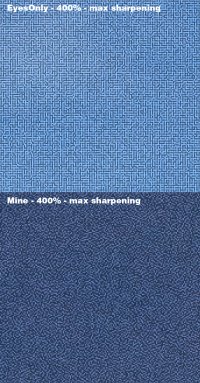
I opened the file in Lightroom, and something is definitely wrong, nothing like images from my 5D MK II. you can see the grid at normal viewing size, no need to go to 1:1

However, it is not the original RAW file, it is a TIFF file, so something could be wrong with the conversion.

Here is what I see after opening the Tiff file in Lightroom 3 with no adjustments.

5dtest-X2.jpg
 
Upvote 0
If I try to download it, it also says TIFF, but I uploaded a CR2 file. I think it's just a browser thing. You can save it as CR2. And no matter what if I open it, ACR comes up, so it's RAW data.
 
Upvote 0
I just tried it in ACR6.6 (Elements version) and DxO7.1. Both give the grid pattern easily visible at 200%+. Coincidently I was just trying out my new 5D2 today, and in a quick look mine doesn't give that pattern.

My gut feel from seeing it is there's something wrong with the de-mosaicing during raw conversion, but as different software shows it, maybe it is something about the camera RAW output?

So some random diagnostic thoughts: download and re-install the latest firmware. Reset the camera to defaults and then see if it is still there.
 
Upvote 0
Thanks David for the comparison. I did the same thing with sharpening and details and it looked very suspicous to me too.

Would it be better to get a new one and send it back to Canon without asking for a replacement, or should the refurbished cameras in general be flawless?
 
Upvote 0
EyesOnly said:
Thanks David for the comparison. I did the same thing with sharpening and details and it looked very suspicous to me too.

Would it be better to get a new one and send it back to Canon without asking for a replacement, or should the refurbished cameras in general be flawless?

It depends on what you paid. right now, new ones are the same price as the refurbs (which are out of stock), so I'd go for a new one. Maybe Canon will exchange it for a new one, you can ask.
 
Upvote 0
Status
Not open for further replies.