Why is my 5D3 so noisy???

Status
Not open for further replies.
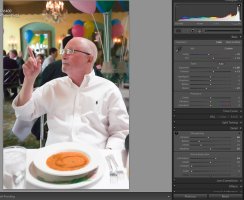
Realizing that there is not a whole lot that can be done with a low resolution jpeg, here is my try using lightroom. I brightened it up 1.5 stops, corrected colors, added NR, and sharpness.

noisy_shot-L.jpg
 
Upvote 0
Thanks. I understand what you are saying. I'm not sure, but I read somewhere where the last real ISO on the 1Dx was higher than 3200. I have to find it though so I don't want to say for sure. At any rate, my 5000 shots are less noisy than 6400, for sure. I'm not sure about my 5D3, I haven't used it much that high.

But I do get what you are saying.
 
Upvote 0
rpt said:
cayenne said:
I'm not familiar with ETTR...what is that?
Expose to the right...

Edit: iPad changed my word "Expose" to "Exposé"! Wow! Corrected it...


Ahh..ok. A new acronym to learn.

So, the advice I'm getting, is to overexpose on darker indoor pics, right?

I'm still VERY much the noob.

I'm trying to learn to only shoot manual. I generally pick an aperture I want, then ISO as low as I can guess I can get it, and then when shooting, I try to adjust shutter speed till the exposure is about right.

When I've been doing video, I'd found that it worked MUCH better if I slightly underexposed, and in Post I've been able to do much more with it.

It seems the advice here so far, is, that I should over expose at higher ISO's indoors...for still images?

Also, I'm wondering if something may be amiss with my lens. I was using my 17-40mm f/4 lens.

I've found many of my images not only seem noisy, but also BAD with focus. I was shooting the other night with it, and I have it set to One Shot, with AF set to the first expansion using the 4 points surrounding the center (cross shaped). Anyway, the other night using it, I noticed on many shots, the focus points didn't seem to illuminate red like they usually do, I wonder if something might be amiss with the lens? I bought it used....

I do use the 'joystick' controller on the back to move the focus around to where I want it....

I'm attaching 3x more..these were more indicative of my shooting with the bright behind my dad, etc.

I know, bad WB, I saw that later.

I'll admit, I was indulging quite a bit in the cocktails...but even so, most of these were only after one drink starting the 2nd one.

Of late, MANY of my shots just seem to look like cr@p like this....
:(

These were shot in RAW, and I've just made jpgs of them at 50% size...these are straight out of the camera.
I can fix a lot in post usually, but I can't seem to make anything useful out of these with the noise and focus problems.

Thanks so far for all the advice, I'm still trying to digest it all.....please keep the suggestions coming.

cayenne

 

Attachments

  • noisy_shot 1.jpg
    noisy_shot 1.jpg
    1.1 MB · Views: 1,198
  • noisy_shot 2.jpg
    noisy_shot 2.jpg
    1.3 MB · Views: 1,208
  • noisy_shot 3.jpg
    noisy_shot 3.jpg
    1.6 MB · Views: 1,190
Upvote 0
David Hull said:
Do you have Highlight Tone Priority (User Manual page 146) and Auto Lighting Optimizer (User Manual Page 142) turned "OFF" in the menus? I didn't bother to read through the replies so perhaps this has been mentioned already but that is the first thing I did when I noticed that my 5D3 had more noise than I expected.
No, both of those are turned off.
 
Upvote 0
again massive under exposure mate

here is how i have my camera setup
- spot metering I use this 99% of the time and very rarely i switch it to evaluative
- always meter on the persons face
- manual mode only (not being snobby but I just can't use AV or TV or auto anything properly it always comes out wrong
- in the viewfinder on the little meter scale with the center of the frame over the persons face i adjust my shutter speed or iso so the little marker is over +1 over what the camera meters then take a shot from here i'm either happy and leave it at +1 or i adjust it over or under by 1/3rd of a stop to taste
coupled with this its essential to have highlight alert enabled aka the blinkies (you know the screen flashes black and white in blown highlight areas) ensure no skin has the blinkies and dont worry if it looks over exposed.

no be aware as iso increase your available dynamic range reduces alot so the higher you go the less highlight headroom you have . this is why auto anything pretty much always underexposes to protect tghe highlights even if you might not care if those highlights it is protecting blow or not. Focus on the face exposure forget the rest and its all good.

this sounds like alot of work but at night in an event the lighting is often pretty constant even if it is crap and its basically set and forget with the odd iso or SS tweak where needed. Especially if you are using flash with ETTL it gets a whole lot easier

then in post pull down the exposure by a stop or so overall and boost the shadows which come back clean and not full of gain noise or apply a curve trim the highlights as required and then look at contrast etc. very basic

the key is dont blow out the skin highlights and expose as far over as you can without blowing key highlights
 
Upvote 0
Here is a rework of the last shot all done in Lightroom with the adjustment panel as well.

WB on plate.

I adjusted the exposure for my monitor at 100cd/m², I suspect most peoples monitors are too bright and the shirt and table will have little detail, but it is there.
 

Attachments

  • 1234.jpg
    1234.jpg
    111.7 KB · Views: 1,114
Upvote 0
I don't know much about the technical aspects, I just love to take pictures. I know this, however: my 5Diii does a better job handling noise than any camera I've used. Its predecessor is a 7D. I do mostly wildlife photography and my "prime lens" is the 100-400 F4-5.6L. A lot of my pictures are cropped, sometimes cropped quite a bit. At ISO 640 I can crop an image down to about 1/4 of its original size without any discernible noise at ISO 640. That would be impossible with my 7D.
 
Upvote 0
privatebydesign said:
Here is a rework of the last shot all done in Lightroom with the adjustment panel as well.

WB on plate.

I adjusted the exposure for my monitor at 100cd/m², I suspect most peoples monitors are too bright and the shirt and table will have little detail, but it is there.
A question for you. Why did you set color NR to 0 from the default of 25? Is it because you pulled blacks down to -22?
 
Upvote 0
rpt said:
privatebydesign said:
Here is a rework of the last shot all done in Lightroom with the adjustment panel as well.

WB on plate.

I adjusted the exposure for my monitor at 100cd/m², I suspect most peoples monitors are too bright and the shirt and table will have little detail, but it is there.
A question for you. Why did you set color NR to 0 from the default of 25? Is it because you pulled blacks down to -22?

Good eye! I have all noise reduction zeroed on import into Lightroom, that means unless I apply something it is not automatically applied. I see no colour noise that needed dealing with, only luminance noise, so it stayed at zero.

Actually I have all kinds of import presets for Lightroom but they are all for my cameras at specific iso levels. Import presets are a very powerful feature of Lightroom that is often overlooked.
 
Upvote 0
wickidwombat said:
again massive under exposure mate

here is how i have my camera setup
- spot metering I use this 99% of the time and very rarely i switch it to evaluative
- always meter on the persons face
- manual mode only (not being snobby but I just can't use AV or TV or auto anything properly it always comes out wrong
- in the viewfinder on the little meter scale with the center of the frame over the persons face i adjust my shutter speed or iso so the little marker is over +1 over what the camera meters then take a shot from here i'm either happy and leave it at +1 or i adjust it over or under by 1/3rd of a stop to taste
coupled with this its essential to have highlight alert enabled aka the blinkies (you know the screen flashes black and white in blown highlight areas) ensure no skin has the blinkies and dont worry if it looks over exposed.

no be aware as iso increase your available dynamic range reduces alot so the higher you go the less highlight headroom you have . this is why auto anything pretty much always underexposes to protect tghe highlights even if you might not care if those highlights it is protecting blow or not. Focus on the face exposure forget the rest and its all good.

this sounds like alot of work but at night in an event the lighting is often pretty constant even if it is crap and its basically set and forget with the odd iso or SS tweak where needed. Especially if you are using flash with ETTL it gets a whole lot easier

then in post pull down the exposure by a stop or so overall and boost the shadows which come back clean and not full of gain noise or apply a curve trim the highlights as required and then look at contrast etc. very basic

the key is dont blow out the skin highlights and expose as far over as you can without blowing key highlights

This.

CAYENNE: THIS!
 
Upvote 0
wickidwombat said:
again massive under exposure mate

here is how i have my camera setup
- spot metering I use this 99% of the time and very rarely i switch it to evaluative
- always meter on the persons face
- manual mode only (not being snobby but I just can't use AV or TV or auto anything properly it always comes out wrong
- in the viewfinder on the little meter scale with the center of the frame over the persons face i adjust my shutter speed or iso so the little marker is over +1 over what the camera meters then take a shot from here i'm either happy and leave it at +1 or i adjust it over or under by 1/3rd of a stop to taste
coupled with this its essential to have highlight alert enabled aka the blinkies (you know the screen flashes black and white in blown highlight areas) ensure no skin has the blinkies and dont worry if it looks over exposed.

no be aware as iso increase your available dynamic range reduces alot so the higher you go the less highlight headroom you have . this is why auto anything pretty much always underexposes to protect tghe highlights even if you might not care if those highlights it is protecting blow or not. Focus on the face exposure forget the rest and its all good.

this sounds like alot of work but at night in an event the lighting is often pretty constant even if it is crap and its basically set and forget with the odd iso or SS tweak where needed. Especially if you are using flash with ETTL it gets a whole lot easier

then in post pull down the exposure by a stop or so overall and boost the shadows which come back clean and not full of gain noise or apply a curve trim the highlights as required and then look at contrast etc. very basic

the key is dont blow out the skin highlights and expose as far over as you can without blowing key highlights

Thanks for the advice!!

I'm not familiar with the 'blinkies' highlight alert setting....I didn't know there was a way to set up the viewfinder to have it flash when something is overexposed....I'll start to research where that is set at!!

I don't have Lightroom, I'm currently using Apeture 3. I also have the NIK plugins. I can adjust the WB, and get them looking decent with regard to color, and with bringing down that glare in the windows...

But even with shapening and trying to use the Apeture noise reduction, it looks horrible.

I just seem to rarely ever get the super tack sharp, clear, like your could reach through and touch images that most others post on here. LIke at the beginning of the thread, those with the sports shots, likely shot in MUCH tougher conditions that I have, and they look very pro....so much of mine looks like cr@p.

If I set up poses, like I did with a friend of mine with headshots, I can get some really good looking images, but when out and about like eating at a restaurant or taking snaps around the Quarter with friends, I just never seem to be able to get really crisp pro looking shots for the most part.

But ya'll have given me something to work on...the +1 exposure on the meter, and exposing spot for the face, I'll start working on those.

BY the way...I have a dropbox set up with these RAW images in them if anyone wants to play with them and post what you'd do to correct and let me see how much noise you can clean from them, PM me and I'll give you the link and maybe you can post the jpg back to this thread?

Again THANK YOU all very much for all the input and suggestions. I know the best way is to get it right in camera and I'm definitely taking notes here!!!

cayenne
 
Upvote 0
wickidwombat said:
the blinkies are on the LCD not in the viewfinder its a playback review option so any blown highligths flash
the exposure meter is along the bottom of the veiwfinder so you can see realtime what the camera is metering

Oh...Live view...ok.

So, you're saying to take a test shot....play it back and look there to see what is blown out, etc...and adjust for next shot?

Thank you for the replies!

C
 
Upvote 0
cayenne said:
wickidwombat said:
the blinkies are on the LCD not in the viewfinder its a playback review option so any blown highligths flash
the exposure meter is along the bottom of the veiwfinder so you can see realtime what the camera is metering
So, you're saying to take a test shot....play it back and look there to see what is blown out, etc...and adjust for next shot?

Thank you for the replies!

C

yep I do this automatically when the situations change take a general test shot with my settings as i eyeball it then check and adjust then i know it's right

something else to consider is the picture on the screen is actually a jpg so the raw will actually only clip higher than what is displayed so even if you do get a little clipping on the screen that will still be recoverable in the raw basically if you work off the image on the screen and the clipping warning (blinkies) you will be conservative and still have enough raw highlight protection the amount of that extra raw headroom is dependent on iso, the higher your iso the less raw headroom you have here
 
Upvote 0
RLPhoto said:
ETTR, and Process noise in LR. Easily making great ISO 12,800 shots.
High ISO is typically used when the scene is shutter speed and aperture limited, meaning it's necessary to increase ISO in order to achieve an acceptable level of output brightness for a given DOF and shutter speed. In such situations ETTR is not available because it would require decreasing the DOF or shutter speed below the already minimum necessary for the scene, the minimums that necessitated increasing the ISO to begin with.
 
Upvote 0
horshack said:
RLPhoto said:
ETTR, and Process noise in LR. Easily making great ISO 12,800 shots.
High ISO is typically used when the scene is shutter speed and aperture limited, meaning it's necessary to increase ISO in order to achieve an acceptable level of output brightness for a given DOF and shutter speed. In such situations ETTR is not available because it would require decreasing the DOF or shutter speed below the already minimum necessary for the scene, the minimums that necessitated increasing the ISO to begin with.

actually it is. you are better off exposing a little higher say iso 8000 or 12800 even vs iso 6400 rather than try push that 6400 in post if the 6400 shot results in an exposure that is underexposed. This is where it takes some practice to know how much latitude you will have with highlights at the higher iso levels trial and error is the key here. Basically though the higher the iso the more critical it is to nail the exposure high iso is very unforgiving of under exposure and has alot less highlight headroom than low iso so you have a lower ability to ETTR but never the less its still better to expose a little right than risk being under even if it mean jacking up the in camera iso
 
Upvote 0
dilbert said:
If you look at the graph on this page:

http://home.comcast.net/~NikonD70/Charts/PDR_Shadow.htm#D800e,EOS%205D%20Mark%20III

... when it flattens out, you no longer gain anything by using ETTR with a higher ISO to remove noise.

ETTR works well with Canon cameras because the amplification is done before the conversion from analogue to digital.

With the 5D2, it is quite clear that beyond ISO 1600, there's not much to be gained by raising the ISO and then ETTR.

Similarly, from ISO 1600 to ISO 6400 on the 5D3, there's maybe 1 stop of DR gain with 2 stops of ISO movement.

+1

That's been my experience. At high ISO's, there is no extra DR to allow for much overexposure, exposure really needs to be as close as you can reasonably get it. Even so, a small overexposure is usually better than a small underexposure.
 
Upvote 0
ankorwatt said:
pwp said:
When shooting higher iso's, ETTR is an absolute 100% must.
Right from the start I've been astounded how much detail there is in 5D3 highlights before they blow to 255.

Modified technique on your part should deliver fantastic high iso 5D3 image files.

-PW

Is it a must ? what happens with the R+B channels compare to green ? do you use magenta filter? WHAT does ETTR means.
I think you all shall read this . For some of you you only expose the motive richer = the "iso" 6400 iso are now equal to 3200, 1600 exposure and you are moving the middle grey to the right and with clipping of high lights and less noise as a result.

http://www.dpreview.com/forums/post/42322633

part2
http://www.dpreview.com/forums/post/51133125

Oh dear!

Anybody thinking results from an Olympus can be transposed to a Canon is beyond help. Why in gods name would you even dream of putting a magenta filter on a camera that is very well known to favour the red channel? If you were interested in using the above technique on a Canon you would need to use a cyan or better yet, azure filter.
 
Upvote 0
Status
Not open for further replies.