• The Canon Rumors Forum has officially been shut down as of July 10, 2026.

    All data will be deleted on September 16, 2026.

    the ad free experience will return by July 17, 2026.

  • Locked
Using (Fill) Flash

So I've been doing most if not all of my photography over the last 7 years without using a flash. I like ambient light and hate what an external flash does to the weight balance of my camera body.

I'm pretty happy with most of the results but it's time to get more out of my photography and start using fill-flash. The goal however is to preserve as much ambient light as possible; I dislike it when a flash has obviously been used to get a picture.

So my question is: Do you have any recommendations I can start out with? What conditions would typically require which settings?

Note that I would like to use it for general photography because I do very little portraiture.

FWIW I have a Metz 48 AF-1 with a STO-FEN Omni Bounce. I'm not immediately interested in getting more flash gear or reflective screens etc.

Thanks all!

  • Locked
Another crappy question about 5D mk2 iso performance...

So I bought a 5Dii as a back up camera for weddings but I've never shot with it as I don't trust the ISO performance. I'm spoilt with the 5Diii by the fact I trust it to 3200 and not having that much grain or sharpness lost. I used to shoot weddings 90% with a 50mm 1.4 and just swap to the 24-105 when I was doing groups. but now I have a 35mm and I'm comfortable doing 99% of the day with that, just putting the wide on for the biiiig groups but I kinda miss the detail shots I'd be able to do with the 50 a little. I swapped it now and again to make sure I got what I needed last wedding but I wish I had slightly more of people done on the 50. The 35mm is ace for the ceremony BTW, if anyone's reading this far...

Anyway, the crux of the matter is that I want to double cam on my next wedding, 50mm on the 5Dii and 35mm on the 5Diii... I'm not using flash and shooting at 2.2, what ISO can I feasibly get away with shooting at on a 5Dii with out making a mess of everything?

P.S. no crappy "shoot at what you need to to get the shot" answers. just what I can actually trust the camera to deliver professional standard photography to discerning customers.

  • Locked
5DIII AF area selection (sports)

Which AF area mode do you guys use when shooting sports? I have read a number of Canon reps and professional sports shooters saying they use "Auto selection:61 pt AF". Granted most of these are with the 1DX, but would that not be the case with the 5DIII? The only time I tried this mode was at AMA Supercross in Anaheim, CA. More times than not the AF system seemed to lock focus on the padded blocks used to line the track rather than the rider or motorcycle. Is there some setting that needs to go along with the 61 pt AF mode to get a higher pct of keepers due to focus lock? It seems like the only modes I get predictable results are "Expand AF area: +" and "Expand AF area: Surround".

Does the 5DIII have face detection like on the 1DX?

  • Locked
Canon 24-70mm 2.8 II , error?

Today I used my new 24-70 for only the 3rd time and the camera now won't recognise the lens, aperture shows up as "00" and no focusing. There was no issues the first 2 times I used it. Tried it on 2 different body's (5d3 & 1DMK1V), changed batteries etc and still no hope. It will switch back and forth though, it will work for 3 photos then stop for 3 and at times won't work for ages. Any body with some idea's?

  • Locked
Question about TDP's sample crops

Hopefully one of you jolly fine fellows can answer a question that has been bugging me for a while!?

When using The Digital Pictures' sample crops to compare lens performance against other lenses or the same lens used on a crop and full frame body, for example, it astounds me how soft the crop body rendition is in comparison. The below link illustrates my question:

http://www.the-digital-picture.com/Reviews/ISO-12233-Sample-Crops.aspx?Lens=687&Camera=453&Sample=0&FLI=3&API=3&LensComp=687&CameraComp=736&SampleComp=0&FLIComp=3&APIComp=3

The 70-200 2.8L IS II is obviously one of Canon's legendary lenses, but why does the crop crop (crop body crop!)- which is a 60D in this case- look so much softer than the full frame 1Ds III? Is it just that the 60D has a very soft output? I chose f5.6 as the aperture for both bodies so there should be no diffraction issues but the comparison is much the same at other apertures anyway. Even more surprising in the above comparison is how soft the corners are on the 60D crops compared to the 1Ds III, which surprises me because the crop body is not using the lens's full image circle. The first time I used TDP's comparison was with ultrawide zooms so I just figured that it was the fact that the full frame ultra wides were performing better than a crop equivalent (think EF-S 10-22 on crop compared against 17-40L on full frame, but when I started looking at other lenses I saw it was pretty much always the same- the FF crops were visibly sharper with the same lens. Any thoughts?

  • Locked
5D Mark iii Clean HDMI Output Problem

So I updated my 5D to the latest firmware about a month ago. Recently I got the chance to try it out. So I tried it with a normal monitor using HDMI and I couldn't get rid of the boxes, or in other words the 'Clean' HDMI I wanted. I searched the internet about how to fix this. I found out I had to change a couple setting in the menu. So I changed the HDMI mirroring option to "Mirroring" and adjusted the HDMI frame rate to auto. However, the boxes would just not go away.

So next I connected my 5D to my SmallHD AC7 monitor. However this time, an image would appear for a couple seconds then the screen on the monitor goes blue. I tried adjusting the setting on my monitor but I just can't get and ouput. I tried connecting the camera to the other monitor again but the boxes just wont go away.

I checked the firmware and it shows that its updated to the latest firmware (1.2.1). What do you think the problem is? Do you think I should re-update my Camera? How Could I fix this? :(

Thanks!

  • Locked
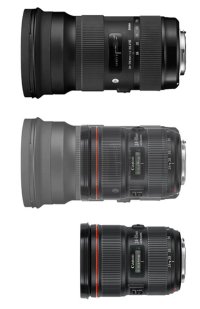
First pic of Sigma 24-70 F/2 posted

Just saw this at CW:
http://www.canonwatch.com/rumor-first-picture-of-sigma-24-70mm-f2-lens-leaked/

I am not speaking to the legitimacy of a low-res photo. It may be fake.

BUT, presuming it is real, I've superimposed known glass in PS, in this case, the 24-70 F/2.8L II.

My very crude PS ruler work yields that the new Sigma 24-70 F/2 comes out to:

1.56x as a long as a 24-70 II (at the 24mm end)
1.20x the filter diameter as the 24-70 II (or, roughly 98mm on the Sigma)

And we could also start guessing if we're looking at an internally focusing lens here. It may not telescope beyond the length shown in the picture, like a Canon 70-200.

Mad speculation is fun sometimes. :D

- A

Attachments

  • Sigma.jpg
    Sigma.jpg
    49.9 KB · Views: 6,380

  • Locked
Sigma Announces Mount Conversion Service

HTML:
<div name="googleone_share_1" style="position:relative;z-index:5;float: right; /*margin: 70px 0 0 0;*/ top:70px; right:120px; width:0;"><g:plusone size="tall" count="1" href="http://www.canonrumors.com/2013/08/sigma-announces-mount-coversion-service/"></g:plusone></div><div style="float: right; margin:0 0 70px 70px;"><a href="https://twitter.com/share" class="twitter-share-button" data-count="vertical" data-url="http://www.canonrumors.com/2013/08/sigma-announces-mount-coversion-service/">Tweet</a></div>
<p><b>RONKONKOMA, N.Y., – Aug. 1, 2013</b> - Sigma Corporation of America, a leading researcher, developer, manufacturer and service provider of some of the world’s most impressive lines of lenses, cameras and flashes, today announced a revolutionary new, fee-based service that will enable the company’s Global Vision lens owners to change their lens mounts for use on different camera systems.</p>
<p>Starting Sept. 2, Global Vision lens owners can request the Mount Conversion Service to convert their current Sport, Contemporary or Art DSLR lenses to their choice of a Sigma, Sony, Pentax, Nikon or Canon mount. Global Vision category lenses for mirrorless interchangeable lens cameras (MILCs) can be updated to either a micro four thirds (MFT) or Sony E- mount.</p>
<p>In addition to the announcement of the industry’s first Mount Conversion Service, Sigma is also extending the warranty on all of its products – including cameras, lenses and flashes purchased on or after July 1, 2013 – to four years. Previously, warranties varied by product. This enhanced product protection provides Sigma’s customers with more consistency and improved service.</p>
<p>“Professionals and amateurs alike are taking advantage of the many affordable camera options in today’s market; they’re updating their camera bags and exploring new systems and brands,” said Mark Amir-Hamzeh, president of Sigma Corporation of America. “When photographers purchase a lens, it’s often a significant, financial and artistic commitment – and we believe that investment should last a lifetime. Our new Mount Conversion Service and extended warranty are intended to help Sigma users get more enjoyment from our products, regardless of how their approach to photography changes overtime.”</p>
<p>The Mount Conversion Service is limited to all of Sigma’s Global Vision lenses. Current, applicable full-frame lenses include the 120-300mm F2.8 DG OS Sport and 35mm F1.4 DG Art; APS-C crop sensor lenses include the 30mm F1.4 DC HSM Art, 17-70mm F2.8-4 DC OS Macro Contemporary and 18-35mm F1.8 DC Art; and MILC lenses include the 19mm F2.8 DN Art, 30mm F2.8 DN Art and 60mm F2.8 DN Art. Lenses can be converted to any mount of a photographer’s choosing, as long as Sigma has released that product in the requested mount.</p>
<p>Cost of the conversion will range between $80 to $250, plus shipping costs, depending on the focal length of the lens. All lenses will be shipped to Sigma’s US subsidiary in New York, and updated, calibrated and optimized for the new camera system at Sigma’s factory in Aizu, Japan. All lenses that undergo the Mount Conversion Service will be covered under warranty for six months following the update. Teleconverters, USB Docks and other accessories are not eligible for the service.</p>
<p>To request the Mount Conversion Service, please visit your local Sigma subsidiary. Customers in the United States should visit <a href="http://www.sigmaphoto.com/" target="_blank" rel="nofollow">www.sigmaphoto.com</a>.</p>
<p><strong><span style="color: #ff0000;">c</span>r</strong></p>

  • Locked
Gear Advice foe and awesome Greece trip

Hello

Me and one of my friends are going to go to Greece on 5th of August for almost 1 month. I am planing to visit Santorini (if any of you have been on an awesome island not far from Santorini, let me know), Athens, Meteora, and Thessaloniki. Also if you guys know other places, tell me.

So far I packed 5D3 17-40 with a polarizer and a 8 stop ND filter, 50 1.4, 70-200 2.8 and 1 600EXRT and ST3 trigger. Also I will bring a GoPro Hero 1 and a Manfrotto tripod.

For renting I want a 24 TS-E a fisheye, eather the canon 15 2.8 or the canon 8-15. A GoPro Hero 3 Black, and a quadrotor for changing the perspective.

I will have with me a mac 11 inch to see in some cases if I nailed the focus and two 750 HDD, one main and one back up.
Mostly I am shooting cityscape, landscape, architecture, nature, and I am planing to shot some milky way shots at the islands and at Meteora.

What else should I rent /bring?

Thank you!

Nate

  • Locked
Should I replace my zooms with primes?

When I was showing my vintage automobile images to a gallery owner he remarked that my images would look even better bigger and with a prime lens.

Now I know that primes are largely sharper than zooms. So should I switch from zooms to primes or buy certain primes to compliment my zooms?

The lenses I currently have are:

Canon EF-S 10-22
Canon EF 17-40 L
Canon EF 28-80 L
Canon EF 100 2.8 Macro
Canon EF 70-200 2.8 L.

I will be replacing the 28-80 L with the 24-105 L when I get the 6D body + lens kit.

  • Locked
Sigma Corporation’s new Mount Conversion Service enables lens use across camera

Found on dpreview:

http://www.dpreview.com/news/2013/08/01/sigma-us-announces-mount-conversion-service-for-recent-global-vision-lenses

"Sigma has announced a 'Mount Conversion Service' for any of its recent 'Global Vision' lenses - a paid-for service designed to reduce the uncertainty of changing camera systems. The company says it will charge between $80 and $250, plus shipping costs, depending on the specific lens. The Global Vision range currently includes seven lenses - from the huge 120-30mm F2.8 DG OS Sport for full-frame DSLRs, down to the 19mm F2.8 DN Art for Micro Four Thirds. The company has also extended the warranties on all new products to four years."

  • Locked
Picture styles

Which one do you use, for what kind of job and why?

When I have complete control of the lighting, like on a set, I usually try to get an in-camera look as near as possible to the final look I want to get, so I usually create a specific style for each film, modifing an existing style or creating a new one with that infernal tool that is Canon's Picture Style Editor. Unfortunately I don't know about any other software that can do the work...

When I don't have control over the lighting and I know I won't have much time for the color grading, like when I'm shooting events or corporate videos, I usually choose the "Neutral" style, setting sharpness to "0" and sometimes lowering the contrast as much as possible.

When I don't have control over the lighting but I know I'll have time for a proper color grading, I often use the Technicolor CineStyle v1.0, which is the only "flat" style I really like. And the only one I know that is able to increase so much the DR, without showing too much noise.

These are the picture styles I tried so far:
Technicolor CineStyle, Marvels Cine, cineplus Picture Styles, Canon Video Camera X-Series Look, Flaat picture styles, ExtraFlat Picture Style, Superflat Picture Style

What about you?

  • Locked
Wide angle lens' for crop sensor camera

I just took the plunge and ordered myself a 60d upgrading from a 450d. I also bought the EF 35mm f/2 (not the new one with IS) because I wanted a fast prime for general shooting to replace the 18-55mm kit lens that came with the 450d.

I am an outdoors person so I love to shoot landscapes so I have been looking for a good wide angle prime for this. After having the EF 35mm for a while, I would like to get a wide angle prime lens over a zoom. The wide aperture for shooting in low light or nighttime situations and the great amount of control over the depth of field. I don't need the flexibility of a zoom (however I am open to zoom recommendations) as landscapes are more about composition than framing (and you can always crop it later if you want). I am leaning away from a fisheye lens because of their distortion and if I were to use one I would end up correcting every image anyway. I would also like something that I could throw a rectangular ND Grad on for certain situations

Here is what I have found so far in my budget (<$700)

Right now i'm not sure what to go with. There doesn't seem to be very many options in the segment. I can't be the only one with this problem.

  • Locked
Help me price used equipment please!

Hey guys there's a few lenses I'm interested in that are for sale on Craigslist first is a canon 500mm 4.5L next is a canon 300mm f4L non is and last a new 16-35 2.8 version I. I'm most interested in the 500 but they all interest me for the right price. What's the value on these lenses? And I'm aware about them being older, but I am currently using a 20 year old 20-35 2.8 (which I love) and a 20+ year old 80-200 2.8(also love) thanks guys

  • Locked
New Canon VIXIA Mini Compact Personal Camcorder Offers a Unique Feature Set Inspiring Shooters to Be

HTML:
<div name="googleone_share_1" style="position:relative;z-index:5;float: right; /*margin: 70px 0 0 0;*/ top:70px; right:120px; width:0;"><g:plusone size="tall" count="1" href="http://www.canonrumors.com/2013/07/new-canon-vixia-mini-compact-personal-camcorder-offers-a-unique-feature-set-inspiring-shooters-to-become-the-stars-of-their-own-videos/"></g:plusone></div><div style="float: right; margin:0 0 70px 70px;"><a href="https://twitter.com/share" class="twitter-share-button" data-count="vertical" data-url="http://www.canonrumors.com/2013/07/new-canon-vixia-mini-compact-personal-camcorder-offers-a-unique-feature-set-inspiring-shooters-to-become-the-stars-of-their-own-videos/">Tweet</a></div>
<p><i>The New VIXIA mini Compact Personal Camcorder Features an Ultra Wide-Angle Lens, Full HD Video, Vari-Angle LCD Monitor and Slim Ultra-Compact Body with Built-in Stand, and Allows for Convenient Hands-Free Shooting with built-in Wi-Fi</i></p>
<p><b>Melville, N.Y., July 31, 2013</b> – Canon U.S.A., Inc., a leader in digital imaging solutions, today announced the new VIXIA mini compact personal camcorder. The creatively designed VIXIA mini personal camcorder allows shooters to easily record their hobbies, special interests and memorable moments hands-free, and then share those videos and images on their favorite social networking sites or their own blogs via built-in Wi-Fi or via the free Canon Movie Uploader app*.</p>
<p>The VIXIA mini compact personal camcorder features an ultra wide-angle Canon f/2.8 fisheye lens (160 degree movies / 170 degree photos) allowing a user to shoot from unique and creative perspectives while including their surroundings to make their videos and images more interesting. By utilizing the Wide Mode users can give the viewer a full view of their surroundings and then switch to Close-Up Mode to provide emphasis on a particular subject. While in Close-up Mode, users can record a centered 1920 x 1440 resolution image with little distortion. They can also quickly toggle from one shooting mode to the other, or switch back and forth between video and image mode, by touching the camcorder’s innovatively designed 2.7-inch capacitive-tilt touch panel LCD display. Attached to the camera by two parallel hinges, the Vari-Angle LCD monitor allows for various shooting styles, including low-angle shooting, normal and high-angle-shooting and self-shooting.</p>
<p><!--more--></p>
<p>In addition, the camcorder’s 12.8 Megapixel High-Sensitivity CMOS image sensor combined with the Canon DIGIC DV4 Image Processor creates the Canon HS SYSTEM, allowing shooters to capture and record stunning Full HD video in MP4 format as well as jpeg still images to a removable microSD card, all in the exceptional image quality standard that the Canon line of VIXIA camcorders are known for. The camcorder’s video image quality is further enhanced with the use of a Mechanical Shutter for the recording of moving subjects with little distortion. Beyond delivering high-quality video, the VIXIA mini compact personal camcorder also records high-quality audio thanks to its built-in stereo microphone. By using Audio Scene Select modes, users can choose an audio scene that matches their surroundings such as music or speech or even suppressing road noise.</p>
<p>“The new VIXIA mini compact personal camcorder marks the birth of an innovative video camera designed specifically for the social media savvy user,” said Yuichi Ishizuka, executive vice president and general manager, Imaging Technologies & Communications Group, Canon U.S.A. “This uniquely styled compact personal camcorder allows users to shoot, view and share videos and photos of themselves enjoying their hobbies or special occasions with family and friends.”</p>
<div><b>Tools to Become the Star</b></div>
<p>The Canon VIXIA mini compact personal camcorder comes with a feature set that puts the user in the driver seat, expanding their creativity, allowing them to not only be the director of their videos or images, but also the star. Mirror Image Recording/Playback lets users view the scene they are recording in real time so they can watch as they record. So whether they are shooting their latest blog post about cooking a favorite Italian culinary delight, or filming a practice golf swing to help perfect their back stroke, the VIXIA mini compact personal camcorder is a versatile and convenient tool.</p>
<p>New Special Scene Modes such as Food & Fashion, Sports, and Macro provide users with advanced presets to help capture impressive images even under difficult shooting conditions to prevent over/under exposure. For those looking to shoot in a fun and unique perspective, the camcorder’s Slow Motion or Fast Motion modes provide imaging effects that allow creativity in controlling space and time. Slow Motion allows shooting video at a choice of two slow motion speeds – 1/4x (VGA) and 1/2x (720p) allowing viewers to easily see and closely examine video of dancers or other fast moving subjects. Fast Motion allows shooting at two fast motion speeds – 4x and 2x – ideal for speeding up footage of cooking, makeup, nail art, etc.</p>
<p>The camcorder’s Smart Auto Mode allows the beginning user to capture those spontaneous moments with a touch of the screen. Smart Auto intelligently selects one of 38 predefined situations to give outstanding video and still image output.</p>
<p>The VIXIA mini compact personal camcorder comes with a built-in adjustable stand allowing users to tilt and elevate it up to approximately 60 degrees providing a new way to record video hands-free, and the camcorder’s tripod socket also allows for flexible positioning of the device. And an automatic lens cover helps protect against scratches and dust when the camera is not in use.</p>
<div><b>Advanced Connectivity to Help Users Share Their World</b></div>
<p>Once a user has recorded their video blog, or a day at the park with the kids, it’s time to share the video or images with friends, family and fans. The VIXIA mini compact personal camcorder comes with built-in Wi-Fi allowing users to quickly share their video and photos to social networking sites like YouTube and Facebook, or they can be sent directly to their PC. A user can also upload their video or still images taken with the VIXIA mini compact personal camcorder from virtually anywhere by downloading the free Canon Movie Uploader app onto their iOS supported device.*</p>
<p>The Live Streaming feature allows for users to view and record on their iOS or Android device when they download the free Canon CameraAccess2 App**.The Canon CameraAccess2 App is available for download on both iOS and Android supported smartphones and tablets. The Live Streaming feature also allows a user to control the VIXIA mini compact personal camcorder from remote locations.</p>
<div><b>Pricing & Availability</b></div>
<p>The VIXIA mini compact personal camcorder will be available in black and white and is scheduled to be available September 2013 for an estimated retail price of $299.99.1 An optional VIXIA mini carrying case and strap are scheduled to also be available September 2013 in black or white for an estimated retail price of $14.99.1 For more information, and a full list of product specifications, visit <a href="http://www.usa.canon.com/vixiamini" target="_self">http://www.usa.canon.com/vixiamini</a></p>

  • Locked
What's Coming August 21, 2013? [CR2]

HTML:
<div name="googleone_share_1" style="position:relative;z-index:5;float: right; /*margin: 70px 0 0 0;*/ top:70px; right:120px; width:0;"><g:plusone size="tall" count="1" href=""></g:plusone></div><div style="float: right; margin:0 0 70px 70px;"><a href="https://twitter.com/share" class="twitter-share-button" data-count="vertical" data-url="">Tweet</a></div>
<p><strong>What to expect on August 21, 2013

</strong>First, we’re told by a great source that only PowerShot announcements will take place on the 21st. We’re also told not to expect anything “high end”, nothing like the Sony RX100 II. I would imagine at least a few new PowerShots will have features that go along with sharing photos.</p>
<p>Which brings us to…. as some have pointed out, the invitation shows a cloud and not an EOS, PowerShot or EF logo like most invites. There’s a good chance that this is for the Project 1709 photo management service. You can visit it at <a href="https://www.project1709.com/" target="_blank">www.project1709.com</a>.</p>
<p>I have feelers out to see if anything bigger in the way of an EOS camera is to be announced or showcased. There is always a possibility of a “development” announcement, as that can afford Canon time to actually get a product to market.</p>
<p>More to come…</p>
<p><strong><span style="color: #ff0000;">c</span>r</strong></p>

  • Locked
What's so bad about HDR?

I don't get why HDR is laughed at like it's an Instagram filter... I mean, I guess a "purist" would say its like driving automatic in a sports car—or at least that's the same vibe I pick up when I see photographers discuss it—though it really doesn't seem like there is any good reason to scoff at it. Personally, I'm not a fan of the photos that are blown out or as I like to call it, "Lisa Frankensteined," where it looks like the photographer went full retard with the effect sliders... but I think in general, and when used tastefully (like anything really), it's pretty useful.

Anyone who thinks HDR is ridiculous, I'd like to hear why..

PS - Or is it like I'm suspecting: The people complaining are the same people who bitch about less experienced photographers using expensive pro gear, manual-only snobs, and "its not the gear, its the photographer" preachers.

  • Locked
3rd Party Flashes vs. Canon's...

Hi All, once again I come for your advice. I just got my 5D Mark III to go along w/my 5D Mark II. There's still a few items I need (such as a grip for the MK III--I much prefer a grip as my MK II already has one), but of immediate need, I feel is another flash...a stronger flash! I currently have only the 430 EX II. I've been looking at the refurbished Canon 600 EX-RT offered by the Canon store for $440, but it's out of stock. I'm also looking at the YN 568 EX II. Any of you have any positive experiences with 3rd party flashes? If so, which one in particular do you recommend? Thanks!!

  • Locked
Which gel holder for the 600ex-rt - original or 3rd party?

I'd like to buy effect and color correction gels for my 600ex-rt flashes, and there are decent offers from the UK cut for the original Canon gel holder - see http://flashgels.co.uk/shop/index.php?main_page=index&cPath=13

However, I'm not so sure if the Canon gel holder is really the way to go, and the flash afaik won't recognize 3rd party gels anyway so there's no need for large gels that cover the sensor... Questions:

* Do you use the Canon gel holder with the 600ex-rt or did you buy other holders (which) that take other/smaller gels (which?)?

* Do you use a plastic gel holder at all or simply velcro-strap the gels to the flash (with the added advantage that this method works on all other flash types, too)?

Thanks!

  • Locked
Which coldshoe for 600ex-rt type (sealed hotshoe) flashes?

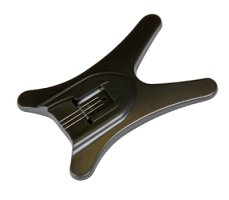
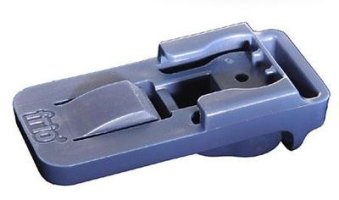
I'm very good at loosing small plastic parts, so I'd like to stock up on some coldshoes for my flashes. I've already tried to order one version, but it doesn't really fit because the rubber part on the hotshoe gets crammed inside the coldshoe, there is no lock and the flash tends to fall off (picture of this version attached, it's the black gadget). Before I waste money on other overpriced plastic pieces:

* Did you find any type of 3rd party coldshoe for putting on the ground that is equivalent to what Canon delivers (no, thanks, I'm not buying an original Canon part for this :-p)?

* I also need a foolproof coldshoe just to attach the flash to a bracket or tripod, something like the blue thing in the attached picture, but I'd be ok if it was cheaper than this patented version...

Thanks for any help, I cannot predict how these ebay offers really fit and I'm not willing to pay €20 in a local camera store for e 2 ct plastic piece, call it principle if you like :-o

Attachments

  • 276249_2_e8248255.jpg
    276249_2_e8248255.jpg
    20.9 KB · Views: 551
  • $(KGrHqFHJ!8FHTWh57-rBR6R16e-vQ~~60_1.JPG
    $(KGrHqFHJ!8FHTWh57-rBR6R16e-vQ~~60_1.JPG
    11.6 KB · Views: 549

Filter

Forum statistics

Threads
37,480
Messages
975,426
Members
24,816
Latest member
GLBDD

Gallery statistics

Categories
1
Albums
29
Uploaded media
372
Embedded media
1
Comments
25
Disk usage
1 GB