Show your Bird Portraits

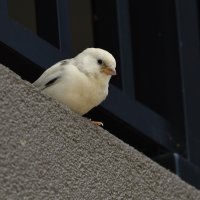
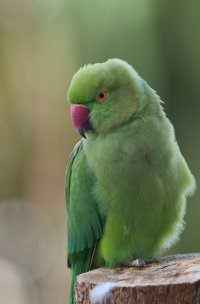
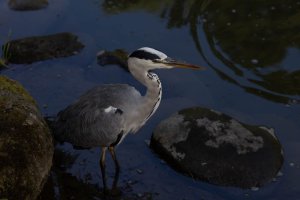
I like all of them - including that Sparrow! Was it on the boat?! The first two are kind of so peaceful and I like it but the Sparrow is kind of out of place, lost and it looks like interesting story...
It is strange to be 20-30 miles of course and see Monarch butterflies and passerines. We had two purple finches and a 2 white throated sparrows hitch a ride with us. Happy birds will circle boat a few times and take off. Birds in distress will land and rest. The sparrow in the pic sat right under my legs for quite some time.
 
  • Like
Reactions: 1 user
Upvote 0
Today I tried again to get some photos of that sparrow. Didn't succeed to get any better (I was trying to get it on a branch, well isolated from the background...): too much people. For a moment it was posing perfectly on small bush but I couldn't shoot: there were few kids behind (far enough from the focus point but go explain this to the parents!). My computer is still useless, no DxO PL and with the parrot I had to crop until it fits for CR.

DSC_1147.jpgDSC_1167.jpg
 
  • Like
  • Love
Reactions: 7 users
Upvote 0
A bit of background: 99% of my shooting is jpeg only.

A bit more background: DxO and other 'tricks' used by experts who post here? I have zero experience with DxO etc.

I do own Topaz Photo, the Topaz folks offer regular updates.

I suspect Topaz Photo offers more than I know how to use.

But here is my latest effort:

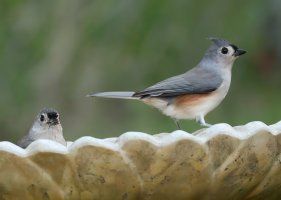
R5MkII & 200-800 @ 800; not much light [6:07pm CDT image acquired/sunset on what was a clear day 6:18pm]; ISO 12800; wide open at f9.5; 1/250s; cropped jpeg straight from camera--

K41A2574 picasa crop.JPG

...the latest version of Topaz Photo has a one-step one-click fix-up that is still in beta form. Topaz refers to it as 'Wonder', I think.

The above image after the one-click 'Wonder':

K41A2574 picasa crop-topaz-wonder.JPG

...with no snark intended, I'm certain the pixel-peepers can criticize the Wonder treatment--no doubt with good reason.

But I am amazed.

ISO 12800.

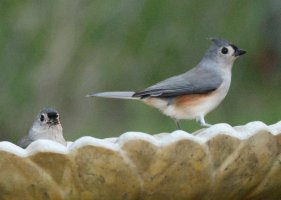
My pair of Tufted Titmice never looked so good (sort of).

Oh my.

Comments and suggestions more than welcome.

Thanks for reading.
 
Last edited:
  • Like
Reactions: 4 users
Upvote 0
A bit of background: 99% of my shooting is jpeg only.

A bit more background: DxO and other 'tricks' used by experts who post here? I have zero experience with DxO etc.

I do own Topaz Photo, the Topaz folks offer regular updates.

I suspect Topaz Photo offers more than I know how to use.

But here is my latest effort:

R5MkII & 200-800 @ 800; not much light [6:07pm CDT image acquired/sunset on what was a clear day 6:18pm]; ISO 12800; wide open at f9.5; 1/250s; cropped jpeg straight from camera--

View attachment 226512

...the latest version of Topaz Photo has a one-step one-click fix-up that is still in beta form. Topaz refers to it as 'Wonder', I think.

The above image after the one-click 'Wonder':

View attachment 226513

...with no snark intended, I'm certain the pixel-peepers can criticize the Wonder treatment--no doubt with good reason.

But I am amazed.

ISO 12800.

My pair of Tufted Titmice never looked so good (sort of).

Oh my.

Comments and suggestions more than welcome.

Thanks for reading.

This is what I have to say about this sort of software correction. Topaz Labs products have gone down the toilet, they turn everything into mush now. I won't promote them on the site anymore. Their new subscription model is insanity. They think they're Adobe or something, and even Adobe annoys me. :)

If you want something to deal with noise and all of that. DXO PureRAW 5 is the ticket. There is a fully functional demo on their web site. Everyone should have PureRAW. If there is nothing else you buy in software, buy that. No affiliate link, I paid full price for my license.

As for the photos, it looks like you're shooting in the evening when all the contrast is gone. Once the "golden hour" leaves, it's time to put the camera away. You also need to get closer.

Stop shooting JPG only. You need RAW files to get the best out of software.
 
Upvote 0
This is what I have to say about this sort of software correction. Topaz Labs products have gone down the toilet, they turn everything into mush now. I won't promote them on the site anymore. Their new subscription model is insanity. They think they're Adobe or something, and even Adobe annoys me. :)

If you want something to deal with noise and all of that. DXO PureRAW 5 is the ticket. There is a fully functional demo on their web site. Everyone should have PureRAW. If there is nothing else you buy in software, buy that. No affiliate link, I paid full price for my license.

As for the photos, it looks like you're shooting in the evening when all the contrast is gone. Once the "golden hour" leaves, it's time to put the camera away. You also need to get closer.

Stop shooting JPG only. You need RAW files to get the best out of software.
I have to agree 100% with what you say about both Topaz and DxO (though I use DxO PL as a standalone application rather than PureRaw). Topaz was once a pretty good denoising and sharpening tool, and Gigapixel the best upsizing. Since going over to AI, you have to work hard to remove the artefacts it introduces. PS beta has a generative upsizing tool, from which I posted images comparing it with Topaz, and found fewer artefacts. $37/month is plain ridiculous for renting the software.
 
  • Like
Reactions: 5 users
Upvote 0
A bit of background: 99% of my shooting is jpeg only.

A bit more background: DxO and other 'tricks' used by experts who post here? I have zero experience with DxO etc.

I do own Topaz Photo, the Topaz folks offer regular updates.

I suspect Topaz Photo offers more than I know how to use.

But here is my latest effort:

R5MkII & 200-800 @ 800; not much light [6:07pm CDT image acquired/sunset on what was a clear day 6:18pm]; ISO 12800; wide open at f9.5; 1/250s; cropped jpeg straight from camera--

View attachment 226512

...the latest version of Topaz Photo has a one-step one-click fix-up that is still in beta form. Topaz refers to it as 'Wonder', I think.

The above image after the one-click 'Wonder':

View attachment 226513

...with no snark intended, I'm certain the pixel-peepers can criticize the Wonder treatment--no doubt with good reason.

But I am amazed.

ISO 12800.

My pair of Tufted Titmice never looked so good (sort of).

Oh my.

Comments and suggestions more than welcome.

Thanks for reading.
Just downloaded the new Topaz Photo to try out the Wonder mode. But, it was going to take 107 minutes to process the first image from RAW and the same for a jpeg on my MacBook Air, which is the latest model. How long did it take on your computer?

(I also own a perpetual licence for Photo AI, and have got a complimentary to the new Topaz Photo, but in future it will be on subscription).
 
Last edited:
Upvote 0
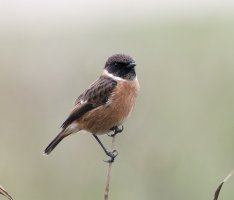
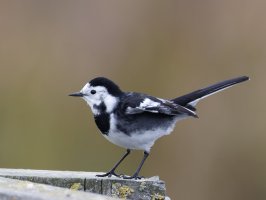
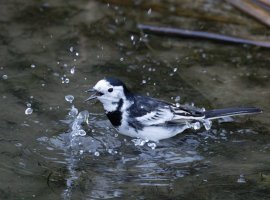
A newly arrived Stonechat and a much closer Pied (white) Wagtail today. I really do like the 200-800 for shooting small birds. The Stonechat was 25m away. It's been a terrible few months for birds here and hopefully we will get some immigrants now.6L8A8467-DxO_Stonechat.jpg6L8A8630-DxO_Pied_Wagtail_on_jetty.jpg6L8A8686-DxO_Pied_Wagtail_bathing.jpg
 
  • Like
Reactions: 8 users
Upvote 0
Lovely shots, Alan.
a025.gif
 
  • Like
Reactions: 1 users
Upvote 0
Just downloaded the new Topaz Photo to try out the Wonder mode. But, it was going to take 107 minutes to process the first image from RAW and the same for a jpeg on my MacBook Air, which is the latest model. How long did it take on your computer?

(I also own a perpetual licence for Photo AI, and have got a complimentary to the new Topaz Photo, but in future it will be on subscription).
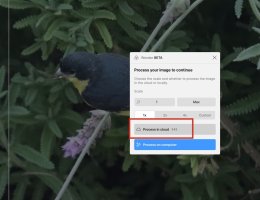
After selecting Wonder, this window (minus the red rectangle) appeared:
251017 for cr.jpg

For this particular fix, the total time (after clicking Process in cloud) was about 90 seconds (including upload, processing and download).

I've had some other decent results with the various Topaz products, but admit that the product is no panacea.

=====

Were you 'offered' the choices of cloud processing or processing on computer (...in the Wonder BETA window)?

I have not read any of the recent promotional material regarding Topaz Photo and Topaz Photo AI, and admit to a certain confusion about these 'two' products (pricing and subscription terms etc)...but will try to respond in full to the responses in this thread.
 
  • Like
Reactions: 1 user
Upvote 0
After selecting Wonder, this window (minus the red rectangle) appeared:
View attachment 226520

For this particular fix, the total time (after clicking Process in cloud) was about 90 seconds (including upload, processing and download).

I've had some other decent results with the various Topaz products, but admit that the product is no panacea.

=====

Were you 'offered' the choices of cloud processing or processing on computer (...in the Wonder BETA window)?

I have not read any of the recent promotional material regarding Topaz Photo and Topaz Photo AI, and admit to a certain confusion about these 'two' products (pricing and subscription terms etc)...but will try to respond in full to the responses in this thread.
I was offered the choice and chose computer. I repeated this morning using the Cloud but gave up after several minutes with RAW, a full-size jpeg then a tiny crop. Each even took a minute or so to upload. Maybe there are problems from over here but it is clearly not practical for me even to test. Topaz has always been amusing with its almost daily updates and have to download 20 gb each time.
 
Upvote 0
I was offered the choice and chose computer. I repeated this morning using the Cloud but gave up after several minutes with RAW, a full-size jpeg then a tiny crop. Each even took a minute or so to upload. Maybe there are problems from over here but it is clearly not practical for me even to test. Topaz has always been amusing with its almost daily updates and have to download 20 gb each time.
I was not amused that I had to wait 3 months for PhotoAI to support the R5 Mk II raw files.

Their new subscription model charges 17$ a month ($199 annual billing) for their Photo app. That is more expensive than Adobe’s Photography Plan for Lightroom and Photoshop. I wonder how many of their customers are going to transition to their subscription model.

This is what you get when you take a Topaz Studio subcription:
IMG_0451.png
 
Last edited:
Upvote 0
I was not amused that I had to wait 3 months for PhotoAI to support the R5 Mk II raw files.

Their new subscription model charges 17$ a month ($199 annual billing) for their Photo app. That is more expensive than Adobe’s Photography Plan for Lightroom and Photoshop. I wonder how many of their customers are going to transition to their subscription model.

This is what you get when you take a Topaz Studio subcription:
View attachment 226525

I don't think Topaz Labs likes me anymore, I laid into them about this among other things. Their dumba** CEO actually sent a mass mail saying AI would replace most photography.

Not a big loss, their software is terrible.
 
Upvote 0
I don't think Topaz Labs likes me anymore, I laid into them about this among other things. Their dumba** CEO actually sent a mass mail saying AI would replace most photography.

Not a big loss, their software is terrible.
At the time Topaz told me that they had to wait for Libraw library for R5 Mk II. After Libraw support for the R5 Mk II became available, it took Topaz almost 2 months to release PhotoAI. They went from a Pay once, to pay every 12-18 months, to pay every month. The quality of their products declined with every step.
 
Upvote 0
At the time Topaz told me that they had to wait for Libraw library for R5 Mk II. After Libraw support for the R5 Mk II became available, it took Topaz almost 2 months to release PhotoAI. They went from a Pay once, to pay every 12-18 months, to pay every month. The quality of their products declined with every step.
I never used Topaz on RAW. If I needed it, I would just apply it to an exported jpeg from DxO.
 
Upvote 0
I never used Topaz on RAW. If I needed it, I would just apply it to an exported jpeg from DxO.
I use PhotoAI sporadically, usually for photo’s where the sharpness is a little off. At the time Topaz Denoise was good, the results from PhotoAI are usually over-sharpened. Animals and birds look like someone has combed their hair or feathers.
The improvements in LR for noise reduction, DxO Pure Raw for ‘problem’ photo’s and the introduction of a subscription model will be the end of Topaz for me.
 
Upvote 0
I use PhotoAI sporadically, usually for photo’s where the sharpness is a little off. At the time Topaz Denoise was good, the results from PhotoAI are usually over-sharpened. Animals and birds look like someone has combed their hair or feathers.
The improvements in LR for noise reduction, DxO Pure Raw for ‘problem’ photo’s and the introduction of a subscription model will be the end of Topaz for me.
But you can easily reduce the amount of sharpening when using Topaz AI.
Their "auto mode" tends to oversharpen and to produce strange artefacts.
 
Upvote 0