Do smaller RAW formats give lower noise?

Status
Not open for further replies.
Dec 12, 2012
105
0
5,826
tl;dr version: I'm really interested in low noise during low-light/high-ISO shots, and am wondering if shooting in smaller RAW formats could help in that effort.

I'm betting it doesn't work, but what does shooting in smaller RAW sizes (e.g. M-RAW, S-RAW) actually do in terms of mapping sensor sites to the final image, and can it combine sensor site outputs to increase apparent light sensitivity without boosting ISO? And if not, why not?

Example: take a 20 megapixel sensor, intelligently combine the readings of each block of 2x2 red, green, and blue neighboring sensor sites, and spit out a 5 megapixel image. If that's done closer to the sensor, before the interpolation of subsensor sites into RGB pixels, might it result in a better (e.g. lower noise) result? The idea would be to discard the outputs of aberrant sensor sites before they could muddy the interpolation algorithm and "dirty" more final pixels. I wonder if that would be better than taking a full resolution image, applying noise reduction post-processing tools, and spitting out a 5 megapixel image at the end of the workflow.

Any thoughts? Anyone actually know how sensor sites are mapped onto S-RAW and M-RAW image pixels? Thanks!
 
Bottom line, all things being equal,is the size of the photo diode( sensor). So small sensor sizes would need lower resolution to have the same S/N
 
Upvote 0
In an ideal world and if the imaging process in low light is dominated by photon noise a reduction of the spatial resolution by a factor of two (i.e. going from eg. 20Mpix to 5Mpix) would mean that the total info of 4 pixels is combined into 1 pixel leading to an improvement of the signal/noise ratio by a factor of two (=sqrt (4)) . That is the maximum that you will gain!!! -> When going to smaller RAWS the improvement will be much smaller because other systematic noise components dominate in most of the cases and the resolution reduction is much smaller... So don't expect too much gain...
 
Upvote 0
from a purely mathematical/physical point of view, you have two options for such a scenario:
  • Calculate the average (or something similar) of these four pixels, this reduces noise
  • Add the values of these four pixels, this wouldn't result in much better noise, but, if i thought about it right, would give you a 4 stops brighter image. Also an iteresting option ;)
 
Upvote 0
If you are talking about the existing small "RAW" formats": they are not implemented well yet, there s obvious aliasing but the final results may depend too much of the RAW converter used (DPP or LR). It does makes sense to shoot mRAW at high ISO: the effective resolution is low anyway, and from noise point of view, mRAW is a good conversion. This is not binning - just conversion done in the camera. What you gain is smaller files.

From theoretical point of view: the source is the same RAW, and the only thing you could possibly gain is conversion which DPP or LR (or any other converter) cannot do. Downsizing does not "reduce" noise more than NR does. Noise has to be measured against detail, at the same size. Then downsizing does not change it.

Binning: hardware binning can reduce read noise, in principle (not so simple though, you need different AD converters for that). It does nothing to photon noise. Binnig, software for hardware, is downsizing with one of the worst algorithms (there are even worse). You are much better of with you garden variety downsizing in your favorite software, if you really need to downsize (and reducing noise is not a reason for that).

Bottom line: once you capture a noisy image (always, actually), noise is there to stay, you cannot cheat. Just use your favorite NR software to reduce it, together with the detail.
 
Upvote 0
Good evening.

@curby
From what I saw, it depends on the RAW converter you use and the color noise removal settings.

The scenario:
- take the same image in RAW and sRAW at ISO12800. (I am using a 7D btw)
- develop the images in ACR 5.6 (PSE7)
- develop the images in DPP (v3.11.31)
- resize the RAW to 2592x1728 (same size as sRAW - I used bicubic resize)

Result:
- with no color noise removal in DPP the resulting images look (almost) the same
- however, with "15" as color noise removal settings in ACR the sRAW is nearly noise free while the downsized RAW still has a lot color noise in it.
- luminance noise isn't that much affected by that

Some more stuff to think about:
- sRAW: 2592x1728 = 4,27 megapixel
- RAW: 5184x3456 = 17,08 megapixel
- so RAW has exactly 4x the resolution of sRAW.
- the Canon sensors use a bayer matrix (https://en.wikipedia.org/wiki/Bayer_filter) which has 1 blue, 1 red, 2 green sensels. That means, that the true COLOR resolution of the so-called 18mp sensor of my 7D is really 4.27 megapixel for red and blue each and 8.54mp for green.
- higher image resolution comes from interpolating, which is a polite word for "algorithmic guessing". Nothing wrong with that, one just have to know it and decide to live with the result or not.

Unfortunately I don't know the algorithms behind sRAW, but basically IF Canon did it right you get free image stacking (4 images) which should result in less noise and better color reproduction. Search the web to find noise reduction tools that use that image stacking idea - it's a working solution and if the 7D can do that on the fly for me - I'm game.

And 4.27mp native sensor resolution is plenty for the normal photo stuff ;) - you don't need the interpolated stuff in most cases anyway.

Good news: even the interpolated 17.08mp look very good from the 7D RAW! ;)

Kind regards,
Th.
 
Upvote 0
thkn777 said:
IF Canon did it right you get free image stacking (4 images) which should result in less noise and better color reproduction

^ This is the crux of my question: if I don't need the full sensor resolution anyway, maybe doing (some of) the downsizing ahead of time results in a better final image. It all depends on the specifics of how RAW and sRAW actually map sensor sites to the file.

Relatedly, does anyone know whether Canon's RAW format stores post-interpolation RGB pixels, or does it separately store the red, green and blue data as pre-interpolation discrete readouts? If the latter, whatever smarts could have been applied to the sRAW should still be applicable to the full sized RAW image.
 
Upvote 0
curby said:
thkn777 said:
IF Canon did it right you get free image stacking (4 images) which should result in less noise and better color reproduction

^ This is the crux of my question: if I don't need the full sensor resolution anyway, maybe doing (some of) the downsizing ahead of time results in a better final image. It all depends on the specifics of how RAW and sRAW actually map sensor sites to the file.

If you need a simple answer: I does not.

Relatedly, does anyone know whether Canon's RAW format stores post-interpolation RGB pixels, or does it separately store the red, green and blue data as pre-interpolation discrete readouts? If the latter, whatever smarts could have been applied to the sRAW should still be applicable to the full sized RAW image.

The RAW format records non-interpolated RGB values. Yes, whatever Canon is doing to produce the smaller "RAW" formats, you can do it yourself, if you knew how (and if you find a really good reason for that).
 
Upvote 0
@curby
You might find some of your questions answered here or maybe you only get some more stuff to think about ;)
- http://lclevy.free.fr/cr2/
- http://www.openphotographyforums.com/forums/showthread.php?t=13916
- http://www.dpreview.com/forums/post/26204152
- http://www.flickr.com/groups/canon_7d_digital_slr/discuss/72157624044656218/

According to different websites RAW, mRAW and sRAW seems to use different coding/data structure. While RAW is more like the "traditional" bayer matrix storage, mRAW and sRAW work in a different way.

So... if you really want, you might be able to analyze the RAW file the way dcraw does it (for example), extract pieces of data and basically write your own RAW converter ("curby-raw" ;) ). In reality it is more likely that you want to use existing software - but then you don't have access to the RGB data, but get the (somehow) interpolated image based on RAW data.

Some algorithms to interpolate the RAW data were already implemented by Canon - that's how you can generate mRAW and sRAW by combining different parts of the bayer matrix data. The generated pixel color information will be stored in a file, which is otherwise untouched and can be processed in a similar way like a true RAW file. Not all RAW converters support mRAW and sRAW, because of these different approach. And ofc there is the JPEG-out-of-camera function, which does all the bayer matrix interpolating stuff, too.

So in reality developing a RAW and trying to get something like mRAW or sRAW with postprocessing from the developed photo won't work - because mRAW and sRAW are directly generated from the bayer matrix data. Your only chance would be to build "curby-raw". I think this is what Pi suggested.

Now for the "full sensor resolution": what is this in your understanding? The sensor of my 7D can't(!) resolve true 18mp (we know it's more like 17mp in the image file) of 1:1 color information as I explained in my previous post. It has 18mp grey sensors with filters on it - 25% of them red, 25% blue, 50% green. Let's say I try to shoot a red rose... no greens, no blues, just shades of red - all the resolution I get is 4,27mp (not very realistic, it just get's you the idea). Everyone trying to shoot all red or all blue flowers will know that "resolution loss". Try to see it from the other side: sRAW is what you get without guessing. Everything else is good interpolation.

BTW: Canon pre-processes RAW files in some cases. You don't believe it? Tonal priority effect will be applied to RAW files, too. And you can't convince me, that the ISO values for each pixel (18mp!!) will be adjusted "on the fly". No - the image is taken, analyzed and then "adjusted". And after that the adjusted RGB bayer matrix data will be written to the CF card. And I believe there will be other (minor) stuff, that's done before the data is finally on the CF card, too.

Sorry for the wall of text here, hope it helps in some way.

Regards,
Th.
 
Upvote 0
Upvote 0
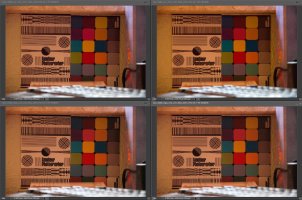
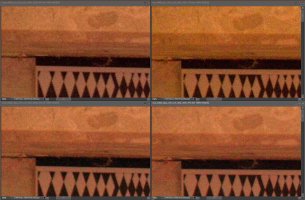
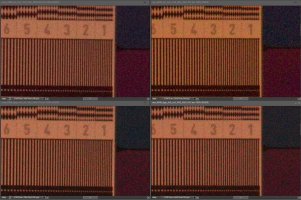
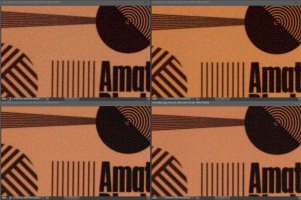
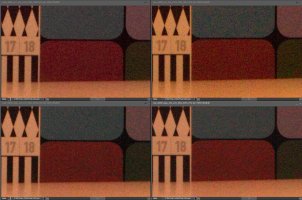
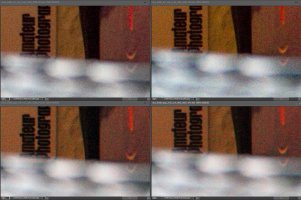
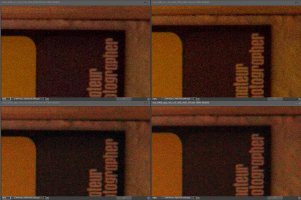
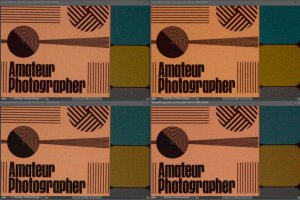
Here's a little non-scientific ISO6400 sRAW-vs-RAW comparison.
- I took the same image in sRAW and RAW
- I developed the shots in DPP and ACR
- there are two versions for each raw converter: one without any noise reduction and one with 25% color noise reduction.
- Everything else like sharpening etc. was left at 0 or the smallest possible value.
- the files with noise reduction where opened in PSE7 as these show the biggest differences
- the sRAW images where upscaled to the RAW size using bicubic interpolation
- auto histogram was performed on all images
- I then arranged the 4 images side by side, ACR on top, DPP in the lower row.
- upscaled sRAW is left, RAW is on the right side
- I picked different image areas and took screenshots which I saved as a JPEG file in max. quality setting

Be my guest and have a look. As the forum resizes the images for preview, download the full size version for a 100% view.

Kind regards,
Th.

#7 - whole image view
 

Attachments

  • sraw_vs_raw_7D_01_07_fullview.jpg
    sraw_vs_raw_7D_01_07_fullview.jpg
    261.5 KB · Views: 619
Upvote 0
Upscaled lower resolution images are something like NR images. You will see less noise but less detail, too. On the other hand, at such high ISO, there is not so much detail left.

You can try to downsize the full resolution images (bicubic smoother, for example), then upsize them, and then compare.
 
Upvote 0
No, don't use mRAW or sRAW, only do it when you run out of storage space in the field, or if that happens you might as well shoot JPGs. In camera RAW cooking is not good. The dinky processor in your camera will never offer same demosacking quality as a modern RAW processing software running on a good computer.

And if you are so obsessed with noise that you are willing to sacrifice half linear resolution, you can shoot (regular) RAW, process it, then downscale 2x in the final output. You will get far better result than using sRAW.
 
Upvote 0
To reiterate, the goal is smaller final images anyway: I wonder what thkn's images would look like if they were all resized to SRAW size. Would the resizing lessen the perceived chroma noise of the full RAW images? From those limited tests, I'm not seeing a lot of benefit to the full RAW (such as greater detail), and the reduced chroma noise of the SRAW images seems like a pretty compelling benefit. Of course, that goes against what most people here are saying: namely, that shooting SRAW does NOT offer such advantages.

Thanks for the tests! I might have to do my own testing when I upgrade my body to something that can do smaller RAWs.
 
Upvote 0
@curby
You are welcome. Here's the downsized result. Just one image - I'm in a hurry, sorry.

@All
Remember - curby asked for technical information about sRAW and about low light high ISO shots only. In many situations RAW is the better choice as the higher pixel count wins over the noise, but "stacking" images to get better results (less noise, better color accuracy) has never been a bad idea. I did that by taking multiple shots and combine in specialiced noise removal software in the past and it worked well. My Nokia 808 cellphone does this trick and produces high quality 5mp or 8mp images from the ~40mp sensor. sRAW kinda "stacks" the information of a 2x2 sensel array without "color guessing" like in a 18mp(17mp) image derived from a RAW file but it generates a file, that still has some "raw" feeling (see WB adjustment and stuff). So sRAW is really quite different from RAW. Because of these differences it might work for you or not. If cropping is not an issue and you use the full image anyway for displaying on computer displays, mobile phones, tablet pc, TV, printing normal sized photos and stuff the sRAW resolution is is high enough.

I was pixel-peeping for many years and was looking for the highest resolution, sharpness and so on and I know what you are talking about - but I am also after clean images with good color accuracy. When it comes to ISO1600+ I think sRAW is a valid option on my 7D - not for everybody, maybe not for you, maybe not with your camera body /shrug that's fine.

I generate HDR's from sRAW for example as I've got the feeling, that the better color accuracy and less noise of the sRAW files help with that. Ofc this heavily depends on the software I use so you might get other results. Also combining the sRAW files is faster on my PC compared to using RAW. ;)

Have a nice day and happy snapping!
Th.
 

Attachments

  • sraw_vs_raw_7D_01_08_downsized.jpg
    sraw_vs_raw_7D_01_08_downsized.jpg
    283.7 KB · Views: 367
Upvote 0
Status
Not open for further replies.