
1DX- coated in ice, nice and white, and still clicking

Status
Not open for further replies.
Dec 14, 2012
10
0
4,691
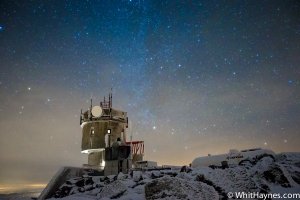
Last night I shot a 6 hour time-lapse on the summit of the highest peak in the east. My 1DX turned white with ice and snow, but kept clicking all night long. Hope you enjoy the clip.

Link: https://vimeo.com/55635735

Here is a single image from the sequence:
 

Attachments

  • Mount Washington Observatory-2.jpg
    Mount Washington Observatory-2.jpg
    239.9 KB · Views: 3,837
The back of the camera was facing into the wind, and I got lucky. I was assuming it would slowly ice over and create a frosted effect. There also wasn't too much moisture in the air, so that definitely helped. Most of the icing happened on the top and back of the body, and the lens barrel turned white. I had the camera out in the cold for an hour before I started shooting to keep the lens from fogging up as well.
 
Upvote 0
Very cool. I would love to learn how to do this one day. How many shots did you have to take and what was the interval between each shot? Also if you don't mind me asking I would love to know what settings you used on the camera to take the shots? Every time I attempt something like this I either get the stars starting to turn into trails (to long of shutter) or the stars just not showing up (to short a shutter or to low an iso?). I realize you may not want to give away your secrets but any pointers would be greatly appreciated.
 
Upvote 0
nightbreath said:
How did you get that aliasing on the building? Is it sharpening when changing image size?

Sizing down an image adds "anti aliasing" basically. Sharpening counteracts that. Still wondering what u actually mean. If you get jagged edges in your photos maybe ur method of resizing or sharpening is just not good.
 
Upvote 0
The exposures were 20 seconds long at F4.5 (you can see a little movement in the stars due to the long exposure). There was no delay between shots. I was using the TC-80N3 to control the shutter. This was just a quick edit while I am on the road, so I didnt take the time to make it perfect, just wanted to show what I've been shooting. This sequence is part of a time-lapse project that I've been working on for the past year.
Thanks for watching!
 
Upvote 0
Whit said:
The exposures were 20 seconds long at F4.5 (you can see a little movement in the stars due to the long exposure). There was no delay between shots. I was using the TC-80N3 to control the shutter. This was just a quick edit while I am on the road, so I didnt take the time to make it perfect, just wanted to show what I've been shooting. This sequence is part of a time-lapse project that I've been working on for the past year.
Thanks for watching!

Thanks for the additional info. I can't wait to give this another attempt myself and more importantly see your finished product. :) Good luck on it as a year is a long time to be working on something.
 
Upvote 0
sandymandy said:
Sizing down an image adds "anti aliasing" basically. Sharpening counteracts that. Still wondering what u actually mean. If you get jagged edges in your photos maybe ur method of resizing or sharpening is just not good.
Sizing down may add aliasing as well (it depends on the algorithm you use). I was interested in exact reason that led to the issue, to expand my knowledge base :)
 
Upvote 0
Status
Not open for further replies.