5D Mark III vs 5D Mark II Raw Image Quality

  • Thread starter Thread starter Otter
  • Start date Start date
Status
Not open for further replies.
kevl said:
I've been all though LR4 and can't find any way to set what you are talking about. Color Noise Detail is set at 50 by default in LR4, but doesn't get applied unless you adjust the Color Noise slider.
A setting of "25" is pretty agressive NR and would make the cat look plastic.

In that case, would you mind publishing the RAW file or sending it to me privately? I've seen correctly exposed ISO 400 files with more visible chroma noise.
 
Upvote 0
SambalOelek said:
kevl said:
I've been all though LR4 and can't find any way to set what you are talking about. Color Noise Detail is set at 50 by default in LR4, but doesn't get applied unless you adjust the Color Noise slider.
A setting of "25" is pretty agressive NR and would make the cat look plastic.

In that case, would you mind publishing the RAW file or sending it to me privately? I've seen correctly exposed ISO 400 files with more visible chroma noise.

OK I uploaded it to MediaFire.

http://www.mediafire.com/?5ay71skgmod5tm9

The image does impress for the noise level, if not the subject & comp, but I can't see how I could have inadvertently added noise reduction to it...

This CR2 RAW file was copied directly from the harddrive and not exported from Lightroom.

Kev
 
Upvote 0
Thanks for posting kevi... for giggles I downloaded your file and opened into photoshop with the latest ACR.... ACR automatically sets color noise at 25 and detail at 50 standard... you can drop 25 to 0, but surprisingly, the "color noise" that sambai was referring to, really doesn't change that much if any from 0 to 25... there is plenty of noise, but it's fine noise that only goes away when the luminance slider is played with, and that doesn't fully disappear until it's around the 50 mark.. But it is leaps and bounds above what we had to play with before... and this is even taking into account that ACR is STILL buggy with 5d3 files and have been proven so time and time again. Once adobe gets that straightened, it will be even more consistent and will render files even better. So yes, he is right that some NR was inadvertently applied by ACR, not you, and that you can knock it from 25 to 0 and get more noise, but he is wrong about how much noise and what kind of noise... Minimal difference in color noise between 0 and 25 and it is luminance noise more than anything else, which is to be expected, and cleans up quite nicely.

 
Upvote 0
awinphoto said:
Thanks for posting kevi... for giggles I downloaded your file and opened into photoshop with the latest ACR.... ACR automatically sets color noise at 25 and detail at 50 standard... you can drop 25 to 0, but surprisingly, the "color noise" that sambai was referring to, really doesn't change that much if any from 0 to 25... there is plenty of noise, but it's fine noise that only goes away when the luminance slider is played with, and that doesn't fully disappear until it's around the 50 mark.. But it is leaps and bounds above what we had to play with before... and this is even taking into account that ACR is STILL buggy with 5d3 files and have been proven so time and time again. Once adobe gets that straightened, it will be even more consistent and will render files even better. So yes, he is right that some NR was inadvertently applied by ACR, not you, and that you can knock it from 25 to 0 and get more noise, but he is wrong about how much noise and what kind of noise... Minimal difference in color noise between 0 and 25 and it is luminance noise more than anything else, which is to be expected, and cleans up quite nicely.

Thanks for the explanation! :)
 
Upvote 0
awinphoto said:
So yes, he is right that some NR was inadvertently applied by ACR, not you, and that you can knock it from 25 to 0 and get more noise, but he is wrong about how much noise and what kind of noise... Minimal difference in color noise between 0 and 25 and it is luminance noise more than anything else, which is to be expected, and cleans up quite nicely.
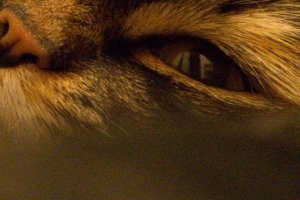
If you are referring to what Sambal Oelek said about the cat at ISO 6400, I'm not sure I agree, but maybe I got you wrong. I'll try to post three 100% crops: one without any NR, one with the default 25 chroma NR, and one with 69 (!) luminance NR without chroma NR, which makes the chroma noise easily distinguishable form the luma noise.
 

Attachments

  • cat no NR.jpg
    cat no NR.jpg
    186.4 KB · Views: 4,418
  • cat 25 chroma NR.jpg
    cat 25 chroma NR.jpg
    163.4 KB · Views: 4,425
  • cat 69 luminance and no chroma NR.jpg
    cat 69 luminance and no chroma NR.jpg
    160.9 KB · Views: 4,390
Upvote 0
filo64 said:
awinphoto said:
So yes, he is right that some NR was inadvertently applied by ACR, not you, and that you can knock it from 25 to 0 and get more noise, but he is wrong about how much noise and what kind of noise... Minimal difference in color noise between 0 and 25 and it is luminance noise more than anything else, which is to be expected, and cleans up quite nicely.
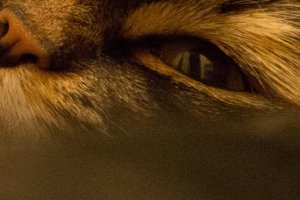
If you are referring to what Sambal Oelek said about the cat at ISO 6400, I'm not sure I agree, but maybe I got you wrong. I'll try to post three 100% crops: one without any NR, one with the default 25 chroma NR, and one with 69 (!) luminance NR without chroma NR, which makes the chroma noise easily distinguishable form the luma noise.

What I was expecting was to see a lot more color noise (chrominance noise or chroma noise for short), similar to filo64's result. Luminance noise is already visible in the jpg (the "graininess" of the OOF areas), so i figured that at least some chroma NR was being applied by the RAW converter.

Thanks to kevl for uploading the file.
 
Upvote 0
SambalOelek said:
filo64 said:
awinphoto said:
So yes, he is right that some NR was inadvertently applied by ACR, not you, and that you can knock it from 25 to 0 and get more noise, but he is wrong about how much noise and what kind of noise... Minimal difference in color noise between 0 and 25 and it is luminance noise more than anything else, which is to be expected, and cleans up quite nicely.
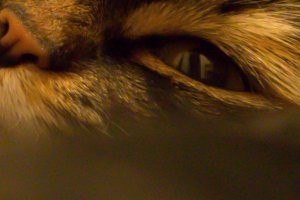
If you are referring to what Sambal Oelek said about the cat at ISO 6400, I'm not sure I agree, but maybe I got you wrong. I'll try to post three 100% crops: one without any NR, one with the default 25 chroma NR, and one with 69 (!) luminance NR without chroma NR, which makes the chroma noise easily distinguishable form the luma noise.

What I was expecting was to see a lot more color noise (chrominance noise or chroma noise for short), similar to filo64's result. Luminance noise is already visible in the jpg (the "graininess" of the OOF areas), so i figured that at least some chroma NR was being applied by the RAW converter.

Thanks to kevl for uploading the file.

Thanks for posting this!

Kev
 
Upvote 0
One thing I think we can all agree on:

The 5D Mark III is capable of amazing performance by creating usable files at ISOs which we often finding ourselves needing to use: 1600-6400. Of course I would clean up a file shot at 6400 before I printed it.

I can shoot a band in a night club and shoot night city street photos at 6400, and that's what I needed the 5D3 to be able to do. I don't "think" I'll "need" higher ISOs than that but time will tell. If higher ones clean up well then I may use them, but I don't "need" them.

The thread isn't really about this, but what would people say is the highest ISO the 5D3 can use to produce a usable print? Any examples?

Thanks for everyone that pushed about the cat image - I really appreciate all that I've learned because of it.

Kev
 
Upvote 0
Status
Not open for further replies.