• The Canon Rumors Forum has officially been shut down as of July 10, 2026.

    All data will be deleted on September 16, 2026.

    the ad free experience will return by July 17, 2026.

5Diii pink picture problem

  • Thread starter Thread starter thatcherk1
  • Start date Start date
Status
Not open for further replies.
T

thatcherk1

Guest
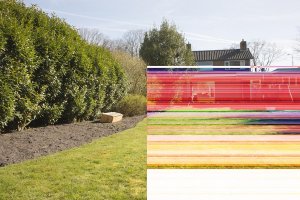
I was shooting some tests with my 5D just now and one of the shots I took has an extreme pink to it (except at the top of the frame) see below. This was the only shot that did this. None of the other shots had this problem. I was shooting RAW to CF, and JPG to SD card. It was pink in both RAW and JPG. Here is a compressed jpg version:
A12_0162.jpg


and here is a link to the original untouched .cr2:
http://dl.dropbox.com/u/2077993/A12_0162.CR2


Anyone else having weird things like this happening?
 
Love the Pink Honda shot.

If your camera is not shooting right straight out of the box, go straight back to the dealer. Let them see and try it, but if no problem can be found and fixed, ask for a return. If it did not work from the beginning, they are obligated to take it back, or exchange it. (Warrantee of merchantability) If they won't, contact your credit card company (hopefully you paid with a credit card) and open a dispute.
 
Upvote 0
looks like a data recording issue, I've had images show up similar to this on other cameras when something went wrong with the card or if I lost battery power while the buffer was still recording to the card.
 
Upvote 0
thatcherk1 said:
No, this was taken in sunlight on the street. You can see the black bar near the top of the frame and then a seemingly normal image above that a little bit.


Here is a link to the .cr2 that was taken 1 second later, which appears normal.
http://dl.dropbox.com/u/2077993/A12_0163.CR2

I didn't notice the black bar. Some sort of a data save issue. Give a total erase to both cards, not a incamera format, but a write all zeros or ones type of erase. Then format them in camera. this will assure that one of the cards does not have a issue that might mess up the write to card function.

I think the format is not really the answer, but its really easy thing to do that removes that possibility.

If it happens again after that, I'd exchange the camera or send it in for repair.
 
Upvote 0
Mt Spokane Photography said:
thatcherk1 said:
No, this was taken in sunlight on the street. You can see the black bar near the top of the frame and then a seemingly normal image above that a little bit.


Here is a link to the .cr2 that was taken 1 second later, which appears normal.
http://dl.dropbox.com/u/2077993/A12_0163.CR2

I didn't notice the black bar. Some sort of a data save issue. Give a total erase to both cards, not a incamera format, but a write all zeros or ones type of erase. Then format them in camera. this will assure that one of the cards does not have a issue that might mess up the write to card function.

I think the format is not really the answer, but its really easy thing to do that removes that possibility.

If it happens again after that, I'd exchange the camera or send it in for repair.

I don't think it's data savinig related issue - there were two different data streams being saved: one cr2 to cf and second jpg to sd. If so, then it's not possible that two different types of data were corrupted the same way. If jpg which was produced from cr2 looks the same, then cr2 was corrupted first in camera's memory before producing jpg.
 
Upvote 0
YES!!! It happened to me as well.... Took the 5D for a workout over the weekend at the zoo - to get myself familiarized with the controls for a wedding shoot in a couple of weeks time. Took over 350+ photos and had 4 come out like this.

http://photography-on-the.net/forum/showthread.php?t=1164487

I had the same setting as you - RAW to CF and JPG to SD. I was using a Sandisk Extreme CF card and a Sandisk Ultra II SD card (waiting for the Extreme SD card to arrive).

I hope it's not a hardware issue!!!

thatcherk1 said:
I was shooting some tests with my 5D just now and one of the shots I took has an extreme pink to it (except at the top of the frame) see below. This was the only shot that did this. None of the other shots had this problem. I was shooting RAW to CF, and JPG to SD card. It was pink in both RAW and JPG.

http://dl.dropbox.com/u/2077993/A12_0162.CR2


Anyone else having weird things like this happening?
 
Upvote 0
Had the same thing when shooting in RAW.. i tried browsing images in picassa and then lightroom.. If i open in DPP it displays fine and i can export the image without problems.

Maybe the Canon RAW codec for the 5D MKIII has a few teething problems?

What software are you using to display the image?
 
Upvote 0
You said right out of the box... Did you fully charge the battery AND did you format the cards in the camera before shooting?
I ask on both because on my XSi if I take a card from another camera (60D or Nikon CoolPix), insert it and shoot, on occasion I get single color pictures.
When the battery is VERY low when I put it in, it shows full right away until I take a few shots, then it says empty. However, almost all of those shots contain errors (one kind or another)...
 
Upvote 0
Looks similar to what happened when i tried to copy all of my image files (RAWs + jpegs) from a hard drive to a drive on a new (cheap) RAID controller.

Many of my files were corrupted in exactly the same way, often partially corrupted with bands of extreme colour like in your example.

so if both the image on the CF and SD card were corrupted in exactly the same way then i would conclude a problem with the 5d Mk III writing the data rather than formatting or corruption on the card itself.
 
Upvote 0
rickystern said:
Quite the opposite problem, mine were all really, really blue.

I used to have the blue problem with the 5d Mk II when shooting raw, but every time it was fully recoverable on a PC with proper raw conversion and fixing white balance.

I wish then op would try DPP... I dont have a mark III yet or access to DPP 3.11.10 to try it with his raw file
 
Upvote 0
I also have a little problem, see attachment..

Didn't notice it on the LCD screen and it appeared when I zoomed in to a 100% in Adobe Bridge. After that it also appeared on the thumbnail in Bridge. I'm hoping this is just a PC / software issue and will be resolved with a new Camera Raw update?

Edit: No problems with the rest of the 500 shots I took. My CF card is only 4 GB and pretty old.
 

Attachments

  • Problem.jpg
    Problem.jpg
    126.1 KB · Views: 1,700
Upvote 0
bakker said:
I also have a little problem, see attachment..

Didn't notice it on the LCD screen and it appeared when I zoomed in to a 100% in Adobe Bridge. After that it also appeared on the thumbnail in Bridge. I'm hoping this is just a PC / software issue and will be resolved with a new Camera Raw update?

Edit: No problems with the rest of the 500 shots I took. My CF card is only 4 GB and pretty old.
That's pretty much how some of my photos looked like when trying to import into Aperture/Lightroom 4.
No issues with jpegs from the MkIII, and no issues with RAWs from a MkII already on the card.
Guess we await a few fixes, and both LR and Aperture, Bridge to handle MkIII files
 
Upvote 0
Status
Not open for further replies.