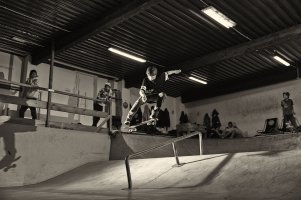
5DIII - too grainy or not?

meli said:
Nope. In the jpg the values for face & arm are already @ 252+ and actually parts of his nose and lips are already clipped; if you think you could add another 2.5stops and be able with your LR 4+ to bring'em back then damn, pls torrent us your LR cause it must be some pretty special sauce ;D

Bear in mind that the JPEG image provides only 8 bits of dynamic range per color (assuming a 24-bit JPEG image), whereas Canon RAW files provide 14 bits per color (per subpixel, that is). This means that in the worst case, a RAW file can represent a range of brightness values 64 times as wide as the JPEG image, which in practice translates to about three stops in each direction (IIRC), not counting any loss caused by JPEG compression artifacts.

In other words, by definition, assuming Lightroom can recover highlights in this picture now, if you shot the same photo in RAW mode, you could brighten the shot by up to three more stops before Lightroom would lose the ability to recover highlights.

This, of course, assumes that the JPEG was produced from the RAW data without further brightening or darkening.
 
Upvote 0
Skulker said:
There could be a reasonable shot in the raw. But its always going to be quite soft.
Are you referring to the 5D Mark III RAW softness issue? If so, that was resolved two years ago with Canon's Digital Photo Professional 3.11.26.0... or by using any third party RAW converter such as Adobe Camera RAW.
 
Upvote 0
climber said:
Hi. I took the attached picture at ISO 200 and it looks quite noisy/grainy in the shadows at 100%. Could someone take a look and say if this is normal or not? Or it is just me doing something wrong? Picture is converted in LR 4.3 and unprocessed.

You've used a very low ISO setting. For action, you need higher shutter speeds, and that means using a higher ISO setting. You might actually find that using a higher ISO in this case might actually reduce the appearance of shadow noise, as it will increase your utilization of the camera's available dynamic range to create a more saturated image before read noise is injected into the image. That won't entirely solve the "noise" issue, though.

The only other thing you MIGHT be doing wrong is overestimating how much noise there is in the shadows. :P

Noise is a NATURAL consequence of the physical nature of light. Sensors have discrete elements that sense light, however light falls randomly and slightly unevenly on those elements, so there is an intrinsic error rate...some pixels are slightly brighter than they should be, others are slightly darker than they should be, resulting in "noise".

It's ALWAYS occurred in photos. In the film days, noise was often much worse than what we deal with today, on all but the highest grade (and usually slower) films. For example, one of the most loved films for its high quality, exceptional color, and fine grain was (and actually still is) Velvia 50. This SLOW film has long been THE film for serious large format landscape photographers. It isn't cheap (and only seems to get more expensive with time), however thanks to its slow speed, it is able to achieve a very fine grain size and is therefor low noise...however it's 100% useless for the kind of action photograph you've taken!

In the film era, you would be using at least an ISO 400 film, maybe even an ISO 800 film. Higher ISO films used larger grains in order to increase the film's sensitivity. That resulted in high ISO film images appearing MUCH noisier than high ISO digital images are today. You should count yourself lucky you have the option to crank ISO as high as ISO 12800 these days and still not experience the same kind of film grain you would have with ISO 800 film.

Your image, though underexposed, is actually relatively clean. It IS underexposed, however. If you lift it by a couple stops in Lightroom, you'll be lifting read noise along with the image. That means your shadows will actually be noisier than if you had taken the image at ISO 800 in the camera. Increasing ISO is actually a means of REDUCING read noise, therefor resulting in cleaner shadows, since the image signal is amplified before the pixels are read...so read noise is added AFTER (and therefor it is a lesser fraction of the output signal.) You do need to be aware that in the presence of less light, total signal noise (not just the noise in the shadows that's added by the cameras readout electronics, but noise intrinsic to the signal, derived from the nature of light) will increase. That's physics, nothing we can do to change that.

If you don't like the amount of noise that is present in an image at ISO 800 with the natural levels of light in your photo, the only real option you have is to add light! If you bring along artificial light, either bounced flash or some kind of flash or continuous lighting on stands, you will open up the option of using a lower ISO setting while still exposing your subject properly.

EDIT: On closer inspection of the image at 100%, you really do need to crank up the ISO, lot! ISO 800 is probably the minimum you need, but I think ISO 1600 at least is necessary. You can see both subject motion blur (due to his motion) as well as camera shake blur in your example shot. That is an indication of a shutter speed that is much too low. You want to use the highest shutter speed you can get away with, at LEAST 1/focalLength (and 1/focalLengthx2 if your using an APS-C sensor), in order to prevent blur from camera shake. Depending on how fast your subject is moving, you may need an even higher shutter speed than that. That is going to warrant 3-4 stops higher ISO than you were using...or bring in a LOT more light.

 
Upvote 0
Don't forget this is a flash illuminated action shot, if HSS is not an option then 1/200 could well be it for shutter speed, that means everything else is a work around, the sync speed is often the only hard limit in this type of shooting situation.

If shots like this are the primary reason for the camera then much more though needed to go into sync speed.

As for the background, there is still zero indication from the OP as to what he wanted the background to look like, I am sure, as he was using flash, the intention was to intentionally under expose the background, in which case a touch of noise reduction and a lowering of flash power is all he needs to do.
 
Upvote 0
privatebydesign said:
Don't forget this is a flash illuminated action shot, if HSS is not an option then 1/200 could well be it for shutter speed, that means everything else is a work around, the sync speed is often the only hard limit in this type of shooting situation.

Oh, sorry, didn't catch that it was a flashed shot.

That definitely changes some things. With direct flash, your bound to have a bright subject and dim background, which has the potential to increase noise in the background (especially if you lift it).

privatebydesign said:
If shots like this are the primary reason for the camera then much more though needed to go into sync speed.

As for the background, there is still zero indication from the OP as to what he wanted the background to look like, I am sure, as he was using flash, the intention was to intentionally under expose the background, in which case a touch of noise reduction and a lowering of flash power is all he needs to do.

Agreed, there isn't enough noise in the background in the sample shot to be a problem. It would only take a feather touch of NR to eliminate it.
 
Upvote 0
Hey, I really appreciate your help. I learned quite a lot of new things by this thread.

Yes, the minimum shutter speed allowed in this case was 1/200 due to flashes.

I don't really know how I want the picture looks like, but something similar as Skulker's version. Just brighter background.

I could not attach a RAW photo here becase it is too big - 23MB. The max attachment size is 4MB. If anyone is willing to play with original RAW file, I can send him. Just let me now. It doesn't bother me what he will end up with. I'm just curious what is possible to do with such RAW file.

Thanks again for all of your help.
 
Upvote 0
jabbott said:
Skulker said:
There could be a reasonable shot in the raw. But its always going to be quite soft.
Are you referring to the 5D Mark III RAW softness issue? If so, that was resolved two years ago with Canon's Digital Photo Professional 3.11.26.0... or by using any third party RAW converter such as Adobe Camera RAW.

no i was referring to that shot. It's an action shot with shallow depth of field and slow shutter speed.. I'm not aware there is a "softness issue" with the 5D3. ;D
 
Upvote 0
climber said:
Thanks for uploading. I loaded it into Lightroom and tried the following which seems to help:

- "Auto" tone in the Develop > Tone section
- Noise reduction to 25

This brightens the background, keeps noise under control and keeps highlights from blowing out. Note how the highlight and shadow adjuster both go to 40... this means that Lightroom is having to reduce highlights and boost shadows equally to get a more even exposure. It's also a testament to the 5D3's metering system which struck a nice balance between highlights and shadows, regardless of how prevalent they were. All of this just helps the existing photo though... I still think it would help to boost ISO for future shoots.

If you boosted ISO in camera it would certainly help get the shadows exposed without as much noise, but you'll want to experiment to find the point at which highlights start significantly clipping. Quickly looking at the RAW, it looks like you might have around two stops of additional room to safely expose to the right. The Mac version of RawDigger says that 0.3-0.4% of the photo is overexposed, while 30-43% is underexposed. I don't have the Windows version of RawDigger which shows a nice histogram plot so if anyone does I would be curious to hear what they find. Here's an informative guide on ETTR I recently found:

http://www.dpreview.com/articles/6641165460/ettr-exposed
 
Upvote 0
I read this article along with some others. I understand that base ISO (100 in may case) is needed for ETTR to "saturate" sensor. But let see my case. Aperture f/2.8 is max. and I could not set a longer shutter speed because of fast moving object. Thus, ISO 200 should be appropriate for ETTR. And If I look for flickering that shows overexposing parts of image, I see them only in lights and on the small part of skater arm. Which should be just like ETTR should be.

So, why should be good to increase an ISO?

If I campare my image with that one in the article where two men sit in the room with a small window, they seem quite similar. If so, I could also bring out of my image details and colors.

Yes, one thing is for sure. I have to learn a lot of things.
 
Upvote 0
climber said:
Thus, ISO 200 should be appropriate for ETTR.

ETTR only has to do with the histogram - you need to raise iso until you touch the right side (save some safety margin in changing light). You can use Magic Lantern to automate this process btw.

climber said:
And If I look for flickering that shows overexposing parts of image, I see them only in lights and on the small part of skater arm. Which should be just like ETTR should be.

The Canon blinkies do not measure for raw, but for jpeg - so if it blinks, it might very well be you can still recover it. To get real raw metering and histogram, again use Magic Lantern.

Your shot is underexposed in raw - this is after an edit, due to the underexposure it's still noisy (I just used acr denoising) and has banding ... it seems the 5d3 is really worse here than the 6d, I've never seen that on the latter.

6tde.jpg
 
Upvote 0
If you look at this image (http://4.static.img-dpreview.com/files/articles/6641165460/250/2790690.jpg) in this article (http://www.dpreview.com/articles/6641165460/ettr-exposed) it's obvious that it is under exposed - and I think also much more then my image. But, at the end he got out very nice result. As I undertand, he under exposed this image with purpose to preserve the sun just on the right side of histogram. I wonder now two things:

1. How was he able to get such a nice result from that under exposed image?
2. Why is he advocating that kind of underexposing if everybody says, that pushing data out of the shadows is not the best thing and will result in more noise at the end?
 
Upvote 0
@Climber:

ETTR is very simple: Expose to the right! That's really it. You honestly don't have to get too technical about it, and if you DO try to get too technical about it, your going to spend more time fiddling than photographing.

The concept is pretty strait forward. Noise in an image signal is a ratio of the saturation of the signal. When using a digital sensor, where exposure in post is effectively "fluid", you should maximize the saturation of your signal as best as possible, and correct the exposure in post. By "exposing to the right", you increase the number of pixels that have a higher signal to noise ratio, and thereby reduce the amount of noise in those pixels. You also put a larger percentage of the image signal above the read noise floor, and usually require a post-process exposure pull in order to correct, meaning you reduce the read noise floor even further than is otherwise the case.

The mechanics are also pretty simple. First, choose the shutter speed you REQUIRE in order to freeze the motion in your shot. Then, push ISO until your histogram reaches well into the right-most vertical box in the histogram display. You do not want the histogram to ride up the right-hand edge, and to maintain the best color fidelity in the highlights, you want the histogram to peak just a little before the right-hand edge, then fall.

Regardless of how the exposure looks when you do that, that is considered "correct exposure" in the digital world. Making the image look "correct" to human eyes is a post-processing matter, and a matter of personal taste, so don't bother trying to achieve that in camera. Just expose to the right. It's not really hard, and as you practice with it, you'll get a feel for how far to the right you can push without running the risk of clipping highlights you don't want clipped.

I also want to point out a fact about noise in regards to the processed image Marsu42 shared. He lifted the background shadows quite a bit, and revealed some banding noise. Banding noise like that is primarily a problem at the lower ISO settings. You were at ISO 200. To expose properly (without flash) you would very likely have been at ISO 800 or ISO 1600...at these settings, banding noise is extremely low to non-existent on most current Canon cameras (older cameras, like the 5D II, might still exhibit some banding at higher ISO settings.) You will still have read noise, but you'll be able to lift it more without that unsightly banding.

I use a Canon 7D myself currently, and I employ ETTR in most of my work. The 7D has terrible banding in the shadows at ISO 100, 200, and 400, but that banding is almost non-existent at ISO 800 and not present at higher ISO settings. I usually shoot at ISO 800 and above, and I often lift the shadows by several stops in photos where I try to preserve the highlights, which results in my key subject ending up mostly in the darker midtones and upper shadow tones. I never have problems with banding.
 
Upvote 0
Hi Climber, nice to see someone else shooting skate shots. -hence my screen name :) Now is that a make ? looks like an ollie north but back foot looks like a reply sketchy land!!
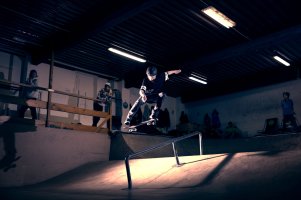
Yeah bringing up shadow in shots like these will bring out a fair bit of noise, I generally live with it no ones going to notice too much. Couple of other things look like they need dealt with at time of shooting tho..
Isn't sharp! mix of motion blur, camera movement and focus being off. Focus looks like its on the background.
Dont shoot flash at full power, if its speedlights use them at 1/4 power and it should freeze most things if you can manual so it won't fluctuate and shoot fairly wide open.

Or going for a higher iso and HSS flash so mix ambient and flash at say 1/2000s to get a more even look but think starker flash is better and darkens down distracting backgrounds.

Personally I tend to do a lot of post in capture one and PS to get a more interesting grade / look to indoor skatepark shots as are generally pretty horrible looking. Black and white tends looks a lot better.

I've made two quick grades to make it look a bit more stylish and compensate for the lack of colour and hard environment.

BTW the wee corner QP looks rad and great fun :)
 

Attachments

  • _N3A8532 copy_2500.jpg
    _N3A8532 copy_2500.jpg
    638.4 KB · Views: 1,095
  • _N3A8532_2500.jpg
    _N3A8532_2500.jpg
    970.7 KB · Views: 1,148
Upvote 0
jrista said:
ETTR is very simple: Expose to the right! That's really it. You honestly don't have to get too technical about it....
ETTR is the strongest noise reduction tool you have. I'm consistently gobsmacked how much detail there is hidden in the highlights of not just my 5D3 which is plain phenomenal, but in almost equal measure in files from my 1D Mk4 and my little travel camera, the truly tiny APS-C SL-1 (aka EOS 100D).

ETTR can be counter intuitive particularly for photographers who learned shooting film, but once this very simple technique is mastered you'll barely even think about it. Until you get the feel of it, keep an eye on histograms and highlight alert.

With carefully exposed files, it's extremely rare to go to the noise reduction slider in LR5 or call in the useful abilities of Nik D-fine. Too many steps in post-pro slow things down to a crawl. ETTR is your friend!

-pw
 
Upvote 0