
I have used the 5DSr for countless wedding and portrait shoots. I have, to my knowledge, never seen an issue with morie. Actually I thought it would never be an issue. Well I finally found a shot that had plenty and man is it ugly. It is strange that it happened in this particular shot and not countless others with more pattern. BTW this is a very tight crop of a much larger image.
You are using an out of date browser. It may not display this or other websites correctly.
You should upgrade or use an alternative browser.
You should upgrade or use an alternative browser.
5DSr morie
- Thread starter jaayres20
- Start date
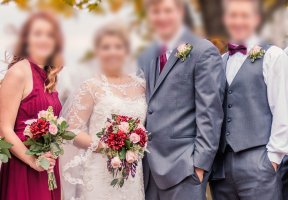

I've had this on tuxedos with the 24-70 f/2.8L II at f/3.2. I stopped down the lens to I think around f/5.6 or f/6.3 and the moire went away. And that was with a camera with an AA filter. This is one reason I went with the 5Ds.
Upvote
0

Hi jaayres.
Wow that looks like a serious case of moire. I was talking to one of the experts at a show after his demo of the 5DSr. We were discussing the moire issue and he was explaining that it is a result of the interference between the frequencies (spacing of the photo sites and the threads in the fabric in this case) and that the best way to clean it from a photo is to take a step forwards or backwards as this will change the relative frequency and therefore reduce or eliminate the moire. Of course first you have to see it and I'd guess it won't show up on the LCD of the camera!
I don't know if this is correct, I think I understand the theory and it sounds feasible to me, but I thought I would throw it out to you guys (it seems some of you might know this field in a professional capacity) and see whether it is correct.
Cheers, Graham.
Wow that looks like a serious case of moire. I was talking to one of the experts at a show after his demo of the 5DSr. We were discussing the moire issue and he was explaining that it is a result of the interference between the frequencies (spacing of the photo sites and the threads in the fabric in this case) and that the best way to clean it from a photo is to take a step forwards or backwards as this will change the relative frequency and therefore reduce or eliminate the moire. Of course first you have to see it and I'd guess it won't show up on the LCD of the camera!
I don't know if this is correct, I think I understand the theory and it sounds feasible to me, but I thought I would throw it out to you guys (it seems some of you might know this field in a professional capacity) and see whether it is correct.
Cheers, Graham.
Upvote
0
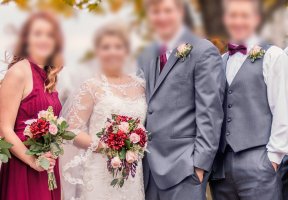
privatebydesign said:Nice example. But the ease with which it is removed confirms my thinking that if I get a 5DS or 5DSR it will be the R.
Just curious, what did you use to remove it? In my final image I plan on delivering to my clients, I used an adjustment brush in Lightroom that removes morie. However that was the very first time I have used the brush, and I don't think it did as good of a job of your example.
This did not hinder my liking for the camera, I absolutely love it, and like I said, this is the very first time out of tens of thousands of wedding photos with suits and tuxedos that I have eve seen it.
Upvote
0

I used a technique in Photoshop where you separate the colour from the pattern, then replace the colours with the right one (or close enough) and then change the pattern with a Hue and Saturation layer.
It sounds complicated but really isn't, and depending on how much the moire impacts the image, and the complexity of the area impacted, it can be done pretty quickly. I have had images where this technique still doesn't get rid of it, but they are few and far between.
The Lightroom/ACR Moire tool is pretty effective on small areas of moire, but it only works on the colour, as it is a comparatively simple colour blur brush, it doesn't touch the underlying pattern moire which in your case was pretty bad.
I'll do a quick video if you are interested.
It sounds complicated but really isn't, and depending on how much the moire impacts the image, and the complexity of the area impacted, it can be done pretty quickly. I have had images where this technique still doesn't get rid of it, but they are few and far between.
The Lightroom/ACR Moire tool is pretty effective on small areas of moire, but it only works on the colour, as it is a comparatively simple colour blur brush, it doesn't touch the underlying pattern moire which in your case was pretty bad.
I'll do a quick video if you are interested.
Upvote
0

A video would be most appreciatedprivatebydesign said:I used a technique in Photoshop where you separate the colour from the pattern, then replace the colours with the right one (or close enough) and then change the pattern with a Hue and Saturation layer.
It sounds complicated but really isn't, and depending on how much the moire impacts the image, and the complexity of the area impacted, it can be done pretty quickly. I have had images where this technique still doesn't get rid of it, but they are few and far between.
The Lightroom/ACR Moire tool is pretty effective on small areas of moire, but it only works on the colour, as it is a comparatively simple colour blur brush, it doesn't touch the underlying pattern moire which in your case was pretty bad.
I'll do a quick video if you are interested.
Upvote
0
+1Eldar said:A video would be most appreciatedprivatebydesign said:I used a technique in Photoshop where you separate the colour from the pattern, then replace the colours with the right one (or close enough) and then change the pattern with a Hue and Saturation layer......
I'll do a quick video if you are interested.
I don't use photoshop, but you're technique did an excellent job on that photo. A video would be very interesting,
Upvote
0

HighLowISO said:+1Eldar said:A video would be most appreciatedprivatebydesign said:I used a technique in Photoshop where you separate the colour from the pattern, then replace the colours with the right one (or close enough) and then change the pattern with a Hue and Saturation layer......
I'll do a quick video if you are interested.
I don't use photoshop, but you're technique did an excellent job on that photo. A video would be very interesting,
+1 I'd really like to see that vid too, that was a great job.
As an aside I'd also be interested to see how Capture One Pro 9 Moire removal tool would deal with that but that would need the original RAW to get the best out of it I think.
Upvote
0

zim said:HighLowISO said:+1Eldar said:A video would be most appreciatedprivatebydesign said:I used a technique in Photoshop where you separate the colour from the pattern, then replace the colours with the right one (or close enough) and then change the pattern with a Hue and Saturation layer......
I'll do a quick video if you are interested.
I don't use photoshop, but you're technique did an excellent job on that photo. A video would be very interesting,
+1 I'd really like to see that vid too, that was a great job.
As an aside I'd also be interested to see how Capture One Pro 9 Moire removal tool would deal with that but that would need the original RAW to get the best out of it I think.
Also need a raw for DXO Optics Pro 10.
Upvote
0
Here is a link to the video I made.
https://www.dropbox.com/s/qanxr42olhuhu56/Moire%20removal.mp4?dl=0
As I say in the video I have refined a technique I saw a while ago on Vimeo, the link for that video is here https://vimeo.com/23508129 though I have found my version to be better the original might solve a problem image mine doesn't. Though once you understand where the false patterns are coming from it isn't difficult to work out smart ways of overcoming it most of the time.
P.S. If anybody has a file with moire that this technique does not fix then post it here, or drop me a PM, and I will tweak the technique to see what can be done.
https://www.dropbox.com/s/qanxr42olhuhu56/Moire%20removal.mp4?dl=0
As I say in the video I have refined a technique I saw a while ago on Vimeo, the link for that video is here https://vimeo.com/23508129 though I have found my version to be better the original might solve a problem image mine doesn't. Though once you understand where the false patterns are coming from it isn't difficult to work out smart ways of overcoming it most of the time.
P.S. If anybody has a file with moire that this technique does not fix then post it here, or drop me a PM, and I will tweak the technique to see what can be done.
Upvote
0
privatebydesign said:Here is a link to the video I made.
https://www.dropbox.com/s/qanxr42olhuhu56/Moire%20removal.mp4?dl=0
As I say in the video I have refined a technique I saw a while ago on Vimeo, the link for that video is here https://vimeo.com/23508129 though I have found my version to be better the original might solve a problem image mine doesn't. Though once you understand where the false patterns are coming from it isn't difficult to work out smart ways of overcoming it most of the time.
P.S. If anybody has a file with moire that this technique does not fix then post it here, or drop me a PM, and I will tweak the technique to see what can be done.
Thanks PBD a very interesting and useful vid. not just for the moire but layer manipulation in general.
I had a go with a trial copy of Capture One Pro 9, I'm a DXO user. The moire tool in C1 simply desaturated which of course isn't enough. In DXO the moire tool is only available for RAW files.
C1 has another method which can be used using the advanced colour editor, I'll post results although they have to be taken with a pinch of salt as I'm really just starting to learn the program.
Edit: I missed a bit at the bottom of his jacket ;D
Attachments

Upvote
0

Thank you for great video.privatebydesign said:Here is a link to the video I made.
https://www.dropbox.com/s/qanxr42olhuhu56/Moire%20removal.mp4?dl=0
As I say in the video I have refined a technique I saw a while ago on Vimeo, the link for that video is here https://vimeo.com/23508129 though I have found my version to be better the original might solve a problem image mine doesn't. Though once you understand where the false patterns are coming from it isn't difficult to work out smart ways of overcoming it most of the time.
P.S. If anybody has a file with moire that this technique does not fix then post it here, or drop me a PM, and I will tweak the technique to see what can be done.
A Happy New Year to you.

Upvote
0
Hi PBD.
Thanks for posting this, although I don't have / use photoshop it is always interesting to see how things can be done.
Happy new year.
Cheers, Graham.
Thanks for posting this, although I don't have / use photoshop it is always interesting to see how things can be done.
Happy new year.
Cheers, Graham.
Upvote
0
kphoto99 said:In this case, the easy fix would be to desaturate the jacket since it is grey already.
Desaturating would do nothing for the luminance pattern, which was the entire point of the video.
zim said:Thanks PBD a very interesting and useful vid. not just for the moire but layer manipulation in general.
I had a go with a trial copy of Capture One Pro 9, I'm a DXO user. The moire tool in C1 simply desaturated which of course isn't enough. In DXO the moire tool is only available for RAW files.
C1 has another method which can be used using the advanced colour editor, I'll post results although they have to be taken with a pinch of salt as I'm really just starting to learn the program.
Edit: I missed a bit at the bottom of his jacket ;D
You are welcome zim. Interesting that C1 takes the most basic route of simple desaturation, at least ACR/LR uses a smart colour blur technique to deal with the colour aspect of the moire.
You are welcome aj.ajfotofilmagem said:Thank you for great video.
A Happy New Year to you.
And a Happy new Year to you too ;D
You are most welcome Graham.Valvebounce said:Hi PBD.
Thanks for posting this, although I don't have / use photoshop it is always interesting to see how things can be done.
Happy new year.
Cheers, Graham.
I don't see why the technique is limited to PS, Affinity Photo and Elements have layers and blending modes so it should work just the same in much cheaper programs.
Happy New Year to you too. ;D
Hopefully Canon will bring me a 1DX MkII and TS-E45 L!
Upvote
0
privatebydesign said:kphoto99 said:In this case, the easy fix would be to desaturate the jacket since it is grey already.
Desaturating would do nothing for the luminance pattern, which was the entire point of the video.
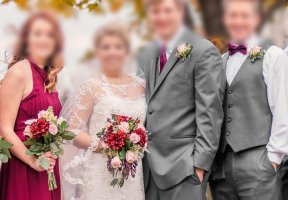
A quick and dirty 2 minutes desaturation:
Attachments
Upvote
0
kphoto99 said:privatebydesign said:kphoto99 said:In this case, the easy fix would be to desaturate the jacket since it is grey already.
Desaturating would do nothing for the luminance pattern, which was the entire point of the video.
A quick and dirty 2 minutes desaturation:

I see what you mean now, trouble is, the suits
Your desaturate is basically what the bottom H/S layer is doing in my version (you can also use a B&W layer for a lot more pattern control), do the colour layer on top and you end up with the same thing.
Upvote
0
Excellent! thanks!privatebydesign said:Here is a link to the video I made.
https://www.dropbox.com/s/qanxr42olhuhu56/Moire%20removal.mp4?dl=0
....
Upvote
0
After listening to Gregory Heisler praise the 5DsR and how he'd never seen evidence of moire from it and watching a video of Peter Hurley trying to get it from an office chair cushion and not being able to, I said screw it and got the R. I figured Nikon and Sony have abandoned the AA filter so it's the future.
Well I have had tons of moire issues and when you are shooting thousands of shots for a agency to sift through it can lead to headaches removing on that many photos. In hind sight wish I had gotten the 5Ds instead.
You really need to shoot tethered and view on a monitor to see it. I shoot with eye-fi cards sending to iPad and the reduced jpegs can conceal it.
Backing up or moving forward isn't really the answer with since fabric is rarely flat and people are always (usually) moving.
Well I have had tons of moire issues and when you are shooting thousands of shots for a agency to sift through it can lead to headaches removing on that many photos. In hind sight wish I had gotten the 5Ds instead.
You really need to shoot tethered and view on a monitor to see it. I shoot with eye-fi cards sending to iPad and the reduced jpegs can conceal it.
Backing up or moving forward isn't really the answer with since fabric is rarely flat and people are always (usually) moving.
Upvote
0
Similar threads
D
- Replies
- 32
- Views
- 5K

- Replies
- 4
- Views
- 3K
