Can I copy camera pics direct to a tablet?

Bennymiata

Canon Rumors Premium
Feb 14, 2012
1,010
303
12,306
Sydney Australia
www.georgebphoto.com.au
I'd like to ask some advice from you learned ladies and gentlemen.

I have a 5D3 and a Samsung Galaxy Tab S.
I can plug in a USB key into the tablet and copy images and videos both ways, but can I plug my camera into my tablet and download the photos from the camera directly (with the correct cables)?
Do I need some software to be able to do it?
 
Just tried downloading .CR2s and .jpgs from 6D to Asus tablet, pretty straightforward and easy.
I can't say regarding video as I've zero interest.
I used DSLR Controller from Google Play, USD $7.99.
Transferring images is just one of many features of DSLR Controller, its primary function is tethered remote control where it fairly well excels.
You'll need a USB Host adapter, also known as USB OTG (on the go) connected to your tab, that will connect to your camera's standard USB cable.
Samsung's Host adapter cable runs around USD $20,00, similar can be found on Amazon for around USD $3.

If you've used Canon's free EOS Remote app for Android, you'll leave that freebie behind once you try DSLR Controller. Never mind, I see EOS Remote is only for 6D and 70D over WiFi.
DSLR Controller can connect over WiFi or USB to most recent Canon DSLRs.
 
Upvote 0
Hi North Star.

Could you kindly tell me if you copied the files from a CF card or an SD card? I've been looking for a solution to the same question & the Apple Camera Kit is only compatible with SD cards. Since I don't use a SD card, the other option - lightening to USB cable supposedly (internet tells me) can't power a card reader to copy content from CF card to iPad. And I want to avoid connecting my camera directly to the iPad ( even though thats possible with the charging turned off) if I can. Is there a way around?

Thanks for you help.
 
Upvote 0
I have the Samsung Galaxy Tab 2, 10.1 & all I do is put the images I want to add to my tablet in a folder & then plug the tablet into my desktop & copy & paste the images I want to the tablet. Been doing this for over 2 years now. Samsung makes the Best tablets without a doubt!
 
Upvote 0
Bennymiata said:
I'd like to ask some advice from you learned ladies and gentlemen.

I have a 5D3 and a Samsung Galaxy Tab S.
I can plug in a USB key into the tablet and copy images and videos both ways, but can I plug my camera into my tablet and download the photos from the camera directly (with the correct cables)?
Do I need some software to be able to do it?

I use a eye-fi card in my 5D MK III. It can download to my computer or tablet or smartphone, but the files start downloading automatically so you have no control over the timing.

No cables or other claptrap. I only download jpeg, but it can do either or both. You might take a look.

http://www.eyefi.com/products/
 
Upvote 0
Ronak1003 said:
Hi North Star.

Could you kindly tell me if you copied the files from a CF card or an SD card? I've been looking for a solution to the same question & the Apple Camera Kit is only compatible with SD cards. Since I don't use a SD card, the other option - lightening to USB cable supposedly (internet tells me) can't power a card reader to copy content from CF card to iPad. And I want to avoid connecting my camera directly to the iPad ( even though thats possible with the charging turned off) if I can. Is there a way around?

Thanks for you help.

ronak...

I'm pretty sure you can copy from either CF or SD... The Apple camera connection kit includes TWO connectors, one is an SD reader/connector and the other is a USB connector. Just buy(you probably already have one) a mini USB to USB cable, plug the mini USB into the camera, and the USB into the connector attached to your iPad...now you're good to go!!

http://store.apple.com/us/product/MC531ZM/A/apple-ipad-camera-connection-kit?fnode=3a

Hope this helps.

north
 
Upvote 0
Northstar said:
Ronak1003 said:
Hi North Star.

Could you kindly tell me if you copied the files from a CF card or an SD card? I've been looking for a solution to the same question & the Apple Camera Kit is only compatible with SD cards. Since I don't use a SD card, the other option - lightening to USB cable supposedly (internet tells me) can't power a card reader to copy content from CF card to iPad. And I want to avoid connecting my camera directly to the iPad ( even though thats possible with the charging turned off) if I can. Is there a way around?

Thanks for you help.

ronak...

I'm pretty sure you can copy from either CF or SD... The Apple camera connection kit includes TWO connectors, one is an SD reader/connector and the other is a USB connector. Just buy(you probably already have one) a mini USB to USB cable, plug the mini USB into the camera, and the USB into the connector attached to your iPad...now you're good to go!!

http://store.apple.com/us/product/MC531ZM/A/apple-ipad-camera-connection-kit?fnode=3a

Hope this helps.

north

Just be aware that this kit is for the old iPad connection. If you need the newer connection, you need to buy two separate cables at $29 each (or pick which one you want to use -- either direct connect to camera or plug in the SD card)

Connect to camera:

http://store.apple.com/us/product/MD821ZM/A/lightning-to-usb-camera-adapter?fnode=3a

Use SD card:

http://store.apple.com/us/product/MD822ZM/A/lightning-to-sd-card-camera-reader?fnode=3a
 
Upvote 0
unfocused said:
Northstar said:
Ronak1003 said:
Hi North Star.

Could you kindly tell me if you copied the files from a CF card or an SD card? I've been looking for a solution to the same question & the Apple Camera Kit is only compatible with SD cards. Since I don't use a SD card, the other option - lightening to USB cable supposedly (internet tells me) can't power a card reader to copy content from CF card to iPad. And I want to avoid connecting my camera directly to the iPad ( even though thats possible with the charging turned off) if I can. Is there a way around?

Thanks for you help.

ronak...

I'm pretty sure you can copy from either CF or SD... The Apple camera connection kit includes TWO connectors, one is an SD reader/connector and the other is a USB connector. Just buy(you probably already have one) a mini USB to USB cable, plug the mini USB into the camera, and the USB into the connector attached to your iPad...now you're good to go!!

http://store.apple.com/us/product/MC531ZM/A/apple-ipad-camera-connection-kit?fnode=3a

Hope this helps.

north

Just be aware that this kit is for the old iPad connection. If you need the newer connection, you need to buy two separate cables at $29 each (or pick which one you want to use -- either direct connect to camera or plug in the SD card)

Connect to camera:

http://store.apple.com/us/product/MD821ZM/A/lightning-to-usb-camera-adapter?fnode=3a

Use SD card:

http://store.apple.com/us/product/MD822ZM/A/lightning-to-sd-card-camera-reader?fnode=3a

I had the old kit for my iPad 1 and recently picked up the SD card reader for my Mini 2 and it is slow as molasses in transferring images. I tried a test set from my EOS-M and it took forever to load the small sample set.

Is that your experience? Is there some sort of caching I can turn off? It seems to want to display a thumbnail of all the images to allow you to select what to transfer and that rendering from the raw CR2 files seems to take forever...
 
Upvote 0
Hi, it can be done because your Samsung Galaxy Tab S supports USB On-The-Go (OTG). Use an USB OTG hub to connect the camera to the tablet.

I use an USB OTG hub & card reader to connect my 5D II with an Asus tablet. That's the hub I use: http://www.inline-info.de/en/inline-detail/artikel/8450/
The camera is connected by its standard micro USB cable to the USB hub and the hub itself is connected to the tablet. To control the camera I use the "DSLR Controller" app, which works well. With this app jpeg and CR2 files can be transfered to the tablet.

With this particular hub you can also copy them directly to an USB flash drive or just read the CF card without connecting the camera. I use this mehod to make back-up copies of my pictures during holidays. The files are transfered directly from the CF card to an USB flash drive. Copying several GB of data can be a bit slow but it works.
 
Upvote 0
Thanks for your responses guys.

What I need it for is so that when I am doing a job for a customer out in the field, I can download the camera shots directly into my tablet, preferably with a wire as wireless is too slow for high res images, then I can select the photos I want to transfer and then copy them onto a USB key or onto their phone, as well as having a copy for myself.

What I really wanted to know is if I put the appropriate cable into my camera and my tablet, will they talk to each other or not, without using other 3rd party software.
 
Upvote 0
Bennymiata said:
Thanks for your responses guys.

What I need it for is so that when I am doing a job for a customer out in the field, I can download the camera shots directly into my tablet, preferably with a wire as wireless is too slow for high res images, then I can select the photos I want to transfer and then copy them onto a USB key or onto their phone, as well as having a copy for myself.

What I really wanted to know is if I put the appropriate cable into my camera and my tablet, will they talk to each other or not, without using other 3rd party software.
Just for this thread, I've been trying various combinations of 6D to ASUS tablet and 6D to Samsung Galaxy S4.

All wired attempts required a USB Host (OTG) adapter cable, mine is a genuine Samsung found in store at Best Buy.

Camera to device only worked using a 3rd party app, doesn't meet your desired spec.

Card reader worked flawlessly, transparently using the built into Samsung 'My Files' app.
Connect the OTG cable, Samsung device shows a 'USB connector connected' notification, that notification then goes away.
Connect card reader, insert card from camera, notification shows 'USB mass storage device connected', the Samsung 'My Files' app opens immediately and by itself showing the contents of the root of the card.
Browse to the files you want to transfer, 'My Files' will show a 'Gallery' thumbnail and the file name, a long press brings up a context menu relative to that file, or checking the box brings up a context menu at the top right of the app.
Check box select multiple files of your choice, use the app's context menu to move or copy, I suggest you choose copy.
Tap 'My Files' at the top left of the app twice to get to the level where you choose 'Device Storage', 'SD Memory Card' or 'UsbDriveA', drill down to wherever you want to go, paste where you like.

Files are now copied from the camera's card to the device.

Don't just yank the card at this point.
Instead, pull down the status bar, see the 'USB Mass storage connected' notification'? 'Select to remove USB mass storage safely'.

Open the Samsung 'Gallery' app, start by creating a new album from within the app, sort and select the photos you want to transfer to your client, copy them to the newly created album from within the 'Gallery' app.

Back to the OTG cable, connect an appropriate card reader or a thumb drive, reverse the browse/copy/paste procedure described above.
---
It took longer to write and probably to read than it takes to do.
--
TLDR:
Connect OTG adapter.
Connect card reader or thumb drive.
Browse/copy/paste files from connected device to device internal or SD Card storage.
Remove connected device safely.
In Gallery, sort and copy to a new album.
Connect another card or thumb drive.
Browse/copy/paste newly created album files from device internal or SD Card storage to connected device.
Safely disconnect.
Hand to client.
Profit.

___________
edit---
If your field work includes tripod work with considered exposure and careful composition, you will be blown away with delight if you do so tethered to your tab through DSLR Controller. DSLR Controller is worth a whole lot more than the USD $8 cost.
While you'll be blown away with delight, your client will be extremely impressed with your mad skillz, wonder why you charge so little.
Seriously.
Tethering, especially to the general public, looks (and is) rather high tech and exotic, very very professional.
---
Next job, quote higher.
Mo' profit.

---edit
__________
edit the 2nd--------

Ok, now I'm on to an anti Canon rant, one of many I have available, I find Canon is just lame beyond description in many ways, still I buy and shoot Canon because among my far fewer Nikon rant topics, Nikon has a couple of absolute deal killers that make Nikon's superiority over Canon in many ways absolutely irrelevant. Nikon wins all the battles but quits just in time for Canon to win the war and my $$.
---
Anyway, plug a Nikon, Olympus, probably Sony into a USB socket on a PC, there's your device as an external drive, no drivers or software needed.
I just plugged one of my old Nikons directly into my Sammy G4 via USB OTG, same thing, root of the Nikon's SD Card just popped up on my home screen in My Files ready for browse/copy/paste.

In contrast, plug a Canon into a PC, the OS screams back I ain't gots no drivers for dis ting, whatcha 'spec me to do now boss, huh?
So you run the software disc that came with the camera, now you can use Zoom Browser or whatever to copy from your directly connected Canon. No way possible to write anything back to the camera installed card, none.
Considering this 'feature' of Canons, there's no reasonable reason to expect a phone to access a Canon directly without 3rd party software.

Many Canon shooters prefer using a card reader for these very reasons. The card shows as a removable drive no matter what device the reader is connected to, simply use Windows Explorer, Finder, My Files, Nautilus, whatever file browser your OS uses by default, drag/drop/copy/paste all work normally.

So, if you care not for tethering but only want to transfer files around, Canons, when directly connected, suck to the point of fail at the task, use a card reader.

Nikons etc. are so transparent as removable drives, any type file can be transferred directly from PC to cabled camera whether the camera can do anything with the files or not. Nikon with a USB cable can serve exactly like a thumb drive and/or a card reader.
Canons just cannot do this.

Sorry Nikon, you excel at this topic. But you are the only camera maker with flocked, dust generating and collecting mirror boxes, that's one deal killer.

--- edit the 2nd


.

 
Upvote 0
tolusina said:
Ok, now I'm on to an anti Canon rant, one of many I have available, I find Canon is just lame beyond description in many ways, still I buy and shoot Canon because among my far fewer Nikon rant topics, Nikon has a couple of absolute deal killers that make Nikon's superiority over Canon in many ways absolutely irrelevant. Nikon wins all the battles but quits just in time for Canon to win the war and my $$.
---
Anyway, plug a Nikon, Olympus, probably Sony into a USB socket on a PC, there's your device as an external drive, no drivers or software needed.
I just plugged one of my old Nikons directly into my Sammy G4 via USB OTG, same thing, root of the Nikon's SD Card just popped up on my home screen in My Files ready for browse/copy/paste.

In contrast, plug a Canon into a PC, the OS screams back I ain't gots no drivers for dis ting, whatcha 'spec me to do now boss, huh?
So you run the software disc that came with the camera, now you can use Zoom Browser or whatever to copy from your directly connected Canon. No way possible to write anything back to the camera installed card, none.
Considering this 'feature' of Canons, there's no reasonable reason to expect a phone to access a Canon directly without 3rd party software.

Many Canon shooters prefer using a card reader for these very reasons. The card shows as a removable drive no matter what device the reader is connected to, simply use Windows Explorer, Finder, My Files, Nautilus, whatever file browser your OS uses by default, drag/drop/copy/paste all work normally.

So, if you care not for tethering but only want to transfer files around, Canons, when directly connected, suck to the point of fail at the task, use a card reader.

Nikons etc. are so transparent as removable drives, any type file can be transferred directly from PC to cabled camera whether the camera can do anything with the files or not. Nikon with a USB cable can serve exactly like a thumb drive and/or a card reader.
Canons just cannot do this.

Sorry Nikon, you excel at this topic. But you are the only camera maker with flocked, dust generating and collecting mirror boxes, that's one deal killer.


Appologies if I'm not picking you up correctly here but when I plug my 7D into my PC (USB cable) it just appears in Explorer and I can copy files, no software installed. The only annoyance is that it's USB2.

Regards
 
Upvote 0
zim said:
.....
Appologies if I'm not picking you up correctly here but when I plug my 7D into my PC (USB cable) it just appears in Explorer and I can copy files, no software installed. The only annoyance is that it's USB2.

Regards

Really? Nothing installed from the EOS Solutions disc? No Lightroom, Photoshop or any other cataloging type software?
I briefly had a Rebel years back, did not show in explorer without software, same with my current 6D.

I'm intrigued to learn that the 7D shows as a removable drive. Can you copy other, non-image files to the camera, use the camera like a very expensive thumb drive?
Canon, what's up with that? Some models do, others don't??
 
Upvote 0
tolusina said:
zim said:
.....
Appologies if I'm not picking you up correctly here but when I plug my 7D into my PC (USB cable) it just appears in Explorer and I can copy files, no software installed. The only annoyance is that it's USB2.

Regards

Really? Nothing installed from the EOS Solutions disc? No Lightroom, Photoshop or any other cataloging type software?
I briefly had a Rebel years back, did not show in explorer without software, same with my current 6D.

I'm intrigued to learn that the 7D shows as a removable drive. Can you copy other, non-image files to the camera, use the camera like a very expensive thumb drive?
Canon, what's up with that? Some models do, others don't??

Not as a removable drive, as a folder, at work, can't remember the exact bit of the tree it's under. Will have a look tonight and post back better details. Windows 8.1 may have something to do with it.

Regards
 
Upvote 0
tolusina said:
Bennymiata said:
Thanks for your responses guys.

What I need it for is so that when I am doing a job for a customer out in the field, I can download the camera shots directly into my tablet, preferably with a wire as wireless is too slow for high res images, then I can select the photos I want to transfer and then copy them onto a USB key or onto their phone, as well as having a copy for myself.

What I really wanted to know is if I put the appropriate cable into my camera and my tablet, will they talk to each other or not, without using other 3rd party software.
Just for this thread, I've been trying various combinations of 6D to ASUS tablet and 6D to Samsung Galaxy S4.

All wired attempts required a USB Host (OTG) adapter cable, mine is a genuine Samsung found in store at Best Buy.

Camera to device only worked using a 3rd party app, doesn't meet your desired spec.

Card reader worked flawlessly, transparently using the built into Samsung 'My Files' app.
Connect the OTG cable, Samsung device shows a 'USB connector connected' notification, that notification then goes away.
Connect card reader, insert card from camera, notification shows 'USB mass storage device connected', the Samsung 'My Files' app opens immediately and by itself showing the contents of the root of the card.
Browse to the files you want to transfer, 'My Files' will show a 'Gallery' thumbnail and the file name, a long press brings up a context menu relative to that file, or checking the box brings up a context menu at the top right of the app.
Check box select multiple files of your choice, use the app's context menu to move or copy, I suggest you choose copy.
Tap 'My Files' at the top left of the app twice to get to the level where you choose 'Device Storage', 'SD Memory Card' or 'UsbDriveA', drill down to wherever you want to go, paste where you like.

Files are now copied from the camera's card to the device.

Don't just yank the card at this point.
Instead, pull down the status bar, see the 'USB Mass storage connected' notification'? 'Select to remove USB mass storage safely'.

Open the Samsung 'Gallery' app, start by creating a new album from within the app, sort and select the photos you want to transfer to your client, copy them to the newly created album from within the 'Gallery' app.

Back to the OTG cable, connect an appropriate card reader or a thumb drive, reverse the browse/copy/paste procedure described above.
---
It took longer to write and probably to read than it takes to do.
--
TLDR:
Connect OTG adapter.
Connect card reader or thumb drive.
Browse/copy/paste files from connected device to device internal or SD Card storage.
Remove connected device safely.
In Gallery, sort and copy to a new album.
Connect another card or thumb drive.
Browse/copy/paste newly created album files from device internal or SD Card storage to connected device.
Safely disconnect.
Hand to client.
Profit.

___________
edit---
If your field work includes tripod work with considered exposure and careful composition, you will be blown away with delight if you do so tethered to your tab through DSLR Controller. DSLR Controller is worth a whole lot more than the USD $8 cost.
While you'll be blown away with delight, your client will be extremely impressed with your mad skillz, wonder why you charge so little.
Seriously.
Tethering, especially to the general public, looks (and is) rather high tech and exotic, very very professional.
---
Next job, quote higher.
Mo' profit.

---edit
__________
edit the 2nd--------

Ok, now I'm on to an anti Canon rant, one of many I have available, I find Canon is just lame beyond description in many ways, still I buy and shoot Canon because among my far fewer Nikon rant topics, Nikon has a couple of absolute deal killers that make Nikon's superiority over Canon in many ways absolutely irrelevant. Nikon wins all the battles but quits just in time for Canon to win the war and my $$.
---
Anyway, plug a Nikon, Olympus, probably Sony into a USB socket on a PC, there's your device as an external drive, no drivers or software needed.
I just plugged one of my old Nikons directly into my Sammy G4 via USB OTG, same thing, root of the Nikon's SD Card just popped up on my home screen in My Files ready for browse/copy/paste.

In contrast, plug a Canon into a PC, the OS screams back I ain't gots no drivers for dis ting, whatcha 'spec me to do now boss, huh?
So you run the software disc that came with the camera, now you can use Zoom Browser or whatever to copy from your directly connected Canon. No way possible to write anything back to the camera installed card, none.
Considering this 'feature' of Canons, there's no reasonable reason to expect a phone to access a Canon directly without 3rd party software.

Many Canon shooters prefer using a card reader for these very reasons. The card shows as a removable drive no matter what device the reader is connected to, simply use Windows Explorer, Finder, My Files, Nautilus, whatever file browser your OS uses by default, drag/drop/copy/paste all work normally.

So, if you care not for tethering but only want to transfer files around, Canons, when directly connected, suck to the point of fail at the task, use a card reader.

Nikons etc. are so transparent as removable drives, any type file can be transferred directly from PC to cabled camera whether the camera can do anything with the files or not. Nikon with a USB cable can serve exactly like a thumb drive and/or a card reader.
Canons just cannot do this.

Sorry Nikon, you excel at this topic. But you are the only camera maker with flocked, dust generating and collecting mirror boxes, that's one deal killer.

--- edit the 2nd


.

I've never had to install any driver to access my Canon camera via USB on a Windows system nor do drivers exist for any of the several Canon cameras I've owned.
 
Upvote 0
zim said:
tolusina said:
zim said:
.....
Appologies if I'm not picking you up correctly here but when I plug my 7D into my PC (USB cable) it just appears in Explorer and I can copy files, no software installed. The only annoyance is that it's USB2.

Regards

Really? Nothing installed from the EOS Solutions disc? No Lightroom, Photoshop or any other cataloging type software?
I briefly had a Rebel years back, did not show in explorer without software, same with my current 6D.

I'm intrigued to learn that the 7D shows as a removable drive. Can you copy other, non-image files to the camera, use the camera like a very expensive thumb drive?
Canon, what's up with that? Some models do, others don't??

Not as a removable drive, as a folder, at work, can't remember the exact bit of the tree it's under. Will have a look tonight and post back better details. Windows 8.1 may have something to do with it.

Regards


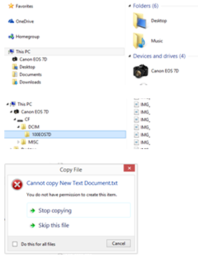
Hi tolusina,

Camera Firmware – 2.0.3
PC OS – 8.1
Cable into Camera
Switch Camera on
Cable into PC

No option to Eject

As you can see not able to copy to the card though, first time I've tried that.

Regards
 

Attachments

  • device.png
    device.png
    75 KB · Views: 331
Upvote 0
I need to read a couple of the long posts (thank you to those others for contributing solutions), but a speed read tells me the following little device is not mentioned.

I had the same desire as Bennymista: send a confirmation image to a client from my phone so he/she would give me clearance and I'd be covered for any later arguments. I found a small item in Amazon by marketer "ikross" with a micro USB on the back end and a choice of USB or SDHC card on the "front". (Also offers microUSB, MS Pro, and "M2" slots.) I realize that the SDHC" designation might be a problem... The solid device adds an inch to the length of the phone while in use. I like having a little "block" device rather than a dongle format.

I did install DSLR Controller on my phone, too, for this purpose.

This is about $12-13 before shipping.
http://www.amazon.com/iKross-Micro-USB-Memory-Adapter-Samsung/dp/B00DRU2IGY/ref=sr_1_6?s=wireless&ie=UTF8&qid=1414011835&sr=1-6&keywords=ikross+OTG

or search "ikross OTG" and a page with a couple of deals will appear.

I usually feed RAW files to both CF and SD cards in my bodies but I guess it'd be necessary to change that to put JPEGs on the SD card to set up the approval cycle.
 
Upvote 0