
J
You are using an out of date browser. It may not display this or other websites correctly.
You should upgrade or use an alternative browser.
You should upgrade or use an alternative browser.
- Status
- Not open for further replies.
Nice conclusion to your post. Glad to see such positive news about the video capabilities, instead of all the "this looks soft" posts.
I don't have permission to view your attachment. I assume it's a video clip?
I don't have permission to view your attachment. I assume it's a video clip?
Upvote
0
J
jcs
Guest
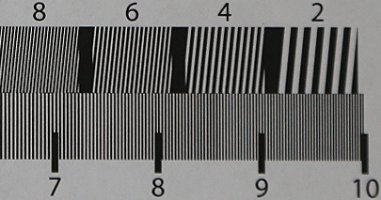
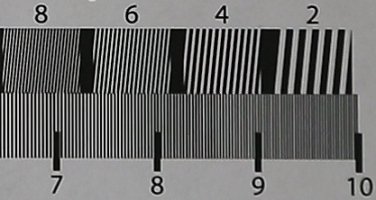
It looks like Canon is doing an Unsharp Mask sharpen for video, thus the halos. I'll turning off in-camera sharpen and test again. Note that the still was sharpened the same as the video (and no halos in the still).
For those who want to try this at home: http://www.bealecorner.org/red/test-patterns/ . Comparing a still to a video frame is easier than setting up a proper (and correct) resolution test, especially when your printer can't really print the entire chart at full resolution (pre-made charts are $150+). My Xerox Phaser 6180DN was able to do a good job up to the 4:3 marks on one sheet (could print out 3 sheets in sections). The still frame compare was good enough for my curiosity.
For those with 5D3's: try turning off in-camera sharpen and sharpening with a convolution style sharpen in post. Looks excellent running in real-time in PPro (using the GPU sharpen filter around 33-48).
For those who want to try this at home: http://www.bealecorner.org/red/test-patterns/ . Comparing a still to a video frame is easier than setting up a proper (and correct) resolution test, especially when your printer can't really print the entire chart at full resolution (pre-made charts are $150+). My Xerox Phaser 6180DN was able to do a good job up to the 4:3 marks on one sheet (could print out 3 sheets in sections). The still frame compare was good enough for my curiosity.
For those with 5D3's: try turning off in-camera sharpen and sharpening with a convolution style sharpen in post. Looks excellent running in real-time in PPro (using the GPU sharpen filter around 33-48).
Upvote
0
Any other thoughts about the camera, now that you've had it for a whole day? I read a review on one of the video sites, and that guy didn't like it much at all.
I'm getting mine primarily for stills, but it'd be nice to know that it's a potent video camera, too. I know I'd like to have had it at an event I shot about six weeks ago. Lots of girls with fishnets, and the moiré came out to play.
I'm getting mine primarily for stills, but it'd be nice to know that it's a potent video camera, too. I know I'd like to have had it at an event I shot about six weeks ago. Lots of girls with fishnets, and the moiré came out to play.
Upvote
0
J
jcs
Guest
Just tested indoors with the 70-200 2.8 II- looks great. Used "P" setting, "Faithful" profile, and sharpened to 33 in PPro (renamed file .MPG to play in realtime). 100% pixel peeping looks pretty good. Looks excellent playing back full screen. Will test on a real shoot soon (will also test other lenses).
Best results so far:
1. "Faithful" profile (0 everything)
2. IPB mode
3. Rename file .MPG for real-time playback in PPro CS5.5
4. Sharpen as needed, 33 seems to be a good starting point
Best results so far:
1. "Faithful" profile (0 everything)
2. IPB mode
3. Rename file .MPG for real-time playback in PPro CS5.5
4. Sharpen as needed, 33 seems to be a good starting point
Attachments
Upvote
0
jcs are you finding IPB is better than ALL-I for tripod shots of nonmoving subjects? I was thinking this would be the case.
And is faithful better than neutral for you? When you say 0 everything, does that mean sliders fully to the left or dead center?
And is faithful better than neutral for you? When you say 0 everything, does that mean sliders fully to the left or dead center?
Upvote
0
J
jcs
Guest
peederj- haven't done a real shoot with people yet, however there is a technical issue with I-frame- perhaps not being deblocked correctly (camera encoder or NLE decoder issue). IPB looks great and uses less memory; not missing I-frame at this point. Haven't tried Neutral yet- should work too. All 0 is the setting for parms. Some params go negative.
psolberg- sounds like the 5D3 is doing better for Andrew after turning off camera sharpening and sharpening in post: http://www.eoshd.com/comments/index.php/topic,449.0.html#d2
psolberg- sounds like the 5D3 is doing better for Andrew after turning off camera sharpening and sharpening in post: http://www.eoshd.com/comments/index.php/topic,449.0.html#d2
Upvote
0
Some people have claimed Neutral is a completely different processing than the other modes, so i would prioritize that. Many people have been shooting exclusively neutral (myself included) since Vince Laforet originally recommended it and explained why years ago.
Upvote
0
peederj said:jcs are you finding IPB is better than ALL-I for tripod shots of nonmoving subjects? I was thinking this would be the case.
And is faithful better than neutral for you? When you say 0 everything, does that mean sliders fully to the left or dead center?
ALL-I is going to be better than IPB for everything. As for picture style, 0 is to the far left for sharpness and dead center for contrast, sat, and color tone. Sharpness needs to be cut down all the way no matter what, and if anything cut down the contrast a bit. With the Cinestyle profile they suggested 0 for sharpness, -4 for contrast and -2 for saturation.
Upvote
0
J
jcs
Guest
In PPro CS5.5, I-only is only good for real-time playback without renaming the file from MOV to MPG (to get around a PPro bug).
I have analyzed the footage: it has more artifacts than IBP (which is more efficient- than I-only). The artifacts look like a deblocking issue (horizontal and vertical lines). Andrew Reid at EOSHD reported this issue as "mosquito noise", which is consistent with a deblocking issue (my guess, could be something else).
I have analyzed the footage: it has more artifacts than IBP (which is more efficient- than I-only). The artifacts look like a deblocking issue (horizontal and vertical lines). Andrew Reid at EOSHD reported this issue as "mosquito noise", which is consistent with a deblocking issue (my guess, could be something else).
Upvote
0
jcs said:In PPro CS5.5, I-only is only good for real-time playback without renaming the file from MOV to MPG (to get around a PPro bug).
I have analyzed the footage: it has more artifacts than IBP (which is more efficient- than I-only). The artifacts look like a deblocking issue (horizontal and vertical lines). Andrew Reid at EOSHD reported this issue as "mosquito noise", which is consistent with a deblocking issue (my guess, could be something else).
In your initial comments, you posited that this could be a playback issue, rather than an encoding issue. Do you still think this is a possibility?
Upvote
0
jcs said:peederj- haven't done a real shoot with people yet, however there is a technical issue with I-frame- perhaps not being deblocked correctly (camera encoder or NLE decoder issue). IPB looks great and uses less memory; not missing I-frame at this point. Haven't tried Neutral yet- should work too. All 0 is the setting for parms. Some params go negative.
psolberg- sounds like the 5D3 is doing better for Andrew after turning off camera sharpening and sharpening in post: http://www.eoshd.com/comments/index.php/topic,449.0.html#d2
Off course you can sharpen in post. But the detail won't fully return. It simply improves what you got...which is not the same as capturing more detail to start with and introduces artifacts. Just as with stills, you can't sharpen your way to what is not there.
Upvote
0
J
jcs
Guest
Stephen- hard to say until we hear from Canon and Adobe.
psolberg- check out the bear picture and Andrew's comments here: http://www.eoshd.com/content/7608/cinestyle-on-the-5d-mark-iii-and-fixing-softness-in-post#d2
He too was surprised, but it works. A clean, anti-aliased image can be sharpened quite a bit by removing the anti-aliasing with a convolution sharpen filter. The trick is to remove enough to increase sharpness while not introducing excessive aliasing.
psolberg- check out the bear picture and Andrew's comments here: http://www.eoshd.com/content/7608/cinestyle-on-the-5d-mark-iii-and-fixing-softness-in-post#d2
He too was surprised, but it works. A clean, anti-aliased image can be sharpened quite a bit by removing the anti-aliasing with a convolution sharpen filter. The trick is to remove enough to increase sharpness while not introducing excessive aliasing.
Upvote
0
jcs now I have the 5D3 and doing tests I can confirm you probably want to be using the following picture style (unless you are using a 3rd party one like CineStyle):
EDITED: This was the old Vince Laforet suggested setting, Neutral 0, -4, -2, 0, but now I've decided it's no longer best. Instead, I'm now suggesting another setting in my updated post below.
Reading Andrew's site, he's got factual errors in many of the articles I read. For instance, in his camera comparison as posted now, he dismisses the C300 has having only 4:2:0 color when in fact it has 4:2:2 as can be easily verified on Canon's site. Lazy for someone of that influence...this is why proper journals hire fact checkers.
EDITED: This was the old Vince Laforet suggested setting, Neutral 0, -4, -2, 0, but now I've decided it's no longer best. Instead, I'm now suggesting another setting in my updated post below.
Reading Andrew's site, he's got factual errors in many of the articles I read. For instance, in his camera comparison as posted now, he dismisses the C300 has having only 4:2:0 color when in fact it has 4:2:2 as can be easily verified on Canon's site. Lazy for someone of that influence...this is why proper journals hire fact checkers.
Upvote
0
J
jcs
Guest
Thanks for the tip peederj, I can experiment with Neutral. I have CineStyle and a bunch of other profiles; I can also create some from scratch. Here's a real-time LUT (instead of LUT Budy) for PPro and CineStyle: http://brightland.com/w/. I only use it for reference: instead creating curves from scratch based on content.
Andrew at EOSHD verified that the 5D3 can in fact be sharpened in post to closely match the GH2- the images should be helpful to others concerned about the ultimate image quality of the 5D3.
The Brick Wall Test and Bugatti Veyron footage I just shot might also be helpful to those wanting to understand the quality and actual resolution of the 5D3.
Andrew at EOSHD verified that the 5D3 can in fact be sharpened in post to closely match the GH2- the images should be helpful to others concerned about the ultimate image quality of the 5D3.
The Brick Wall Test and Bugatti Veyron footage I just shot might also be helpful to those wanting to understand the quality and actual resolution of the 5D3.
Upvote
0
- Status
- Not open for further replies.
Similar threads

- Replies
- 9
- Views
- 665
- Replies
- 2
- Views
- 460

- Replies
- 155
- Views
- 21K

- Replies
- 239
- Views
- 28K


- Replies
- 193
- Views
- 21K
