Canon 7Dii vs Nikon D750 Dynamic Range Test

MichaelTheMaven said:
My last post directed at Domino Dude. Not you Jrista. 8)


Right, but...he was correct. ;P And I was also responding to what you were saying about needing 14.5 stops. You don't, your current wedge has plenty of space to handle what were saying you should try doing to make proper use of the wedge and get accurate dynamic range readings.


Oh, another thing. The 14.5 stops...I haven't checked, but I assume that is what DXO is reporting as the D750's dynamic range? That is incorrect. That is the NORMALIZED dynamic range. The "Print DR" as they call it. You should be referencing their Screen DR numbers instead, since your images are 100% full size. You are not downsampling them (and neither have I been in my analyses in PI), so Screen DR is the only number reported by DXO that is going to accurately represent the "hardware DR", or the DR of a non-scaled RAW image. I am trying to check DXO now, but their site is mind-bogglingly slow, and isn't loading the page. I assume that the Screen DR is less than 14.0...as mathematically it is impossible to have more than 14 stops of DR with 14-bit data. I suspect it is somewhere between 13.5 and 13.8 stops Screen DR, in which case, your wedge has just about enough space to accurately measure the dynamic range of the D750.
 
Upvote 0
Then we are going to have to respectfully disagree. If the precision your require is as outline, you cannot measure anything over 13.3 DR with a just a 13.3Ev strip. I would be happy to buy you an ND strip if you believe you can work it out.

I can see you are putting a lot of analysis into this and I really appreciate it. We agree on many points about the utilization of the wedge, but I actually think there are several ways to use it (not just one) and possibly even better tests that will come from it. Right now I am leaning towards putting a 4 stop ND filter infront of it, which technically then could get us a strip in the 17 Stop range.

Additionally, what you are suggesting to overexpose the first step and only that first step on all cameras, as well as all channels is going to be just about impossible, and would make the test less quick and easy and more of a headache.

My mind still isn't reconciled that what I am doing is incorrect for comparison between two cameras shooting on the same settings, so we might disagree there too and that is ok.

I think the results are easily visible and speak for themselves and I am still open to any feedback you or others have and definitely do not want my gratitude to be misinterpreted.
 
Upvote 0
I checked Sensorgen.info on the D750. According to those numbers, the maximum DR is 13.9...so slightly over capacity for the T4110, but close enough that I think it's workable.


I also calculated the gain for ISO 100. Assuming 2^14 - 600 is the maximum numeric value, that means the gain is 81608/15784 e-/DN, or 5.17e-/DN. The read noise at ISO 100 is 5.5e-, so 5.5/5.17 = 1.064 DN. In terms of minimum read noise in a D750 NEF, the STDev can, theoretically, get as low as 1.064. I don't know what temperature DXO tests at, however temperature does play a role, as dark current noise doubles every ~5.8°C, and with read noise levels this low, even with CDS, a change in temperature can change that 1.064 to 1.1 or 1.2 or more pretty easily.


Without accounting for temperature and dark current, the dynamic range that we are likely to measure in tests with a Stouffer wedge could very, very easily drop below the 13.9 stops as measured by DXO. So I still think that the 13.7 stops available in the wedge is good enough to measure the DR of the D750.
 
Upvote 0
MichaelTheMaven said:
Then we are going to have to respectfully disagree. If the precision your require is as outline, you cannot measure anything over 13.3 DR with a just a 13.3Ev strip. I would be happy to buy you an ND strip if you believe you can work it out.


Is the wedge 13.3 or 13.7 stops? You've stated both...just want to be sure I am on the same page as you...


If the wedge only has 13.3 stops, then yes, that is insufficient to measure the DR of the D750, even accounting for a potential loss in DR due to temperature.


MichaelTheMaven said:
I can see you are putting a lot of analysis into this and I really appreciate it. We agree on many points about the utilization of the wedge, but I actually think there are several ways to use it (not just one) and possibly even better tests that will come from it. Right now I am leaning towards putting a 4 stop ND filter infront of it, which technically then could get us a strip in the 17 Stop range.


Hmm, I'm confused. If you put a 4-stop ND in front of the wedge...that will darken all the swatches, no? All that does is shift the luminance output down, meaning your exposures would have to be even longer to properly saturate the exposure. But, that doesn't change the fact that each wedge is 1/3rd of a stop different. ND or no ND, the wedge represents the dynamic range it represents.


Unless you are talking about putting an ND filter in front of only part of the wedge...say steps 41 through 21 or something like that. Then, I agree...that would increase the dynamic range, at the cost of having a large sudden drop in exposure half way through the wedge. I guess that could work...


MichaelTheMaven said:
Additionally, what you are suggesting to overexpose the first step and only that first step on all cameras, as well as all channels is going to be just about impossible, and would make the test less quick and easy and more of a headache.


My mind still isn't reconciled that what I am doing is incorrect for comparison between two cameras shooting on the same settings, so we might disagree there too and that is ok.


I agree, it would make testing more tedious.


I do strongly assert, however, that doing so is the only way to generate a viable comparison. It's the only way to guarantee that all cameras expose optimally. As PixInsights statistics clearly demonstrate, the 5D III image is slightly underexposed relative to the D750 image. That is putting it at a disadvantage. I do not believe that increasing the exposure by a third of a stop (which is probably too much anyway to achieve parity with your existing D750 image) is really going to change things that much...instead of wedge 35 being the last useful wedge, wedge 36 would be the last useful wedge. Not a huge change, and in the grand scheme of things, even with your current images, pretty much all of the wedges in the range from 30-41 are riddled with color noise and banding, and are unlikely to be useful anyway without heavy NR, and after heavy NR, your going to suffer a significant loss in detail, so...how useful are they then? (And that, in a nutshell, is the cost of Canon's read noise.)


You could shortcut the process a bit. I think you underexposed by 2/3rds to 1 full stop. I would just redo the test, and increase the exposure by 2/3rds of a stop, then 1 stop, and see if either of those result in the correct output. I'm betting one of them does, so it shouldn't be all that tedious to get some better exposures on the wedges (i.e. you shouldn't have to painstakingly test each and every third stop difference to find the right one...I think the math can tell you exactly how to correct.)

 
Upvote 0
MichaelTheMaven said:
Right, but it isn't 13.7, it is 13.3 (if we are overexposing the first step) and we actually agree that more real estate is needed.

I would love to test the A7s on S-log, well past the 13 Ev mark.


Well, the first step should only be clipped. To put it another way, the first step should be fully saturated. I don't believe that means your losing the first step. It just means your exposing it properly for the test case. In which case, you still have the full 13.7 stops the wedge offers.


Anyway, it's up to you whether you want to retake the images or not. I think it would be useful, as right now, because of the exposure discrepancy between the 5D III, D750, and 7D II, we can't really compare the data and assume the results are accurate.
 
Upvote 0
when this was first posted i was a bit confused because that step wedge didn't look at all like what i am used to seeing. Honestly i wanted to grab a remote and work with the white/black levels. I believe Jrista is pointing you in the correct direction. I'm ISF cert and with i used to calibrate monitors the step wedge was an important pattern, esp with digital gear. Its amazing what happens to a step pattern when you start cranking on the white/black levels with digital equipment. Not so much with analog gear, but i suppose i may as well forget anything i might know about CRT projectors... ah well.
 
Upvote 0
Ill definitely re-do it in the future, I just won't be able to do it right away. It has been a helpful discussion and scrutiny is what makes these tests better. You guys are really the only ones who are trying to help me with this, so I do appreciate it and I am listening.

I should have expressed it more along the lines of "how can you accurately measure up to 14-15 stops of DR with a 13.7 Dr test strip", and while I have repeatedly agreed with everyone that it would be idea to overexpose that first step, with a larger DR strip, they do not exist. We can't seem to get past that point.

In any event, I think I we might be on the same page with the ND filter over part of the existing strip. That way we can get the first part dialed in, and still have enough headroom on the dark end to measure into the 14-15Ev range.
 
Upvote 0
wooow wooow... jrista.
I read this thread today, very interesting, thank you people ...
BUT.... a strip with more dynamic range ... is this possible ?
Please explain .....
Does't the strip .. exhibit "A" already go from white 255 to black 0
How can you get a whiter white or blacker black ?
I have a lot to do with artwork and pay a lot for pantone colour books .. apparently they are printed on the worlds most expensive printer .. a 27 colour printer ... just a side note there.
Anyway I was interested to hear how you can get more DR .... does it have more increments from white to black ?
 
Upvote 0
It's not a matter of white, it's a matter of bright. Dynamic range has to do with signal power over noise floor. It is possible to have a wedge that transmits less in the darkest swatch and transmits more in the brightest swatch. That would then increase the ratio of brightest over darkest. So yes, it is possible. However, I don't think it is easy, hence the reason the wedges that have more dynamic range are more expensive.
 
Upvote 0
MichaelTheMaven said:
Ill definitely re-do it in the future, I just won't be able to do it right away. It has been a helpful discussion and scrutiny is what makes these tests better. You guys are really the only ones who are trying to help me with this, so I do appreciate it and I am listening.

+1 for your efforts, this is very interesting and beyond standard quick reviews around the net. From doing some test shots and calibration for Magic Lantern I know you only realize how complicated getting valid results really is after the first (few) attempt(s) :-\

Btw Nikon ergonomy still suc*s :-p
 
Upvote 0
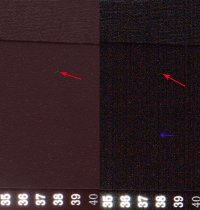
Here a image taken from the raw data, at the right the canon 5 dmk3 and left the Nikon 750, stretch with ImagesPlus astronomical software, zero noise reduction. crop and arrows with photoshop.
Red arrows: these are white specks on the card! not noise!
Blue arrow: banding in the Canon image.
Overall: in the Nikon image you see a red hue, but way less noise.
So what you think? especial the red hue, is the card realy red or black?
Garret van der Veen
 

Attachments

  • canon-5-dmk3-nikon-750-cs5-final-small-met-pijlen500k.jpg
    canon-5-dmk3-nikon-750-cs5-final-small-met-pijlen500k.jpg
    469.5 KB · Views: 209
Upvote 0
garret said:
So what you think? especial the red hue, is the card realy red or black?

Did the Nikon raw processing have correct white balance? If not, there is always the option of shooting a color+wb card to calibrate - but you cannot wiz away banding that easily.

Note: Let's not forget we're we're comparing sensors that are 2.5 years apart, for the banding the newer 6d would have been a much better choice.
 
Upvote 0
Marsu42 said:
garret said:
So what you think? especial the red hue, is the card realy red or black?

Did the Nikon raw processing have correct white balance? If not, there is always the option of shooting a color+wb card to calibrate - but you cannot wiz away banding that easily.

Note: Let's not forget we're we're comparing sensors that are 2.5 years apart, for the banding the newer 6d would have been a much better choice.

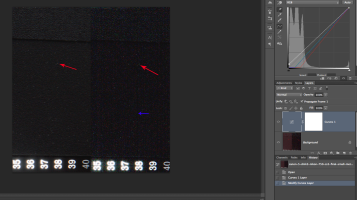
Marsu, that is what happens in the blacks when you lift the shadows like that on Nikon files. Having said that it is easy to remove, just do a curves adjustment layer and set the black point, this will give you the option to make different curves on the R, G and B channels to allow for the shadow hues, if you were working an important file you could use a luminosity mask on the curves to only alter specific dark tones very accurately.

Of course if you are going to those lengths then finagling the Canon file noise/detail equation is just as easy.
 

Attachments

  • Screen Shot 2014-11-15 at 12.18.07 PM.png
    Screen Shot 2014-11-15 at 12.18.07 PM.png
    1.1 MB · Views: 216
Upvote 0
Marsu42 said:
privatebydesign said:
Marsu, that is what happens in the blacks when you lift the shadows like that on Nikon files.

Interesting, I never shot Nikon. Why does the red tint creep in when raising shadows? And why don't they get rid of this effect - is it a basic difference between cr2 and nef files, or the sensors, or... ?

I don't know, but the colour fidelity and tonality degradation is dramatic. Whilst there is no doubt that the Exmor files can be lifted much more than Canon files it certainly isn't a free lunch and the actual quality of the information down in those dark shadows is limited. I have said many times, and I have printed a lot of Nikon files, when the lifted areas take up more than a small area of the image the file ends up looking very flat, the tonality just isn't there and that is because of the gamma curves that are already applied to the RAW information, to then apply another gamma shaped curve on top of that stretches the few tones to nothing.
 
Upvote 0
Marsu42 said:
privatebydesign said:
Marsu, that is what happens in the blacks when you lift the shadows like that on Nikon files.

Interesting, I never shot Nikon. Why does the red tint creep in when raising shadows? And why don't they get rid of this effect - is it a basic difference between cr2 and nef files, or the sensors, or... ?


It just looks like a difference in white balance to me. The red shift in the Nikon file appears throughout the level scale...it affects the brighter tones as much as it affects the darker tones.
 
Upvote 0
garret said:
Here a image taken from the raw data, at the right the canon 5 dmk3 and left the Nikon 750, stretch with ImagesPlus astronomical software, zero noise reduction. crop and arrows with photoshop.
Red arrows: these are white specks on the card! not noise!
Blue arrow: banding in the Canon image.
Overall: in the Nikon image you see a red hue, but way less noise.
So what you think? especial the red hue, is the card realy red or black?
Garret van der Veen


I am pretty sure the red hue is just due to white balance. I do not believe that is the correct color, but it is easily correctable. The card and wedge should be neutral in color.
 
Upvote 0
jrista said:
garret said:
Here a image taken from the raw data, at the right the canon 5 dmk3 and left the Nikon 750, stretch with ImagesPlus astronomical software, zero noise reduction. crop and arrows with photoshop.
Red arrows: these are white specks on the card! not noise!
Blue arrow: banding in the Canon image.
Overall: in the Nikon image you see a red hue, but way less noise.
So what you think? especial the red hue, is the card realy red or black?
Garret van der Veen


I am pretty sure the red hue is just due to white balance. I do not believe that is the correct color, but it is easily correctable. The card and wedge should be neutral in color.

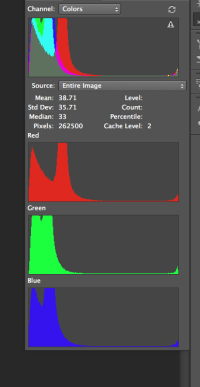
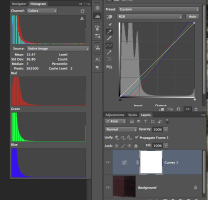
It is not as simple as the white balance, if it was all the whites would also be as red, and they are not, don't confuse the magenta fringing as red toned whites. If you look at a channel histogram you can see the red shift in the shadows and a slight lack of red in the highlights.

It is due to changes in the response curve at different tones which could be caused by any number of fundamental things, the only way to sort it out is to apply a channel tone curve, probably several with luminosity masks, to overcome the precise shifts.

The first histogram is the untouched file, the second is the three point three channel corrected file, I have included the tone curve adjustment lines too. Although the resulting lines look linear they are not. And, of course, any adjustments you make to the actual shadows would need a similarly adjusted curves layer.

None of this is that difficult, but the time and skill involved is not as trivial as many would lead you to believe good processing of Exmor files is.
 

Attachments

  • Screen Shot 2014-11-15 at 5.11.45 PM.png
    Screen Shot 2014-11-15 at 5.11.45 PM.png
    32.6 KB · Views: 677
  • Screen Shot 2014-11-15 at 5.16.00 PM.png
    Screen Shot 2014-11-15 at 5.16.00 PM.png
    114.1 KB · Views: 161
Upvote 0