• The Canon Rumors Forum has officially been shut down as of July 10, 2026.

    All data will be deleted on September 16, 2026.

    the ad free experience will return by July 17, 2026.

How do you strap your camera?

  • Thread starter Thread starter Deleted member 399245
  • Start date Start date
D

Deleted member 399245

Guest
Despite the title this is not a BDSM camera thread. Thinking back to my review of the R52 one my main issues currently is how to carry the camera.
How do you do it in a way that doesn't rely on the hand only, doesn't activate the viewfinder, and doesn't let the camera hit your body on an angle?
 
  • Haha
Reactions: 1 user
I use mostly a Blackrapid strap with a QD connector, that attaches directly to the RRS base plate or lens plate. Occasionally, I use a Spider Holster with their Arca Clamp connected to the camera plate.

Special use case is my 600/4, which I carry with a Blackrapid Sport L strap (left-handed so the lens/camera hangs on my left side), with the Blackrapid lug connected (with Loctite Blue) to a Kirk 1” clamp that attaches to the lens foot.
 
Upvote 0
Depends a lot on the camera.
  • BlackRapid strap for a 1DXm2 with L series lenses.
  • Peak Design Slide Lite for the R6mx/R7/R8/6D bodies and lenses.
  • Peak Design Cuff/Leash/Capture for the M series.
But most of my carrying is done in a backpack. I take the camera out when I'm ready to shoot. I don't lug the camera around on a strap when I'm not shooting.
 
Upvote 0
Thank you for your answers. A harness would definetelly too big for my use and a backpack a no go. I am not sure how you are placing the various straps though, do you have pictures to share on how they sit against your bodies? I am currently using a peak design anchor mount and I guess I am just not wearing it correctly.
 
Upvote 0
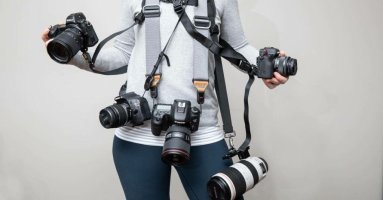
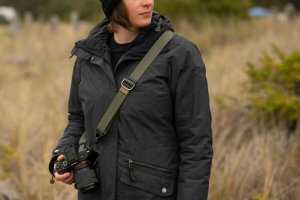
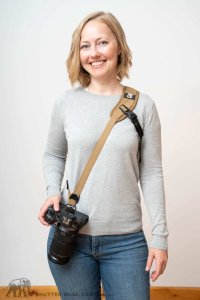
I tried to go for more of a sling setup (which I really less prefer since it makes the camera more far away from my eye) and it still doesn't work for me, it hits me at an angle if i want to keep it in front. Even these promotional materials are all with people holding the camera to prevent that. As far as I can see with current anchor points there is no way to avoid activating the viewfinder and hitting yourself while walking.
A purely bottom anchor also doesn't work unless you use a long lens, the camera will just flips on itself and hit you with the front of the lens.
 

Attachments

  • best-camera-strap-1024x536.jpg
    best-camera-strap-1024x536.jpg
    46.1 KB · Views: 9
  • Gold-Bluffs-3225.jpg
    Gold-Bluffs-3225.jpg
    114.1 KB · Views: 10
  • Senza titolo.jpg
    Senza titolo.jpg
    74.5 KB · Views: 9
Upvote 0
I'm using either my OP/Tech or Think Tank camera strap in the cross body configuration. I have added the Peak Design Anchor Links to each strap thus making changing straps, using a tripod, or wrist strap. I like the cross body with anchor on the body and the other attached to bottom of the RRS L bracket. This allows the body and lens to hang pointing down and seams to feel lighter IMO.
 
Upvote 0
How do you get the lens and body pointing down with the existing mounting points of the camera?
By using a PeakDesign Capture clip mounted on a backpack strap, and the clip adapter screwed in the camera's tripod thread. I do it even with heavier lenses (R5 II + RF 100-500) when hiking. A very quick access to the camera is a huge advantage of this system. Disadvantage: Doesn't work (well?) with gripped bodies.
PS: On the left strap, camera 1 + WA zoom, on the right strap, camera 2 + telezoom.
Less often used lenses are carried inside the backpack.
 
  • Like
Reactions: 1 user
Upvote 0
That is very interesting since I have a bag that I carry around in which I could install it, It could also be fast enough for my needs but I am not sure, would need to try, looking at all these options a normal neck strap is still unbeatable.
 
Upvote 0
How do you get the lens and body pointing down with the existing mounting points of the camera?
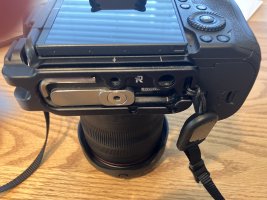
These photos show the way I attach strap attachment points. You can find good camera base plates with strap attachment points which allows you to use a tripod (you don't need a L Bracket).
 

Attachments

  • IMG_3193.JPG
    IMG_3193.JPG
    2 MB · Views: 9
  • IMG_3191.JPG
    IMG_3191.JPG
    1.8 MB · Views: 8
Upvote 0
These photos show the way I attach strap attachment points. You can find good camera base plates with strap attachment points which allows you to use a tripod (you don't need a L Bracket).
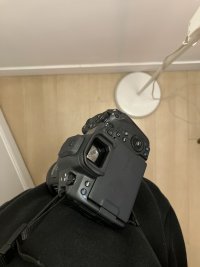
Very similar to mine, how do you avoid the camera hitting you at an angle when resting against your body/walking? This is how it is for me.
 

Attachments

  • strap.JPG
    strap.JPG
    2.7 MB · Views: 11
Upvote 0