
You are using an out of date browser. It may not display this or other websites correctly.
You should upgrade or use an alternative browser.
You should upgrade or use an alternative browser.
lightroom 4 5dmkIII raw now supported download the release candidate here
- Thread starter bornshooter
- Start date
- Status
- Not open for further replies.
I've downloaded it (mac). It works fine and is basically a DNG converter within LR4. The images are converted from CR2 to DNG whereas my CR2 from my MK II stayed as CR2. It does save a step though
Upvote
0

If Apple doesn't get their act together as far as Aperture 3 recognizing 5D III RAW files I might have to jump ship. Aperture 3 freezes on me a lot. So far Lr 4 is smooth, I just have some interface learning to do. 
Upvote
0
I find that Aperture exports everything at a quarter of the original size on my machine. Even when I have told it to do it at 100% so I don't use Aperture any more
Upvote
0
E
EvilTed
Guest
The lens correction makes a BIG difference on all my raw images I've shot to date with the following lenses:
24-105 F/4
50 F/1.8
70-200 F/2.8
The biggest correction is with the 50 F/1.8 which has no lens correction profiles for in camera correction, but for the 24-105 and the 70-200, all the images get brighter and the histogram moves to the right.
This is weird because I'm not doing any exposure correction.
Anyone know what's causing this?
I've shot everything AV and auto ISO so far.
cheers
ET
24-105 F/4
50 F/1.8
70-200 F/2.8
The biggest correction is with the 50 F/1.8 which has no lens correction profiles for in camera correction, but for the 24-105 and the 70-200, all the images get brighter and the histogram moves to the right.
This is weird because I'm not doing any exposure correction.
Anyone know what's causing this?
I've shot everything AV and auto ISO so far.
cheers
ET
Upvote
0

Probably mostly around the edges. There is alot of lens vignette on those lenses. If you are coming from a cropped sensor camera, you probably never noticed much vignette because you were only using the center of the lens. With a full frame, the edges of your photos will be less sharp and have more lens vignette than before.Vaz said:I did a bunch of shooting with the 50 1.4 and after applying the lens correction in lightroom the images would get significantly brighter.
Upvote
0
itsnotmeyouknow said:I've downloaded it (mac). It works fine and is basically a DNG converter within LR4. The images are converted from CR2 to DNG whereas my CR2 from my MK II stayed as CR2. It does save a step though
What? That's ridiculous. What is it with Adobe and their DuNG, anyway? So in other words, LR 4.1 doesn't support the Mk III any better than LR 4.0. Or LR 3, for that matter.
Upvote
0
A
Alker
Guest
Stephen Melvin said:itsnotmeyouknow said:I've downloaded it (mac). It works fine and is basically a DNG converter within LR4. The images are converted from CR2 to DNG whereas my CR2 from my MK II stayed as CR2. It does save a step though
What? That's ridiculous. What is it with Adobe and their DuNG, anyway? So in other words, LR 4.1 doesn't support the Mk III any better than LR 4.0. Or LR 3, for that matter.
Please tell me this is not true !!!!!
Upvote
0

itsnotmeyouknow said:is basically a DNG converter within LR4
How do you know this? I am not sure i follow. I downloaded the windows version and it works just fine.
Upvote
0
Alker said:Yep works fine...
No idea why this rumor came up about DNG conversion.
Maybe this:
One of the import options is "Copy as DNG," but if you don't choose it, by default it seems to leave 5DIII CR2s as they were
Glad to see this. That did seem kind of bizarre...
Upvote
0
Alker said:Yep works fine...
No idea why this rumor came up about DNG conversion.
Maybe this:
One of the import options is "Copy as DNG," but if you don't choose it, by default it seems to leave 5DIII CR2s as they were
Agreed, I haven't played around with it much yet, but as far as the import went, it copied the files as it should, leaving them as CR2. Not that I particularly *mind* DNG, I just currently haven't been convinced that I should change to that from Canon's native CR2.
Upvote
0
The latest info on what bugs remain in the 4.1 RC can be found here:
http://blogs.adobe.com/lightroomjournal/
and here
http://feedback.photoshop.com/photoshop_family/topics
and here:
http://feedback.photoshop.com/photoshop_family/topics/lr4_deleted_all_my_tone_curve_adjustments#
http://blogs.adobe.com/lightroomjournal/
and here
http://feedback.photoshop.com/photoshop_family/topics
and here:
http://feedback.photoshop.com/photoshop_family/topics/lr4_deleted_all_my_tone_curve_adjustments#
Upvote
0
E
EvilTed
Guest
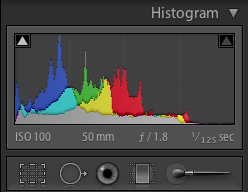
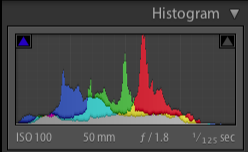
Here are two histograms from LR4 showing the effect of lens correction on the 50mm F/1.8.
The rest of the settings are unchanged and the CA checkbox has no effect.
Why would fixing the lens for what should be vignetting or barrel/pin cushion distortion change the histogram in this manner. It doesn't make sense to me?
ET
The rest of the settings are unchanged and the CA checkbox has no effect.
Why would fixing the lens for what should be vignetting or barrel/pin cushion distortion change the histogram in this manner. It doesn't make sense to me?
ET
Attachments
Upvote
0
Vignetting is a darkening of the non-center portions of an image. Correction of this, by definition, would make the image brighter. That is what you are seeing on the histogram.
Upvote
0
- Status
- Not open for further replies.
Similar threads
- Replies
- 24
- Views
- 12K
L

- Replies
- 51
- Views
- 29K

- Replies
- 19
- Views
- 25K
