
You are using an out of date browser. It may not display this or other websites correctly.
You should upgrade or use an alternative browser.
You should upgrade or use an alternative browser.
Please share your camera settings
- Thread starter sunnyVan
- Start date
- Status
- Not open for further replies.

On my one-slot bodies (7D and 6D) I shoot RAW and Jpeg Large, but honestly that's force of habit more than anything else since it's probably been a couple of years since I last used a jpeg file from the 7D, and I've never used jpegs from the 6D... I really should just change it to RAW-only on both, I guess...
On my 5D III I now shoot RAW + RAW, so both cards record the same files, simply as a card failure safety thing.
On the X-E1 I actually find myself using the jpegs from time to time so the dual file type recording is more handy there.
On my 5D III I now shoot RAW + RAW, so both cards record the same files, simply as a card failure safety thing.
On the X-E1 I actually find myself using the jpegs from time to time so the dual file type recording is more handy there.
Upvote
0
madspihl said:On my one-slot bodies (7D and 6D) I shoot RAW and Jpeg Large, but honestly that's force of habit more than anything else since it's probably been a couple of years since I last used a jpeg file from the 7D, and I've never used jpegs from the 6D... I really should just change it to RAW-only on both, I guess...
On my 5D III I now shoot RAW + RAW, so both cards record the same files, simply as a card failure safety thing.
On the X-E1 I actually find myself using the jpegs from time to time so the dual file type recording is more handy there.
So you own both Mk3 and 6D? I've never seen someone who has both. If you have Mk3, why would you want 6D? Just curious.
Upvote
0

Raw... Set to standard or portrait, NR off. I'll adjust through DPP alone most of the time. If I need to "clean" the images, I use LR or PP (very seldom, mostly for portraits and some landscapes).
Upvote
0
sunnyVan said:madspihl said:On my one-slot bodies (7D and 6D) I shoot RAW and Jpeg Large, but honestly that's force of habit more than anything else since it's probably been a couple of years since I last used a jpeg file from the 7D, and I've never used jpegs from the 6D... I really should just change it to RAW-only on both, I guess...
On my 5D III I now shoot RAW + RAW, so both cards record the same files, simply as a card failure safety thing.
On the X-E1 I actually find myself using the jpegs from time to time so the dual file type recording is more handy there.
So you own both Mk3 and 6D? I've never seen someone who has both. If you have Mk3, why would you want 6D? Just curious.
I think he use it as a backup or second camera. Primes on 6D and Zooms on 5D3 when shooting a wedding.

Upvote
0
I have a 1Ds Mk ii, so probably not that relevant. I use: -
RAW (which probably reduces the impact of the following)
Noise Reduction Off
Color Matrix 1 Standard
Tone Curve Standard
Sharpness 5
Contrast +1
But I make the occasional time lapse movie (the 1Ds cameras are great for this - built like a tank, you just leave them outside overnight and turn them off in the morning). For this I use small or medium JPEG. When I start shooting stills again, I often forget to change it back to RAW. I'm often surprised by the quality of the smaller JPEGs. Not as good as a RAW file, but still pretty good and fine for non-critical use.
FWIW, I also have an Olympus EPL-1. It makes great JPEGs in camera. I can rarely better the JPEG file by a noticeable amount by shooting RAW. Therefore, it lives in JPEG mode. The only time I shoot RAW with it is if I intend to do a lot of post production work (in my case, shooting IR and doing color channel switches and fake colour).
Even though I'm in the RAW brainwashee camp, I'd say Ken's advice is fine for most people in most situations.
RAW (which probably reduces the impact of the following)
Noise Reduction Off
Color Matrix 1 Standard
Tone Curve Standard
Sharpness 5
Contrast +1
But I make the occasional time lapse movie (the 1Ds cameras are great for this - built like a tank, you just leave them outside overnight and turn them off in the morning). For this I use small or medium JPEG. When I start shooting stills again, I often forget to change it back to RAW. I'm often surprised by the quality of the smaller JPEGs. Not as good as a RAW file, but still pretty good and fine for non-critical use.
FWIW, I also have an Olympus EPL-1. It makes great JPEGs in camera. I can rarely better the JPEG file by a noticeable amount by shooting RAW. Therefore, it lives in JPEG mode. The only time I shoot RAW with it is if I intend to do a lot of post production work (in my case, shooting IR and doing color channel switches and fake colour).
Even though I'm in the RAW brainwashee camp, I'd say Ken's advice is fine for most people in most situations.
Upvote
0
verysimplejason said:sunnyVan said:madspihl said:On my one-slot bodies (7D and 6D) I shoot RAW and Jpeg Large, but honestly that's force of habit more than anything else since it's probably been a couple of years since I last used a jpeg file from the 7D, and I've never used jpegs from the 6D... I really should just change it to RAW-only on both, I guess...
On my 5D III I now shoot RAW + RAW, so both cards record the same files, simply as a card failure safety thing.
On the X-E1 I actually find myself using the jpegs from time to time so the dual file type recording is more handy there.
So you own both Mk3 and 6D? I've never seen someone who has both. If you have Mk3, why would you want 6D? Just curious.
I think he use it as a backup or second camera. Primes on 6D and Zooms on 5D3 when shooting a wedding.
I use the 6D as a backup (used to be a 5D II but I got the 6D mainly for low light capabilities because it's so dark up here much of the year). I live in a very remote Arctic environment and when we shoot stuff in the backcountry and something goes wrong with just one body you might as well just go home (which is often way more expensive than having a backup body, btw.).
Upvote
0
I shoot RAW or in some situations RAW + S3. The S3 files are used for sharing photographs immediately after a shoot.
IMHO shooting RAW has its numerous advantages which have already been highlighted above. From a personal standpoint, I'm still learning post processing in LR so maybe a couple of months, years I may be able to process my shots differently.
The technological advancements in post processing techniques would also come in handy and would possibly work best with RAW images.
IMHO shooting RAW has its numerous advantages which have already been highlighted above. From a personal standpoint, I'm still learning post processing in LR so maybe a couple of months, years I may be able to process my shots differently.
The technological advancements in post processing techniques would also come in handy and would possibly work best with RAW images.
Upvote
0
sunnyVan said:madspihl said:On my one-slot bodies (7D and 6D) I shoot RAW and Jpeg Large, but honestly that's force of habit more than anything else since it's probably been a couple of years since I last used a jpeg file from the 7D, and I've never used jpegs from the 6D... I really should just change it to RAW-only on both, I guess...
On my 5D III I now shoot RAW + RAW, so both cards record the same files, simply as a card failure safety thing.
On the X-E1 I actually find myself using the jpegs from time to time so the dual file type recording is more handy there.
So you own both Mk3 and 6D? I've never seen someone who has both. If you have Mk3, why would you want 6D? Just curious.
I own the same combo of the 5D3 and 6D. My work takes me desert areas at least once a month where changing lenses is not a possibility. I use teles on the 5D3 and the WA on the 6D.
Upvote
0
P
paul13walnut5
Guest
Ken Rockwell claims that he doesn't need to shoot RAW and he said if you know what you are doing JPEG is fine. He also said the smallest size JPEG is good enough.
well I think I know what I'm doing but I need RAW. Anyway, my real question is
1. what size of RAW and JPEG do you normally use?
2. do you use camera NR at all? or do you use LR?
3. what settings would you advise against and for?
Hi SunnyVan
The main setting I would advise against is looking up Ken Rockwell's site.
I can only vouch for my cameras, and the one's I have owned in the past, but I've always found a little luminance NR and a tiny bit of sharpening at the ACR stage make my images much more pleasing to me.
I have a 7D and 600D currently, and I'm delighted with the results from these cameras, with a little bit of raw work.
So, on the first count, I don't agree with KR.
On the second count... I kind of agree up to a point. We don't really need more than 6MP for everyday shooting or online use. But I, like everybody else, shoots at full MP. It depends on the end destination.
And KR can't possibly know what that is for anybody else other than himself.
With cameras becoming so fast now, and decent high capacity fast memory so cheap, I struggle to think of reasons not to shoot at least RAW+jpeg.
I generally shoot RAW only.
I have the incamera NR set up for long exposure only (+1s)
I don't bother with highlight priority modes etc.
Upvote
0
Thanks for all your input. It looks like nobody really uses the camera NR too much. Now I know I'm not alone.
I guess I'll use medium RAW as a compromise. I try to delete unwanted pics as much as possible. But still the storage space required is getting out of control. Perhaps I could skip JPEG altogether even though it helps little.
For people who use LR, do you import as DNG or leave as is?
I guess I'll use medium RAW as a compromise. I try to delete unwanted pics as much as possible. But still the storage space required is getting out of control. Perhaps I could skip JPEG altogether even though it helps little.
For people who use LR, do you import as DNG or leave as is?
Upvote
0

neuroanatomist said:RAW only. No in-camera NR (except long exposure NR as needed).
This is how I do it also.
You need to experiment with the settings and find what you like best.
Upvote
0

I save as RAW and small, fine, JPG.
I heard the following definition ages ago: The difference between an amateur photographer and a professional is that the amateur KNOWS that they can get it right with just one shot..... and apparantly Mr. Rockwell knows he can get it right in just one shot.
" You don't need to shoot RAW if you know what you are doing"
JPG is the finished product. Anyone who thinks that they can always get everything right with the camera settings and produce the perfect final image straight from the camera every time has a huge ego and a fundamental lack of understanding of digital photography and of human nature. ( photography is part artform..... we will tweak pictures to what our idea of the final image is, and there is a LOT of individual variation/preference) I would not take anyone seriously who would make such a statement.
" You don't need to shoot RAW if you know what you are doing"
That must be why Raw is only offered in low-end point/shoot cameras and not availiable in any of the DSLR's or pro cameras.... NOT!
What you have is an egomaniac shouting out how good they are and that anyone who thinks otherwise just doesn't know what they are doing.... My advice is to smile and nod, and ignore him.
I heard the following definition ages ago: The difference between an amateur photographer and a professional is that the amateur KNOWS that they can get it right with just one shot..... and apparantly Mr. Rockwell knows he can get it right in just one shot.
" You don't need to shoot RAW if you know what you are doing"
JPG is the finished product. Anyone who thinks that they can always get everything right with the camera settings and produce the perfect final image straight from the camera every time has a huge ego and a fundamental lack of understanding of digital photography and of human nature. ( photography is part artform..... we will tweak pictures to what our idea of the final image is, and there is a LOT of individual variation/preference) I would not take anyone seriously who would make such a statement.
" You don't need to shoot RAW if you know what you are doing"
That must be why Raw is only offered in low-end point/shoot cameras and not availiable in any of the DSLR's or pro cameras.... NOT!
What you have is an egomaniac shouting out how good they are and that anyone who thinks otherwise just doesn't know what they are doing.... My advice is to smile and nod, and ignore him.
Upvote
0
" You don't need to shoot RAW if you know what you are doing"
Think of the data flow. ( obviously simplified, but you get the idea....)
in-camera JPG
Step 1: Data is read from the sensor.
Step 2: Data is processed, manipulated by fast algorithm with set parameters, and compressed in a lossy form.
Step 3: Lossy image is saved, raw data discarded.
in-camera RAW
Step 1: Data is read from the sensor.
Step 2: Data is processed, manipulated by trivial algorithm with set parameters, and a lossy thumbnail image is created.
Step 3: Raw data is stored in a lossless format plus embedded thumbnail.
at-home JPG:
Step 1: RAW data is read.
Step 2: Complex algorithm requiring far more computing power than camera can provide, is used to create JPG image.
Step 3: User examines JPG image, and adjusts settings to suit.
Step 4: keep repeating until you have optimized image.
Step 5: Save JPG as you prefer.
And note that as you are going through all the adjustment cycles you may decide to dump out a version of that JPG colour balanced with your printer profile, and another one colour balanced to your monitor profile. As far as I know, NOBODY makes a DSLR that allows you to enter in IO colour profiles ...... and certainly not multiple profiles on the same JPG.
I would have corrected the statement to be "you NEED to be able to shoot RAW if you know what you are doing".
Think of the data flow. ( obviously simplified, but you get the idea....)
in-camera JPG
Step 1: Data is read from the sensor.
Step 2: Data is processed, manipulated by fast algorithm with set parameters, and compressed in a lossy form.
Step 3: Lossy image is saved, raw data discarded.
in-camera RAW
Step 1: Data is read from the sensor.
Step 2: Data is processed, manipulated by trivial algorithm with set parameters, and a lossy thumbnail image is created.
Step 3: Raw data is stored in a lossless format plus embedded thumbnail.
at-home JPG:
Step 1: RAW data is read.
Step 2: Complex algorithm requiring far more computing power than camera can provide, is used to create JPG image.
Step 3: User examines JPG image, and adjusts settings to suit.
Step 4: keep repeating until you have optimized image.
Step 5: Save JPG as you prefer.
And note that as you are going through all the adjustment cycles you may decide to dump out a version of that JPG colour balanced with your printer profile, and another one colour balanced to your monitor profile. As far as I know, NOBODY makes a DSLR that allows you to enter in IO colour profiles ...... and certainly not multiple profiles on the same JPG.
I would have corrected the statement to be "you NEED to be able to shoot RAW if you know what you are doing".
Upvote
0
Sometimes I run out of disk space. Even having a ton of hard drives, shooting RAW doesn't always make sense. If I'm going to print something, then always RAW. Otherwise, M JPG has worked well in many situations (candids, landscape).
I think M RAW is actually a pretty good compromise, and you're getting noise reduced via interpolation.
Sometimes, I make so many photographs and can get so sidetracked by manual RAW conversion that shooting JPG speeds up my ability to catalog and review everything.
I think M RAW is actually a pretty good compromise, and you're getting noise reduced via interpolation.
Sometimes, I make so many photographs and can get so sidetracked by manual RAW conversion that shooting JPG speeds up my ability to catalog and review everything.
Upvote
0
aroo said:Sometimes I run out of disk space. Even having a ton of hard drives, shooting RAW doesn't always make sense. If I'm going to print something, then always RAW. Otherwise, M JPG has worked well in many situations (candids, landscape).
I think M RAW is actually a pretty good compromise, and you're getting noise reduced via interpolation.
Sometimes, I make so many photographs and can get so sidetracked by manual RAW conversion that shooting JPG speeds up my ability to catalog and review everything.
Actually, you can get that noise reduction via interpolation from the full raw, just export as a smaller JPG.
Definitely takes a lot more space, and takes longer to sort through at times because of waiting for LR4 to prepare the preview images on import, even the standard previews. But, for me, that's why I built a 8TB RAIDZ NAS where I keep everything and backup to CrashPlan from that.
Upvote
0
Sort of to prove a point.....
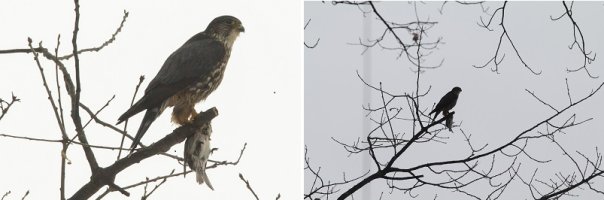
The camera is set to save JPG and RAW..... I am in the house taking pictures of Fluffy the cat.... I see a flash of movement outside and snap this picture. No time to adjust any settings other than a quick twist of a thumbwheel...
The picture is of a horribly backlit Kestrel with a Redpoll snack, through a dirty patio window, and just about every imaginable setting on the camera wrong for the shot. On the left is the JPG created from the RAW file, on the right is the camera's JPG.
Sometimes there is just no time to do things right. RAW lets you claw back a lot of mistakes.
The camera is set to save JPG and RAW..... I am in the house taking pictures of Fluffy the cat.... I see a flash of movement outside and snap this picture. No time to adjust any settings other than a quick twist of a thumbwheel...
The picture is of a horribly backlit Kestrel with a Redpoll snack, through a dirty patio window, and just about every imaginable setting on the camera wrong for the shot. On the left is the JPG created from the RAW file, on the right is the camera's JPG.
Sometimes there is just no time to do things right. RAW lets you claw back a lot of mistakes.
Attachments
Upvote
0
- Status
- Not open for further replies.


