Problems with Canon mk3 locking up

Does your canon 5D mk3 lock up while filming video


  • Total voters
    20
Status
Not open for further replies.
So are you still going to get a MK3?

With the MK3 you can record up to 29:59m split over 3 files(4gb). However the issue for most of us with the freezing has nothing to do with the time limit as you can see from the videos shown it freezes 18 seconds into recording.


filmdock said:
I am scheduled to buy a Mark III tomorrow and I saw posts about video capture lock-up/freezing and I was alarmed so I immediately reviewed my Mark II footages. Here's what I think. I have used a Mark II for a feature film last year and I know that these DSLRs can only record up to about 12 minutes of full HD footage in .MOV format. Why? Because any card whether CF or SD and even flash drives are formatted in FAT32 regardless of its capacity which means they can only keep up to 4GB (I've recorded a 4.18GB of 00:12:12 footage) of file at a time and 12 minutes of full HD in .MOV is exactly 4GB. I think that's what causing it to lock up. The only problem is that it shouldn't freeze to avoid losing data. Mark II just stops recording and stores that long footage. Then you just have to push record again. So to those of you who already have the Mark III who use it to cover long events, hit that pause/record button before it reaches that 12 minute mark.
 
Upvote 0
I had a 5D MK3 loaded with a sandisk Extreme Pro 32 GB SD card rolling on high end corporate video and lost 7 mins or so of footage of a CEO interview due to a freeze. Luckily I was running as second cam - with primary cam a SONY F-800. It was a serious embarrassment, but not a disaster only because the primary cam saved us. I had another freeze recently while rolling video - again a Sandisk Extreme Pro 32 GB (a different copy from the first one) and a different 5 D MK3!! Not sure what is going on, but all trust is gone. Will not roll a single clip longer then 7 mins or so for fear of losing a massive moment. I have used these cameras extensively for broadcast without problems, for several years since the very early days of the 5d mk2, and love them. Please, Canon, get to the bottom of this!
 
Upvote 0
I feel your pain. Please send your MK3's into Canon along with what you wrote. The more people that send in their camera's the more Canon will see that it's just not being made up and will be forced to address the issue. This is a real issue and loosing footage, even if you have backup camera's rolling at the time in unacceptable.

People shouldn't have to live with the freezing "cause they have backups"

Please post what Canon does to your MK3's and sign the petition.

Many Thanks!

ibobulus said:
I had a 5D MK3 loaded with a sandisk Extreme Pro 32 GB SD card rolling on high end corporate video and lost 7 mins or so of footage of a CEO interview due to a freeze. Luckily I was running as second cam - with primary cam a SONY F-800. It was a serious embarrassment, but not a disaster only because the primary cam saved us. I had another freeze recently while rolling video - again a Sandisk Extreme Pro 32 GB (a different copy from the first one) and a different 5 D MK3!! Not sure what is going on, but all trust is gone. Will not roll a single clip longer then 7 mins or so for fear of losing a massive moment. I have used these cameras extensively for broadcast without problems, for several years since the very early days of the 5d mk2, and love them. Please, Canon, get to the bottom of this!
 
Upvote 0
Problems with Canon mk3 (missing RAW files)

I am shooting mostly stills, in RAW+JPEG mode.

Regularly, there are some RAW files missing, means all I am left with is a JPEG. It just happens to a few images. But it is still annoying.

Anyone else experiences this issues?
 
Upvote 0
To all who have had issues with the cameras locking up. I am working with Canon in the US, another guy (Maxim) in AU, trying to figure some of these issues and assisting Canon along the way.

As of this post, there is no found cause as to what is resulting in the cameras crashing.

It has been reported on the following cameras:

7D
5DMII
5DMIII
6D

Takes place when both taking photos and video, the latter of which seems to be more prominent.

You MUST MUST MUST MUST contact Canon to report this.

It is NOT the cards, it is NOT the types of cards, it has nothing to do with the recording options within the camera's menu.
 
Upvote 0
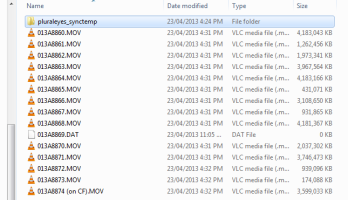
Another one here with the same issue and timing as OP. I've used both my MkIII's a lot and never had a problem. This was the first time I ran an SD in the cam with a CF and was recording to the SD at the time. I initially thought mine was at the 4gb changeover on last file before 29:59 limit but now that I look it appears it wrote the last 4gb file properly and got 2.5 minutes in to the next file before locking up. So at least I only lost 2.5 mins instead of the whole 22min file it was up to at the time!
 

Attachments

  • Capture.PNG
    Capture.PNG
    41.1 KB · Views: 785
Upvote 0
It's out of question buy a pro camera 3500 €and never knows when you bring back a video without problems or you must apologize to the client that CANON company is the reason that you lost his event or you must make the marriage again and maybe get a full video. With 7d never had this problem or 5dII .
Sorry about my bad English .
 
Upvote 0
I get and ERR 2 when I use the Lexar 600x or 1000x 32 GB card. I have yet to see the problem with the 16gb cards 2 600x.

I've only seen the problem when shooting with a 17-40. I have seen the problem when shooting in full manual, 1080P.

Totally unacceptable.
 
Upvote 0
My MarkIII started locking up when filming a concert, then started showing only a white screen or going pink or red
or green when taking pictures. Sent it back to Canon and say it a warranty issue and are replacing the Main Board.
Only problem is after a week and a half no one can tell me when they will get the parts to fix it. The repair loop
has no part to fix this problem. I'm really disappointed with this set of issues, and will probably dump the MarkIII
when I get it back, whenever that will be... purchased in Nov. 2012. No parts at the repair facility for a possible
known issue is unexcuseable...... my customers would not accept such a situation.
 
Upvote 0
Status
Not open for further replies.