Ruined photo, or rescue opportunity?

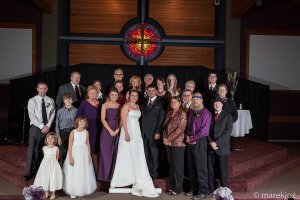
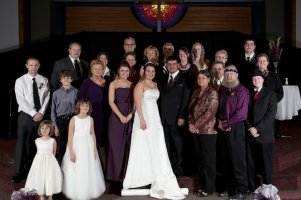
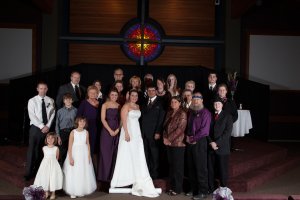
Hello I recently shot a wedding and during the group photos it became rather rushed as I was given a very short amount of time to set up for my shots. During the chaos and confusion I think one of my flashes malfunctioned or simply turned off, here is the resulting photo. My question, is this photo ruined or is there a way to rescue it? The shadows on a few faces is what is in question if you didn't notice right away :( Hopefully this isn't a huge fail on my part! Thank you everyone!
 

Attachments

  • wedding.JPG
    wedding.JPG
    1.1 MB · Views: 2,593
Looks bad - especially guy in the background.

I take it even in the haste, you took a couple of shots of this gathering? Are the shadows on the same faces on all the shots? Otherwise in PS one can transplant well exposed faces on top of the under exposed ones ;)

Good luck
 
Upvote 0
kennephoto said:
My question, is this photo ruined or is there a way to rescue it?

As long as the data is there you can rescue it, though it might involve some work. Even the guy in the back has some resolution left in his face, so you can mask (with smooth alpha-border) the shadow in PS & raise it, then correct for the white balance. As long as you downscale the shot to the resolution you posted people might not even recognize the edit & be more worried about the clipped whites and cut feet :-> ... but if you didn't take $10k for the wedding and the clients aren't amateur photogs I'd say you'd be still ok.
 
Upvote 0
Please tell us you shot RAW. If you didn't, let this be the day that you switch to 100% RAW shooting.

There is work to do with this image, but it's by no means lost. If this needs to be your money shot and you don't feel up to the task, pay someone to do it for you. If the result still looks a bit weird, it's extraordinary how much conversion to B&W can conceal. Good luck, and post the rescued image when it's done.

-PW
 
Upvote 0
pwp said:
Please tell us you shot RAW. If you didn't, let this be the day that you switch to 100% RAW shooting.

There is work to do with this image, but it's by no means lost. If this needs to be your money shot and you don't feel up to the task, pay someone to do it for you. If the result still looks a bit weird, it's extraordinary how much conversion to B&W can conceal. Good luck, and post the rescued image when it's done.

-PW

+1
 
Upvote 0
Menace said:
Looks bad - especially guy in the background.

I take it even in the haste, you took a couple of shots of this gathering? Are the shadows on the same faces on all the shots? Otherwise in PS one can transplant well exposed faces on top of the under exposed ones ;)

Good luck

The shadows are the same in the other shots I did get a shot where the flashes did it fire at all maybe I can use that somehow.
 
Upvote 0
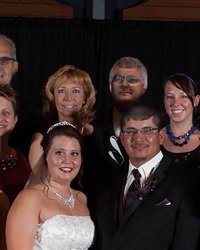
Depending on how you want to compromise... you could recover some detail from the shadows of the guy behind the groom... IMHO he is the deal breaker the way he is...


I did a quick and dirty Shadow pull in CS5 on a crop of your shot.. some exposure tune / NR / color/ hue adjustments to get it close..

Didnt bother with his neck since this was a proof of concept... with a RAW file and more time you could do much better.
 

Attachments

  • wedding.jpg
    wedding.jpg
    24.3 KB · Views: 1,707
Upvote 0
K-amps said:
Depending on how you want to compromise... you could recover some detail from the shadows of the guy behind the groom... IMHO he is the deal breaker the way he is...


I did a quick and dirty Shadow pull in CS5 on a crop of your shot.. some exposure tune / NR / color/ hue adjustments to get it close..

Didnt bother with his neck since this was a proof of concept... with a RAW file and more time you could do much better.

This seems like good news to me!
 
Upvote 0
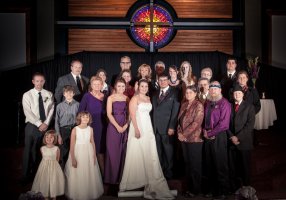
Here's a quick pass in Lightroom.

I didn't do much to the face shadows. But if you use Lightroom, I think a combination of the brush tool with exposure, shadow, noise, highlight, contrast, saturation, and noise adjustments should be able to recover quite a bit from the face shadows.

My personal opinion is that the overall is more important than a few mistakes. You've got 23 people in the shot and most look good. But it is true that some client's might be unhappy with this.
 

Attachments

  • Wedding.jpg
    Wedding.jpg
    1.7 MB · Views: 1,571
Upvote 0
dirtcastle said:
Post the full-size, original file. That will give people a chance to post high quality edits.

I just had a look in LR, too. The data in the face in the back is there, but with extremely low resolution and some noise. Btw that's exactly the reason why I'm always complaining about my aps-c and Canon sensors vs. Nikon, when raising shadows you'll run into exactly this problem.

Imho you cannot completely recover this shot, the best that'll be possible is some plastic look like K-Amps' version or you can moderately raise it to lessen the contrast - but it'll be still clear that the face was occluded when the flash fired, sorry. Or maybe you can really copy/paste the face from another good shot.

But that surely will remind you to check for the flashes firing next time - or switch to radio triggers :-o - why did the flash fail to fire anyway? Wasn't the optical link working?
 
Upvote 0
I’ll have a look for you too but I don’t think I can do much more then what’s already been done. I feel for you but I feel for the couple more. I don't know your background but it might help if you follow a wedding photographer for a couple of weddings and even do some study or just stick to your day job. Did you charge the couple for this and do they know you are amateur photographer? I know some people say the best way to learn is to shoot lots, but you run the risk of running you name into the ground if you keep up with pictures like this. It’s not just the shadows that’s bad there are people’s heads that you can’t even see. I encourage people around me normally and I hate to be a stick in the mud.
 
Upvote 0