
You are using an out of date browser. It may not display this or other websites correctly.
You should upgrade or use an alternative browser.
You should upgrade or use an alternative browser.
Show your Bird Portraits
- Thread starter 1982chris911
- Start date


Thanks, all.
Guy, much of the detail and sharpness comes from my sharpening "secret weapon" - in PhotoShop I use Topaz Detail's Deblur algorithm (which looks like a kind of RL deconvolution), applied with a brush, at a setting of 17 (17 is pretty arbitrary! It just so happens that's what I saved to my preset).
I might then fade the result a bit to suit, but I'm extremely impressed by how this algorithm brings out detail and sharpness without looking overdone or introducing artefacts. That's all I ever need to do.
Ironically, I don't use its "Detail" sliders at all.
That said, I've found that the free Athentech "Perfect Exposure" plugin to be really good at bringing out detail too. I'll usually apply the "Detail and Shadows" preset, then dial back the Exposure slider and the Opacity from the "Adjust" panel.
Mind you, the camera and lens (and hopefully, I ) have something to do with the sharpness, too..!
GuyF said:Must check out Photo Ninja.
Guy, much of the detail and sharpness comes from my sharpening "secret weapon" - in PhotoShop I use Topaz Detail's Deblur algorithm (which looks like a kind of RL deconvolution), applied with a brush, at a setting of 17 (17 is pretty arbitrary! It just so happens that's what I saved to my preset).
I might then fade the result a bit to suit, but I'm extremely impressed by how this algorithm brings out detail and sharpness without looking overdone or introducing artefacts. That's all I ever need to do.
Ironically, I don't use its "Detail" sliders at all.
That said, I've found that the free Athentech "Perfect Exposure" plugin to be really good at bringing out detail too. I'll usually apply the "Detail and Shadows" preset, then dial back the Exposure slider and the Opacity from the "Adjust" panel.
Mind you, the camera and lens (and hopefully, I
) have something to do with the sharpness, too..!
Upvote
0
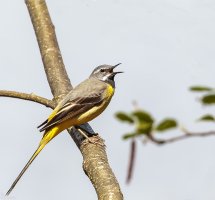


Are you sure you are a photographer and not a lens salesman? Those pictures make me want to rush out and get that lens far more than any images Canon published....Keith_Reeder said:Enjoying my new 100-400mm Mk II and Mk II 1.4x (on my 7D Mk II, handheld):
NICE!
Upvote
0
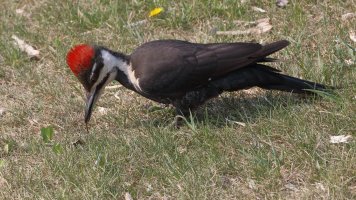
Thanks Click. I have been lurking for a couple of years now and decided it was time to man up and post an image.
Thanks Mikehit and you are right it is a Grey Wagtail. Must have had a senior moment there.
Thanks Mikehit and you are right it is a Grey Wagtail. Must have had a senior moment there.
Upvote
0
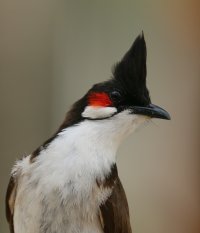
Keith_Reeder said:...in PhotoShop I use Topaz Detail's Deblur algorithm...
Thanks for the additional info. So many software packages, so little time to try them all!
Upvote
0

GuyF said:Keith_Reeder said:...in PhotoShop I use Topaz Detail's Deblur algorithm...
Thanks for the additional info. So many software packages, so little time to try them all!
In mulling over this issue of sharpness that everyone strives for, the following has only recently hit me as a relative beginner, especially after my purchase of a used 1D4 (16 MP). That is, if I could fill the frame then the IQ was superb but given that I was usually rather far away and cropping fairly heavily then the 6D (20 MP) really pulled ahead (both MP and ISO). I used to restrict myself to ISO 1250 with the 6D but that's only a rule I now follow if I'm not close to filling the frame. I'd say that with today's cameras and lenses that "fairly sharp" is the norm if cropping is minimal unless there are focus (AFMA) or blur/shake problems. Sometimes the shutter speed required is higher than we might think.
Jack
Upvote
0

Eldar said:A Great Crested Grebe is admiring her eggs. in about three weeks time, we will have some special looking chicks here.
5DSR, 600mm f4L IS II
1/1600s, f/6.3, ISO400
For sure you will have more lovely shots!
Jack
Upvote
0
Eldar said:A Great Crested Grebe is admiring her eggs. in about three weeks time, we will have some special looking chicks here.
5DSR, 600mm f4L IS II
1/1600s, f/6.3, ISO400
A very welcome change to the cliche'd Grebe photos. Lovely.
Upvote
0


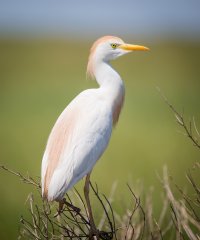
Eldar this is fantastic! Where did you shoot it?Eldar said:A Great Crested Grebe is admiring her eggs. in about three weeks time, we will have some special looking chicks here.
5DSR, 600mm f4L IS II
1/1600s, f/6.3, ISO400
Upvote
0
Similar threads

- Replies
- 118
- Views
- 99K
