TS-E for dummy

Oct 31, 2012
1,564
284
15,068
Ok, time to educate a dummy. For some time I've been looking for the TS-E lens(es), and reading quite a bit about them too. Problem is that without one in hand, the instructions can be complicated. Now I finally snatched one from the Canon refurb deals, 24 Mark II :) Waiting for the shipment to arrive...

I'm sure I'll learn plenty by just playing with the knobs, but to start with, can someone give dummy-proof setting how they usually use in certain situations. Dummy-proof as in how is the tilt (including direction), shift (including direction), rotation and focus, for following scenarios:

1: Typical landscape

2: Typical tall building when standing relatively close

3: The "mandatory" miniature shot


For 1), I was reading one recommendation about rotating 30 degrees, and then shifting each end, rotate 30 to another side and again shift. Then stitch the 4 shots.

For bonus points: Seems tripod is recommended usually. Anyone use handheld?

And should I get ND and/or CPL?

 
tpatana said:
Ok, time to educate a dummy. For some time I've been looking for the TS-E lens(es), and reading quite a bit about them too. Problem is that without one in hand, the instructions can be complicated. Now I finally snatched one from the Canon refurb deals, 24 Mark II :) Waiting for the shipment to arrive...

I'm sure I'll learn plenty by just playing with the knobs, but to start with, can someone give dummy-proof setting how they usually use in certain situations. Dummy-proof as in how is the tilt (including direction), shift (including direction), rotation and focus, for following scenarios:

1: Typical landscape

2: Typical tall building when standing relatively close

3: The "mandatory" miniature shot


For 1), I was reading one recommendation about rotating 30 degrees, and then shifting each end, rotate 30 to another side and again shift. Then stitch the 4 shots.

For bonus points: Seems tripod is recommended usually. Anyone use handheld?

And should I get ND and/or CPL?

Congrats on the 24mm. I have a 90mm :)

Turning the knobs made a few lightbulbs go off in my head:
If you don't shift, the center point/axis won't change in focus as you tilt. In the case of the pictures, I focused using 10x LiveView on the center point and then tilted to get the right focus plan (along the glass).

Shot 1: no tilt.
Shot 2: tilted to get focal plane to match the glass
Shot 3: #2 + our coffee
Shot 4: max reverse tilt of #3
(missing shot: me drinking the coffee)

Another user (sorry, I forgot who) reported that he saw a pro shoot with a T/S lens handheld, but that is pretty rare. A tripod is highly recommended as any movement on your part will be seen as a change on focus plane.
 

Attachments

  • TSE90-2.JPG
    TSE90-2.JPG
    374.3 KB · Views: 214
  • TSE90-3.JPG
    TSE90-3.JPG
    374.4 KB · Views: 201
  • TSE90-4.JPG
    TSE90-4.JPG
    394.9 KB · Views: 207
  • TSE90-5.JPG
    TSE90-5.JPG
    353.8 KB · Views: 200
Upvote 0
kaihp said:
Another user (sorry, I forgot who) reported that he saw a pro shoot with a T/S lens handheld, but that is pretty rare. A tripod is highly recommended as any movement on your part will be seen as a change on focus plane.

Using shift hand-held is quite feasible, at least for the usual "tall buildings not falling backwards" type of correction. Using tilt hand-held, on the other hand, is certainly asking for trouble (it's hard enough on a tripod ...)

But then again, I've only had my first TS-E (24mm, same as OP) for a couple of months, and I'm still experimenting with it, so I can't really contribute a lot to this thread (but will be following contributions from others ;) )
 
Upvote 0
You might start with these threads if you haven't already read them.

http://www.canonrumors.com/forum/index.php?topic=24660.msg484950#msg484950
http://www.canonrumors.com/forum/index.php?topic=27551.msg544408#msg544408

I have to agree that this is a pretty good primer

https://www.schneideroptics.com/pdfs/photo/PC-TS%20Anleitung%201-12%20en.PDF

There's also some videos from Canon

https://www.youtube.com/watch?v=mmPQVvF3EPQ
http://www.learn.usa.canon.com/galleries/galleries/tutorials/tiltShift_laforet_gallery.shtml

Kai even did a reasonable intro on Digital Rev

https://www.youtube.com/watch?v=0HRYlJUwzYA
 
Upvote 0
tpatana said:
Ok, time to educate a dummy. For some time I've been looking for the TS-E lens(es), and reading quite a bit about them too. Problem is that without one in hand, the instructions can be complicated. Now I finally snatched one from the Canon refurb deals, 24 Mark II :) Waiting for the shipment to arrive...

I'm sure I'll learn plenty by just playing with the knobs, but to start with, can someone give dummy-proof setting how they usually use in certain situations. Dummy-proof as in how is the tilt (including direction), shift (including direction), rotation and focus, for following scenarios:

1: Typical landscape

2: Typical tall building when standing relatively close

3: The "mandatory" miniature shot


For 1), I was reading one recommendation about rotating 30 degrees, and then shifting each end, rotate 30 to another side and again shift. Then stitch the 4 shots.

For bonus points: Seems tripod is recommended usually. Anyone use handheld?

And should I get ND and/or CPL?

Dear friend, Mr. tpatana.
Welcome to the club " Tilt & Shift Lens Club " , Yes, I have this awesome Babe Canon TS-E 24 MM. F/ 3.5 L MK II about 18 months ago, and with one of my Canon Camera all the times with B+W82 KSM C-POL MRC. FILTER for all of my out door scenery/ streetscape / Landscape photos.
Yes, I use hand hold shooting, When I set Shutter Speed faster than 1/ 125 SEC. And F = 8.0 or higher number, During ISO = 100 to 400.
But I will use tripods when the Shutter speed slower than 1/80 SEC., Spacial for take the photos of the skyscaper If I use Shift Function to correct the Perspective.
Because this Babe = Manual Focus only, I set my Focus point at 1 spot Focus on the Center, And Set the Beep Sound, When I rotate the focus ring until I can see the green square( Depend on Camera Model) at the center view finder and the beep sound, = That the perfected Focus for me.
Good luck for your new Lens----Yes, If I have only 2 Lenses in this world, TS-E 24 mm L MK II and EF 85 mm. F/ 1.2 L MK II = that good enough for me.
Have a great work week, Sir,
Surapon.
 

Attachments

  • B-1.jpg
    B-1.jpg
    1 MB · Views: 174
  • GC-5.jpg
    GC-5.jpg
    827.4 KB · Views: 192
  • D-002.jpg
    D-002.jpg
    180.2 KB · Views: 190
  • AW-1.jpg
    AW-1.jpg
    100.6 KB · Views: 184
  • 02.jpg
    02.jpg
    183.8 KB · Views: 194
Upvote 0
Good luck for your new Lens----Yes, If I have only 2 Lenses in this world, TS-E 24 mm L MK II and EF 85 mm. F/ 1.2 L MK II = that good enough for me.
Have a great work week, Sir,
Surapon.
 

Attachments

  • HDR-MT PILOT-BY CAMERA.jpg
    HDR-MT PILOT-BY CAMERA.jpg
    193.6 KB · Views: 207
  • HDR-F-NON-HDR.jpg
    HDR-F-NON-HDR.jpg
    1.3 MB · Views: 204
  • HDR-C-3.jpg
    HDR-C-3.jpg
    1.6 MB · Views: 200
  • GC-8.jpg
    GC-8.jpg
    861.9 KB · Views: 191
Upvote 0
Good luck for your new Lens----Yes, If I have only 2 Lenses in this world, TS-E 24 mm L MK II and EF 85 mm. F/ 1.2 L MK II = that good enough for me.
Have a great work week, Sir,
Surapon.
 

Attachments

  • IMG_1765.JPG
    IMG_1765.JPG
    897 KB · Views: 207
  • IMG_2348.JPG
    IMG_2348.JPG
    975.4 KB · Views: 189
  • NY-1.jpg
    NY-1.jpg
    1 MB · Views: 190
  • Z-8.jpg
    Z-8.jpg
    924 KB · Views: 202
Upvote 0
Tilt with the front round nob. Shift with the back round nob. There is a flat button on the lens that you push in, which enables you to rotate the body so that you can change the direction of the tilt or change the direction of the shift.

Yes, I have shot the lens hand-held, although critical focusing is best done at 10x on Live View, so a tripod is highly advised.

The miniature look is allegedly best accomplished with the TS-E 45, but the TS-E 24 may still do it decently well.

I generally use shift (but not tilt) with my TS-E 17 and 24. One way to learn the lens is to use a tripod, level the tripod, and make sure the lens is neither tilted or shifted. The horizon should be centered in your frame. Now shift the lens with the back nob until the horizon is 1/3 up or down. Now the shot conforms with the rule of thirds (at least with the weighting of sky with land), but trees, buildings, and other objects in the composition are in a normal orientation (ie not falling backwards).

Another test is to set up a landscape on your tripod, level the lens, then do a 3-photo shift sequence. Shoot at 0, then at -11, then at +11. Take those three shots, stitch them together, and you will have a shift panorama.

A third test you can try is set up the lens on a tripod to the side of a mirror and shift it left or right until the mirror is in the center of the frame but the tripod, camera, and lens will hopefully not be evident. It's a cool trick.
 
Upvote 0
I have the 24mm, use it mostly for shift panos as well as shift landscapes and cityscapes. For buildings I love that I could make the verticals absolutely parallel, at times I use a bit of back camera tilt just to get a touch of converging verticals which at times look more natural. Use it handheld a lot for single frames, tripod and remote control is always advisable.

The magic of tilt is awesome but takes a bit of understanding. Camera body tilt combined with lens tilt works wonders with low level landscapes with everything in focus. I found an iOS app called Snapi Tilt Calculator which is very usable and can even measure camera body tilt by holding your device against the back of the camera.

The lens is normally used with a 6D and I use an iPhone or iPad with a WiFi connection to remotely use live view on the device and to control all functions of the camera.

Enjoy the lens.
 
Upvote 0
tpatana said:
1: Typical landscape

2: Typical tall building when standing relatively close

3: The "mandatory" miniature shot


For 1), I was reading one recommendation about rotating 30 degrees, and then shifting each end, rotate 30 to another side and again shift. Then stitch the 4 shots.

For bonus points: Seems tripod is recommended usually. Anyone use handheld?

And should I get ND and/or CPL?

1. You can certainly use shift to create a panorama, personally I find that 24mm is wide enough for most landscape shooting, and if I need a pano shot I'm better off with a longer lens (I use the 24-70 at the long end) in portrait orientation. For 'general' landscape use, ~0.5° of downward tilt will get near-to-far in focus at f/5.6-8.

2. This is my main use for TS-E lenses, and since 24mm often isn't wide enough, I also got the 17mm and I travel with both (and 17mm still isn't wide enough sometimes - in Europe, there are many big, lovely Münsters with very little space around them. For eliminating keystoning (the 'falling away' of buildings), have your camera level (the in-camera electronic level is quite handy) then apply upward shift until the verticals are straight.


EOS 1D X, TS-E 17mm f/4L, 30 s, f/9, ISO 100

Although normally with architecture shift is used but not tilt, sometimes both can be used. For example:


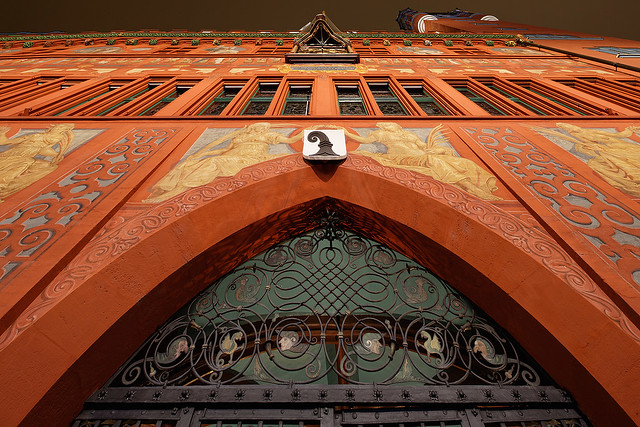
EOS 1D X, TS-E 17mm f/4L, 30 s, f/11, ISO 100

For the above shot, I placed the tripod close to the building (the Rathaus in Basel, Switzerland), pointed the camera straight up and used downward shift (because that's the way the camera was facing) to effectively move the camera even closer to the building, then I used a bit of downward tilt so the entire façade was in focus.

3. I've never shot the 'mandatory' miniature. ;) But a bit of upward tilt is what you need.

I have done a bit of handheld shift shooting, it's certainly possible but a bit awkward. A tripod is certainly preferable in most situations. One thing to be aware of is that shift and tilt will affect viewfinder-based metering, leading to over- or under-exposure (depending on the direction of the lens movement) if you're using an automatic mode or rely on the metering for manual settings. So, you can either meter with the movements in the neutral position then apply shift or tilt, or what is usually easiest is to use live view, since image sensor-based metering is not affected.

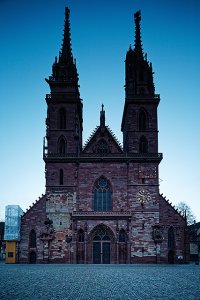
An ND and/or CPL filter can be useful depending on when you're shooting. In particular, with architecture if it's not night time, there are usually people around. I use a 10-stop ND to blur them out. The TS-E 24 is good for that, good 82mm filters aren't cheap but at least they're smaller than the Wonderpana setup I use with the 17mm lens. The shot below was taken with the TS-E 17 and the Wonderpana 145mm 10-stop ND, and was a >3 minute exposure (during which there were many pedestrians and cyclists passing across the field of view).
 

Attachments

  • Basel Münster.jpg
    Basel Münster.jpg
    361.9 KB · Views: 1,426
Upvote 0
quod said:
There is a flat button on the lens that you push in, which enables you to rotate the body so that you can change the direction of the tilt or change the direction of the shift.

On the 24mm II and the 17, there are two flat levers/buttons - one in back that allows you to rotate the whole lens (so you can shift in portrait vs. landscape orientation, for example), the other between the shift and tilt sections so you can change the relative orientation of shift vs. tilt (on the older TS-E lenses, you need to disassemble/reassemble the lens to do that).
 
Upvote 0
neuroanatomist said:
tpatana said:
1: Typical landscape

2: Typical tall building when standing relatively close

3: The "mandatory" miniature shot


For 1), I was reading one recommendation about rotating 30 degrees, and then shifting each end, rotate 30 to another side and again shift. Then stitch the 4 shots.

For bonus points: Seems tripod is recommended usually. Anyone use handheld?

And should I get ND and/or CPL?

1. You can certainly use shift to create a panorama, personally I find that 24mm is wide enough for most landscape shooting, and if I need a pano shot I'm better off with a longer lens (I use the 24-70 at the long end) in portrait orientation. For 'general' landscape use, ~0.5° of downward tilt will get near-to-far in focus at f/5.6-8.

2. This is my main use for TS-E lenses, and since 24mm often isn't wide enough, I also got the 17mm and I travel with both (and 17mm still isn't wide enough sometimes - in Europe, there are many big, lovely Münsters with very little space around them. For eliminating keystoning (the 'falling away' of buildings), have your camera level (the in-camera electronic level is quite handy) then apply upward shift until the verticals are straight.


EOS 1D X, TS-E 17mm f/4L, 30 s, f/9, ISO 100

Although normally with architecture shift is used but not tilt, sometimes both can be used. For example:


EOS 1D X, TS-E 17mm f/4L, 30 s, f/11, ISO 100

For the above shot, I placed the tripod close to the building (the Rathaus in Basel, Switzerland), pointed the camera straight up and used downward shift (because that's the way the camera was facing) to effectively move the camera even closer to the building, then I used a bit of downward tilt so the entire façade was in focus.

3. I've never shot the 'mandatory' miniature. ;) But a bit of upward tilt is what you need.

I have done a bit of handheld shift shooting, it's certainly possible but a bit awkward. A tripod is certainly preferable in most situations. One thing to be aware of is that shift and tilt will affect viewfinder-based metering, leading to over- or under-exposure (depending on the direction of the lens movement) if you're using an automatic mode or rely on the metering for manual settings. So, you can either meter with the movements in the neutral position then apply shift or tilt, or what is usually easiest is to use live view, since image sensor-based metering is not affected.

An ND and/or CPL filter can be useful depending on when you're shooting. In particular, with architecture if it's not night time, there are usually people around. I use a 10-stop ND to blur them out. The TS-E 24 is good for that, good 82mm filters aren't cheap but at least they're smaller than the Wonderpana setup I use with the 17mm lens. The shot below was taken with the TS-E 17 and the Wonderpana 145mm 10-stop ND, and was a >3 minute exposure (during which there were many pedestrians and cyclists passing across the field of view).
Wow, that second picture is positively delicious to my eyeballs!
 
Upvote 0
Thanks for the tips, especially those Neuro-pics are awesome. Need to play plenty when the lens arrives.

I already have the 77mm cpl, so I guess need to buy new one for this :( And/or ND, that might be more needed?
 
Upvote 0
Ok, played some with the lens, and also spent long time reading this: http://www.northlight-images.co.uk/article_pages/using_tilt.html

I was happy with the text and descriptions of how things work, until I spent time studying the cheat sheets they provide at the end. That got me plenty confused.

If I read it correctly, it gives the tilt angle you need for landscape photos to basically lay flat horizontal the focal plane when focused to infinity.

Sounds great, but the confusing part: why distance from ground would affect which tilt angle is needed for horizontal focal plane?

If you look the animated pictures earlier in the article, they show how the focal plane tilts with the lens tilt. That makes sense, but from that picture, there's only one tilt amount to make the focal plane horizontal, and it doesn't depend on the distance from ground.

Obviously I'm missing something in there, I just can't figure out what.
 
Upvote 0
tpatana said:
Ok, played some with the lens, and also spent long time reading this: http://www.northlight-images.co.uk/article_pages/using_tilt.html

I was happy with the text and descriptions of how things work, until I spent time studying the cheat sheets they provide at the end. That got me plenty confused.

If I read it correctly, it gives the tilt angle you need for landscape photos to basically lay flat horizontal the focal plane when focused to infinity.

Sounds great, but the confusing part: why distance from ground would affect which tilt angle is needed for horizontal focal plane?

If you look the animated pictures earlier in the article, they show how the focal plane tilts with the lens tilt. That makes sense, but from that picture, there's only one tilt amount to make the focal plane horizontal, and it doesn't depend on the distance from ground.

Obviously I'm missing something in there, I just can't figure out what.
it would be nice to have a magnified split-screen in live view with two independent zones to aid in manual focus, nailing depth of field, and focusing with tilt.
 
Upvote 0
tpatana said:
Ok, played some with the lens, and also spent long time reading this: http://www.northlight-images.co.uk/article_pages/using_tilt.html

I was happy with the text and descriptions of how things work, until I spent time studying the cheat sheets they provide at the end. That got me plenty confused.

If I read it correctly, it gives the tilt angle you need for landscape photos to basically lay flat horizontal the focal plane when focused to infinity.

Sounds great, but the confusing part: why distance from ground would affect which tilt angle is needed for horizontal focal plane?

If you look the animated pictures earlier in the article, they show how the focal plane tilts with the lens tilt. That makes sense, but from that picture, there's only one tilt amount to make the focal plane horizontal, and it doesn't depend on the distance from ground.

Obviously I'm missing something in there, I just can't figure out what.

First up - they are not 'cheat sheets' - they do require an understanding of what they are for :-)

Try duplicating the shots in my kitchen (with the bits of wood) in the article.

I've used this to show the use of tilt when teaching, and know that it sometimes takes a few goes before the 'lightbulb moment'.

If there is a specific part of the article that isn't clear, mail me directly or use the comment form and I'll see if I can make it clearer?
 
Upvote 0
keithcooper said:
First up - they are not 'cheat sheets' - they do require an understanding of what they are for :-)

Try duplicating the shots in my kitchen (with the bits of wood) in the article.

I've used this to show the use of tilt when teaching, and know that it sometimes takes a few goes before the 'lightbulb moment'.

If there is a specific part of the article that isn't clear, mail me directly or use the comment form and I'll see if I can make it clearer?

Just about to go prepare my traditional Christmas sushi, so I'll reply in longer after I've played some more with the lens.

But part of my problem is that I'm physicist by degree and engineer by trade, so I'm not satisfied with things "just" working, I must also understand why/how. I'm not doubting the behavior described in the article, but I have trouble wrapping my head around the idea that the horizontal plane requires different tilt depending on the distance from ground. So say I have camera at height X, and tilt Y degrees to make the focal plane horizontal. Now if I move the camera 30cm straight up, why would the focal plane not still be horizontal? Shouldn't it just be 30cm higher than it used to be?

And using the "cheat sheets" ( ;D ), I'm ~176cm, so say I would hand-hold the camera ~165cm or so on typical stance. From the chart, I'm reading that I'd need only ~0.8 degree tilt to get the focal plane horizontal. At 0 degree, the focal plane is vertical (butterfly-example), so sounds interesting that only 0.8 degree would already have it horizontal.

So yes, need to go play with the lens to get used to those tilts and all, but one day I'd love to also understand _why_ it behaves like that.

Now, those fish ain't gonna fry themselves...
 
Upvote 0
tpatana said:
So say I have camera at height X, and tilt Y degrees to make the focal plane horizontal. Now if I move the camera 30cm straight up, why would the focal plane not still be horizontal? Shouldn't it just be 30cm higher than it used to be?

Yes, in that scenario, the focal plane will still be horizontal, and 30cm higher than it used to be. If that's what you want, great, but often it's not what you would be looking for. Assuming that the focal plane was at ground level in the first place, and that you want to put it back on the ground after raising your camera 30cm, that's where you'll have to adjust tilt. You can't just move the focus ring, because your plane of focus will not remain horizontal. You'll have to adjust focus AND tilt (in your example, lower the amount of tilt).
 
Upvote 0
NorbR said:
tpatana said:
So say I have camera at height X, and tilt Y degrees to make the focal plane horizontal. Now if I move the camera 30cm straight up, why would the focal plane not still be horizontal? Shouldn't it just be 30cm higher than it used to be?

Yes, in that scenario, the focal plane will still be horizontal, and 30cm higher than it used to be. If that's what you want, great, but often it's not what you would be looking for. Assuming that the focal plane was at ground level in the first place, and that you want to put it back on the ground after raising your camera 30cm, that's where you'll have to adjust tilt. You can't just move the focus ring, because your plane of focus will not remain horizontal. You'll have to adjust focus AND tilt (in your example, lower the amount of tilt).

If that were completely true, the focal plane is always horizontal no matter what, since that chart covers basically every tilt angle. It'd be just question of how high from ground the plane is, or how much below ground.

So what I'm saying, there's some missing piece on the puzzle that I haven't figured out yet.
 
Upvote 0