
Video Noise - Does this look right?

Status
Not open for further replies.
Jul 5, 2013
4
0
4,611
I've shot film and video for 30 years, but am new to the Canon Mark lll. Today, I'm returning my second camera in two weeks due to unacceptable noise and faint vertical stripes in underexposed areas. ISOs in multiples of 320 minimize but don't eliminate the problem. Flat picture profiles, which I prefer for grading, make the issue worse.

The problem is very obvious even with video displayed on a broadcast monitor direct out of the HDMI port. It is more subtle on the attached still grab, but still apparent in the wall upper left. When panning, it's almost as if I were shooting through something vertical very close to the lens. BTW, I've tried several lenses as well as older and current Canon firmware. Haven't loaded Magic Lantern yet. Insights would be appreciated. Is this just how it is supposed to look?
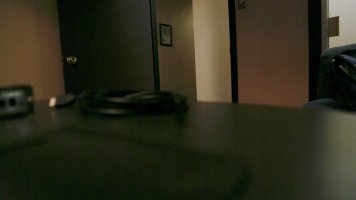
 

Attachments

  • 5D noise test still.jpg
    5D noise test still.jpg
    138.8 KB · Views: 762
We record light. You are trying to record dark. I've been doing video a mere 12 years, and the first thing I look at in any scene is the quality quantity and colour of the light, and what I'll need to add.

High ISO looks particularly yukky on video because the noise is animated and the picture detail is moving.

Don't be fooled by high ISO's. Put your film or video hat back on. Current DSLRs are great, especially for stills. They need light to work though.
 
Upvote 0
In response to the two responses regarding my noisy video: This image was intentionally underexposed to check the noise performance in shadow. I sometimes shoot drama, and sometimes even in corporate/industrial shooting I need to deliver a picture this dark.

I shot a video early this week on a white soundstage with products displayed on white columns. When I panned across closeups of the dark product and when talent in dark clothing moved across the frame, you could see (on a large monitor) faint vertical stripes. Everything was properly exposed using Canon 24-105 f4 lens at ISO 320, 30 fps, 1/60 shutter. When I look at pans or movement across the frame, it almost looks like I have some a filter in that is producing subtle vertical stripes. And, yes, I've removed the low-priced protective glass and experimented with faster, sharper lenses.

The still sample still was shot at 640 ISO 30 fps, 1/30 shutter. 320, 640 and 1250 are the sweet spots for low noise with this chip. ISO below 320 doesn't help, although ISOs above 1250 do exacerbate the problem.

Thanks again for your input.
 
Upvote 0
The noise in your video is, unfortunately, completely normal for that kind of a scene. It's simply the way it is. The obvious solution is to get more light onto the sensor, that won't eliminate noise altogether but it will help keep it manageable.

I would also recommend using something like Neat Video (works wonders) to clean the image up in post. If you use it correctly, it can get you fantastic results. I've gotten extremely dark, ISO 1600+ footage looking cleaner than stuff shot at ISO 100, I kid you not.
 
Upvote 0
I use a 6D all the time (not a 5D3) but they should have similar noise performance in video mode. I can't imagine seeing that much noise on my 6D until I had passed 5000 or so.

That being said, if you are using Flaat_11 or Flaat_12 you'll definitely get a ton of noise in the shadows and mids. I don't shoot anything flatter than Flaat_10 on my 6D except in extreme circumstances because the amount of noise kills me and I often can't get it back in post. Flaat_11 is noisy, Flaat_12 is just plain gross no matter what you do. It's not the camera, it's the amount those profiles push the levels. I would love to have 12 stops of dynamic range in my video shots, but not if the noise is that pronounced.

So I guess what I'm trying to ask is, what exact picture profile were you using?
 
Upvote 0
Mpicts said:
I've shot film and video for 30 years, but am new to the Canon Mark lll. Today, I'm returning my second camera in two weeks due to unacceptable noise and faint vertical stripes in underexposed areas. ISOs in multiples of 320 minimize but don't eliminate the problem. Flat picture profiles, which I prefer for grading, make the issue worse.

The problem is very obvious even with video displayed on a broadcast monitor direct out of the HDMI port. It is more subtle on the attached still grab, but still apparent in the wall upper left. When panning, it's almost as if I were shooting through something vertical very close to the lens. BTW, I've tried several lenses as well as older and current Canon firmware. Haven't loaded Magic Lantern yet. Insights would be appreciated. Is this just how it is supposed to look?

As Meatball_Sub wrote, that amount of noise is absolutely normal when you underexpose a dark area, expecially with hi ISO and flat picture profiles. You can reduce a bit this problem using the Magic Lantern ISO settings and the maximum in-camera hi ISO noise reduction, but you won't get rid of it. As far as I know, color grading is the only way to achieve a "dark look" without a lot of video noise.
 
Upvote 0
Thanks to all for the input. I replaced the camera for the third time and the image is vastly improved! It'd turned the camera and made sure I got one with a very different serial number. The difference is unmistakable, even at high ISO and flat picture profile.

There must have been a bad lot coming from the factory. My third 5D is beautiful.
 
Upvote 0
Mpicts said:
Thanks to all for the input. I replaced the camera for the third time and the image is vastly improved! It'd turned the camera and made sure I got one with a very different serial number. The difference is unmistakable, even at high ISO and flat picture profile.

There must have been a bad lot coming from the factory. My third 5D is beautiful.

Any chance to see a new screen shot for your new perfect 5D?
 
Upvote 0
Status
Not open for further replies.