Your Canon EOS-1D X user tips

Status
Not open for further replies.
bdunbar79 said:
Aaron78 said:
Don't mean to butt in on this post, but does anyone that owns the 1dx have anything they don't like so far? I sold my 5dII to get one, and really loved the sharpness from it but wanted an updated system. Can you crop photos as well with the 1dx as, say, the 5dII and 5dIII and be still super sharp? How does everyone feel about the dynamic range? Thank you

I can say that the exposure is more accurate and the colors are more accurate, on the 1DX vs either 5D's. You cannot quite crop as far on the 1DX as you can on the 5D3. It's not a huge difference, just be careful about lens choice vs. object you are shooting to ensure that you don't have to do a ton of cropping. For most typical crops, the 1DX is just great. The pictures from the 1DX tend to look a bit better than the 5D3.

I would never crop if i didn't need to, but small birds can be tough and i can't quite afford a 600mm f4 at the moment so it may be required from time to time. Thanks for the feedback.
 
Upvote 0
So I thought it was the Wakeboard finals today, but no, it was only wakesurf, yesterday was wakeBOARD. Wakesurf are for chilli'n and when you're hung over, so very little to watch and try camerawise.

Completely flat but bright (backlit) made it even worse.

I used Case 6 and bakced off the auto-switch one step, seemed to work great. What an AF system this is!

Here's an example. Had to use gradients to not end up with suuperfalt light like the raw was.

surf.jpg
 
Upvote 0
Richard Lane said:
Glad you're happy with the results. It certainly looks like it nailed focus.

Now, we all need longer lenses again! :)

Yeah, every shot was pretty much as sharp as they come with the 135. I struggled a bit with the MA, my FoCal software said -9, but I had it at -7 before and went back and forth on those, ending up on the last shots at -8. Came home and calibrated again with way longer distance to target, and ended up with -8 :P

The diffcult thing was to keep the surfer focused when the waves came up between me and the surfer. I couldn't use Case 2 as this would lead to a lot of OOF pictures. I backed down the auto switch, as mentioned, and it helped a great deal.

Any other hints for both tracking erradic movement AND ignoring subjects that momentarely block my subject? I used 8 pt surrounding, and I must say, it worked way better than anything I have ever tried (I had a 5d3 and 1d4)
 
Upvote 0
Viggo,

I fire a 3-4 shot burst on every shot I take. That way at least 1 or 2 will be spot on. If you depend on one shot in any Canon DSLR's AI Servo mode, the hit rate with something this challenging will be less than 70%, in my experience. So switch to AI Servo, "L" burst rate, which is 3 max. Or you can select "H" and shoot say, 4 shot bursts. I've found this to be superior to tracking cases and hit rates.
 
Upvote 0
bdunbar79 said:
Viggo,

I fire a 3-4 shot burst on every shot I take. That way at least 1 or 2 will be spot on. If you depend on one shot in any Canon DSLR's AI Servo mode, the hit rate with something this challenging will be less than 70%, in my experience. So switch to AI Servo, "L" burst rate, which is 3 max. Or you can select "H" and shoot say, 4 shot bursts. I've found this to be superior to tracking cases and hit rates.

Yeah, I have it at 12fps, and I would usually shoot off 2-4 shots of a small event, like a surf-trick, but I like to get better at tracking and understand really how to set up the gear and how to track for best possible results. And many of the shots from today were just ONE shot, and they were still perfectly focused, and with the shortened relase-lag , it's hard to miss with this incredible camera. But I can always improve!
 
Upvote 0
Viggo said:
The diffcult thing was to keep the surfer focused when the waves came up between me and the surfer.
I was looking for a setting for this as well. On the MKIV, there is a setting with 2 horizontal points only, without any lower or upper expansion points. It's commonly used for tennis, so that the lower point doesn't hit the net, but I found that it worked with surfing too, in order to not have the lower point hit the bottom portion of the wave or backwash. I don't see this setting on the 1DX.

The other thing you could do, is change to only 4 expansion points instead of 8, so this way you'll have 2 less lower points.

Of course, you could also raise the entire expansion point configuration higher in the frame, or use single point which makes tracking more difficult.

Viggo said:
Any other hints for both tracking erradic movement AND ignoring subjects that momentarely block my subject? I used 8 pt surrounding, and I must say, it worked way better than anything I have ever tried (I had a 5d3 and 1d4)

To avoid obstructions, you just have to lower the Tracking Sensitivity from Zero to -1/2 or -1.

The lower it is the longer it will ignore the obstruction. Set it too low and it will delay locking onto a new target. To change to a new target quickly, you can just take your finger off of the AF button and then re-lock your AF onto the new target, without waiting for the tracking sensitivity to let go of the previous target.

Rich
 
Upvote 0
Viggo said:
bdunbar79 said:
Viggo,

I fire a 3-4 shot burst on every shot I take. That way at least 1 or 2 will be spot on. If you depend on one shot in any Canon DSLR's AI Servo mode, the hit rate with something this challenging will be less than 70%, in my experience. So switch to AI Servo, "L" burst rate, which is 3 max. Or you can select "H" and shoot say, 4 shot bursts. I've found this to be superior to tracking cases and hit rates.

Yeah, I have it at 12fps, and I would usually shoot off 2-4 shots of a small event, like a surf-trick, but I like to get better at tracking and understand really how to set up the gear and how to track for best possible results. And many of the shots from today were just ONE shot, and they were still perfectly focused, and with the shortened relase-lag , it's hard to miss with this incredible camera. But I can always improve!

Yes and you are also shooting in very difficult situations. Even field sports it's tough to get every shot in focus and often times impossible, especially at night. I liked my keeper rate with the 1DX at night vs. the 1D4. Although, during the state track meet last year I didn't have one OOF shot with the 1D4 and looking at my RAW files, I had shot 1579 shots! If the 1DX can do that at night, well then that would be quite an improvement in itself.
 
Upvote 0
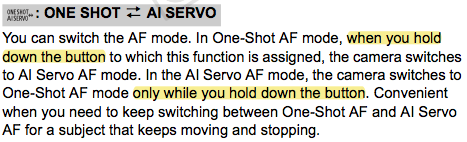
Has anyone tried to configure the automatic ONE SHOT to AI SERVO switching functionality in any of the allowed buttons? According to page 339 of the manual, if you are in One-Shot AF mode and you press the configured button the camera switches to AI Servo and you dont have to hold down the button. It seems it only works if you keep holding the button...
 
Upvote 0
smi said:
According to page 339 of the manual, if you are in One-Shot AF mode and you press the configured button the camera switches to AI Servo and you dont have to hold down the button. It seems it only works if you keep holding the button...

You might want to re-read that page. Hold ≠ press. Nowhere does it say when you press the button. FWIW, I have this assigned to my M.Fn2 button, and it's quite handy - I can hold it down with my ring finger easily while shooting.
 

Attachments

  • OneShot-Servo.png
    OneShot-Servo.png
    33 KB · Views: 996
Upvote 0
Warm thanks for the clarification Neuro. I guess I misread the instruction. I have also assigned this function to M-Fn2 button. I guess I have to try to see how easy is to use it in action. May I also ask what is your preferred buttons configuration? Warm thanks. I am thinking of assigning RAW/JPEG switch to DOF, and ISO setting to the SET button... I have also assigned *H to the * button.
 
Upvote 0
smi said:
May I also ask what is your preferred buttons configuration? Warm thanks. I am thinking of assigning RAW/JPEG switch to DOF, and ISO setting to the SET button... I have also assigned *H to the * button.

Most of mine are default - I actually use AE Lock and DoF Preview as intended reasonably often. I do have back-button AF set up, direct AF point selection with the multicontroller, and my M.Fn1 button is set to "C" (successive presses cycle between the C# settings, thanks Rich for the suggestion!).
 
Upvote 0
I've started to use the AF-ON button as AF-ON and not OFF lately, and it takes a lot of stress off my triggerfinger. But wasn't there an option on the mk4 where the shutterbutton would only take the picture and not (also) AF? The way I have the 1d X set up now is so that both the AF-ON and the shutterbutton do AF. I kind of like that way if I just press the shutter (old habit VERY hard to turn) I still have normal AF operation.

I have the dof button to stop AF and the m***f***n button no.2 to switch to One Shot. Do you guys have it primarly set to Ai or One shot?
 
Upvote 0
Viggo said:
But wasn't there an option on the mk4 where the shutterbutton would only take the picture and not (also) AF?

Yep, on all recent cameras, even the Rebels. That's back-button AF, and I use it routinely. You set the shutter to metering start only, AF-ON to autofocus + metering start.
 
Upvote 0
Viggo said:
The way I have the 1d X set up now is so that both the AF-ON and the shutterbutton do AF. I kind of like that way if I just press the shutter (old habit VERY hard to turn) I still have normal AF operation.

I have the dof button to stop AF and the m***f***n button no.2 to switch to One Shot. Do you guys have it primarly set to Ai or One shot?

You should definitely set it up as Neuro suggested. The way you have it now, the final AF will happen at the shutter-button, so essentially the AF-On has very little relevance in your set-up. Once you detach AF from the Shutter button then you wont need AF stop anymore, since all you will have to do to stop AF, will be to remove your finger from the AF-on button. It will take a little getting used to, but I find it a lot better to track and AF with one button (as opposed to a half shutter press) and then when I see the shot that I like, just fire away on the shutter button. You should switch it now for practice and not right before an event, because otherwise I guarantee you that you will forget to AF and you will have OOF shots, everyone does it when they first switch.

90% of the time I'm in AI Servo. I will switch with the AI Servo<-->One Shot Button for perched birds, and switch with the AF mode button for portraits and landscapes.
 
Upvote 0
Richard Lane said:
90% of the time I'm in AI Servo. I will switch with the AI Servo<-->One Shot Button for perched birds, and switch with the AF mode button for portraits and landscapes.

Can different selection modes be associated with the press-and-hold toggle between AI Servo and One Shot? For example, in servo I'm using 61-pt auto selection a subject can be tracked right across the frame and so iTR can be used, but when I press M.Fn2, I don't want 61-pt auto selection. I suspect the answer is no, but maybe I missed something?
 
Upvote 0
@Richard: Are you sure the "last AF is on the shutter" ? Because if I aim at something white and the AF-light strobes and the AF just sits there and I press the shutter, it does NOTHING, but if I release the AF-ON in the same no-af possible situation, it tries again. Same thing in One Shot, if I lock with either button the other doesn't do anything as long as the first is pressed. SO if the AF-ON has priority then I can keep AF on both buttons for reasons mentioned below.

Ah, okay... So I set the shutterbutton to meter when pressed.. Yeeeeah, well then I guess it might not be for me then, just because, If I want to shoot a shot in One shot, I first have to press the m...f..n button to switch to One Shot from Ai, then push the AF-ON button on the back, hold them and then push the shutter. To me, using three buttons to take a picture is ridicolous.

In Ai though, it's pretty great! Canon should do a combo, where I can have One shot at the shutter button alone, and then Ai on the AF-ON button, so when it's pushed it's Ai on the AF-on and only release on the shutter, and if I just want one shot release the AF-ON and take shot like you always have (with One Shot focus).
 
Upvote 0
Status
Not open for further replies.