The structure of a CR2 file

DominoDude

Certified photon catcher
Feb 7, 2013
910
3
10,156
::1
First, I may have placed this in a thread / topic in which it don't belong. Feel free to inform me or move it (if you have such powers). Was the best I could figure out for now, and no search returned anything showing the same or similar content.

For those who want to waste a few hours, or if you just need to know all and everything about what can be found inside a typical CR2 file and which structure it has, then you might enjoy some information found here -> http://lclevy.free.fr/cr2/
It is presented as a work in progress, so take it for what it is.

There should be some "But I knew that already", a few "Oh, that's interesting", and perhaps even a "Bah, who cares".
 
DominoDude said:
It is presented as a work in progress, so take it for what it is.

You might want to check with Phil Harvey's exiftool site and the Canon maker notes there, he's also done a lot of research and it's the most complete list of Canon props I know. If your list is better than his, let him know so he can amend exiftool with your information.
 
Upvote 0
OK, that's pretty cool/neat. A great reference! It also might explain a little bit why every new model has a different RAW file that we have to wait for aftermarket software developers like Adobe to decode/reverse engineer.

What I really wish that Canon, Nikon, Pentax, etc would do is change their stance on the RAW file being proprietary and issue a SDK (Software Development Kit) for all 3rd party software companies to use in advance of the release of a new camera model so they can release software updates quickly. In other words, offer software support and cooperation to make new camera releases a smoother experience for everyone.

It's ludicrous for Canon, et al. to assume that any serious photographer will not use a program like Photoshop or Lightroom on their images. In other words, Canon's "competing" image software is only an anecdotal answer and so should not be considered a reason to limit support for "competing" aftermarket editing software. Keeping the RAW file a secret simply makes everyone's life difficult and I assume slows down sales of a camera as well. Many photographers will simply wait to purchase until Adobe, et al. have support ready for that new camera. So Canon is actually hurting their own sales over a petty file format/software policy.

Anyone else have a different take it this? Am I missing something?
 
Upvote 0
RustyTheGeek said:
OK, that's pretty cool/neat. A great reference! It also might explain a little bit why every new model has a different RAW file that we have to wait for aftermarket software developers like Adobe to decode/reverse engineer.

What I really wish that Canon, Nikon, Pentax, etc would do is change their stance on the RAW file being proprietary and issue a SDK (Software Development Kit) for all 3rd party software companies to use in advance of the release of a new camera model so they can release software updates quickly. In other words, offer software support and cooperation to make new camera releases a smoother experience for everyone.

It's ludicrous for Canon, et al. to assume that any serious photographer will not use a program like Photoshop or Lightroom on their images. In other words, Canon's "competing" image software is only an anecdotal answer and so should not be considered a reason to limit support for "competing" aftermarket editing software. Keeping the RAW file a secret simply makes everyone's life difficult and I assume slows down sales of a camera as well. Many photographers will simply wait to purchase until Adobe, et al. have support ready for that new camera. So Canon is actually hurting their own sales over a petty file format/software policy.

Anyone else have a different take it this? Am I missing something?
Given that Canon offers Lightroom with some of its bodies, it does seem like a stupid way of doing things.
 
Upvote 0
Marsu42 said:
DominoDude said:
It is presented as a work in progress, so take it for what it is.

You might want to check with Phil Harvey's exiftool site and the Canon maker notes there, he's also done a lot of research and it's the most complete list of Canon props I know. If your list is better than his, let him know so he can amend exiftool with your information.
I think ExifTool is "ganz genau" on par with the information I found here, but ExifTool is more commonly known, so I added this snippet to broaden the knowledge in the geek in us.
If nothing else there is a cross reference section; that is always a good sign that the facts and information is valid and usable.

____
I've used ExifTool since early on this year, and could still make use of a few bat-files to ease that manoeuvre - I keep poking around at all the wrong places with a not so smart use of options/flags. As soon as I manage to get some structure into that I will create myself some useful scripts. For now, too much change between the sessions so I just run directly from the prompt and fiddle with options until I get temporary fixes to whatever problem or question I had.
 
Upvote 0
RustyTheGeek said:
OK, that's pretty cool/neat. A great reference! It also might explain a little bit why every new model has a different RAW file that we have to wait for aftermarket software developers like Adobe to decode/reverse engineer.

What I really wish that Canon, Nikon, Pentax, etc would do is change their stance on the RAW file being proprietary and issue a SDK (Software Development Kit) for all 3rd party software companies to use in advance of the release of a new camera model so they can release software updates quickly. In other words, offer software support and cooperation to make new camera releases a smoother experience for everyone.

It's ludicrous for Canon, et al. to assume that any serious photographer will not use a program like Photoshop or Lightroom on their images. In other words, Canon's "competing" image software is only an anecdotal answer and so should not be considered a reason to limit support for "competing" aftermarket editing software. Keeping the RAW file a secret simply makes everyone's life difficult and I assume slows down sales of a camera as well. Many photographers will simply wait to purchase until Adobe, et al. have support ready for that new camera. So Canon is actually hurting their own sales over a petty file format/software policy.

Anyone else have a different take it this? Am I missing something?

Si si. A CR2 file is much like a big Pelican case with slots for all and everything, and with a table of content hanging on the inside of the lid describing where everything is and how big it's supposed to be. It would/should be extremely easy for Canon to make this common knowledge, and it would certainly make it easier for a handful of existing software designers and future appl makers. In no way would it compromise the inner workings of Canon nor take away from what they do best (making slightly too noisy sensors that we grind our teeth over :) ). Done right, it could even give them a good amount of goodwill.

I haven't looked into the other existing formats from other manufacturers, nor the general DNG format, but I would assume that they are not all too different from each other.
 
Upvote 0
DominoDude said:
I haven't looked into the other existing formats from other manufacturers, nor the general DNG format, but I would assume that they are not all too different from each other.

The dng format is made to be independent from manufacturers, and as far as I've looked into it I really like what Adobe does here. You have a some choices (embed thumbnail or not, fast load data) that makes it "better" and more flexible than cr2. Last not least, the lossy dng format with still lossless wb operation is great.
 
Upvote 0
Since I have a large format printer I've realized that raw processed with ACR are very noisy while the same raw processed with DPP can be enlarged without problem.
I use DPP to make a TIFF, and then i open it in Ps.
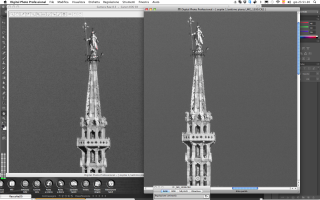
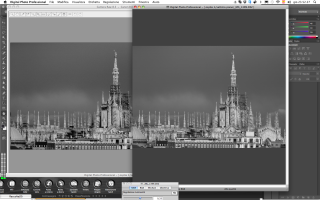
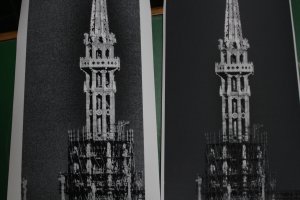
The attached example is from a test from a 90 x 135 cm print size left ACR right DPP.
The printer is an HP Z3200 camera EOS 5D
I decided to buy the printer when the lab said "12 mpx is not enough, you have to buy another camera".
 

Attachments

  • Schermata 2014-11-06 a 23.51.20.png
    Schermata 2014-11-06 a 23.51.20.png
    1.3 MB · Views: 264
  • Schermata 2014-11-06 a 23.52.27.png
    Schermata 2014-11-06 a 23.52.27.png
    927.1 KB · Views: 222
  • IMG_9079.jpg
    IMG_9079.jpg
    247.4 KB · Views: 243
Upvote 0
marcel said:
Since I have a large format printer I've realized that raw processed with ACR are very noisy while the same raw processed with DPP can be enlarged without problem.

You're definitely doing something wrong there. ACR has very good denoising, as far as I remember it has even improved in the latest version(s). Denoising and sharpening parameters cant take some trial&error tweaking, and you might to have the denoise brush for some areas. And DxO's PRIME might be better for high iso. But having said that, I'm sure dpp cannot be that superior.

marcel said:
I decided to buy the printer when the lab said "12 mpx is not enough, you have to buy another camera".

As far as large print go - yes, I guess for 90x135cm (~a1+) 12mp is bordering on too low resolution, but it really depends on how much detail your scene has and from how far away you view it. Lucky me I never go beyond a3, so my 18mp is enough even after some amount of cropping.
 
Upvote 0
Marsu42 said:
marcel said:
Since I have a large format printer I've realized that raw processed with ACR are very noisy while the same raw processed with DPP can be enlarged without problem.

You're definitely doing something wrong there. ACR has very good denoising, as far as I remember it has even improved in the latest version(s). Denoising and sharpening parameters cant take some trial&error tweaking, and you might to have the denoise brush for some areas. And DxO's PRIME might be better for high iso. But having said that, I'm sure dpp cannot be that superior.

marcel said:
I decided to buy the printer when the lab said "12 mpx is not enough, you have to buy another camera".

As far as large print go - yes, I guess for 90x135cm (~a1+) 12mp is bordering on too low resolution, but it really depends on how much detail your scene has and from how far away you view it. Lucky me I never go beyond a3, so my 18mp is enough even after some amount of cropping.

This is what I thought before having the printer in my house.
 
Upvote 0
marcel said:
This is what I thought before having the printer in my house.

Indeed, I don't doubt you've spend some though on this - but the apparent immense difference from your screenshots is worthy of a troll posting :-p. I hope we'll get more input into this, I never used dpp and can only tell about the acr side. It's not like Canon has some secret anti-noise weapon hidden in their cameras or post software.

Edit: Imho you should open a new thread in the postprocessing section about it, few people will this off-topic issue in a "cr2 structure" thread.
 
Upvote 0
marcel said:
Marsu42 said:
marcel said:
Since I have a large format printer I've realized that raw processed with ACR are very noisy while the same raw processed with DPP can be enlarged without problem.

You're definitely doing something wrong there. ACR has very good denoising, as far as I remember it has even improved in the latest version(s). Denoising and sharpening parameters cant take some trial&error tweaking, and you might to have the denoise brush for some areas. And DxO's PRIME might be better for high iso. But having said that, I'm sure dpp cannot be that superior.

marcel said:
I decided to buy the printer when the lab said "12 mpx is not enough, you have to buy another camera".

As far as large print go - yes, I guess for 90x135cm (~a1+) 12mp is bordering on too low resolution, but it really depends on how much detail your scene has and from how far away you view it. Lucky me I never go beyond a3, so my 18mp is enough even after some amount of cropping.

This is what I thought before having the printer in my house.

Where do you live? I might have to drop by unannounced with a few 'test files'! :D
 
Upvote 0
Marsu42 said:
marcel said:
This is what I thought before having the printer in my house.

Indeed, I don't doubt you've spend some though on this - but the apparent immense difference from your screenshots is worthy of a troll posting :-p. I hope we'll get more input into this, I never used dpp and can only tell about the acr side. It's not like Canon has some secret anti-noise weapon hidden in their cameras or post software.

Edit: Imho you should open a new thread in the postprocessing section about it, few people will this off-topic issue in a "cr2 structure" thread.

if I were a troll would write in the Adobe forum. :)

I think is not off-topic. From the page linked in the first post:
"Why writing a document to explain the CR2 format and why not just asking to Canon ? Canon do not want to release the official specification of the format for "Intellectual Property" reasons."

People think adobe can not go wrong, it is taken for granted. It is much easier to accuse me to be a troll.
 
Upvote 0
marcel said:
I think is not off-topic. From the page linked in the first post

I didn't write this to rant at you, just to state that most CR regulars with insight into this nr matter won't find this discussion in this thread, and thus we won't be able to pin down the problem.

Btw I'm not such a fan of software monopoly Adobe, but I cannot deny their raw workflow and library management with LR is stellar (I couldn't run anything else on my old laptop anyway).
 
Upvote 0
marcel said:
Since I have a large format printer I've realized that raw processed with ACR are very noisy while the same raw processed with DPP can be enlarged without problem.
I use DPP to make a TIFF, and then i open it in Ps.
The attached example is from a test from a 90 x 135 cm print size left ACR right DPP.
The printer is an HP Z3200 camera EOS 5D
I decided to buy the printer when the lab said "12 mpx is not enough, you have to buy another camera".

I print big all the time, you are doing something wrong for there to be that kind of difference between the two.

In my experience DPP can be very slightly better than ACR on some files, but the difference is so small I practically never bother using it. For there to be such a noticeable difference, not just in the noise but in the contrast and detail as well, means there is something wrong.
 
Upvote 0
So wait, if I'm reading this right, Canon's CR2 files (in true RAW format) provide two greyscale images, each of whose pixels alternate between subpixels shot with two different color filters, and compresses those images in a lossless JPEG? No wonder the RAW files are so big. What they're doing is basically like using JPEG or MPEG compression on an interlaced video image without deinterlacing it first. When you do that, you give up almost all of the spatial redundancy that would otherwise be removed by compression, at least in one direction.

Four color channels is sensible. Three color channels (fold the greens together), would make some sense (though they would be different sizes, and the spatial redundancy would be a little screwy), but two channels is just plain wrong.... How could that possibly make sense?
 
Upvote 0