Hi,
this is my first post so please forgive me if I posted in the wrong section or if I did anything else wrong.
I just googled "5d mark iii instantly recalled af point" and google came up with http://cpn.canon-europe.com/files/education/technical/inside_canon_eos_5d_mark_iii/EOS_5D_Mark_III_AF_setting_guidebook.pdf which reminded me of the 1DX AF guide.
In the 1DX guide they write "Press the 'AF-point-selection-button-symbol' button while pressing the ISO button until you hear a beep" - this never worked for me and I was really disappointed as I thought the 5D3 and 1DX AF systems were the same. The functionality would be soooo cool!
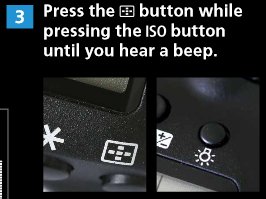
In the 5D3 guide they write the same, but the picture is showing the light bulb for the top LCD. I did what they wrote, but it did not work. Disappointed again. But after some experiments I finally got it to work!
The solution is: Press the AF-point-selection-button and hold it, then just press the top LCD light bulb button just once. Done!
Now I finally can switch instantly between my most used AF points.
I hope you find this useful and sorry if this had been mentioned earlier. I really like this forum and already learned a lot from you all so I thought it is about time to give you something back.
this is my first post so please forgive me if I posted in the wrong section or if I did anything else wrong.
I just googled "5d mark iii instantly recalled af point" and google came up with http://cpn.canon-europe.com/files/education/technical/inside_canon_eos_5d_mark_iii/EOS_5D_Mark_III_AF_setting_guidebook.pdf which reminded me of the 1DX AF guide.
In the 1DX guide they write "Press the 'AF-point-selection-button-symbol' button while pressing the ISO button until you hear a beep" - this never worked for me and I was really disappointed as I thought the 5D3 and 1DX AF systems were the same. The functionality would be soooo cool!
In the 5D3 guide they write the same, but the picture is showing the light bulb for the top LCD. I did what they wrote, but it did not work. Disappointed again. But after some experiments I finally got it to work!
The solution is: Press the AF-point-selection-button and hold it, then just press the top LCD light bulb button just once. Done!
Now I finally can switch instantly between my most used AF points.
I hope you find this useful and sorry if this had been mentioned earlier. I really like this forum and already learned a lot from you all so I thought it is about time to give you something back.