Can you use DPAF and then turn "Live View" off for low-light photography?

Jun 15, 2017
41
0
4,851
Hey all!

I'm looking at getting a 6D MKii (upgrading for a 60D) and I do a lot of low-light long-exposure photography where pollution from the camera can be an issue (see caves). I was wondering if it's possible set up a scene on a tripod with the articulating screen and DPAF and then turn the screen off before shooting a photo?

The articulating screen will make it easier to obscure the screen physically by draping a cloth over it, but it would be better if there was a button to turn it off. Do canons currently have such a thing?

Thanks!
 
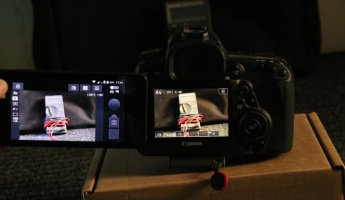
If you tether the camera using say a smart phone, the rear lcd does not come on, and you can blank the smart phone display.

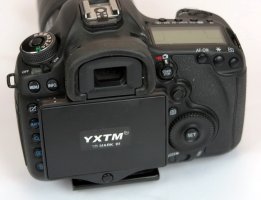
I have a hood over my rear lcd which acts as a shutter when its closed, it might not be a perfect light seal, but it will block 99%.
 

Attachments

  • 5D MK III shade Hood_1.JPG
    5D MK III shade Hood_1.JPG
    122.2 KB · Views: 135
  • 5D MK III shade Hood_2.JPG
    5D MK III shade Hood_2.JPG
    158.1 KB · Views: 137
Upvote 0
Mt Spokane Photography said:
If you tether the camera using say a smart phone, the rear lcd does not come on,

Are you sure?

I'd suggest the OP has a look at the manual or waits until someone with a 6D2 can try it out to see what's possible.

I do what Sporgon suggests too..

This is live view with a 5D4 tethered to a smart phone
 

Attachments

  • sf.jpg
    sf.jpg
    39.9 KB · Views: 140
Upvote 0
foo said:
Mt Spokane Photography said:
If you tether the camera using say a smart phone, the rear lcd does not come on,

Are you sure?

I'd suggest the OP has a look at the manual or waits until someone with a 6D2 can try it out to see what's possible.

I do what Sporgon suggests too..

This is live view with a 5D4 tethered to a smart phone

With Canon utilities, there is a option to turn the lcd on or off, I'm not certain if its there on the iphone. It was turned on by default, but I quickly turned it off.

I have not yet arrived at the point of tethering my 5D MK IV to my iphone, but my 5D MK III did not turn on the lcd.
 
Upvote 0
foo said:
Mt Spokane Photography said:
If you tether the camera using say a smart phone, the rear lcd does not come on,

Are you sure?

I'd suggest the OP has a look at the manual or waits until someone with a 6D2 can try it out to see what's possible.


This is live view with a 5D4 tethered to a smart phone

I hooked up to my iphone tonight:

You can turn off the live view display while tethered to my Iphone using a 5D MK IV and Camera connect. Just open the options settings and select "Live View Display" while in live view. This turns off the rear lcd and the display on my iphone. Then close the options panel and trigger the shutter.

The function is related to the camera connect app, and is likely to be the same for all DSLR's with Wi-Fi.

However, live view is not intended for long exposures. It will shut down after 30 minutes, if your battery does not run down first, its even less desirable to use a smartphone remote.

As mentioned above, use live view to autofocus, and then trigger the shutter with live view turned off.
 
Upvote 0
Mt Spokane Photography said:
foo said:
Mt Spokane Photography said:
If you tether the camera using say a smart phone, the rear lcd does not come on,

Are you sure?

I'd suggest the OP has a look at the manual or waits until someone with a 6D2 can try it out to see what's possible.


This is live view with a 5D4 tethered to a smart phone

I hooked up to my iphone tonight:

You can turn off the live view display while tethered to my Iphone using a 5D MK IV and Camera connect. Just open the options settings and select "Live View Display" while in live view. This turns off the rear lcd and the display on my iphone. Then close the options panel and trigger the shutter.

The function is related to the camera connect app, and is likely to be the same for all DSLR's with Wi-Fi.

However, live view is not intended for long exposures. It will shut down after 30 minutes, if your battery does not run down first, its even less desirable to use a smartphone remote.

As mentioned above, use live view to autofocus, and then trigger the shutter with live view turned off.

Thanks! Exposure should be around 30 seconds.
 
Upvote 0
Sporgon said:
Just switch the camera to M mode, and back button focus. Set up exposure, composition, focus in live view. The just switch live view off and fire the shutter leaving everything set as was ;)

You people are awesome! Didn't know what back button focus meant, looked it up.

Essentially...

1. I'll change my focus to the back button so it doesn't auto-focus and I press the shutter button.

2. Change to live view, and (hopefully) be able to autofocus/manual tweak in low light

3. Switch back to viewfinder

4. Trigger shutter with intervalometer.

I didn't know that focus would hold switching between live view and the view finder, because they're separate focusing methods and as you pointed out, I was afraid it would autofocus when switched to viewfinder.

Thanks a ton! I'll try this!
 
Upvote 0
Am I missing something? Why not just switch the lens to MF instead of changing settings around to backbutton AF? Unless you prefer backbutton AF, but still.

Before liveview we would always use MLU and a remote shutter release after manually focusing through the viewfinder (ick). Having liveview makes this process easier by taking out the squinting through an angle finder for these shots but the rest should stay the same.
 
Upvote 0
wickedac said:
Am I missing something? Why not just switch the lens to MF instead of changing settings around to backbutton AF? Unless you prefer backbutton AF, but still.

Before liveview we would always use MLU and a remote shutter release after manually focusing through the viewfinder (ick). Having liveview makes this process easier by taking out the squinting through an angle finder for these shots but the rest should stay the same.

The manual switch solution works, but also risks moving the camera or changing the focus. Many photographers turn off AF by the shutter button half press. BBF is enabled by default, using it is a matter of personal preference, but I would not criticize anyone using it that way, many if not most pros use BBF to focus and disable focus with shutter half press so the shutter button won't change things once they have it focused where they want.
 
Upvote 0