Morgang321 said:
Well, I haven't even used this new camera on a shoot yet. Only random junk setting it up in the backyard. It wasn't always like this and it's a little hard to describe the problem. The first two days I had the camera there were no problems at all, takes excellent photos. It's updated to 1.04, but the problem didn't start directly after the update.
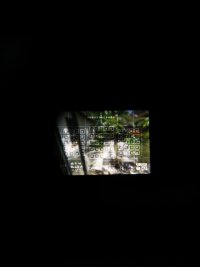
Yesterday I turned the camera on and the viewfinder was turned negative. So badly you can't even see what you're shooting. All the space in the viewfinder is gray, with all the logos and info written in empty space. I always see every single option that the viewfinder is able to display.
I reset the camera, turned it off and took battery out for 20 minutes. Tried to reapply the 1.04 update...
I have no idea what else to try. It wasn't an option I turned on and boom inverted I would have noticed right away because you're unable to see anything.
Any help would be extremely appreciated. I couldn't find a single other person having this problem.
Thanks guys
If you want to do some investigation before calling Canon, about the only thing I can recommend is that you check to see if the focusing screen is still anchored securely in the camera. Its a "user replaceable" part, which means it could have came loose (which is highly unlikely). If it did, it might be causing an electrical issue with the display components and if its misaligned - screwing with metering. (there could also be edge-light leak, a problem with the pentaprism assembly, a problem with the entire sensor and mirror housing assembly, an electrical fault - which is one of the most commonly repaired problems with the 7DmII - and a host of other minor and major issues) What I'm seeing on yours looks more like the focusing screen is either not fully receiving power, or is receiving inverted power. The display area looks "powered off" except for the display elements which are oddly transparent.
When completely powered off, the focusing screen has a dark, grainy appearance (as though you have DOF preview triggered), as the elements and the screen have no electrical charge going to them when looking through the OVF. When the camera is powered, the entire screen becomes electrically charged (which makes it transparent), and the information display components are either charged (Function ON = active, LCD polarized to be dark) or are Function-OFF (charged transparent and LCD un-polarized clear to match the active state of the screen). What you are seeing is no-power (screen is not charged to be transparent), however the display elements are receiving power and are not active (charged transparent, but not "on" to display a polarized LCD) An important thing to note, even when functioning correctly, the screen absorbs a certain percentage of light across its surface - this is because even inactive Liquid Crystal absorbs some light. In order to be "invisible when inactive" the active screen surface light absorption matches the LCD transparency. Keep in mind this is just what I've seen from my experience with LCD elements in transparent displays. Liquid Crystal reflects/transmits light in very interesting ways depending on how the crystal is charged and what direction the light is coming from.
Just be careful looking at it, and don't touch it unless you have the tools to work with the screen. If the focusing screen appears to be properly anchored, then it is most certainly a fault with the body. Canon is pretty much repairing these things ASAP as long as you have a valid warranty for the camera and can provide them some proof of a problem. That picture you took of the LCD is probably more than enough proof.
I was lucky to have service with the place where I bought my 7DmII where in the first 30 days they replace a body "no questions asked". I just showed them a picture that had an unholy glow around things that shouldn't have unholy glows unless you have petroleum jelly smeared on your optics or let your dogs lick your glass. It was pretty easy to see that everything I had in my kit was pristine and undamaged, so I got a new body and so far its been fantastic and seems to get better every time I use it and tweak it for my style. Of course there are horror stories that some people went through multiple bodies to find a properly working copy. But almost everyone who sent their camera to Canon for repair has been happy with the results - at least from what I can see from my humble monitoring of the internet for such things so I'm not caught by surprise with the "next" problem to crop up.