Caution: Sandisk SD Card Issue with 5D Mark IV

Nov 5, 2011
318
52
6,861
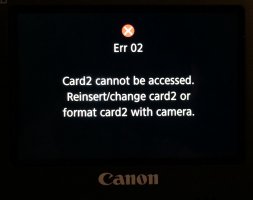
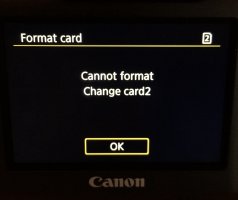
Just picked up a few new 128GB Sandisk SD cards from B&H and ran into an issue with one of them out of the box. The card was not able to be formatted by the 5D Mark IV, would not write to the card, and returned several errors. The write-protect switch was off and tried both ways just in case.

This is the card:
https://www.bhphotovideo.com/c/product/1275616-REG/sandisk_sdsdxxg_128g_ancin_extremepro_sdhc_128gb.html

These are the newer V30 / U3 cards:
SanDisk 128GB Extreme PRO UHS-I SDXC Memory Card (V30)
B&H # SAEPSD128GV3
MFR # SDSDXXG-128G-ANCIN

Not suggesting the problem is wide-spread, but something to be aware of. If you're picking any of these up, be sure to test them thoroughly before discarding the packaging materials.

Defective/bad card was returned to B&H and another was purchased.

For those wondering, these were 100% authentic cards - not import, off-market, or re-branded.
 

Attachments

  • FullSizeRender.jpg
    FullSizeRender.jpg
    511 KB · Views: 305
  • FullSizeRender 2.jpg
    FullSizeRender 2.jpg
    236.1 KB · Views: 327
Curious if you were able to try the card in another camera/device before you returned it...i.e., was it just a bad card and the problem had nothing to do with the 5DIV, or was it a 5DIV specific issue as you state in the title of your topic?
 
Upvote 0
neuroanatomist said:
Curious if you were able to try the card in another camera/device before you returned it...i.e., was it just a bad card and the problem had nothing to do with the 5DIV, or was it a 5DIV specific issue as you state in the title of your topic?

Was able to fully use the bad/defective card in a Canon 70D without any issues. Formatted, tested and worked with RAW photos, tested and worked with video, reviewed photos/video in-camera, re-formatted without issue.
 
Upvote 0
neuroanatomist said:
Good to know, thanks. Might be worth a call to Canon to inform them; IIRC something similar happened with CFast and the 1DX II and a firmware update fixed it.

Tried calling to report and got the runaround where no one could connect me to the right people/person. Sent an email to the support folks with all the info and will see if they get back to me. No longer have the card, so not sure I can be of much help to troubleshoot/diagnose further.
 
Upvote 0
bsbeamer said:
neuroanatomist said:
Good to know, thanks. Might be worth a call to Canon to inform them; IIRC something similar happened with CFast and the 1DX II and a firmware update fixed it.

Tried calling to report and got the runaround where no one could connect me to the right people/person. Sent an email to the support folks with all the info and will see if they get back to me. No longer have the card, so not sure I can be of much help to troubleshoot/diagnose further.
It was nice to inform us. Not all can we return a flash card. I guess 64GB sd cards will do just fine...
 
Upvote 0
Canon support says this might have been a "communications error", that the 5D Mark IV is compatible with SDXC cards, and they are forwarding to customer feedback for investigation. Seems like a fairly canned response that will not lead to any action.
 
Upvote 0
ricky_005 said:
neuroanatomist said:
Good to know, thanks. Might be worth a call to Canon to inform them; IIRC something similar happened with CFast and the 1DX II and a firmware update fixed it.

Explain your logic?

Why would you call Canon when its very apparent it was a defective Sandisk SD card?

bsbeamer said:
Was able to fully use the bad/defective card in a Canon 70D without any issues. Formatted, tested and worked with RAW photos, tested and worked with video, reviewed photos/video in-camera, re-formatted without issue.

It worked fine in another camera so it was not a failed card. Amazon lists it as first available September 17, 2016, so it's possible it's a defective design; however, it's a safe bet that a lot more of these cards have been sold and used than 5D4's, so the defect likely would have been noticed by now. So, it appears that the problem occurs when an otherwise good card is used in a 5D4. Therefore, it's likely (but not definite) that the problem is with the camera. It's also possible there's some odd interaction.
 
Upvote 0
I've had an issue with Card 2 - Sandisk 256gb Extreme Pro on Cam #1

Removed and reinserted and it was fine for the rest of the day. Sadly it's the end of the season so I'll not be putting enough frames through it to do a proper test. I am getting lockups the more I use the body and I don't know if it's specifically this #1 or if it's both yet.
 
Upvote 0
Orangutan said:
ricky_005 said:
neuroanatomist said:
Good to know, thanks. Might be worth a call to Canon to inform them; IIRC something similar happened with CFast and the 1DX II and a firmware update fixed it.

Explain your logic?

Why would you call Canon when its very apparent it was a defective Sandisk SD card?

bsbeamer said:
Was able to fully use the bad/defective card in a Canon 70D without any issues. Formatted, tested and worked with RAW photos, tested and worked with video, reviewed photos/video in-camera, re-formatted without issue.

It worked fine in another camera so it was not a failed card. Amazon lists it as first available September 17, 2016, so it's possible it's a defective design; however, it's a safe bet that a lot more of these cards have been sold and used than 5D4's, so the defect likely would have been noticed by now. So, it appears that the problem occurs when an otherwise good card is used in a 5D4. Therefore, it's likely (but not definite) that the problem is with the camera. It's also possible there's some odd interaction.

This was not a defective Sandisk card. The card worked perfectly fine in a Canon 70D. Had I not tried using it in a Canon 5D4, I honestly would not have suspected any issues and would have kept/used the card like any other. Again, these are the new U3/V30 Sandisk cards which replaced previous generation when they added the V30 spec.

I'm not sure what the issue was and I no longer have the card in my possession, so I cannot troubleshoot further. Wanted to caution anyone out there purchasing these new cards. Hopefully it's an isolated incident, but maybe not.
 
Upvote 0
KarelWH said:
Similar experience with a 32 GB Strontium Nitro micro sdhc card. Unable to reformat. Will try it in a 70D

Have a few friends with similar issues in the past and those turned out to be an issue with the SD adapter, not the micro SD card itself. I'm not sure what brand that is and have never used them. Maybe worth trying a different adapter?
 
Upvote 0
wockawocka said:
I've had an issue with Card 2 - Sandisk 256gb Extreme Pro on Cam #1

Removed and reinserted and it was fine for the rest of the day. Sadly it's the end of the season so I'll not be putting enough frames through it to do a proper test. I am getting lockups the more I use the body and I don't know if it's specifically this #1 or if it's both yet.

Was Cam #1 a Canon 5D4 or another camera?
 
Upvote 0
I've been using a 64GB SanDisk Extreme Pro SD with no issues (so far, knock on wood). Have you tried the card in another 5D4 to confirm whether it is an issue with the camera or just that specific unit?
 
Upvote 0
Act444 said:
I've been using a 64GB SanDisk Extreme Pro SD with no issues (so far, knock on wood). Have you tried the card in another 5D4 to confirm whether it is an issue with the camera or just that specific unit?

Have you been using one of...

bsbeamer said:
the new U3/V30 Sandisk cards which replaced previous generation when they added the V30 spec.

?
 
Upvote 0