Is this a common problem with the 5D mkIII?

Dec 26, 2015
13
0
4,746
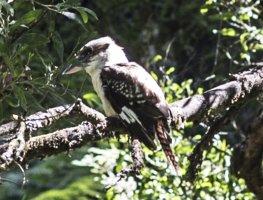
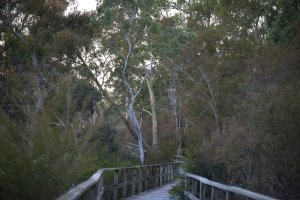
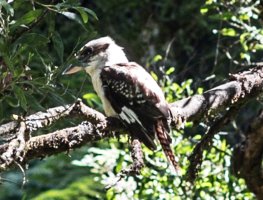
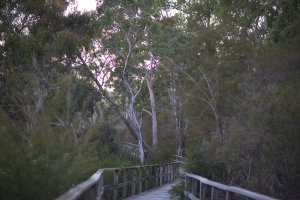
I occasionally get pinkish artifacts on my shots when there is a very bright area next to a darker area. Sometimes it only shows when you magnify the image (as in the Kookaburra photo below - this is cropped from a full frame shot, and then expanded to twice the size to show the problem), but sometimes it is plainly an issue even when not magnified (see the trees photo).

Any hints on what would cause this?

The Kookaburra was taken with an 85mm 1.2L II lens at f 4 and 1/125 sec @ iso 100
The trees were taken with an 85mm 1.2L II lens at f 1.2 and 1/60 sec @ iso 250
 

Attachments

  • IMG26482_Articfcat_Sample1200_800.jpg
    IMG26482_Articfcat_Sample1200_800.jpg
    420.5 KB · Views: 238
  • IMG27932Kookaburra_Sample_200%.jpg
    IMG27932Kookaburra_Sample_200%.jpg
    223.9 KB · Views: 222
Nothing to do with the camera. You're seeing longitudinal chromatic aberration (LoCA, sometimes referred to as purple-green fringing or bokeh fringing). It's a common issue with wide aperture primes like the 85L, mitigated by stopping down the lens.
 
Upvote 0
neuroanatomist said:
Nothing to do with the camera. You're seeing longitudinal chromatic aberration (LoCA, sometimes referred to as purple-green fringing or bokeh fringing). It's a common issue with wide aperture primes like the 85L, mitigated by stopping down the lens.
So if I understand you correctly, it is a combination of the wide-open wide aperture lens and high contrast ratio in the shot itself?
 
Upvote 0
neuroanatomist said:
Nothing to do with the camera. You're seeing longitudinal chromatic aberration (LoCA, sometimes referred to as purple-green fringing or bokeh fringing). It's a common issue with wide aperture primes like the 85L, mitigated by stopping down the lens.
Didn't suspect that. Thanks!
 
Upvote 0
Here's an old post demonstrating LoCA with the 85L II, using a specular highlight as the harsh contrast transition. You can see how the LoCA diminishes as you stop down from wide open.

http://www.canonrumors.com/forum/index.php?topic=13798.msg249293#msg249293
 
Upvote 0
DattaGroover said:
dcm said:
It's your lens. There are many articles describing it. Here's a good introduction from Roger.

http://www.lensrentals.com/blog/2010/10/the-seven-deadly-aberrations
Ah, thanks.

This is the exact issue that the new 35mm L is trying to prevent with its blue Spectrum refractive optics. If it sells lenses, we will see it in other wide aperture lenses.

http://www.dpreview.com/articles/9530547937/canon-ef-35mm-f1-4l-ii-usm-blue-spectrum-refractive-optics
 
Upvote 0
privatebydesign said:
What hasn't been mentioned is that it is comparatively easily removed in Lightroom or Adobe ACR under the Lens Corrections panel and the Color tab.

In cases like this one, the LR solution works well, since it replaces the purple with white. This is not the case where backgrounds are not white, since they suddenly have white spots or fringes.
 
Upvote 0
Mt Spokane Photography said:
privatebydesign said:
What hasn't been mentioned is that it is comparatively easily removed in Lightroom or Adobe ACR under the Lens Corrections panel and the Color tab.

In cases like this one, the LR solution works well, since it replaces the purple with white. This is not the case where backgrounds are not white, since they suddenly have white spots or fringes.
That's good to know. In my other example, with the kookaburra, that probably wouldn't work as well with its green background, though the aberration is much slighter. Neither of these are photos I plan t6o process or display - but it is nice to know what my options are.

A larger problem is when shooting video on the 5D with that lens. I had the problem a few days ago in New Zealand, though it is not that noticeable on a 1080p clip.
 
Upvote 0
Here is a photo with my 85mm f/1.8 showing the purple fringing or LOCA effect, and the lightroom fix. Look closely and you will see the gray/white that replaces the fringing. The purple glow in the upper left corner has become white. Its a severe crop at 1:1

IMG_4324-2.jpg


IMG_4324.jpg
 
Upvote 0
Mt Spokane Photography said:
Here is a photo with my 85mm f/1.8 showing the purple fringing or LOCA effect, and the lightroom fix. Look closely and you will see the gray/white that replaces the fringing. The purple glow in the upper left corner has become white. Its a severe crop at 1:1
Great example. It makes an otherwise unusable image usable.

Thanks!
 
Upvote 0