LR4.1 RC to blame. Check this out!

Status
Not open for further replies.
Here's what I was able to do with Aperture 3.2.3... differing from above in the use of the "Black Point" adjustment to eliminate the crushed blacks in the corner, a slight bump in exposure to move the whole histogram to the right slightly, and the shadow "Radius" adjustment to eliminate the dark shadow transition/halo effect, and a slight white balance adjustment to give it a more neutral tone.

I didn't even come close to maxing out the shadow slider... there's still plenty of room to move here, but the contrast starts to suffer.

I then used a dodge brush on top of all this to write my alias.

Bottom line, there is WAAAY more dynamic range in these RAW's than I ever thought possible.

p611876565-4.jpg

Larger size: http://chrismccormack.zenfolio.com/img/s3/v45/p611876565.jpg

p711023176-3.jpg


Here's a 100% crop of the dark corner area...
p744623374-4.jpg

Larger size: http://chrismccormack.zenfolio.com/img/s3/v38/p744623374.png

Here's the same area after applying Nik Dfine NR and a tad bit of sharpening...
p562140851-4.jpg

Larger size: http://chrismccormack.zenfolio.com/img/s3/v41/p562140851.png

Matt... you need to sweep the walk! :D
 
Upvote 0
I have my own technique which I think really maxes out shadow recovery from raw files. I have been using this for years since my digital rebel days, although I'm sure some of you have better/more efficient methods. This usually takes 20min or so of work and involves creating 3 different exposures from the raw and applying noise reduction to the mid and over exposed files. Then you stitch the 3 exposures together using hdr software or photoshop. Then I'll usually blend that in with the original file.

Anyway I rarely do this because it's work intensive but I was curious about the 5D III after reading this. Here are my results:

Original raw, saved as full sized tiff, resized and converted to jpg in photoshop. Not edited at all:
original.jpg


shadow recovery technique applied:
drrecovery.jpg


There is some loss of detail in the ferns but not bad considering the shadows were basically entirely black in the original shot. This technique works well; In the past I've even been able to extract some pretty crazy shadows from the rebel at 1600 ISO and clean it up. Even when shadow recovery is not needed, I've found this method to be useful for noise reduction while maintaining detail.

What's disappointing about all this is it proves beyond doubt that the data is there - it can be used but it seems the current photo processing software still is unable to give us a slider of some sort that will do all this automatically. I'll probably write up a detailed how-to on this soon for anyone interested. In the meantime I'll keep using this method and I'm glad to know the 5d III has this kind of DR, not that I was gonna use it anyway. Because let's be honest, if you need more dr than this you probably kind of suck at taking pictures. 8)
 
Upvote 0
I tried to use three different RAW converters on a 10000 RAW from today: focused not on shadow detail but on noise.
I find in terms of IQ ACR 6.7 > DPP (latest) > Aperture 3.2.3
 

Attachments

  • RAW Comparison.jpg
    RAW Comparison.jpg
    2.7 MB · Views: 2,227
Upvote 0
After viewing the jpeg I uploaded I see that there is no way anyone can tell a big difference. Well, let me describe:
135/2 at 2, School hall, darkish, Shutter 1/250, ISO 10.000, import in Aperture: strong grainy noise, no shadow lift possible. After RAW de-noise: no big improvement.
Import into DPP: cleaner with luminance 16, croma 10, sharpness 3, much cleaner than Aperture.
Import into ACR 6.7 (latest): after noise adjustments - best possible outcome. Shadow adjustment possible but still limited (ISO 10000!)
Now I need someone to explain to me how to batch-process in ACR... :) This is the first time I used it! Up till now I just shot standard pictures with max ISO 400 ... or 800 at most. This camera makes me want to stretch the time!
 
Upvote 0
VirtualRain said:
Here's what I was able to do with Aperture 3.2.3... differing from above in the use of the "Black Point" adjustment to eliminate the crushed blacks in the corner, a slight bump in exposure to move the whole histogram to the right slightly, and the shadow "Radius" adjustment to eliminate the dark shadow transition/halo effect, and a slight white balance adjustment to give it a more neutral tone.

I didn't even come close to maxing out the shadow slider... there's still plenty of room to move here, but the contrast starts to suffer.

I then used a dodge brush on top of all this to write my alias.

Bottom line, there is WAAAY more dynamic range in these RAW's than I ever thought possible.

Hello VirtualRain,
I just wanted to make sure before I get too excited. So please correct me if I am wrong,

So in terms of dealing with dark areas, Lightroom is bad for CR2 files right ?
and we should use DPP or Aperture instead. Correct ?
 
Upvote 0
VirtualRain said:
I didn't even come close to maxing out the shadow slider...

Bottom line, there is WAAAY more dynamic range in these RAW's than I ever thought possible.

I suppose coming from a sound background and working with mixing boards makes me exceedingly comfortable messing with sliders, in fact my biggest discomfort is *not* moving sliders...

All to say that most of the softs out there are going to be capable of rendering very good results if you learn to use them properly. And the supposed "5D3 shadow problem" simply is a non-issue. Heck I get great results with my 5D2 and even with my 50D.

Which brings me back to the utter goofiness of the Fred Miranda blog on this subject. Granted he was also working with a preview version of LR that is now known to be problematic, but the entire premise to make a comparison based on *default* slider settings is pure goofiness and of absolutely no value to anyone. Plus as we've seen it is extremely misleading until folks dig in and find the truth.

And this is not to diminish the stellar performance of the D800, but to put things into perspective.
 
Upvote 0
rushmore77 said:
Hello VirtualRain,
I just wanted to make sure before I get too excited. So please correct me if I am wrong,

So in terms of dealing with dark areas, Lightroom is bad for CR2 files right ?
and we should use DPP or Aperture instead. Correct ?

As skitron says above... the fact is that all of the RAW converters used in this thread (including LR) are able to get amazing detail out of the darkest shadows revealing an awesome dynamic range on the 5D3 and debunking bullsh1t that says otherwise.

Use the RAW editor you know best.

The title of this thread should be changed to "Unable to get good DR out of your 5D3?... learn how to use your RAW editor!" :D
 
Upvote 0
Dear all,

I'm new to this forum, and I am also fairly new to the art of photography. I do appologize if I haven't yet picked up on the "social rules" governing the forum--I've tried to read up a bit in advance so that I'd be somewhat prepared. I will learn the code, just please be a bit patient with me to start with.

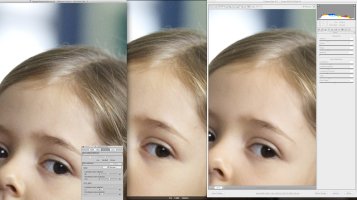
Anyways, even though my skillset is no match for this crowd I still want to try to hang around to learn from you guys. I'm the proud (and happy ;)) owner of a 5DM3, and I'm trying to wrap my head around the chatter on the raw processors out there. I've understood (as this thread points out) that one can get a long way in shadow recovery with quite a few of the processors out there. What I'm wondering is if you guys have made any new discoveries regarding the softness of the pictures produced by the new Adobe 2012 raw engine (LR 4.1 RC)? I've seen some example images from a similar thread showing that LR produces sharper images from the 5DM2 compared to 5DM3, but when using DPP (Canon software) the sharpness from 5DM3 is stellar.

I would do comparisons myself, but I wanted to check with the crowd's experience first.

Cheers!
 
Upvote 0
Status
Not open for further replies.