Need your help again, Dear Sir/ Madam

surapon

80% BY HEART, 15% BY LENSES AND ONLY 5% BY CAMERA
Aug 2, 2013
2,957
5
29,406
76
APEX, NORTH CAROLINA, USA.
Dear Sir/ Madam.
Yes the Most stupid question that I do not know and try to ask my friend( At my Home town Camera Clubs) for 2 years--- And No one know.
About time that I must ask my dear friends in CR, and all of m6y Teachers in CR.
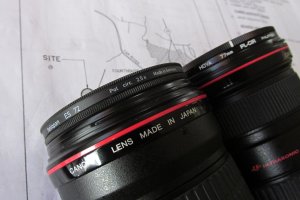
Yes, My Hoya Cir. PL , which they have Mark/ White mark at the outer ring, And That indicated the Sun Location for the Darkest Sky for PL effect and I can turn the outer ring to match the location of the Sun.

___ Big BUT, My high cost Heliopan ES 72 POL. Cir. 2.5X have Number 1, 2, 3,----To Number 26 at the Outer Ring of Filter, and NO ONE ( All of my Club friends) know, Plus I ask the Camera shop that I buy from---No one know----Ha, Ha, Ha- if Number 1 thru Number 24 ---I can guess that the hour of the day---How about 25 and 26---Might be Beer Time ??

Yes, Sir, For Helliopan Cir. PL, I use my eyes to point out the darkest Sky with no problem, But WHAT ARE THE NUMBER 1 to 26 for ?
Thank you, Sir.
Surapon

PS, If you see the photos below, That Indicate that I love my Canon EOS-M----Ha, Ha, Ha.

 

Attachments

  • PL-1.jpg
    PL-1.jpg
    121.3 KB · Views: 311
  • PL-2.jpg
    PL-2.jpg
    140.2 KB · Views: 307
  • PL-3.jpg
    PL-3.jpg
    95.9 KB · Views: 295
  • PL-4.jpg
    PL-4.jpg
    65.5 KB · Views: 286
  • PL-5.jpg
    PL-5.jpg
    91.9 KB · Views: 302
Sporgon said:
Hi Surapon, the numbers will be marking a scale of the polarisation axis, so just a reference to where you have it set.


Thank you, Sir, Dear Friend Sporgon.
But How can I set that number according to the sun's location ?. It must to have an easy way, Like HOYA's White mark.( ??)
Thanks again, Sir.
Surapon
 
Upvote 0
surapon said:
Sporgon said:
Hi Surapon, the numbers will be marking a scale of the polarisation axis, so just a reference to where you have it set.


Thank you, Sir, Dear Friend Sporgon.
But How can I set that number according to the sun's location ?. It must to have an easy way, Like HOYA's White mark.( ??)
Thanks again, Sir.
Surapon

Hi Surapon, I'm guessing that number 1 will equal the same axis as the White mark on the Hoya. I'm assuming the numbers go half way around the lens. Looks good anyway !
 
Upvote 0
surapon said:
Sporgon said:
Hi Surapon, the numbers will be marking a scale of the polarisation axis, so just a reference to where you have it set.


Thank you, Sir, Dear Friend Sporgon.
But How can I set that number according to the sun's location ?. It must to have an easy way, Like HOYA's White mark.( ??)
Thanks again, Sir.
Surapon
No It doesn't work like that. the polarisation is not time of day dependent but where your lens is in relation to the incoming light so if you are changing between 2 or 3 shooting positions constantly the helliopan allows you to remember which point is right for each position more easiliy without having to spend alot of time trying to optimise the polarisation through the viewfinder each time. Does that make sense? I hope so. Its just a arbitrary reference scale not and absolute reference scale related to anything specific.
 
Upvote 0
Description from B&H website:

One of the "wow" factors of this filter are the index markings on the edge of the filter ring. This allows you to hold the filter up to your eye, choose a point that you like for polarization, replace the filter on the camera and simply rotate the ring to the chosen mark.

Phil.
 
Upvote 0
Sporgon said:
surapon said:
Sporgon said:
Hi Surapon, the numbers will be marking a scale of the polarisation axis, so just a reference to where you have it set.


Thank you, Sir, Dear Friend Sporgon.
But How can I set that number according to the sun's location ?. It must to have an easy way, Like HOYA's White mark.( ??)
Thanks again, Sir.
Surapon

Hi Surapon, I'm guessing that number 1 will equal the same axis as the White mark on the Hoya. I'm assuming the numbers go half way around the lens. Looks good anyway !

Thank you, Sir, Dear Friend Sporgon.
I will try this 1 Mark as the maximum Super Dark Blue Sky color tomorrow nand will report back to you.
Thanks.
Surapon
 
Upvote 0
wickidwombat said:
surapon said:
Sporgon said:
Hi Surapon, the numbers will be marking a scale of the polarisation axis, so just a reference to where you have it set.


Thank you, Sir, Dear Friend Sporgon.
But How can I set that number according to the sun's location ?. It must to have an easy way, Like HOYA's White mark.( ??)
Thanks again, Sir.
Surapon
No It doesn't work like that. the polarisation is not time of day dependent but where your lens is in relation to the incoming light so if you are changing between 2 or 3 shooting positions constantly the helliopan allows you to remember which point is right for each position more easiliy without having to spend alot of time trying to optimise the polarisation through the viewfinder each time. Does that make sense? I hope so. Its just a arbitrary reference scale not and absolute reference scale related to anything specific.

Thanks you, Sir, Dear wickidwombat.
I will try to set start with Number "1" at the Sun location behind my shoulder up to number "25" and report back to you.
Thanks.
Surapon
 
Upvote 0
philmoz said:
Description from B&H website:

One of the "wow" factors of this filter are the index markings on the edge of the filter ring. This allows you to hold the filter up to your eye, choose a point that you like for polarization, replace the filter on the camera and simply rotate the ring to the chosen mark.

Phil.

Thanks, Dear friend Phil.
Tomorrow, I will mark the inner ring when as tight to the Lens, And remove the PL Filter---Put near my eyes at the mark at top of my eyes and rotate the outter ring until the darkest blue sky, and remember the location of the number as the same location of the sun---And Put the filter back to to lens---And I will turn the outer ring of filter to make that number point to the sun, and shoot the picture and will report back to you.
Dear Friend, You are right, That " WOW " Factor of this high cost Germany made are only for the " Super Smart Photographers " Only---Not for me ---Ha, Ha, Ha, I love easy way as Cir. PL by Hoya.
Thank you, Sir.
Surapon
 
Upvote 0
Some more info on the use of polarizers. You will notice that he says

Polarization is most effective at 90 degrees to the sun. This means that the subject that you are shooting will display maximum polarization at right angles to the sun's position. At 180 degrees, in other words with the sun right behind you, polarization is almost non-existent.
An old trick for visualizing the maximum angle is to turn your index finger into a gun (like when you were a child), with your thumb pointing upward. Make as if to shoot the sun with your finger and your thumb will point toward where polarization is at its most extreme. Remember though that this isn't just at one angle. Rotate your wrist through 180 degrees (if you can), because the entire circle around the sun is equally polarized.

http://www.luminous-landscape.com/tutorials/polarizers.shtml
 
Upvote 0
Mt Spokane Photography said:
Some more info on the use of polarizers. You will notice that he says

Polarization is most effective at 90 degrees to the sun. This means that the subject that you are shooting will display maximum polarization at right angles to the sun's position. At 180 degrees, in other words with the sun right behind you, polarization is almost non-existent.
An old trick for visualizing the maximum angle is to turn your index finger into a gun (like when you were a child), with your thumb pointing upward. Make as if to shoot the sun with your finger and your thumb will point toward where polarization is at its most extreme. Remember though that this isn't just at one angle. Rotate your wrist through 180 degrees (if you can), because the entire circle around the sun is equally polarized.

http://www.luminous-landscape.com/tutorials/polarizers.shtml


Thousand Thanksss, Dear Friend and my Teacher Mr. Mt Spokane.
Yes, Sir, I use that Point finger / Gun" all the times to get the Super dark Blue sky , When I do not have Cir. PL Filter on my Lens, and It Work Great too.
Have a great weekend , Sir.
Surapon
 
Upvote 0
surapon said:
philmoz said:
Description from B&H website:

One of the "wow" factors of this filter are the index markings on the edge of the filter ring. This allows you to hold the filter up to your eye, choose a point that you like for polarization, replace the filter on the camera and simply rotate the ring to the chosen mark.

Phil.

Thanks, Dear friend Phil.
Tomorrow, I will mark the inner ring when as tight to the Lens, And remove the PL Filter---Put near my eyes at the mark at top of my eyes and rotate the outter ring until the darkest blue sky, and remember the location of the number as the same location of the sun---And Put the filter back to to lens---And I will turn the outer ring of filter to make that number point to the sun, and shoot the picture and will report back to you.
Dear Friend, You are right, That " WOW " Factor of this high cost Germany made are only for the " Super Smart Photographers " Only---Not for me ---Ha, Ha, Ha, I love easy way as Cir. PL by Hoya.
Thank you, Sir.
Surapon

Hi Surapon,

I'm not sure why you need to mark the inner ring when it's attached to the camera?

A polarizer only has one piece of glass that turns with the outer ring.
A variable neutral density filter has two glass elements, one fixed to the inner ring and one that rotates with the outer ring.

The amount of polarization only depends on the angle of glass element (outer ring) relative to the sun.

If you want to work out which number corresponds to maximum polarisation, stand with the sun over one shoulder (90% to the direction you are facing) and rotate the polarizer until you get the deepest blue sky. Then see which number on the ring is facing the sun. This would be equivalent to the single mark on the Hoya ring.

If you do this with the polarizer off the camera, remember that it will only work if you look through it from the rear (threaded) side. You wont see any polarization effect if you look through it from the front side.

Phil.
 
Upvote 0
philmoz said:
surapon said:
philmoz said:
Description from B&H website:

One of the "wow" factors of this filter are the index markings on the edge of the filter ring. This allows you to hold the filter up to your eye, choose a point that you like for polarization, replace the filter on the camera and simply rotate the ring to the chosen mark.

Phil.

Thanks, Dear friend Phil.
Tomorrow, I will mark the inner ring when as tight to the Lens, And remove the PL Filter---Put near my eyes at the mark at top of my eyes and rotate the outter ring until the darkest blue sky, and remember the location of the number as the same location of the sun---And Put the filter back to to lens---And I will turn the outer ring of filter to make that number point to the sun, and shoot the picture and will report back to you.
Dear Friend, You are right, That " WOW " Factor of this high cost Germany made are only for the " Super Smart Photographers " Only---Not for me ---Ha, Ha, Ha, I love easy way as Cir. PL by Hoya.
Thank you, Sir.
Surapon

Hi Surapon,

I'm not sure why you need to mark the inner ring when it's attached to the camera?

A polarizer only has one piece of glass that turns with the outer ring.
A variable neutral density filter has two glass elements, one fixed to the inner ring and one that rotates with the outer ring.

The amount of polarization only depends on the angle of glass element (outer ring) relative to the sun.

If you want to work out which number corresponds to maximum polarisation, stand with the sun over one shoulder (90% to the direction you are facing) and rotate the polarizer until you get the deepest blue sky. Then see which number on the ring is facing the sun. This would be equivalent to the single mark on the Hoya ring.

If you do this with the polarizer off the camera, remember that it will only work if you look through it from the rear (threaded) side. You wont see any polarization effect if you look through it from the front side.

Phil.


Dear Phil.
Wow, Thousand thank for your expertise that make me open my eyes and learn some thing new from you, and all of our friends to day.
Yes, I know this morning after I try as Mr. Mt Spokane tell me to do, by turn the Cir. Filter at close of my eyes and see the effect of PL.
Thanks you, Sir.
Surapon
 
Upvote 0
Yes, Dear Friends and Teachers.
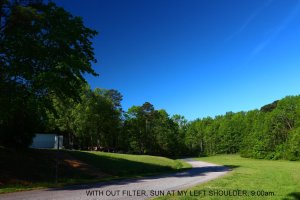
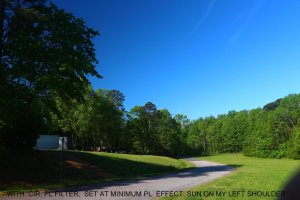
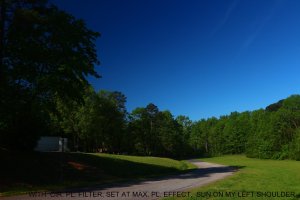
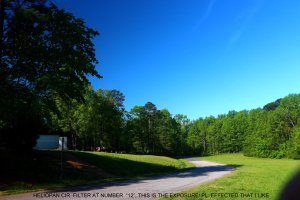
This Sunday Morning at 9:00AM, Bright sun shine at my Left shoulder, I take my Canon EOS-M with Canon EF 17-40 mm F/ 4.0 L USM with Both Cir. PL HOYA , and Heliopan to test.
Yes, Sir/ Madam, I find out :

1) As Mr. Mt Spokane teach me that : use my Finger form as the hand gun , poit the point finger to the subject, and the thumb at the sun location = we will get the maximum PL, Effect/ Dark blur sky with out use the cir. PL. Filter/ by natural effect.
2) For Hoya = the White mark at the Outer ring are great for the Maximum PL. Effect if the White Mark point to the location of the sun.
3) For Heliopan filter = The Maximum PL. Effect ( make the most dark blue sky) at Number "1" and at Number "26"-----If I trun the outer ring start from Number 2 to number 12, at number " 12 " the sky will be the most light blue, and start getting dark if I turn from 13 to the most dark blue sky at number " 26"-----Yes, Sir, I now Agree with our friend Mr.Phil that These Numbers from 1 to 26 on Heliopan are " WOW " Factor of high cost German made Cir. PL. filter that we can remember to use in the future shot ---Not to Light and not to super dark---Just perfected exposure in our creation/ our Idea of the look of the photos.---Yes, My number are 6 and 18.

Thank you, Sir/ Madam to all of my friends and my teachers--------In CR Posts, If we do not understand any things about photography ---( Ha, Ha, Ha, our life too---Ha, Ha, Ha)--Just ask our friends, And we will get the right answers and learn the new IDEAS, which we will get smarter in the near future.

Have a great sunday, Sir/ Madam
Surapon

PS, the Photos below are not Post processing, Just reduce the size of the Photos to fit the CR. requirement.
 

Attachments

  • T-1.jpg
    T-1.jpg
    155.4 KB · Views: 235
  • T-2.jpg
    T-2.jpg
    152.2 KB · Views: 234
  • T-3.jpg
    T-3.jpg
    109.1 KB · Views: 244
  • T-4.jpg
    T-4.jpg
    164.7 KB · Views: 242
Upvote 0