New Full Frame Camera in Testing? [CR1]

privatebydesign said:
It depends to some extent on semantics, and you have far more stamina than I for that.

My old teacher and Wikipedia both referred to Saturation as "the colourfulness of a colour relative to its own brightness". Possibly not the most technical description, but it gets the idea over to non technical folk.

The difficulty with such a statement, as eloquent as it may be, is that it leaves "color" itself relatively undefined. Color may be a highly overloaded term, but in technical terms, color is the product of three dimensions...when you take out saturation, you still have hue and intensity/brightness.

I may be playing semantics here, but I think it's important when discussing color accuracy, calibration, etc. to discuss color properly, in all three of it's dimensions. Therefor, I think a more accurate rephrasing might be: "Saturation is the richness of a hue relative to it's intensity." ;) Then I'd totally agree.

privatebydesign said:
The rest, we agree on, basically.

If you are going to represent something in a space smaller than it occupies in real life you have to do something, I am saying get the saturation levels relative to each other as close as possible (to fit in the smaller space), get the brightness as close as possible (to fit in the reproduction medium), but there is no excuse for not getting the hue correct. If you do that, even though it isn't "true to nature", it is an accurate rendition and will appear so to the eye.

I agree. There is no excuse to not get hue correct. That's a radial factor, and it should be possible in any gamut to choose a proper hue. I still think that saturation matters to a degree. If you have a very tiny gamut, where a deep red is simply not an option, then it doesn't really matter how accurately you choose your hue...your "deep red rose" will still end up some form of pink. In terms of the difference between say sRGB and AdobeRGB, I do agree, a red rose will appear acceptably red as far as your perception goes, that you could have relatively accurately reproduced the color of your image.

I also think that this very same circumstance is the very reason people such as ourselves are constantly seeking larger gamuts...not just for screen, but really more so for print. Greens are easy to reproduce in print...it's the reds, blues, violets, magentas, and in some cases even the oranges that are so difficult to accurately reproduce in print.
 
Upvote 0
TeT said:
LetTheRightLensIn said:
privatebydesign said:
The most anal people I know about image colour are flower photographers and ceramicists, ever photograph a red flower and it not look anything like the flower did? Try deep blue, purple, and mauve flowers, they are a very difficult to get accurate and you have to use a camera profile specifically for the light you shot in.

A lot of trouble with flowers is even more that people seem to stick to sRGB which makes many flowers impossible to show correctly. A wide gamut monitor will give you a much better chance (of course it's true that the WB and profiles and all can still mess with things).

But with any gamut, you have to ultimately prepare the image for the end viewer who is likely using sRGB.

That's exactly it. I don't bother with a high end monitor with wide gamut and all this, because the print shops I use only accept sRGB and if I tinker with a file to make it perfect and anyone I send it to uses a medium quality laptop
To view it in, what's the point? For professionals that do commercial work and advertising posters etc, or magazines and all that stuff I can certainly see the point. But for me and lots if others, creating a ColorChecker Passport profile for daylight and tungsten in LR gets you very far from the standard colors out of your camera.
 
Upvote 0
Viggo said:
TeT said:
LetTheRightLensIn said:
privatebydesign said:
The most anal people I know about image colour are flower photographers and ceramicists, ever photograph a red flower and it not look anything like the flower did? Try deep blue, purple, and mauve flowers, they are a very difficult to get accurate and you have to use a camera profile specifically for the light you shot in.

A lot of trouble with flowers is even more that people seem to stick to sRGB which makes many flowers impossible to show correctly. A wide gamut monitor will give you a much better chance (of course it's true that the WB and profiles and all can still mess with things).

But with any gamut, you have to ultimately prepare the image for the end viewer who is likely using sRGB.

That's exactly it. I don't bother with a high end monitor with wide gamut and all this, because the print shops I use only accept sRGB and if I tinker with a file to make it perfect and anyone I send it to uses a medium quality laptop
To view it in, what's the point? For professionals that do commercial work and advertising posters etc, or magazines and all that stuff I can certainly see the point. But for me and lots if others, creating a ColorChecker Passport profile for daylight and tungsten in LR gets you very far from the standard colors out of your camera.

sRGB can cover every hue (colour) it might not be able to render the saturation (intensity) or the brightness (or darkness) of a specific colour, but my point was about getting the hue correct. As you point out, for the vast majority of the time a very good colour workflow can be covered with the simplest of techniques, a ColorChecker and a custom camera profile in post.

All wide gamut monitors do is give you more degrees of saturation and contrast levels, not hue capability. But wider gamut files and workspaces give you much greater post processing latitude, that doesn't mean the end product can't then fit into a smaller gamut like sRGB, just that it is much easier to get an accurate rendition into a smaller gamut of you start out with the wiggle room inherent in a bigger one.
 
Upvote 0
privatebydesign said:
Viggo said:
TeT said:
LetTheRightLensIn said:
privatebydesign said:
The most anal people I know about image colour are flower photographers and ceramicists, ever photograph a red flower and it not look anything like the flower did? Try deep blue, purple, and mauve flowers, they are a very difficult to get accurate and you have to use a camera profile specifically for the light you shot in.

A lot of trouble with flowers is even more that people seem to stick to sRGB which makes many flowers impossible to show correctly. A wide gamut monitor will give you a much better chance (of course it's true that the WB and profiles and all can still mess with things).

But with any gamut, you have to ultimately prepare the image for the end viewer who is likely using sRGB.

That's exactly it. I don't bother with a high end monitor with wide gamut and all this, because the print shops I use only accept sRGB and if I tinker with a file to make it perfect and anyone I send it to uses a medium quality laptop
To view it in, what's the point? For professionals that do commercial work and advertising posters etc, or magazines and all that stuff I can certainly see the point. But for me and lots if others, creating a ColorChecker Passport profile for daylight and tungsten in LR gets you very far from the standard colors out of your camera.

sRGB can cover every hue (colour) it might not be able to render the saturation (intensity) or the brightness (or darkness) of a specific colour, but my point was about getting the hue correct. As you point out, for the vast majority of the time a very good colour workflow can be covered with the simplest of techniques, a ColorChecker and a custom camera profile in post.

All wide gamut monitors do is give you more degrees of saturation and contrast levels, not hue capability. But wider gamut files and workspaces give you much greater post processing latitude, that doesn't mean the end product can't then fit into a smaller gamut like sRGB, just that it is much easier to get an accurate rendition into a smaller gamut of you start out with the wiggle room inherent in a bigger one.

And yet many photographers choose Canon becuase of their inherant colour rendition. Skin tones are far nicer on Canon than Nikon. I belive this is due to hot reds on the Canon gamut. I don't want a clinical colour accuracy, that would be boring. I want a colour interpretation whihc is nice and pleasing on the eye. In a simular way to hi fi...some components are very neutral and a little bland. I like speakers and amps which inject a little colour to the sound and add some charector to the performance. This is why I like Arcam amps and Ruark speakers. Unfortunatly, both companies have been pretty much killed by the iPhone market....go figure!
 
Upvote 0
GMCPhotographics said:
privatebydesign said:
Viggo said:
TeT said:
LetTheRightLensIn said:
privatebydesign said:
The most anal people I know about image colour are flower photographers and ceramicists, ever photograph a red flower and it not look anything like the flower did? Try deep blue, purple, and mauve flowers, they are a very difficult to get accurate and you have to use a camera profile specifically for the light you shot in.

A lot of trouble with flowers is even more that people seem to stick to sRGB which makes many flowers impossible to show correctly. A wide gamut monitor will give you a much better chance (of course it's true that the WB and profiles and all can still mess with things).

But with any gamut, you have to ultimately prepare the image for the end viewer who is likely using sRGB.

That's exactly it. I don't bother with a high end monitor with wide gamut and all this, because the print shops I use only accept sRGB and if I tinker with a file to make it perfect and anyone I send it to uses a medium quality laptop
To view it in, what's the point? For professionals that do commercial work and advertising posters etc, or magazines and all that stuff I can certainly see the point. But for me and lots if others, creating a ColorChecker Passport profile for daylight and tungsten in LR gets you very far from the standard colors out of your camera.

sRGB can cover every hue (colour) it might not be able to render the saturation (intensity) or the brightness (or darkness) of a specific colour, but my point was about getting the hue correct. As you point out, for the vast majority of the time a very good colour workflow can be covered with the simplest of techniques, a ColorChecker and a custom camera profile in post.

All wide gamut monitors do is give you more degrees of saturation and contrast levels, not hue capability. But wider gamut files and workspaces give you much greater post processing latitude, that doesn't mean the end product can't then fit into a smaller gamut like sRGB, just that it is much easier to get an accurate rendition into a smaller gamut of you start out with the wiggle room inherent in a bigger one.

And yet many photographers choose Canon because of their inherent colour rendition. Skin tones are far nicer on Canon than Nikon. I belive this is due to hot reds on the Canon gamut. I don't want a clinical colour accuracy, that would be boring. I want a colour interpretation whihc is nice and pleasing on the eye. In a simular way to hi fi...some components are very neutral and a little bland. I like speakers and amps which inject a little colour to the sound and add some charector to the performance. This is why I like Arcam amps and Ruark speakers. Unfortunatly, both companies have been pretty much killed by the iPhone market....go figure!

And those "many photographers" would be ill educated.

There is no "inherent" aspect to colour in a RAW file. RAW files don't have a gamut, nor a colourspace, they are rendered into a profile that contains a gamut by software, there is no quality impact or degradation by different rendering algorithms, that is why you can change WB in post to a RAW file with no ill effects, or choose Portrait, Landscape etc Picture Styles after the fact.

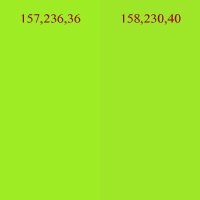
Anybody that makes claims of unique colours from different manufacturers needs to spend an hour or two playing with the free with your camera Utility, Picture Style Editor. Or shoot a wedding with a Canon and Nikon shooter using ColorChecker Passports and a custom camera profiled workflow. Colour is not an ethereal, organic feeling, like many audiophiles experiences , in our RGB colourspaces it is represented by three numbers, make a 157,236,36 render as a 158,230,40 instead, and there is no quality loss.

Which is the more "natural" green? It doesn't matter, you have the power to output whichever you choose regarless of what camera you captured it with.
 

Attachments

  • 1.jpg
    1.jpg
    46 KB · Views: 1,358
Upvote 0
privatebydesign said:
GMCPhotographics said:
And yet many photographers choose Canon because of their inherent colour rendition. Skin tones are far nicer on Canon than Nikon. I belive this is due to hot reds on the Canon gamut. I don't want a clinical colour accuracy, that would be boring. I want a colour interpretation whihc is nice and pleasing on the eye. In a simular way to hi fi...some components are very neutral and a little bland. I like speakers and amps which inject a little colour to the sound and add some charector to the performance. This is why I like Arcam amps and Ruark speakers. Unfortunatly, both companies have been pretty much killed by the iPhone market....go figure!

And those "many photographers" would be ill educated.

There is no "inherent" aspect to colour in a RAW file. RAW files don't have a gamut, nor a colourspace, they are rendered into a profile that contains a gamut by software, there is no quality impact or degradation by different rendering algorithms, that is why you can change WB in post to a RAW file with no ill effects, or choose Portrait, Landscape etc Picture Styles after the fact.

While true, the fact remains that in the default rendering the Canon sensors tend to produce warmer tones with more red and less blue than Sony's sensors, which are still drastically warmer than, for example, Panasonic's ultra-cool sensors. I couldn't tell you how much of that is the choice of colors in the Bayer filters and how much of it is arbitrary white point math differences, but even 20+ years ago, back in the analog CCD days, Canon was always the warmest, Panasonic/JVC the coolest, with the rest at various points in between. And oddly enough, that hasn't changed much despite radical changes in the underlying processing electronics. So I'm guessing that at least part of it is the choice of color filters. Either that or Canon just prefers slightly oversaturated reds. :)
 
Upvote 0
dgatwood said:
privatebydesign said:
GMCPhotographics said:
And yet many photographers choose Canon because of their inherent colour rendition. Skin tones are far nicer on Canon than Nikon. I belive this is due to hot reds on the Canon gamut. I don't want a clinical colour accuracy, that would be boring. I want a colour interpretation whihc is nice and pleasing on the eye. In a simular way to hi fi...some components are very neutral and a little bland. I like speakers and amps which inject a little colour to the sound and add some charector to the performance. This is why I like Arcam amps and Ruark speakers. Unfortunatly, both companies have been pretty much killed by the iPhone market....go figure!

And those "many photographers" would be ill educated.

There is no "inherent" aspect to colour in a RAW file. RAW files don't have a gamut, nor a colourspace, they are rendered into a profile that contains a gamut by software, there is no quality impact or degradation by different rendering algorithms, that is why you can change WB in post to a RAW file with no ill effects, or choose Portrait, Landscape etc Picture Styles after the fact.

While true, the fact remains that in the default rendering the Canon sensors tend to produce warmer tones with more red and less blue than Sony's sensors, which are still drastically warmer than, for example, Panasonic's ultra-cool sensors. I couldn't tell you how much of that is the choice of colors in the Bayer filters and how much of it is arbitrary white point math differences, but even 20+ years ago, back in the analog CCD days, Canon was always the warmest, Panasonic/JVC the coolest, with the rest at various points in between. And oddly enough, that hasn't changed much despite radical changes in the underlying processing electronics. So I'm guessing that at least part of it is the choice of color filters. Either that or Canon just prefers slightly oversaturated reds. :)

What is "default rendering", DPP, LR, ACR 2003/2010/2012, DXO, Capture One, which profile? Camera Standard, Adobe Standard, Landscape, Portrait, Neutral, Faithful, or a custom profile made for the illumination of the subject? What colourspace, Prophoto, Melissa, RGB, sRBG, CMYK?

That is the point, there is no "default rendering", you have to choose one and making your own is very easy. If your Canon files are red, it is your choice.
 
Upvote 0
privatebydesign said:
dgatwood said:
privatebydesign said:
GMCPhotographics said:
And yet many photographers choose Canon because of their inherent colour rendition. Skin tones are far nicer on Canon than Nikon. I belive this is due to hot reds on the Canon gamut. I don't want a clinical colour accuracy, that would be boring. I want a colour interpretation whihc is nice and pleasing on the eye. In a simular way to hi fi...some components are very neutral and a little bland. I like speakers and amps which inject a little colour to the sound and add some charector to the performance. This is why I like Arcam amps and Ruark speakers. Unfortunatly, both companies have been pretty much killed by the iPhone market....go figure!

And those "many photographers" would be ill educated.

There is no "inherent" aspect to colour in a RAW file. RAW files don't have a gamut, nor a colourspace, they are rendered into a profile that contains a gamut by software, there is no quality impact or degradation by different rendering algorithms, that is why you can change WB in post to a RAW file with no ill effects, or choose Portrait, Landscape etc Picture Styles after the fact.

While true, the fact remains that in the default rendering the Canon sensors tend to produce warmer tones with more red and less blue than Sony's sensors, which are still drastically warmer than, for example, Panasonic's ultra-cool sensors. I couldn't tell you how much of that is the choice of colors in the Bayer filters and how much of it is arbitrary white point math differences, but even 20+ years ago, back in the analog CCD days, Canon was always the warmest, Panasonic/JVC the coolest, with the rest at various points in between. And oddly enough, that hasn't changed much despite radical changes in the underlying processing electronics. So I'm guessing that at least part of it is the choice of color filters. Either that or Canon just prefers slightly oversaturated reds. :)

What is "default rendering", DPP, LR, ACR 2003/2010/2012, DXO, Capture One, which profile? Camera Standard, Adobe Standard, Landscape, Portrait, Neutral, Faithful, or a custom profile made for the illumination of the subject? What colourspace, Prophoto, Melissa, RGB, sRBG, CMYK?

That is the point, there is no "default rendering", you have to choose one and making your own is very easy. If your Canon files are red, it is your choice.

PBD is exactly right here. RAW data is RAW data...it has no default, nothing inherent (other than the very minor impact of the silicon's native response curve, however that is generally not even remotely a dominant factor these days). Color is the result of processing, and that processing definitely changes depending on the tool we use to process, the camera profiles/tone curves we apply, the color space we process within, etc.
 
Upvote 0
privatebydesign said:
dgatwood said:
privatebydesign said:
GMCPhotographics said:
And yet many photographers choose Canon because of their inherent colour rendition. Skin tones are far nicer on Canon than Nikon. I belive this is due to hot reds on the Canon gamut. I don't want a clinical colour accuracy, that would be boring. I want a colour interpretation whihc is nice and pleasing on the eye. In a simular way to hi fi...some components are very neutral and a little bland. I like speakers and amps which inject a little colour to the sound and add some charector to the performance. This is why I like Arcam amps and Ruark speakers. Unfortunatly, both companies have been pretty much killed by the iPhone market....go figure!

And those "many photographers" would be ill educated.

There is no "inherent" aspect to colour in a RAW file. RAW files don't have a gamut, nor a colourspace, they are rendered into a profile that contains a gamut by software, there is no quality impact or degradation by different rendering algorithms, that is why you can change WB in post to a RAW file with no ill effects, or choose Portrait, Landscape etc Picture Styles after the fact.

While true, the fact remains that in the default rendering the Canon sensors tend to produce warmer tones with more red and less blue than Sony's sensors, which are still drastically warmer than, for example, Panasonic's ultra-cool sensors. I couldn't tell you how much of that is the choice of colors in the Bayer filters and how much of it is arbitrary white point math differences, but even 20+ years ago, back in the analog CCD days, Canon was always the warmest, Panasonic/JVC the coolest, with the rest at various points in between. And oddly enough, that hasn't changed much despite radical changes in the underlying processing electronics. So I'm guessing that at least part of it is the choice of color filters. Either that or Canon just prefers slightly oversaturated reds. :)

What is "default rendering", DPP, LR, ACR 2003/2010/2012, DXO, Capture One, which profile? Camera Standard, Adobe Standard, Landscape, Portrait, Neutral, Faithful, or a custom profile made for the illumination of the subject? What colourspace, Prophoto, Melissa, RGB, sRBG, CMYK?

That is the point, there is no "default rendering", you have to choose one and making your own is very easy. If your Canon files are red, it is your choice.

IMO, the default rendering is what you get when you compute the color information using the camera-provided AWB color temperature value from the RAW file's EXIF data. Any other color temperature value is a user decision, whereas the camera-provided AWB value is what the camera believes to be "truth".
 
Upvote 0
dgatwood said:
privatebydesign said:
dgatwood said:
privatebydesign said:
GMCPhotographics said:
And yet many photographers choose Canon because of their inherent colour rendition. Skin tones are far nicer on Canon than Nikon. I belive this is due to hot reds on the Canon gamut. I don't want a clinical colour accuracy, that would be boring. I want a colour interpretation whihc is nice and pleasing on the eye. In a simular way to hi fi...some components are very neutral and a little bland. I like speakers and amps which inject a little colour to the sound and add some charector to the performance. This is why I like Arcam amps and Ruark speakers. Unfortunatly, both companies have been pretty much killed by the iPhone market....go figure!

And those "many photographers" would be ill educated.

There is no "inherent" aspect to colour in a RAW file. RAW files don't have a gamut, nor a colourspace, they are rendered into a profile that contains a gamut by software, there is no quality impact or degradation by different rendering algorithms, that is why you can change WB in post to a RAW file with no ill effects, or choose Portrait, Landscape etc Picture Styles after the fact.

While true, the fact remains that in the default rendering the Canon sensors tend to produce warmer tones with more red and less blue than Sony's sensors, which are still drastically warmer than, for example, Panasonic's ultra-cool sensors. I couldn't tell you how much of that is the choice of colors in the Bayer filters and how much of it is arbitrary white point math differences, but even 20+ years ago, back in the analog CCD days, Canon was always the warmest, Panasonic/JVC the coolest, with the rest at various points in between. And oddly enough, that hasn't changed much despite radical changes in the underlying processing electronics. So I'm guessing that at least part of it is the choice of color filters. Either that or Canon just prefers slightly oversaturated reds. :)

What is "default rendering", DPP, LR, ACR 2003/2010/2012, DXO, Capture One, which profile? Camera Standard, Adobe Standard, Landscape, Portrait, Neutral, Faithful, or a custom profile made for the illumination of the subject? What colourspace, Prophoto, Melissa, RGB, sRBG, CMYK?

That is the point, there is no "default rendering", you have to choose one and making your own is very easy. If your Canon files are red, it is your choice.

IMO, the default rendering is what you get when you compute the color information using the camera-provided AWB color temperature value from the RAW file's EXIF data. Any other color temperature value is a user decision, whereas the camera-provided AWB value is what the camera believes to be "truth".

This isn't actually the case. The AWB color temp is just that...a color temp. It is not an actual mathematical algorithm that specified how to achieve that white balance when rendering the raw to screen or to another image format. It's just a piece of metadata. It is then up to the implementer of the RAW editor to actually define the algorithm, to specify the tone curves, that go into actually applying that white balance during rendering.

That's why people comment on how Lightrooms "Canon Faithful" camera style is different than DPP's "Faithful" camera style. It's the same style NAME, but IMPLEMENTED differently. Having a white balance setting of 5250K is largely meaningless...you will get small, often noticeable differences in white balance depending on what RAW editor you use, because they all use slightly different approaches to applying things like white balance, exposure, saturation, picture or camera styles, etc.

There is no "default rendering"...because RAW is not rendered by default. It is RAW...it's just data, that's it. The rendering ENGINE is what determines how the RAW is rendered, and there are many RAW rendering engines out there.
 
Upvote 0
dgatwood said:
IMO, the default rendering is what you get when you compute the color information using the camera-provided AWB color temperature value from the RAW file's EXIF data. Any other color temperature value is a user decision, whereas the camera-provided AWB value is what the camera believes to be "truth".

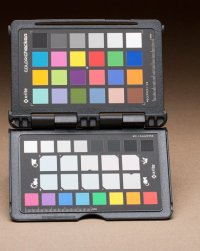
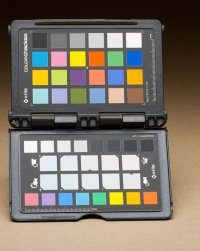
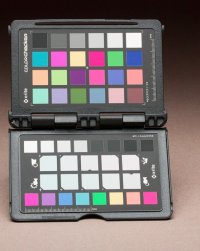
When what computes the colour information? Every program that does the computing will do a different job, the relationship of colours within that program can all set the same WB but still render colours completely differently.

Here are three versions of the same image and they all have the same WB, but the colours are very different, which is "correct"? All I did was tweak the red channel in the camera profile tab. There is no "native" in rendering RAW files, there just isn't.
 

Attachments

  • 11.jpg
    11.jpg
    142.5 KB · Views: 603
  • 12.jpg
    12.jpg
    144.2 KB · Views: 569
  • 13.jpg
    13.jpg
    141.3 KB · Views: 574
Upvote 0