R1-7D said:driandsouza said:Hi.
I recently got myself the IDX 2 and am facing the same sensor dust issues.
What is surprising is that I found a dust spot suddenly appearing in my images in the middle of taking a series of blue sky shots at f22...even without my having changed the lens!
This was after I got my sensor cleaned by Canon (India) a week ago.
(1DXii, 7D, 7Dii, 500mmf4ISii, 1.4xiii, 2xiii, 100mmf2.8IS, 17-40f4)
Hi,
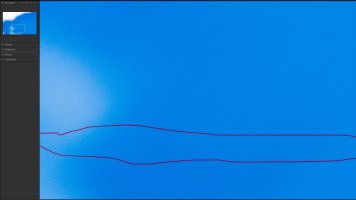
Just to clarify, I'm not experiencing a sensor dust issue. I am experiencing lines that look like brush strokes in two areas of my sensor. These lines appear at f13, and are visible throughout the rest of the aperture range.
Do you have an image you can post up to show what you're experiencing? If you're still seeing only dust it might just be you need to have the sensor cleaned yet again. It's hard to get it spotless, and might not be worth the effort.
I'm out of my country right now, but I'll be home tomorrow night and on Monday I'm sending my camera in. I'll report back what Canon Canada says or does.
I see you are in Canada but for the others here in the US, i just sent mine off to CPS in Virginia for cleaning and it came back spotless, all hot pixels were mapped out, and no streaks. I know this isnt helpful to you in canada but for others with dust and hot pixels, i can say canon did a great job at that facility.
Just a note that Canon does do a factory reset to map out bad pixels. So please save your settings to your memory card before returning it for cleaning so you can restore your settings. AFMA settings are not cleared.
Upvote
0