
You are using an out of date browser. It may not display this or other websites correctly.
You should upgrade or use an alternative browser.
You should upgrade or use an alternative browser.
Show your Bird Portraits
- Thread starter 1982chris911
- Start date

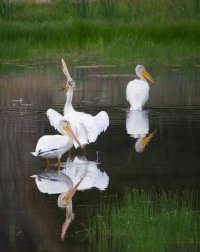
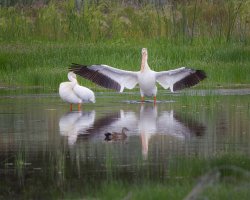
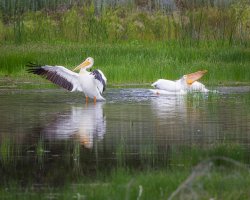


"Downys Sharing"

EOS R1, RF 100-500mm f/4.5-7.1L IS USM + RF 1.4x @ 700mm, 1/1000 s, f/14, ISO 25600
EOS R1, RF 100-500mm f/4.5-7.1L IS USM + RF 1.4x @ 700mm, 1/1000 s, f/14, ISO 25600

Upvote
0


I like the detail in the feathers and the lack of noise for a picture taken at ISO 25000. Do you have to do a lot of post processing to get it this good or is the R1 just that good???"Downys Sharing"
View attachment 230132
EOS R1, RF 100-500mm f/4.5-7.1L IS USM + RF 1.4x @ 700mm, 1/1000 s, f/14, ISO 25600
Upvote
0
Thanks! DxO PhotoLab, using the default options for DeepPrime XD3 so the 'work' is just one click for NR.I like the detail in the feathers and the lack of noise for a picture taken at ISO 25000. Do you have to do a lot of post processing to get it this good or is the R1 just that good???
Upvote
0
How does that compare to Lightroom's Denoise?
Thanks! DxO PhotoLab, using the default options for DeepPrime XD3 so the 'work' is just one click for NR.
Upvote
0

In my experience, they are pretty similar. Photolab has a few more handles to tweak for optimization, but if you are working in LR, you need to transfer a fat TIFF or DNG back for the result. Since LR now will do NR without generating an extra file, it does save space. I have found that LR NR followed by processing in Topaz with additional NR and sharpening typically produces the most favorable result. The exception is Photolab seems to do a bit better job with small sensor cameras, but Topaz is still beneficial as a secondary process, particularly for sharpening. With wide lenses that don't fill the image circle and need corner stretching, Photolab often will give you a larger image, particularly if you break away from the default aspect ratio. Note that processing in Topaz when you are primarily in LR also results in a large secondary file (I use TIFF) . All three tools are dismally slow without a good GPU (preferably Nvidia). Curious to see if Neuro has had similar experience.How does that compare to Lightroom's Denoise?
Upvote
0

Denoise in Photoshop takes a minute per image on my MacBook Air with M4 and 24 GB, which is dismally slow. PL9 is much faster, and speeds up on cropping RAW whereas PS Denoise speed does not increase - it clearly denoises the whole image and not just the cropped area. In my tests, PL9, and even old PL6, is slightly sharper. I wish PS was better as I need the Adobe suite for my work and it would save me buying DxO.In my experience, they are pretty similar. Photolab has a few more handles to tweak for optimization, but if you are working in LR, you need to transfer a fat TIFF or DNG back for the result. Since LR now will do NR without generating an extra file, it does save space. I have found that LR NR followed by processing in Topaz with additional NR and sharpening typically produces the most favorable result. The exception is Photolab seems to do a bit better job with small sensor cameras, but Topaz is still beneficial as a secondary process, particularly for sharpening. With wide lenses that don't fill the image circle and need corner stretching, Photolab often will give you a larger image, particularly if you break away from the default aspect ratio. Note that processing in Topaz when you are primarily in LR also results in a large secondary file (I use TIFF) . All three tools are dismally slow without a good GPU (preferably Nvidia). Curious to see if Neuro has had similar experience.
Upvote
0
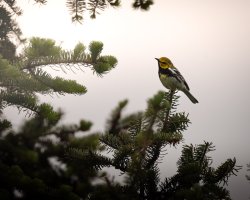
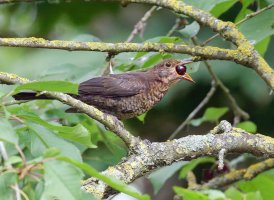
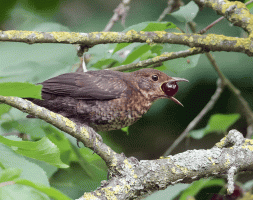
Spotted a bird fly into a tree and instinctively swung up the R5ii + RF 100-500, which was set up for BIF at 1/3200, f/9 and auto iso. It was dark and went to iso 20k. The setting was fortunate as I couldn't see that it was a juvenile Blackbird flying in to eat a berry, and I was able to catch the action. Cropped as usual without reduction.
Upvote
0
The local owlets are growing up...
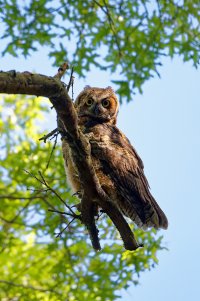
EOS R1, EF 600mm f/4L IS II, 1/2000 s, f/4, ISO 2000
EOS R1, EF 600mm f/4L IS II, 1/2000 s, f/4, ISO 2000
Upvote
0

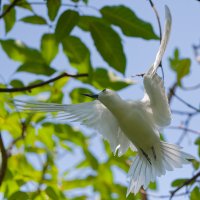
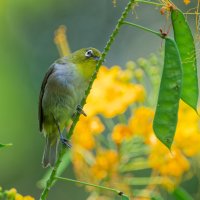
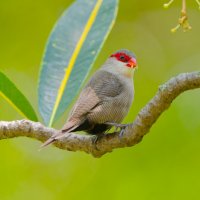
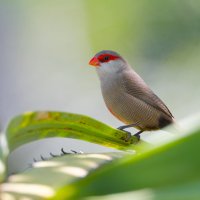
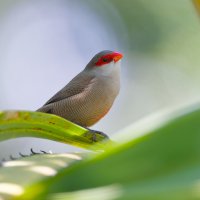
Just these from today. Again (very) close overfly by the Blue-billed White Tern but I got it when it retread to get on the same branch where it's partner was already.
Upvote
0
I slowed it down as it shows how the bird uses its tongue to swallow the berry.I love your gif. Well done, Alan.
Upvote
0
8 seconds in LR for an R5 raw with an i9-13900k with 64 GB and an RTX 4070 TI. PL9 is also about 8 seconds, but the transfer from LR to PL is pretty slow. The computer I just built has an RTX 5080, so should be a bit faster. As I mentioned above, all these AI programs work best with Nvidia GPU because so much of AI is Cuda based. PL9 is sharper than LR because Photolab includes lens correction in the processing. Topaz studio is much better at sharpening than either LR or PL and the auto mask is now very good, but Topaz does require a lot of horsepower for some of the features. I use PL9 for certain images, but I prefer to work in LR for the file management features. LR has an excellent database.Denoise in Photoshop takes a minute per image on my MacBook Air with M4 and 24 GB, which is dismally slow. PL9 is much faster, and speeds up on cropping RAW whereas PS Denoise speed does not increase - it clearly denoises the whole image and not just the cropped area. In my tests, PL9, and even old PL6, is slightly sharper. I wish PS was better as I need the Adobe suite for my work and it would save me buying DxO.
Upvote
0
I am still on the final Topaz AI as I didn't like the way it is has changed in recent years and also going on to a subscription model. Their sharpening is throwing up more artefacts as it adopts more AI. For an image that is fully or partly a wreck, the motion and very strong corrections can make it presentable. Trouble is, I see the artefacts, and can then see them in some images that are posted. For upscaling, generative upscaling in Photoshop is pretty faithful, but the Topaz used in PS adds more detail, and as in Topaz AI more so. The best is to have a good sharp image straight ou of camera!8 seconds in LR for an R5 raw with an i9-13900k with 64 GB and an RTX 4070 TI. PL9 is also about 8 seconds, but the transfer from LR to PL is pretty slow. The computer I just built has an RTX 5080, so should be a bit faster. As I mentioned above, all these AI programs work best with Nvidia GPU because so much of AI is Cuda based. PL9 is sharper than LR because Photolab includes lens correction in the processing. Topaz studio is much better at sharpening than either LR or PL and the auto mask is now very good, but Topaz does require a lot of horsepower for some of the features. I use PL9 for certain images, but I prefer to work in LR for the file management features. LR has an excellent database.
Upvote
0
Similar threads
- Replies
- 118
- Views
- 99K
