Tips for back button set up

Jun 12, 2015
852
296
10,326
I came across this video on YouTube yesterday, about setting up customizable buttons on the 5DIV. I don't think he gives the best advice on the actual set up, but he shows possibilities I was unaware of - that you can make detail customization to the chosen AF mode. It works the same way in the 5Ds/r. To me, the button customization possibilities he demonstrates are fantastic.

https://youtu.be/D_R77Gs8Q6E
 
Larsskv said:
I came across this video on YouTube yesterday, about setting up customizable buttons on the 5DIV. I don't think he gives the best advice on the actual set up, but he shows possibilities I was unaware of - that you can make detail customization to the chosen AF mode. It works the same way in the 5Ds/r. To me, the button customization possibilities he demonstrates are fantastic.

https://youtu.be/D_R77Gs8Q6E

This is really, really neat, I did not know that. Thanks for the link. Works on the 1DXII, too, btw.
 
Upvote 0
shunsai said:
Wow! That's really impressive! I'm even more excited now for this camera than I was before. I can't wait to get one so I can try it out. Thanks for sharing the video. Very informative.
Watched this video last week at Planet 5D. Just so you know, it works on the 7D MkII which I now have set up. Canon really should be boasting about this feature. It's brilliant.

-pw
 
Upvote 0
pwp said:
shunsai said:
Wow! That's really impressive! I'm even more excited now for this camera than I was before. I can't wait to get one so I can try it out. Thanks for sharing the video. Very informative.
Watched this video last week at Planet 5D. Just so you know, it works on the 7D MkII which I now have set up. Canon really should be boasting about this feature. It's brilliant.

-pw

Where can you do it on the 7DII? In the AF Custom Controls menu all I can do is change the AF button between one-shot/servo or AF on/off.
 
Upvote 0
Mikehit said:
Where can you do it on the 7DII? In the AF Custom Controls menu all I can do is change the AF button between one-shot/servo or AF on/off.

When you set either button (AF-ON or *) to 'Metering and AF start', hit the Info button and you can set all the same options as described in this video.

I love this on my 7D2. I have a generic Servo set-up assigned to the * button, and that is so so useful to have.
 
Upvote 0
I´m very happy that so many of you appreciated the video. I really love this feature.

I left my 1DX at work this weekend, but I´m looking forward to see if I can do the same set ut with it.

Most of the time when I use my 5Ds, I use One shot AF and one focus point. Therefore, I set my first back button up with AI servo, case 1 AF mode, and auto 61 AF-point (with center point to initiate AF). I believe this AI Servo set up is the most flexible, and therefore the best pick for the back button, to press when needed.

On the second back button, I picked One shot AF and one focus point, to be used when I shot AI Servo.

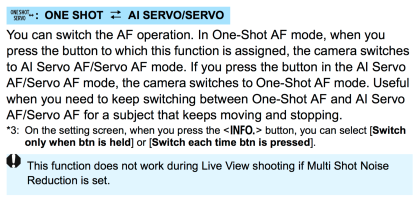
One question for you 5DIV users, can you switch permanently between One shot and AI servo with a press of the back button? On my 5Ds, I need to press and hold the back button as long as I need it, and as soon as I release it, it goes back to the ordinary set up.
 
Upvote 0
Very nice features, upgrades from 5D3.

Some things to think about (at least for me):

1. Shouldn't the shutter button just be left to expose while focus is off? Reason- it will override the back button operation performed right before pushing shutter button?
2.For simplicity, why not just leave back button focus to AI servo plus whatever customization options you want? Reason- This gives easiest, least complicated option- keep it pressed for moving targets, or, press and release for stationary targets?
Opinions?
Scott
 
Upvote 0
Larsskv said:
I´m very happy that so many of you appreciated the video. I really love this feature.

I left my 1DX at work this weekend, but I´m looking forward to see if I can do the same set ut with it.

Most of the time when I use my 5Ds, I use One shot AF and one focus point. Therefore, I set my first back button up with AI servo, case 1 AF mode, and auto 61 AF-point (with center point to initiate AF). I believe this AI Servo set up is the most flexible, and therefore the best pick for the back button, to press when needed.

On the second back button, I picked One shot AF and one focus point, to be used when I shot AI Servo.

One question for you 5DIV users, can you switch permanently between One shot and AI servo with a press of the back button? On my 5Ds, I need to press and hold the back button as long as I need it, and as soon as I release it, it goes back to the ordinary set up.

I can only make it switch while the custom button is pressed. Depress and it goes back to single shot AF. There may be a way to do it but it's beyond me.
 
Upvote 0
scottkinfw said:
Very nice features, upgrades from 5D3.

Some things to think about (at least for me):

1. Shouldn't the shutter button just be left to expose while focus is off? Reason- it will override the back button operation performed right before pushing shutter button?
2.For simplicity, why not just leave back button focus to AI servo plus whatever customization options you want? Reason- This gives easiest, least complicated option- keep it pressed for moving targets, or, press and release for stationary targets?
Opinions?
Scott

1. The AF on the shutter button does not override the back button, when the back button is pressed down. That the beauty of it. :)

2. You may very well have a point, but personally i prefer One shot AF when shooting stationary objects. I would suppose it is a bit more precise and consistent as well, bur I could be wrong about that.
 
Upvote 0
Labdoc said:
Larsskv said:
I´m very happy that so many of you appreciated the video. I really love this feature.

I left my 1DX at work this weekend, but I´m looking forward to see if I can do the same set ut with it.

Most of the time when I use my 5Ds, I use One shot AF and one focus point. Therefore, I set my first back button up with AI servo, case 1 AF mode, and auto 61 AF-point (with center point to initiate AF). I believe this AI Servo set up is the most flexible, and therefore the best pick for the back button, to press when needed.

On the second back button, I picked One shot AF and one focus point, to be used when I shot AI Servo.

One question for you 5DIV users, can you switch permanently between One shot and AI servo with a press of the back button? On my 5Ds, I need to press and hold the back button as long as I need it, and as soon as I release it, it goes back to the ordinary set up.

I can only make it switch while the custom button is pressed. Depress and it goes back to single shot AF. There may be a way to do it but it's beyond me.

Thank you for trying. It would be a great feature. I got the impression that you could do it on the froknowsphoto video, but maybe he was just raving of the feature shown in the video in the link above.
 
Upvote 0
Larsskv said:
Labdoc said:
Larsskv said:
I´m very happy that so many of you appreciated the video. I really love this feature.

I left my 1DX at work this weekend, but I´m looking forward to see if I can do the same set ut with it.

Most of the time when I use my 5Ds, I use One shot AF and one focus point. Therefore, I set my first back button up with AI servo, case 1 AF mode, and auto 61 AF-point (with center point to initiate AF). I believe this AI Servo set up is the most flexible, and therefore the best pick for the back button, to press when needed.

On the second back button, I picked One shot AF and one focus point, to be used when I shot AI Servo.

One question for you 5DIV users, can you switch permanently between One shot and AI servo with a press of the back button? On my 5Ds, I need to press and hold the back button as long as I need it, and as soon as I release it, it goes back to the ordinary set up.

I can only make it switch while the custom button is pressed. Depress and it goes back to single shot AF. There may be a way to do it but it's beyond me.

Thank you for trying. It would be a great feature. I got the impression that you could do it on the froknowsphoto video, but maybe he was just raving of the feature shown in the video in the link above.

On the 1DXII it is possible to choose between "hold" while button is kept pressed and to change it permanently after button was pressed. You need to press the "info" button when you are in the menu where you choose which function you want to assign to a specific button.
 
Upvote 0
LordofTackle said:
Larsskv said:
Labdoc said:
Larsskv said:
I´m very happy that so many of you appreciated the video. I really love this feature.

I left my 1DX at work this weekend, but I´m looking forward to see if I can do the same set ut with it.

Most of the time when I use my 5Ds, I use One shot AF and one focus point. Therefore, I set my first back button up with AI servo, case 1 AF mode, and auto 61 AF-point (with center point to initiate AF). I believe this AI Servo set up is the most flexible, and therefore the best pick for the back button, to press when needed.

On the second back button, I picked One shot AF and one focus point, to be used when I shot AI Servo.

One question for you 5DIV users, can you switch permanently between One shot and AI servo with a press of the back button? On my 5Ds, I need to press and hold the back button as long as I need it, and as soon as I release it, it goes back to the ordinary set up.

I can only make it switch while the custom button is pressed. Depress and it goes back to single shot AF. There may be a way to do it but it's beyond me.

Thank you for trying. It would be a great feature. I got the impression that you could do it on the froknowsphoto video, but maybe he was just raving of the feature shown in the video in the link above.

On the 1DXII it is possible to choose between "hold" while button is kept pressed and to change it permanently after button was pressed. You need to press the "info" button when you are in the menu where you choose which function you want to assign to a specific button.
Yes that works, now it holds the AF mode after the button is pushed. Thanks for another great tip. I changed it from metering and AF to one shot servo, hit info button and chose hold.
 
Upvote 0
NorbR said:
Mikehit said:
Where can you do it on the 7DII? In the AF Custom Controls menu all I can do is change the AF button between one-shot/servo or AF on/off.

When you set either button (AF-ON or *) to 'Metering and AF start', hit the Info button and you can set all the same options as described in this video.

I love this on my 7D2. I have a generic Servo set-up assigned to the * button, and that is so so useful to have.

D'uh....must switch brain on....

Thanks NorB (and pwp of course).
 
Upvote 0
NorbR said:
Mikehit said:
Where can you do it on the 7DII? In the AF Custom Controls menu all I can do is change the AF button between one-shot/servo or AF on/off.

When you set either button (AF-ON or *) to 'Metering and AF start', hit the Info button and you can set all the same options as described in this video.

I love this on my 7D2. I have a generic Servo set-up assigned to the * button, and that is so so useful to have.

One more question, Norbr...
if you assign the AF button in this way, does it switch only when depressed or can you press-and-release and the change sticks until you actively revert it?
 
Upvote 0