Tips for back button set up

LordofTackle said:
Larsskv said:
Labdoc said:
Larsskv said:
I´m very happy that so many of you appreciated the video. I really love this feature.

I left my 1DX at work this weekend, but I´m looking forward to see if I can do the same set ut with it.

Most of the time when I use my 5Ds, I use One shot AF and one focus point. Therefore, I set my first back button up with AI servo, case 1 AF mode, and auto 61 AF-point (with center point to initiate AF). I believe this AI Servo set up is the most flexible, and therefore the best pick for the back button, to press when needed.

On the second back button, I picked One shot AF and one focus point, to be used when I shot AI Servo.

One question for you 5DIV users, can you switch permanently between One shot and AI servo with a press of the back button? On my 5Ds, I need to press and hold the back button as long as I need it, and as soon as I release it, it goes back to the ordinary set up.

I can only make it switch while the custom button is pressed. Depress and it goes back to single shot AF. There may be a way to do it but it's beyond me.

Thank you for trying. It would be a great feature. I got the impression that you could do it on the froknowsphoto video, but maybe he was just raving of the feature shown in the video in the link above.

On the 1DXII it is possible to choose between "hold" while button is kept pressed and to change it permanently after button was pressed. You need to press the "info" button when you are in the menu where you choose which function you want to assign to a specific button.

Thank you for clarifying! I bet the 5DIV does the same.

I don't have this option on my 5Ds. Fingers crossed for a firmware update where they adress it.
 
Upvote 0
Mikehit said:
NorbR said:
Mikehit said:
Where can you do it on the 7DII? In the AF Custom Controls menu all I can do is change the AF button between one-shot/servo or AF on/off.

When you set either button (AF-ON or *) to 'Metering and AF start', hit the Info button and you can set all the same options as described in this video.

I love this on my 7D2. I have a generic Servo set-up assigned to the * button, and that is so so useful to have.

One more question, Norbr...
if you assign the AF button in this way, does it switch only when depressed or can you press-and-release and the change sticks until you actively revert it?

It cannot be used to change the camera setting from One Shot to Servo, if that's what you mean. It's better, in my opinion, because you can set it up so you always have Servo available ... but if you want to switch the camera setting entirely with one push, you can't (as far as I know).

And while there is also the possibility of assigning one of the buttons to such a switch between One Shot and Servo, the 7D2 is old fashioned in that regard, like the 5D3: the only possibility is the 'hold' function.
 
Upvote 0
These AF-functions work on 7DII and 5DIV. But do you need so many different settings?

I use my (repaired) 7DII for BIF or static birds that are far away, the 5DIV for static/bigger birds and birds that come along....

I add some of my personal thoughts: (used with 600mm&1.4 extender)
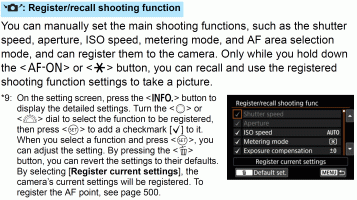
I changed the "*" custom settings to "Register/Recall shooting function". So I can optimize not only the AF settings, but other things like shutter speed, and a lot more too.

Maybe some of us can write to Canon,if they could do such a video/manual to show the optimal / all features of the higher end bodies.
 

Attachments

  • 5d4.gif
    5d4.gif
    383.3 KB · Views: 117
Upvote 0