Okay, so a quick warning upfront: There's some friday morning maths coming up, so I'll gladly admit to beeing wrong if you can point out a mistake in my thoughts.
I'm hardly demanding it be always-on. EVERY special setting of the camera has cases where it provides poor results.
With Canon, features don't become available just because they're easy to implement and usefull for some people though. So if there are a lot of possible issues with a feature, or not many people would use it often, it's just not present in Caon cameras. It would just clutter up the menu for little benefit to the larger market. Or why else are so many Magic Lantern features not present by default? For example, a RAW Histrogramm, Focus Trap release, Focus Peaking, AF Focus Stacking, and so on, have been available there for a long time. But most people get about without them, so some features have been added only recently to some mirrorless models, or are still missing (I'd love a RAW Histogramm).
It's a good example, but a custom chip can often do calculations FAR faster than a general-purpose PC.
Yeah, you're right. Its what allows smartphones to handle 4K Video - And it still took Canon quite a while to adapt that, despite it beeing widely available technology. I image a hardware solution for content based image alignment is going to be a good deal more tricky than that. But that's again confusing the topic. I thought we're talking about blur caused by camera motion - which the camera can detect through sensors without having too look to deep into the image content. As they can obviously do that already with video frames, it surely could be done for stacks of still too.
I gave examples of moonrise, but also say just say a nighttime view of the Alps: Milky Way over the Matterhorn, say, a 10 second hand-held exposure at 15mm. [...] I grant the outside 10% margin may be unusable, with too few photos in the stack to give a low-noise approximation, but the main 80% of the image could be both utterly rock solid and no noise [...] That may be true in many or most cases today, but I don't see a rule of physics that would make it so. Happy to learn I'm wrong though if you can think of something specific.
Okay, so I'm mainly drawing info from this resource here:
https://jonrista.com/the-astrophotographers-guide/astrophotography-basics/snr/
Based on that, I'm under the impression that an image is composed of signal and noise. Noise comes from different sources: The subject (shot noise), the sensor (dark current noise) and the camera circuitry (read noise). Apart from the read noise, these values all increase proportionally to the exposure time. The ratio between the signal and the sum of noise sources is called signal to noise ratio (SNR) and expresses, how visible the signal is, compared to the noise. So you want you SNR to be as high as possible. For weak sources of signal (low light), a single long exposure is likely to yield a better SNR than many short exposures.
Lets define some variables:
r = stops of image stabilization
n = number of subexposures = 2^r
t = total exposure time [seconds]
t/n = exposure time per subexposure [seconds]
s = signal per time [electrons/second]
dc = darc current per time [electrons/second]
rn = read noise [electrons]
Ignoring the difference between sky and object signal that the linked side makes, I get this formula for SNR:
SNRstack = (n * t/n * s) / sqrt( n * (t/n * s + t/n * dc + rn^2) )
=> SNRstack = t * s / sqrt( t * s + t * dc + n * (rn^2) )
For a regular exposure without stacking, n is 1 so the SNR becomes:
SNRsingle = t * s / sqrt( t * s + t * dc + rn^2 )
To find out, how much higher the SNR of single exposure image is, in comparison to a stack of multiple ones, we can devide the second term by the first one:
SNRrel(t, n, dc, rn) = SNRsingle / SNRstack = sqrt( t * s + t * dc + n * (rn^2) ) / sqrt( t * s + t * dc + rn^2 )
According to the linked page, rn = 3 e- and dc = 0.02 e-/s are decent values to assume for an average modern ILC.
SNRrel(t, n, 0.02, 3) = sqrt( t * s + t * 0.02 + n * 9 ) / sqrt( t * s + t * 0.02 + 9 )
That leaves exposure time and number of desired stops of stabilization. Looking at 2 stops, 3 stops and 5 stops and 0.1, 1, 10 and 100 second exposure times I get these four formulas, which now only depend on signal (now called x), so how bright you subject is:
0.1 second 2 stops = ( 0.1*x + 0.1*0.02 + 2^2 * 9)^(1/2) / ( 0.1*x + 0.1*0.02 + 9)^(1/2)
0.1 second 3 stops = ( 0.1*x + 0.1*0.02 + 2^3 * 9)^(1/2) / ( 0.1*x + 0.1*0.02 + 9)^(1/2)
0.1 second 5 stops = ( 0.1*x + 0.1*0.02 + 2^5 * 9)^(1/2) / ( 0.1*x + 0.1*0.02 + 9)^(1/2)
1 second 2 stops = ( x + 0.02 + 2^2 * 9)^(1/2) / ( x + 0.02 + 9)^(1/2)
1 second 3 stops = ( x + 0.02 + 2^3 * 9)^(1/2) / ( x + 0.02 + 9)^(1/2)
1 second 5 stops = ( x + 0.02 + 2^5 * 9)^(1/2) / ( x + 0.02 + 9)^(1/2)
10 second 2 stops = ( 10*x + 10*0.02 + 2^2 * 9)^(1/2) / ( 10*x + 10*0.02 + 9)^(1/2)
10 second 3 stops = ( 10*x + 10*0.02 + 2^3 * 9)^(1/2) / ( 10*x + 10*0.02 + 9)^(1/2)
10 second 5 stops = ( 10*x + 10*0.02 + 2^5 * 9)^(1/2) / ( 10*x + 10*0.02 + 9)^(1/2)
100 second 2 stops = ( 100 *x + 100 *0.02 + 2^2 * 9)^(1/2) / ( 100 *x + 10*0.02 + 9)^(1/2)
100 second 3 stops = ( 100 *x + 100 *0.02 + 2^3 * 9)^(1/2) / ( 100 *x + 10*0.02 + 9)^(1/2)
100 second 5 stops = ( 100 *x + 100 *0.02 + 2^5 * 9)^(1/2) / ( 100 *x + 10*0.02 + 9)^(1/2)
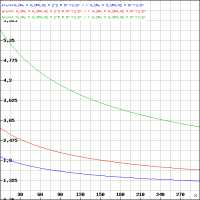
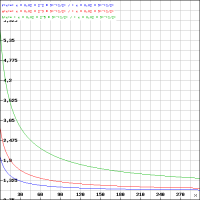
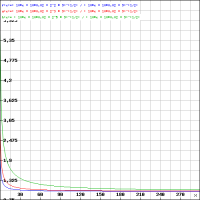
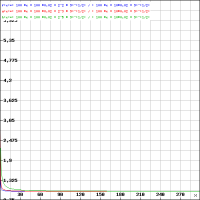
Graphs created with
https://rechneronline.de/funktionsgraphen/
y axis and x axis are the same scale on all four. Each image shows the graphs for each set of exposure times, which vary only in the number of stops of image stabilization (Or, duration of subexposures if you prefer that). y axis is the ratio between SNR of a single exposure image and a stack of 32 (green), 8 (red) or 4 (blue) images. If this is high, a single exposure will look much cleaner than a stack of multiple shorter ones. The x axis is the subject's signal strength (brigthness).
From the first two graphs, I conclude that for very low light subjects such as your milky way example, stacking multiple short exposures will always result in a visibly more noisy image than just taking one longer one. So this "digital image stablization" would be a tradeoff between noise and blur. For bright subjects or long exposure times, the difference probably becomes small enough to call the result equivalent in terms of noise, meaning the stabilized verision will look better as it is less blurry. Unfortunatley I have not idea, how the subject brightness in electrons per second translates to brightness as we know it. For example, if a subjects emits 200 e-/s, what exposure time would result in a good exposure for that?
So take my analysis with a mountain of salt. And keep in mind that I may have screwed up the calculation and am just talking fancy BS here. But it was fun, and on occasion I'll try to experiment with some actual images. After all, the technique here doesn't have to be applied in camera. As mentioned, there are many software solutions for aligning and stacking out there.












