

Upvote
0
You are using an out of date browser. It may not display this or other websites correctly.
You should upgrade or use an alternative browser.
You should upgrade or use an alternative browser.
Filters
Show only:
Tamron 20-40 for Sony FF, Hmmmmmmm
- By jd7
- Third Party Lenses
- 1 Replies
Certainly an interesting option! Would I pick that over the Tamron 17-28 f/1.8 or the Sigma 16-28 f/2.8? I might. Will be interseting to see reviews of the 20-40 f/2.8 in due course.
I could get excited about this glass in an RF mount. But then again, I was a positive vocal minority about the Sigma 24-36 too. We've all got our focal length favs, some of us conventional other not. It's all good.
Upvote
0
What’s next from Canon?
- By glongstaff
- EOS Bodies
- 176 Replies
exactly, and for those jumping on the 'flawed design' just a general wording that not everyone is going to agree on but when you have a professional camera and costing to boot and then being released with all the hype and still release a camera with the issue it had - shame on them!If you are waiting for these changes, you can expect to wait a long time.
I have been a canon owner since the release of the 350D love the 5DMKIII, but haters are going to hate and if you like your camera good for you....but it is a disgrace that large companies are releasing bodies at these prices with flaws they would know about (not talking about small niggles here) and hope all goes fine, yet the purchaser is the one suffering
Upvote
0
Canon Europe - Canon Redline Challenge

- By danfaz
- Canon General
- 1 Replies
Yeah, I was bummed to see it's not open to North America.Redline Challenge: Photography Competition - Canon Europe
Join the Canon Redline Challenge, a photography competition for enthusiasts. Win the chance to get a pro-ready kit and a pro shoot with a Canon Ambassador.www.canon-europe.com
Looks like an interesting contest with a chance to win an R5 and 24-70. Not open to North America
Upvote
0
Patent: Canon presents some interesting fast zoom lens optical formulas
Some people like compact lenses.
RF 24/1.8 = 270g. RF 50/1.8 = 160g. RF 35/1.8 = 305g.
Those are all pretty compact. I think Canon has shown they can do compact prime lenses with larger apertures than f/2.8.
Upvote
0
Anyone tried livestreaming with R5 + Sony Xperia Pro-I ?
It is not compatible with UVCI was wondering if anyone tried to use a Canon Eos r5 along with a Sony Xperia Pro-I to use it as external monitor and enable livestreaming possibilities ?
Sony xperia Pro had a micro HDMI connector so it should work with this one. But it's getting older.
Since Canon enabled using our r5 as webcam, i assume it's compatible with USB uvc protocol.
So i was wondering if anyone tried connecting an r5 to a Sony xperia Pro-I to see if it works (i mean if external monitor and livestreaming do).
Looking forward reading back from your tests.
Upvote
0
R1 For 2024

Probably he meant the R5s.
Agreed. If Canon is consistent, the R1 will be comparatively low resolution, and the high-res body will be an offshoot of the 5 series, in this case the R5.
Methinks GoldWing won't be happy.
Upvote
0
Is the image circle of RF L lenses larger than any EF lens?

- EOS Bodies
- 4 Replies
I suspect that EF format full-frame lenses would be insufficient for use on MF, and RF full-frame format would be a complete disaster.
Lenses are designed to provide adequate coverage across the sensor on their respective camera mount formats, producing a sharp image with minimal vignetting. Making the image circle much larger would cost more money for no gains, so camera companies avoid that, there's very little extra tolerance built in unless it's a tilt-shift lens which needs a larger image circle of decent quality to work properly.
The image quality and brightness of FF lenses drops off drastically beyond the 24×36mm sensor area, and to make matters worse the vignetting of RF lenses is way higher than on EF equivalents, it's a design limitation of the RF mount. Due to Canon being able to cut corners in optical design to a greater extent on the mirrorless format to save manufacturing costs and increase profits, quite a few entry level RF lenses can't even cover the whole FF sensor. The vignetting on many RF lenses is considerable, as I understand that's a result of the shorter flange distance - remember you can't get something for nothing in engineering, there's always a cost...
Whether the Canon lenses can resolve sufficient detail for high MP (such as 100MP) medium format sensors is another matter.
Almost half of Canon's older EF lenses were outresolved by the 5DSr and R5 camera body, and Canon released a list of lenses that were up to scratch.
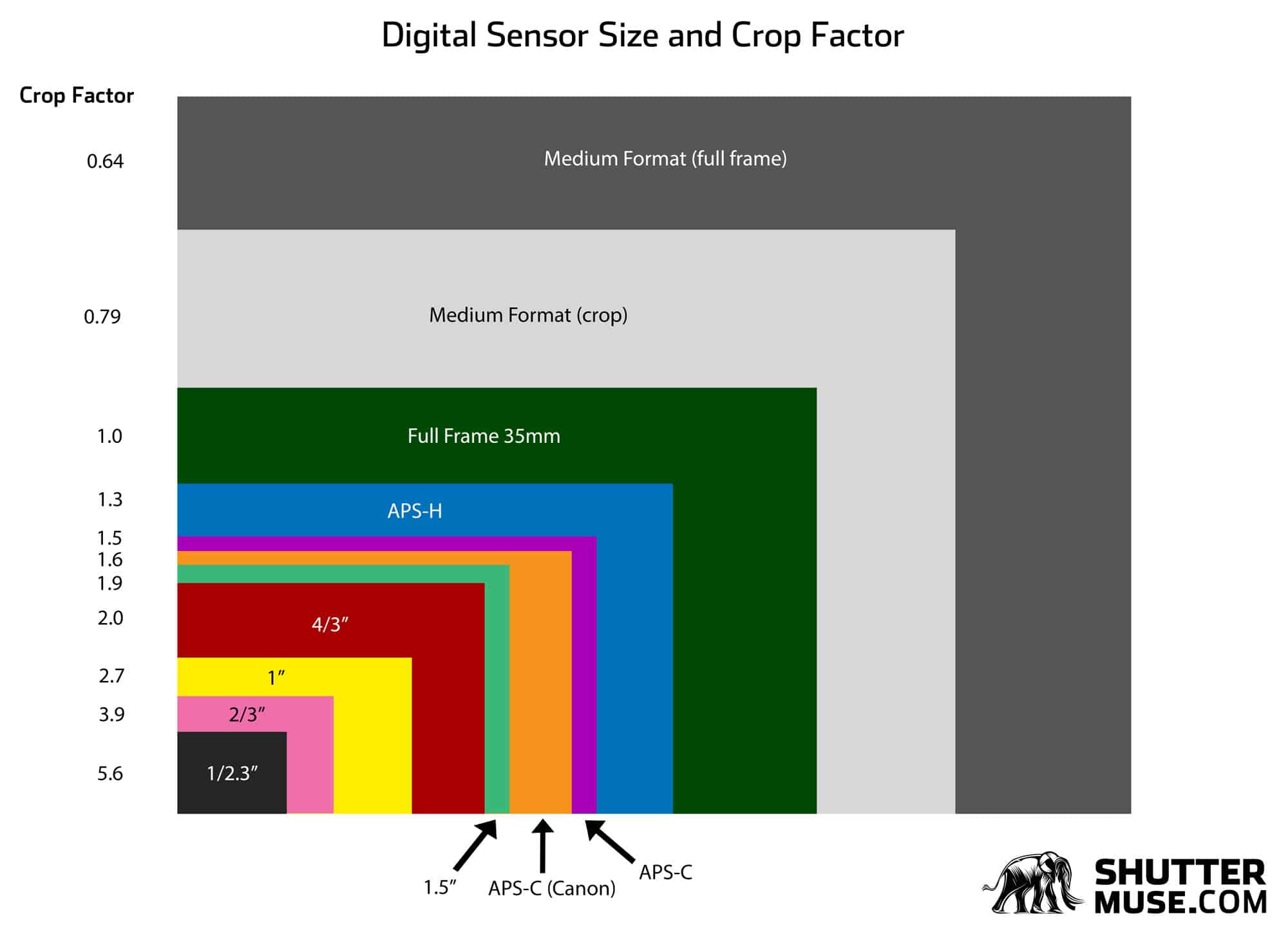
The focal lengths of RF full frame lenses would be all wrong on MF too. The crop factor for a Fujifilm GFX system is 0.79. The focal lengths all change due to crop factor, so all the MF equivalents to their 35mm counterparts will be longer, a MF 110mm lens (87mm FF equivalent) is closer to an FF 85mm portrait lens.
The wide apertures needed on FF would be unnecessary and add extra cost for no purpose on lenses used on MF.
Also, Canon L series lenses are only a big deal in the stills photography works, and in amateur video, but relatively speaking they're a joke in the world of cine lenses where they have a different set of criteria to gauge what a decent lens is. Canon L glass is a master in its own domain, but not absolutely awesome (as marketing hype would have you think) that it can work effectively outside of that. Tools are designed and optimised for specific functions. In the same way that they don't compare to the cine lens range, they're most likely sub-standard for MF also.
Incidentally, the size of the MF sensor is a fair bit wider and taller than a FF, so a FF lens would need to project a decent quality of image 20% beyond its boundaries. Looking at lens MTF charts, the image quality of many lenses barely holds up on the FF sensor periphery.
Lenses are designed to provide adequate coverage across the sensor on their respective camera mount formats, producing a sharp image with minimal vignetting. Making the image circle much larger would cost more money for no gains, so camera companies avoid that, there's very little extra tolerance built in unless it's a tilt-shift lens which needs a larger image circle of decent quality to work properly.
The image quality and brightness of FF lenses drops off drastically beyond the 24×36mm sensor area, and to make matters worse the vignetting of RF lenses is way higher than on EF equivalents, it's a design limitation of the RF mount. Due to Canon being able to cut corners in optical design to a greater extent on the mirrorless format to save manufacturing costs and increase profits, quite a few entry level RF lenses can't even cover the whole FF sensor. The vignetting on many RF lenses is considerable, as I understand that's a result of the shorter flange distance - remember you can't get something for nothing in engineering, there's always a cost...
Whether the Canon lenses can resolve sufficient detail for high MP (such as 100MP) medium format sensors is another matter.
Almost half of Canon's older EF lenses were outresolved by the 5DSr and R5 camera body, and Canon released a list of lenses that were up to scratch.
The focal lengths of RF full frame lenses would be all wrong on MF too. The crop factor for a Fujifilm GFX system is 0.79. The focal lengths all change due to crop factor, so all the MF equivalents to their 35mm counterparts will be longer, a MF 110mm lens (87mm FF equivalent) is closer to an FF 85mm portrait lens.
The wide apertures needed on FF would be unnecessary and add extra cost for no purpose on lenses used on MF.
Also, Canon L series lenses are only a big deal in the stills photography works, and in amateur video, but relatively speaking they're a joke in the world of cine lenses where they have a different set of criteria to gauge what a decent lens is. Canon L glass is a master in its own domain, but not absolutely awesome (as marketing hype would have you think) that it can work effectively outside of that. Tools are designed and optimised for specific functions. In the same way that they don't compare to the cine lens range, they're most likely sub-standard for MF also.
Incidentally, the size of the MF sensor is a fair bit wider and taller than a FF, so a FF lens would need to project a decent quality of image 20% beyond its boundaries. Looking at lens MTF charts, the image quality of many lenses barely holds up on the FF sensor periphery.

Upvote
0
Last in stock DSLRs bodies

- By dolina
- Canon General
- 0 Replies
These are the last DSLRs still on stock. Prices are for US$ body-only as listed on BH Photo
Canon
Nikon
Petax
Canon
- 2020 Canon EOS Rebel T8i (EOS 850D / EOS Kiss X10i) $899
- 2020 Canon EOS-1D X Mark III $6,499
- 2019 Canon EOS 90D $1,199
- 2019 Canon EOS Rebel SL3 (EOS 250D / EOS Kiss X10) $649
- 2017 Canon EOS 6D Mark II $1,399
- 2016 Canon EOS 5D Mark IV $2,699
- 2016 Canon EOS 80D $1,099
- 2016 Canon EOS-1D X Mark II $4,499
- 2015 Canon EOS 5DS R $1,499
Nikon
- 2020 Nikon D780 $2,196.95
- 2019 Nikon D6 $6,496.95
- 2017 Nikon D850 $2,796.95
- 2017 Nikon D7500 $999.95
- 2016 Nikon D5600 $699.95
- 2016 Nikon D500 $1599.95
- 2014 Nikon D750 $1,699.95
Petax
- 2021 Pentax K-3 Mark III $1,696.95
- 2018 Pentax K-1 Mark II $1,796.95
- 2016 Pentax K-70 $616.95
RRS plate for R7
- EOS R
- 3 Replies
Thanks for the Acratech suggestion for an L-bracket. Could be just what I need. It's a little bulkier because it attaches to the camera with an additional clamp, but I only use it with a pano setup so could make for easy on-off while leaving an existing flat plate on the camera.
Upvote
0
The Canon EOS R1 may not come until the 2nd half of 2023 [CR2]
- EOS Bodies
- 188 Replies
The only RF lenses that are essentially straight copies are the 24-105/4L, the RF-S 18-150 and the 400/600 superteles. The others are all new designs.The 70-200 isn't not a straight copy, as evidenced by the telescoping zoom design in the RF. The replacement for the 100-400L is the 100-500L, not the 100-400 non-L. The 100-400 non-L seems to replace the EF 70-300 non-L.
Upvote
0
Adobe Camera RAW and Lightroom have added support for the RF24 f/1.8 and RF15-30 lenses

- By koenkooi
- Canon Lenses
- 0 Replies
Yesterdays Create Cloud update has added lens profiles for the 2 RF lenses that will soon be available. Nice to see that Adobe is back to releasing support *before* the items can land on your desk.
Firmware: Canon EOS R3 v1.2.1 has been released
Canon, please give us the ability to set the burst depth in H+ mode for the R5 !!!!!!!!!!!!!!
This was a feature old 1 series cameras had, but strange vanished from more recent menu options, on every Canon camera.
Being able to set/limit the burst depth is incredibly useful for a lot of studio shooting. We'd use it on almost every studio shoot.
This was a feature old 1 series cameras had, but strange vanished from more recent menu options, on every Canon camera.
Being able to set/limit the burst depth is incredibly useful for a lot of studio shooting. We'd use it on almost every studio shoot.
Upvote
0
Here are some rumoured RF-S lenses that may be coming in the near future.
- Lenses
- 110 Replies
Rf S 16 55 f.2.8, será el objetivo más vendido de Canon, para sus APS C.
Seguro que iguala el Número de Cuerpos vendidos R7/R10.
Seguro que iguala el Número de Cuerpos vendidos R7/R10.
Upvote
0
EF-S 55-250 or EF-M 55-200
- By OskarB
- Canon Lenses
- 0 Replies
I was on a hike with my M6 II again and had the EF-S 55-250 from my girlfriend with me.
The photos of flowers and insects are so much better than with the EF-M 32, especially in terms of bokeh.
So I decided to get one for myself.
I wonder if anyone has a real world comparision of the EF-S 55-250 with the EF-M 55-200? Is it just as good?
Thanks, Oskar
The photos of flowers and insects are so much better than with the EF-M 32, especially in terms of bokeh.
So I decided to get one for myself.
I wonder if anyone has a real world comparision of the EF-S 55-250 with the EF-M 55-200? Is it just as good?
Thanks, Oskar
Lexar announces the Gold Series CFexpress Type A cards, the world’s fastest

- By Chaitanya
- Industry News
- 11 Replies
while there are few SDexpress cards out in market along with reader but compared to CFx A adoption to that format has been nearly exclusively for single camera maker and cards being restricted to handful of capacities(right now). I expect SDexpress is DOA and we might entire market shift to CFx A in coming years with option for users to use cheaper SD cards.Yep, I'd expect Canon to add them to the lower-end cameras and maybe a dual system like Sony has done with CFeA & SD in the one slot.
Keep the CFeB cards for the higher-end models that might need the extra speed.
Upvote
0
Review: Canon RF 100mm f/2.8L IS USM Macro

I made some test shots at mfd and 1:1 mag which I posted here:actually getting some hard evidence when so many were just whining "OMG Canon is staffed by amateurs, I'll never buy this lens."

Upvote
0
Canon R1 - Optimal Glass
- EOS R
- 9 Replies
Maybe if he adds a couple of zeros to those values, Canon will design the kit just for him. Or he could commission Zeiss, they do that sort of thing.I might take that bet.
Upvote
0
Aperture issue with 1992 Sigma 28-70 f/2.8 (only works properly at 2.8)

- By dlee13
- Canon Lenses
- 3 Replies
No problem and I believe you won’t see it closing as Canon use stop down focusing so the lens always stays wide open and only closes the aperture as the photo is taken, that gets as much light as possible when taking photos to help AF.Thanks a lot!
I just checked if that's the case for me as well - and it is. Or at least I don't see the aperture closing when I adjust it.
This also explains why my pictures are all overexposed when I try shooting with a lower aperture.
But if you are keeping the ISO/SS the same but the exposure is always off when changing aperture then a stuck aperture is most likely.
Upvote
0
Is there a new model coming for the Canon EF 100mm f/2.8L IS USM Macro Lens?
Super late response, sorry to you all. I have read your replies with great enthusiasm and understand how the future is going the RF way. So I'll get the EF as soon as possible and enjoy it!
Upvote
0
Sapphire Coated Optical Grade Acrylic Prime Lenses at T1.0 to T2.0
- By unfocused
- Third Party Manufacturers
- 5 Replies
Keep in mind that we are talking about an alternative universe here. Or maybe an alternate multiverse.It won't work if the acrylic is simply coated with sapphire as reflections will be terrible. There has to be a sandwich of coatings to lower the reflections between the acrylic and sapphire and then the sapphire and air on the other side.
Upvote
0
Canon EOS R3 and Canon EOS R5 to receive new firmware next week
- By koenkooi
- EOS Bodies
- 165 Replies
Canon rarely, if ever, backports common sense updates. The R5-II will likely get the fix.I only would know why Canon don’t fix the Electronic shutter limitation to Max 0,5 seconds on the R5.
It is annoying not to be allowed to use the focus bracketing for sunsets on the R5 while it is possible with R7 and even R10 (obviously possible also in the R3).
Upvote
0
Post R3 deliveries in Europe here
Interesting, but I'd pass on that even if I didn't have an R3: I'd only save 2.4% vs buying a new camera (47.138 vs 48.295 DKK) with full warranty from a genuine Canon dealer here in Denmark.If you're in europe
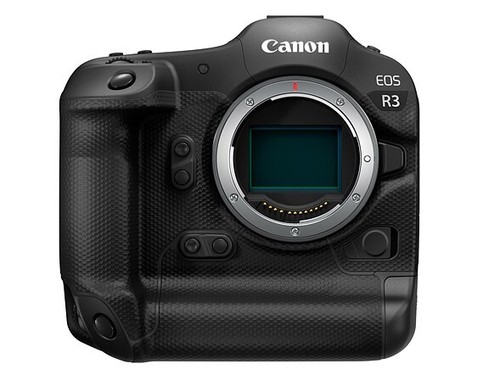
CANON R3 BODY ONLY - MINT IN BOX | eBay
Find many great new & used options and get the best deals for CANON R3 BODY ONLY - MINT IN BOX at the best online prices at eBay! Free shipping for many products!www.ebay.com
Upvote
0
Firmware: Canon EOS R6 v1.6.0 now available
It sounds like you believe that you are communicating with Canon. You aren't. This forum is not affiliated with Canon in any way.
well, we all hope canon spies are sent here and taking notes on all our feature wish lists, so that we finally get a camera thats affordable and no one complains about.
Upvote
0
Canon has pulled firmware v1.2.0 for the Canon EOS R3 due to a bug

I didn't know these recommendations and so, yes, I never did itCanon recommends resetting the camera to default settings (via the menu) *before* performing firmware updates. Existing settings can be saved to a memory card and then re-applied after the updates. They also recommend that the lens is removed prior to updates. I suspect that many people don't do either.
Resetting the camera simply returns it to default settings. The firmware version remains the same.
Upvote
0
Load more
Filter
Forum statistics










Gallery statistics
- Categories
- 1
- Albums
- 29
- Uploaded media
- 372
- Embedded media
- 1
- Comments
- 25
- Disk usage
- 1 GB