
You are using an out of date browser. It may not display this or other websites correctly.
You should upgrade or use an alternative browser.
You should upgrade or use an alternative browser.
Filters
Show only:

Bugs with the 5D III ?!
- EOS Bodies
- 0 Replies
Hi Guys,
I'm now using my 5DIII for 2 weeks and discovered some issues.
1. With the Savety Shift set to ISO, and assigned the Set Button + Main dial to set the ISO speed, you won't be able to set the ISO down using the Set button + main dial when the picture would be overexposed and the savety shizzle skips the iso speed.
2. Not really important but it probably sucks the batterie faster empty...
When you set the mode dial to one of the custom functions (c1-c3) it will activate the backlight (for a second or so) of the main display when you switch between the modes.
And what i will also post under light leaking thread is...that it works also with lens on (lenscap still on) ...and a flashlight pointed on the upper lcd. That also effects the exposure. That isn't true for my 7D.
whould be nice to know if i'm the only one with that "problems".
Cheers Rob
I'm now using my 5DIII for 2 weeks and discovered some issues.
1. With the Savety Shift set to ISO, and assigned the Set Button + Main dial to set the ISO speed, you won't be able to set the ISO down using the Set button + main dial when the picture would be overexposed and the savety shizzle skips the iso speed.
2. Not really important but it probably sucks the batterie faster empty...
When you set the mode dial to one of the custom functions (c1-c3) it will activate the backlight (for a second or so) of the main display when you switch between the modes.
And what i will also post under light leaking thread is...that it works also with lens on (lenscap still on) ...and a flashlight pointed on the upper lcd. That also effects the exposure. That isn't true for my 7D.
whould be nice to know if i'm the only one with that "problems".
Cheers Rob
Sony to Release PMW-100 Camcorder (50Mbps bitrate)
- Third Party Lenses
- 4 Replies
With the smaller sensor, it seems more comparable to the Canon XF300 camcorder, which does 50mbps 4:2:2.
I could be wrong, i kind of new to all this!
I could be wrong, i kind of new to all this!
Upvote
0
5Diii and sigma 85mm 1.4 slow focus (maybe)
- EOS DSLR
- 4 Replies
My 5D3 arrived on Friday. A second-hand Sigma 85/1.4 came earlier in the week. I used the pair together this afternoon, at f/1.4 the whole time. I'm happy so far: I think I'm getting better results from the Sigma wide open than I can from my Canon 85/1.8 at f/2. Haven't had any time to microadjust it, either.
I can't say anything about the focus speed. I tested the Sigma on my 5D2 around the house the day the lens arrived. Nothing seemed amiss on the 5D3.
I can't say anything about the focus speed. I tested the Sigma on my 5D2 around the house the day the lens arrived. Nothing seemed amiss on the 5D3.
Upvote
0
Serious Banding at ISO12800 :(

- By macrodust
- EOS Bodies
- 20 Replies
Aglet said:Bosman said:LR 4 changes my files from how they look on camera with a color cast almost like an overlay. CS5 Bridge doesn't change it at all from the look of the files in camera. I have seen LR in previous versions do this before a lot and i am starting to think bridge may be a better alternatie for true color reproduction...
I haven't played w LR 4 since the public beta but I think you can set which color model it uses to handle your raw files, similar to the ACR front end of Photoshop or LR3 too?..
Either Adobe's version, in at least 2 different year variations (e.g. 2010) or, I think, "Camera Standard," which seems to provide an image much closer to the Canon processed looked.
LR is imitating the Canon camera profiles, such as Standard, Neutral, Faithful, etc. In my opinion Neutral is the one that looks most like the DPP version or the in camera version of this profile. Therefore recommend using Neutral as the starting point for imports in LR, since the "translation" seems closest to the original.
Upvote
0
Upvote
0
Any thoughts on how the 5d3 will compare on dxo mark to the Nikon D800?
- By peederj
- EOS Bodies
- 156 Replies
Very interesting and potentially relevant. Link please.
Update: I found this:
http://falklumo.blogspot.de/2012/04/lumolabs-nikon-d800-video-function.html
Update: I found this:
http://falklumo.blogspot.de/2012/04/lumolabs-nikon-d800-video-function.html
LetTheRightLensIn said:Interesting stuff on DPR where they figured out how D800 video works. They read all pixels in a scanline, but only read every third scanline. They then downsample it from a bit over 1920x1080 down to 1920x1080. That explains why compared to 5D3 video:
D800 video is a bit sharper
D800 video has considerably worse SNR (5D3 appears to 3x3 bin the entire sensor while Nikon appears to skip using 2/3rds of collected photons, it puts even a bit less light than an APS-C sensor would collect) and yet not so much difference for stills (where both make use of the full sensor). D800 tosses away 1.8 stops of SNR and dynamic range for video compared to what it can do for stills apparently (but having a large base ISO DR advantage the ISO100 video on the D800 still has better DR than the 5D3, I'd guess they are even for DR by ISO400 for video and by ISO800 it should already have worse DR than 5D3 video and by ISO1600+ it should have a lot worse DR than the 5D3 video probably like 2 stops worse).
D800 video has more aliasing and a lot more color moire.
I think you have to give the video win to the 5D3, a little less sharp and DR at ISO100 but none of the moire mess. At ISO800 and up it has noticeably better SNR and DR, especially ISO1600+.
(that said they still BADLY need to update 5D3 firmware to add zebra stripes, video focus peaking and a 1.6x crop 2x2 sampled video mode with top clarity and better reach, then they will get the videographers singing its praises and they will fly off the shelf to movie guys)
5D3 also has better liveview sensor output since for some odd reason nikon uses some sort of video feed instead of scaled mode like on D7000 so their liview 100% look has every other line skipped.
Upvote
0
5DMK3 Video Zoom

- EOS DSLR
- 15 Replies
Mt Spokane Photography said:4X Digital Zoom. Read all about it
http://en.akihabaranews.com/110923/toy/thanko-releases-its-mini-canon-5d-mk-iii-clone-with-the-mame-cam-xl-dslr
Wow, $185.
Upvote
0
Lighting up a selected 5D AF sensor
- By rlarsen
- EOS Bodies
- 2 Replies
What some photographers are trying to do, including myself, is duplicate, in the 5D MK lll, the sensible feature found in the 1-D series, and 5D MK ll. When using my 1-MKll bodies, I am able to benefit from a nice plain screen, use Servo AF, and in dark conditions see my selected AF sensor briefly light up. A very useful feature.
I don't want a viewfinder filled with dozens of lit up AF sensors to see what I'm focusing on.
The 5D MK 11 has the helpful feature, but I never liked having 9 little boxes always on the focusing screen.
I'll test AI Focus to find out how well it performs for sports and active subjects.
I don't want a viewfinder filled with dozens of lit up AF sensors to see what I'm focusing on.
The 5D MK 11 has the helpful feature, but I never liked having 9 little boxes always on the focusing screen.
I'll test AI Focus to find out how well it performs for sports and active subjects.
Upvote
0
Canon 50mm 1.2
- Canon Lenses
- 8 Replies
Tried a 50mm f/1.4 and was sorely disappointed with AF performance wide open, which was one of the reasons why I skipped a 50mm prime while using a crop body. Moved to a 5DII, and I really missed the the near-50mm that I was used to on the crop body (with a 35L). Got a used 2011 50 f/1.2 for a decent price -- and it is now sitting on my camera for most indoor/low light situations.
It focuses fairly fast for a prime (much faster than the 85L) and is fairly accurate with such a shallow DOF wide open. The 35L actually has a higher max magnification ratio and can focus a lot closer than the 50L. My 50L copy is a bit inconsistent near its min focus distance but move back a foot or two and the AF works much better. I still use my 35L for tighter spaces (better AF performance at min focal distance) and wider FOV, but I find myself using the 50L more. It works well as general purpose lens and slots well between the 16-35 and 70-200.
It focuses fairly fast for a prime (much faster than the 85L) and is fairly accurate with such a shallow DOF wide open. The 35L actually has a higher max magnification ratio and can focus a lot closer than the 50L. My 50L copy is a bit inconsistent near its min focus distance but move back a foot or two and the AF works much better. I still use my 35L for tighter spaces (better AF performance at min focal distance) and wider FOV, but I find myself using the 50L more. It works well as general purpose lens and slots well between the 16-35 and 70-200.
Upvote
0
When will 5d3 replacement display covers will be available?
- By iso79
- EOS Bodies
- 5 Replies
tasteofjace said:XO Skins has a screen protector kit for both the main screen and the info LCD on the top of the camera. They fit perfectly.
xoskins.com
They don't. They're quite off and don't completely cover the entire screen.
Upvote
0
RAW Codec not supporting 5D mkIII thumbnails in Windows Explorer

- By vWings
- EOS Bodies
- 0 Replies
Getting info warning each time I plug in the 5D mkIII that Canon RAW Codec found a new CR2 file that is not supported by the installed version. When I click the link to the Canon Server http://pdisp01.c-wss.com/os/redirect?pr=ic-cc&id=rawcodec it offers no newer versions of my software. Yes I installed the software that shipped with the camera.
Do all of canons 50 mm lens suck?

Frankie T Fotografia said:I'm surprised none of you have complained about the color fringing on the 50mm f1.2 L lens. The color fringing on this lens is so bad that it's still visible stopped down to f4.
Never been a problem on my copy. Date code 2011. The 50mm 1.2L is the best 50mm out there for SLRs. There is no aspheric 50mm's with the complete feature set of this lens. It's Great!!!
Upvote
0
Compare 70-300 vs. 70-200 with 1.4 iii
- Lenses
- 11 Replies
Not being infected yet by some general artificial preference (L-lenses, full frame bodies) helps a lot around here: If the pictures look the same, they are the same...
Hah!! A disease I'm highly suseptable to...but, duly noted!!
Upvote
0
First Canon EOS 60Da samples (Andromeda, Orion & Pleiades)!

- By epsiloneri
- EOS Bodies
- 37 Replies
For the vignetting, I assume you would only have to take a "master flat" for the lens/camera combination once and for all, and then keep re-use it (much like is done in DPP and DxO). Dust may move around of course. I was more interested in the pixel-to-pixel variation of the flat field - how flat is very flat? If you haven't measured it - no problem I can do it myself when opportunity presents, I was just curious if you already had the data. Same thing for the dark current static structure - how much is the pixel-to-pixel variation? I understand it's a differential measurement, but one should anyway be able to measure this (otherwise one couldn't calibrate for it).
0.05 electrons/pix/sec is great performance, 1 electron/pix/sec not so much. The dark current seems to be (surprisingly) temperature sensitive in this regime. That means one needs to match the temperature of the sensor fairly accurately for the dark. Alternatively, optimise the dark subtraction by scaling it with the help of a bias frame.
The 5D2 sensor is also famous for some "band" structure in the dark that unfortunately is not stable in between exposures, and so very difficult to properly remove. Have you made any progress in this area? It will be interesting to see if the 60Da improves in this area.
0.05 electrons/pix/sec is great performance, 1 electron/pix/sec not so much. The dark current seems to be (surprisingly) temperature sensitive in this regime. That means one needs to match the temperature of the sensor fairly accurately for the dark. Alternatively, optimise the dark subtraction by scaling it with the help of a bias frame.
The 5D2 sensor is also famous for some "band" structure in the dark that unfortunately is not stable in between exposures, and so very difficult to properly remove. Have you made any progress in this area? It will be interesting to see if the 60Da improves in this area.
Upvote
0
No Quick Menu in 5D3?
- By mrmarks
- EOS Bodies
- 2 Replies
Yes, it is. Thanks. Note to self: Don't skip pages in the manual. LOL
Upvote
0
5D3 Light Leak Issue Surfaces

- EOS Bodies
- 3 Replies
I tested mine, and it does happen as noted. But it seems to be somewhat of a red herring. You must have the lens cap on and the viewfinder blocked very well to detect it. I put a piece of dark blue masking tape over my viewfinder, and it still let in 1000 X as much light as thru the top LCD, so I had to really completely block it.
With the lens cap off at very high ISO, in a dark room where I could barely read the exposure, shining a bright light on the top LCD did not change the exposure. I guess if I were to take 10 minute exposures with the lens cap on, a light hitting the top lcd panel might impact exposure time. Of course, in the event a light was on the top LCD wile doing a 10 minute exposure would ruin the exposure in any event. Its hard to imagine how the almost undetectable negligable leak could impact me, or any real world image.
I'm waiting for a expert to tell us what real world impact, if any, it might have.
With the lens cap off at very high ISO, in a dark room where I could barely read the exposure, shining a bright light on the top LCD did not change the exposure. I guess if I were to take 10 minute exposures with the lens cap on, a light hitting the top lcd panel might impact exposure time. Of course, in the event a light was on the top LCD wile doing a 10 minute exposure would ruin the exposure in any event. Its hard to imagine how the almost undetectable negligable leak could impact me, or any real world image.
I'm waiting for a expert to tell us what real world impact, if any, it might have.
Upvote
0
5D3 distortion correction in jpg (w/o manual in-camera raw conversion)?
- EOS Bodies
- 0 Replies
Hi everybody,
I am a long-time reader of and equally long-time learner off this forum, but first-time poster.
First of all, I would like to thank all contributors here for making this such an interesting, educational and civilized place!
Secondly, having bought a 5D3 (yay!), I am currently wondering about one thing -- is there no way to get every shot I take automatically distortion corrected in-camera for jpg? That would be awfully handy in certain situations with my 17-40mm.
I know that distortion correction can be done in-camera via 'manual' raw-jpg conversion, but that's not what I am after. Should't there be a "distiortion correction" option in the "lens aberration correction" entry of the shooting menu?
A bit flabbergasted over this, I would be grateful for anybody who could shed some light on the matter..
Many thanks!
I am a long-time reader of and equally long-time learner off this forum, but first-time poster.
First of all, I would like to thank all contributors here for making this such an interesting, educational and civilized place!
Secondly, having bought a 5D3 (yay!), I am currently wondering about one thing -- is there no way to get every shot I take automatically distortion corrected in-camera for jpg? That would be awfully handy in certain situations with my 17-40mm.
I know that distortion correction can be done in-camera via 'manual' raw-jpg conversion, but that's not what I am after. Should't there be a "distiortion correction" option in the "lens aberration correction" entry of the shooting menu?
A bit flabbergasted over this, I would be grateful for anybody who could shed some light on the matter..
Many thanks!
Canon 5D Mark III availability
- By JR
- EOS Bodies
- 5 Replies
jalbfb said:Good luck. It is a great camera.
It is good indeed! I am relooking at some of the shots I took with the mkIII this week-end (had one for a few days) and while I decided to get the 1DX, it is very hard to resist getting the mkIII anyway as a second body. The economics of it are killing me but I may not be able to resist! Heck, they will last at least another 4 years!
Mmmm, what to do!

Upvote
0
70-300mm L f/4-5.6 colors washed out?
FunPhotons said:What I said was I put it on my 5D MKII, with my color corrections and workflow, and tried to eliminate variables.
Sorry, I mixed that up. So if you've got some shots with all variables eliminated, why not post them? It would be interesting to see the difference.
Upvote
0
5D Mark III vs. D800... what comparisons do you want to see?
- By dafrank
- EOS Bodies
- 48 Replies
Here's what I want to know. I am deeply interested in nthe cameras dynamic range, especially the shadow detail after bringing up the shadows in post.
Here's the test I propose. First, take repeated shots with both cameras with their fastest lenses that you have available. Put the lenscaps firmly on both cameras. Now, go into a pitch black closet. Take a series of exposures, from, -6 to +6 f/stops from the indicated metered exposures to yield both Jpeg and raw shots, go down to your mothers' computers in the basement to load them on hard disk, and don't forget to take off your pajamas and dress in street clothes for the test - very important! On the raw files, please first lift the shadows 6 f/stops, then use the same software to raise the overall brightness of the files another 6 f/stops. Finally, convert the raw files to Tiff, but make them 400% larger than their native sizes while you do it. Now, take the resulting files, both Tiff and Jpeg, and burn separate DVD disks for both the Nikon and Canon files. Go upstairs, open the front or back door of your mom's house. Bring the disks outside. Repeatedly lay them in both the brightest lit areas in the yard and then the darkest shadowed area in the yard. Tell us, please, which disk look better, Nikon or Canon? I bet they'll both look about the same. Don't forget to wear sunglasses in the bright lit areas, as the glare off those disks will be nearly blinding!
Good luck. Looking forward to your results.
Here's the test I propose. First, take repeated shots with both cameras with their fastest lenses that you have available. Put the lenscaps firmly on both cameras. Now, go into a pitch black closet. Take a series of exposures, from, -6 to +6 f/stops from the indicated metered exposures to yield both Jpeg and raw shots, go down to your mothers' computers in the basement to load them on hard disk, and don't forget to take off your pajamas and dress in street clothes for the test - very important! On the raw files, please first lift the shadows 6 f/stops, then use the same software to raise the overall brightness of the files another 6 f/stops. Finally, convert the raw files to Tiff, but make them 400% larger than their native sizes while you do it. Now, take the resulting files, both Tiff and Jpeg, and burn separate DVD disks for both the Nikon and Canon files. Go upstairs, open the front or back door of your mom's house. Bring the disks outside. Repeatedly lay them in both the brightest lit areas in the yard and then the darkest shadowed area in the yard. Tell us, please, which disk look better, Nikon or Canon? I bet they'll both look about the same. Don't forget to wear sunglasses in the bright lit areas, as the glare off those disks will be nearly blinding!
Good luck. Looking forward to your results.
Upvote
0
Depth of Field preview button
nikkito said:Hello there! Just a quick question: do u ever use this button?
I'd like to use it more often esp. for macro and am used to it from the analog days where try & error was not an option. However, on the 60d the button is so unreachable I think it's one of these Canon marketing annoyances to make you upgrade. Luckily, magic lantern has an option to make the dof button "sticky" so you only have to tip it and not have to keep holding it.
Upvote
0
Understanding Canon "IS Mode 3"

- By Marsu42
- Canon Lenses
- 1 Replies
koolkurkle said:I am trying to better understand IS Mode 3 in the new 300mm/400mm 2.8L IS II lenses:
Obviously "mode 3" only activates IS when really taking a picture - which is what I'd like to have on my 70-300L, too, because of exactly the things the manual states: a) it saves battery and skips the annoying IS-sound when pressing half shutter, b) tracking is easier: IS stabilizes the picture for static framing, but "skips" when really wanting to move the lens.
It would be interesting to know how much lag mode 3 produces from full shutter press to picture taken.
Upvote
0
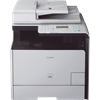
Canon MF8350CDN Multifunction Colour Laser Printer
- Canon General
- 0 Replies
Product Description MF8350CDN
Printer Type Laser - Colour
Available Functions Print, Copy, Scan and Fax
Maximum Media Size (Standard) A4
Total Media Capacity (Plain Paper) 250 sheets paper cassette & 50 sheet multipurpose tray
Maximum Print Speed (Mono) Up to 20 pages per minute
Maximum Print Speed (Color) Up to 20 pages per minute
Maximum Print Resolution (Mono) 2400 x 600 dpi
Duplex Printout Yes
Maximum Copying Speed (Mono) Up to 20 copies per minute
Maximum Copying Speed (Colour) Up to 20 copies per minute
Maximum Scanning Resolution 9600 x 9600 dpi
Maximum Fax Transmission Speed Approx. 3 seconds per page
Interface USB
RAM Installed (Maximum) 128MB
Language Simulation UFRII
Networking Integrated network
Media Types Paper
Automatic Document Feeder Included
Dimensions (W x D x H) 430 W x 484 D x 479 H mm
Weight Approx. 31kg
For more information for the similar products and related products Please Click Here...http://www.penta.com.au/
If you want to compare price from 1000 Stores please Click Here...http://www.shopprice.com.au/
If you Need Consultancy or Tech Support for Service, Maintenance & Repair please Click Here...http://www.techexpert.com.au/
For more Price Comparison Site please Click Here...http://www.justprice.com.au/
If you looking for Brand Laptop, Desktop , Server , Projector & TV with low Price please Click Here...http://www.pcntech.com.au/
Printer Type Laser - Colour
Available Functions Print, Copy, Scan and Fax
Maximum Media Size (Standard) A4
Total Media Capacity (Plain Paper) 250 sheets paper cassette & 50 sheet multipurpose tray
Maximum Print Speed (Mono) Up to 20 pages per minute
Maximum Print Speed (Color) Up to 20 pages per minute
Maximum Print Resolution (Mono) 2400 x 600 dpi
Duplex Printout Yes
Maximum Copying Speed (Mono) Up to 20 copies per minute
Maximum Copying Speed (Colour) Up to 20 copies per minute
Maximum Scanning Resolution 9600 x 9600 dpi
Maximum Fax Transmission Speed Approx. 3 seconds per page
Interface USB
RAM Installed (Maximum) 128MB
Language Simulation UFRII
Networking Integrated network
Media Types Paper
Automatic Document Feeder Included
Dimensions (W x D x H) 430 W x 484 D x 479 H mm
Weight Approx. 31kg
For more information for the similar products and related products Please Click Here...http://www.penta.com.au/
If you want to compare price from 1000 Stores please Click Here...http://www.shopprice.com.au/
If you Need Consultancy or Tech Support for Service, Maintenance & Repair please Click Here...http://www.techexpert.com.au/
For more Price Comparison Site please Click Here...http://www.justprice.com.au/
If you looking for Brand Laptop, Desktop , Server , Projector & TV with low Price please Click Here...http://www.pcntech.com.au/
Attachments
24 - 70mm f/2.8 L I or II
- Lenses
- 32 Replies
I sold my 24-105 tonight for $900 cash.
Yeah, I made a profit for once.
It was however, short lived, because I spent it on a 35mm F/1.4 and 135mm F/2 in preference to the new 24-70mm
ET
Yeah, I made a profit for once.
It was however, short lived, because I spent it on a 35mm F/1.4 and 135mm F/2 in preference to the new 24-70mm
ET
Upvote
0
Load more
Filter
Forum statistics





Gallery statistics
- Categories
- 1
- Albums
- 29
- Uploaded media
- 372
- Embedded media
- 1
- Comments
- 25
- Disk usage
- 1 GB