1DX2 illuminated focus points

May 26, 2012
689
0
9,131
Does anyone else have this "phenomenum" (as Canon would put it)?

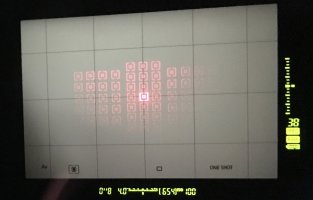
When you focus, the selected point or group is nice and bright (wherever it's positioned) and the other available focus points are quite faint in comparison - so far, so good. The "issue" I have is with the brightness of the other available points. The brightness of them definitely fades from top to bottom and also from the middle out to the far left/right, so much so, that the lowest far left and right points are quite hard to see. Increasing the brightness level (there're only two available) helps slightly but the brightness is not even. This "undocumented graduated effect" is the same no matter what settings I use.

Any thoughts or are they all like that?

Thanks.
 
mine seems to be fine all over -- although I have noticed that if your eye is not square with or otherwise right up on the viewfinder, the illuminated points won't appear as brightly as they should. This is with the "normal" af point illumination option in the menu. The brighter setting seems to be a little too bright.
 
Upvote 0
Thanks all for the replies.

My available AF points are definitely brighter at the top and fade towards the bottom. Having just picked up the camera at the end of last week I don't want to have the trouble of getting it serviced and risking Canon screw up some other thing as I've AFMA'd all my lenses and things are sharp (I'm especially impressed with my new 70-200 f2.8 IS II plus 2x TC mk3 at 400mm). The visibility of the available focus points is a nuisance but probably something I can live with though it shouldn't happen. Will try to post an image tomorrow to let you see how dim the lower left/right points are.

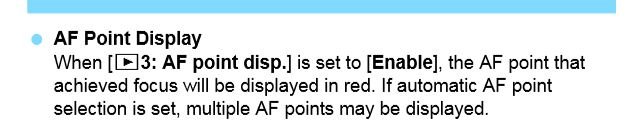
Another "issue" is the focus point isn't being displayed on the image when reviewing it on the rear screen - yes, the AF Point Display setting is set to enable. Any thoughts? (I had a 5D3 for years so I'm not a newbie when it comes to going through menus etc.)

New cameras, huh? Who would have one? ::)
 
Upvote 0
Hi Guy.
As it is a brand new (very expensive) camera are you not able to return to the retailer and exchange it for a working example, you shouldn't have to send it for repair should you. Especially as it now appears it might have more than the original issue.

Cheers, Graham.

GuyF said:
Thanks all for the replies.

My available AF points are definitely brighter at the top and fade towards the bottom. Having just picked up the camera at the end of last week I don't want to have the trouble of getting it serviced and risking Canon screw up some other thing as I've AFMA'd all my lenses and things are sharp (I'm especially impressed with my new 70-200 f2.8 IS II plus 2x TC mk3 at 400mm). The visibility of the available focus points is a nuisance but probably something I can live with though it shouldn't happen. Will try to post an image tomorrow to let you see how dim the lower left/right points are.

Another "issue" is the focus point isn't being displayed on the image when reviewing it on the rear screen - yes, the AF Point Display setting is set to enable. Any thoughts? (I had a 5D3 for years so I'm not a newbie when it comes to going through menus etc.)

New cameras, huh? Who would have one? ::)
 
Upvote 0
GuyF said:
Thanks all for the replies.

My available AF points are definitely brighter at the top and fade towards the bottom. Having just picked up the camera at the end of last week I don't want to have the trouble of getting it serviced and risking Canon screw up some other thing as I've AFMA'd all my lenses and things are sharp (I'm especially impressed with my new 70-200 f2.8 IS II plus 2x TC mk3 at 400mm). The visibility of the available focus points is a nuisance but probably something I can live with though it shouldn't happen. Will try to post an image tomorrow to let you see how dim the lower left/right points are.

Another "issue" is the focus point isn't being displayed on the image when reviewing it on the rear screen - yes, the AF Point Display setting is set to enable. Any thoughts? (I had a 5D3 for years so I'm not a newbie when it comes to going through menus etc.)

New cameras, huh? Who would have one? ::)

The af points won't display on the rear screen if the image is zoomed/magnified to any level.

I do not notice an af point fade from top to bottom. I do notice that the intensity changes based on the light level. I can't say if that is a frame average or if it also tracks the focus point say when in spot metering mode.
 
Upvote 0
I've attached a (bad) image of the illuminated focus points in the viewfinder. Although taken at an angle, you can see the brightness reduces towards the bottom and far left/right.

The Canon site does say this about the focus points: "Whichever is set, the camera will further automatically adjust the relative brightness on top of the user-defined setting, changing it subtly depending upon the ambient light at the moment. Users can see, if they look at the red illumination closely, that as they pan from a dark to light area, or vice-versa, that the brightness of the AF points will shift on its own, getting slightly brighter as ambient light levels rise. This helps ensure that the AF point display will continue to be visible in as many conditions as possible."

Link: http://learn.usa.canon.com/resources/articles/2016/eos1dx_mkii/eos1dx_markii_red_af_illumination.shtml

As for showing the focus point on the rear image, I've enabled this feature but it isn't showing the focus point even with the "magnify image" not in use. Tried different lenses etc. (just in case) but still not showing the AF point(s). The manual is quite clear - see extract from manual below.

I've contacted CPS and will see what they say about the issues.
 

Attachments

  • focus points.jpeg
    focus points.jpeg
    547.4 KB · Views: 235
  • Display AF Point.JPG
    Display AF Point.JPG
    26.9 KB · Views: 943
Upvote 0
Just an update on the "missing" focus points when reviewing images on the rear screen - turns out if you have Distortion Correction enabled, it doesn't display the focus points. I only discovered this by switching off all corrections to use my Sigma 85mm - boy was I surprised/confused to see the focus points appear on the rear screen! Trying Canon lenses with Distortion Correction off shows the focus points okay. Aha!

Looking through the manual, it does mention this. Ahh, if only I had a paper manual to refer to whenever I wanted rather than having to turn on my PC and scroll through! Damn Canon's idiotic idea to not supply a printed manual!

£5200 for a camera and no printed manual - wtf?
 
Upvote 0
I see that on my 1DXm2 as well.

However, this is normal and does not indicate any problems with the camera.

This just reflects which AF points display illumination method during focus is selected.

Three options are related to this:
#3 – Selected pt (…).
When this selected, only selected points will be illuminated and once in focus the focused points will be illuminated in small squares.
Not selected points will be slightly visible but strongly faded with gradients effects as you described.
I think they should not be visible at all according to the selected settings – I think this is light leak (or inducted current leak to other LEDs) providing slight illumination of them

#4 – Selected AF points (focused)
When this selected, only selected points will be illuminated when focused (not before focus achieved).
All the time not selected points will be slightly visible (a bit more illuminated than with option 3) but strongly faded with gradients effects as you described.
I think they should not be visible at all according to the selected settings – I think this is light leak (or inducted current leak to other LEDs) providing slight illumination of them (the same as for #3)

# 2 : All AF points:
Here all AF Points are always visible initially (with no fading/gradient effects) and selected points are in small squares.
When in Focus – all becomes invisible

So everything is normal - this is just matter of knowing your camera.
When I get new one I usually spend a little bit of time checking and testing everything so I know how camera behaves in different situations and with different settings.
 
Upvote 0
Just to clarify the illuminated available focus points in the viewfinder issue -

The selected point/group is fine. No issue. However what you are supposed to see are the other unselected points illuminated to indicate which other ones are available. This "lower level of illumination" should be even. A reply from my dealer and from CPS (along with other owners) all say this should not be happening and the illumination of the other available points should be uniform.

I'll take the camera back to the dealer and get things sorted out - they have given excellent customer support so far and I don't imagine there will be any problem getting the body replaced if need be.
 
Upvote 0
Neutral said:
Not selected points will be slightly visible but strongly faded with gradients effects as you described.

Hi Neutral,

Sorry but where does it say in the manual or Canon website that there should be a gradient effect? I've just searched the manual for "gradient" and "fade" and there is no reference to this in the chapter on selecting the focus points or the display in the viewfinder. If other owners are saying theirs are evenly lit and not graduated, that suggests my camera (and, it appears, yours too) has an issue. Not a major issue, but a fault nevertheless.

From a consumer's point of view, I do wonder if this issue points to possibly other problems yet to appear (I've not tested all functions yet).

I've sent the image to CPS and they'll get back to me.

I'll post an update as soon as I can.

Regards.
 
Upvote 0
GuyF said:
Neutral said:
Not selected points will be slightly visible but strongly faded with gradients effects as you described.

Hi Neutral,

Sorry but where does it say in the manual or Canon website that there should be a gradient effect? I've just searched the manual for "gradient" and "fade" and there is no reference to this in the chapter on selecting the focus points or the display in the viewfinder. If other owners are saying theirs are evenly lit and not graduated, that suggests my camera (and, it appears, yours too) has an issue. Not a major issue, but a fault nevertheless.

From a consumer's point of view, I do wonder if this issue points to possibly other problems yet to appear (I've not tested all functions yet).

I've sent the image to CPS and they'll get back to me.

I'll post an update as soon as I can.

Regards.

I did not look through the manual - I just checked how all that works on mine 1DXm2.
As per menu definitions in the camera (and info available there by pressing info button) the is nothing there that tells that non illuminated points should be visible. And this is logical.

My understanding that non illuminated points are visible due to some side effects on 1DXm2 viewfinder overlay LCD screen and I have no issues with that. So you could see anything there.

Small example - when I changed lights in my house to LED light I found out that at one room LED lamp is slightly illuminated even if switched off. An this is happening because there is another electrical wire goes along and there is small inductance current on the wire to that turned off LED lamp. This is normal - school physics.
Or look at the electricians indicator screwdriver - you touch live wire and indicator comes ON - again due to small induction.
So here in 1DXm2 this was no surprise to see similar effect
If I want to see all AF points and see what is currently selected I can use option #2 - All AF points illuminated and selected ones are highlighted.
 
Upvote 0
Neutral,

I think you're missing the point. If each body is built to the same design and specification, why do you and I have similar graduated illumination yet other owners here (plus my dealer and Canon Professional Services!) suggest there is something not quite right?

Whilst I understand the analogy with home wiring and inductance loops, it is not relevant in this instance. Canon would not design a product (intentionally) where inductance would cause an issue in some bodies but not others!

Just because you are happy with the performance of your camera does not mean it works as intended.

Regards.
 
Upvote 0
My point is that by functional logic only points that are selected to be illuminated should be visible.
And in general it works as it should be with provided menu settings.

If points that are not selected to be illuminated are slightly visible this is possibly some minor issues with the used LCD technology and this does not affect camera performance.
As this possibly kind of side effects (probably related to manufacturing of this element) this could appear differently on different cameras.
So this is why I do not care about that.
Again, if you need to see all points (selected and not selected) just use option # 2 in the menu : All AF points:
All points are visible, focus selected ones are highlighted.

If that would be AF performance itself or Exposure meter problem (main functions in the camera) than this would be completely different story.

I checked 1DXm2 user manual and it does not tell anything that non selected points for illumination should be visible (page 135 and 136 in user manual).
 
Upvote 0
Neutral said:
My point is that by functional logic only points that are selected to be illuminated should be visible.

Just to finish off this thread -

1. I identified an issue.
2. Some users, but not all, thought this was also an issue.
3. My dealer thought it was an issue.
4. Canon UK said it was an issue and that I should send my camera back to them for adjustment/repair.
5. Based on 4. above, my dealer is going to replace the faulty camera.
6. Will Neutral finally accept there was an issue?

Issues are not always just in the mind of the beholder.

Regards.
 
Upvote 0