5D4 Sensor Defect Discovered

wilier said:
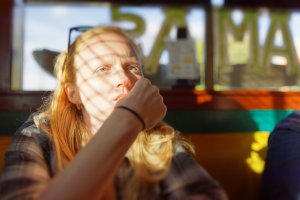
Photo taken from:

https://www.dpreview.com/samples/0574215952/canon-eos-5d-mark-iv-real-world-samples-gallery

Vignetting correction, + 1EV, + 100 shadow recovery.
Sorry, but this is not normal. My old 5dmk3 is way better.

I see some slightly discolored stripes, but they seem very minor compared to the darkness of those areas in the original image. I'll add my voice to others: I'd like to see direct comparison with 6D and 5D3 of the same image, with the same exposure and treatment.

It might be a legitimate problem, but it's hard to tell if it's a true defect, or if the rest of the image is so clean that the few stripes jump out by comparison. When so few photos are captured, minor differences are greatly magnified by shadow lift.
 
Upvote 0
Orangutan said:
wilier said:
Photo taken from:

https://www.dpreview.com/samples/0574215952/canon-eos-5d-mark-iv-real-world-samples-gallery

Vignetting correction, + 1EV, + 100 shadow recovery.
Sorry, but this is not normal. My old 5dmk3 is way better.

I see some slightly discolored stripes, but they seem very minor compared to the darkness of those areas in the original image. I'll add my voice to others: I'd like to see direct comparison with 6D and 5D3 of the same image, with the same exposure and treatment.

It might be a legitimate problem, but it's hard to tell if it's a true defect, or if the rest of the image is so clean that the few stripes jump out by comparison. When so few photos are captured, minor differences are greatly magnified by shadow lift.

In this discussion in Facebook user group there is a thread started Nov 4th there is a user ""Pe Nu" who has done test you are thinking of. https://www.facebook.com/groups/1044470378923162/?fref=ts

Edit: for some reason seems that in the test the user originally overexposed so could be more detailed with underexposing. Might be that someone in here has done direct comparison, but hard to find from almost 30 pages :-).
 
Upvote 0
risc32 said:
I've been gone for a while. came back to look around and i see i haven't missed much. people who don't know what they are doing running around saying the sky is falling, but i guess that's the internet for ya'. at least we have moved on from photography with the lens cap on..... progress i suppose.

If only that were true....

PixelTrawler said:
The user Tally over on the potn forum has a good test to show the pattern.
Take an image with the body cap on and cover the viewfinder.
 
Upvote 0
I have very good news:

Stop the press
:)

Melbourne, Australia, 20.11.2016, 3:15pm. Canon Inc NYSE: CAJ value shoot through the roof following this announcement from Melbourne, Australia. buy!

Same image processed in DXO Optics Pro 11.3.0 at +3EV and +50 shadows, -100 highlights, standard (non-prime) rendering - comes out almost clear of banding!

i can see some barely visible faint meager streak to the right of the person's fist but that's nothing!!!

I start noticing banding more clearly if the image is pushed crazy +4EV, +100 shadows but it was unnecessary as even with such a serious level of underexposure and +3EV exposure compensation I had to pull back highlights by -100 to avoid clipping.

same image pushed +2EV and +50 shadows in LR resulted in some nasty banding as per original image posted.
so there we go.

You can push the same image 2EV further with DXO Optics Pro than with LR. :D what a crock :)


wilier said:
Photo taken from:

https://www.dpreview.com/samples/0574215952/canon-eos-5d-mark-iv-real-world-samples-gallery

Vignetting correction, + 1EV, + 100 shadow recovery.
Sorry, but this is not normal. My old 5dmk3 is way better.
 

Attachments

  • 793A7212_DxO-1.jpg
    793A7212_DxO-1.jpg
    1.1 MB · Views: 161
Upvote 0
Thanks Alex_M for letting us know. This is indeed good news :)

EDIT: DxO can output a DNG file so I guess it must be safe to process that DNG file with other software without the banding problem :)
 
Upvote 0
MichaelTheMaven said:
When I followed up with them and pointed out this is a more wide-spread issue than my own case, presented my video and asked what they wanted me to share with my subscribers they ceased communicating with me.

Ill post a follow up video soon.

MM

Mike the Mentor,
Canon should be aware of your presence online and hopefully communicate in the best possible way once they have more information.
Having seen and enjoyed your testinge methodology for some time due to the consistency over time, it would be a shame if the MkIV misses the bus in terms of
percieved performance. Although I must say many mKIV pictures posted online look very good compared to older cameras in general.
If life does not lead me astray I am one prospective buyer after the new year. Im also considering 5DS it has the autofocus but lacks robust wifi which I come to enjoy on the 6D.

your shootouts for some
 
Upvote 0
Alex_M said:
I have very good news:

Stop the press
:)

Melbourne, Australia, 20.11.2016, 3:15pm. Canon Inc NYSE: CAJ value shoot through the roof following this announcement from Melbourne, Australia. buy!

Same image processed in DXO Optics Pro 11.3.0 at +3EV and +50 shadows, -100 highlights, standard (non-prime) rendering - comes out almost clear of banding!

i can see some barely visible faint meager streak to the right of the person's fist but that's nothing!!!

I start noticing banding more clearly if the image is pushed crazy +4EV, +100 shadows but it was unnecessary as even with such a serious level of underexposure and +3EV exposure compensation I had to pull back highlights by -100 to avoid clipping.

same image pushed +2EV and +50 shadows in LR resulted in some nasty banding as per original image posted.
so there we go.

You can push the same image 2EV further with DXO Optics Pro than with LR. :D what a crock :)


wilier said:
Photo taken from:

https://www.dpreview.com/samples/0574215952/canon-eos-5d-mark-iv-real-world-samples-gallery

Vignetting correction, + 1EV, + 100 shadow recovery.
Sorry, but this is not normal. My old 5dmk3 is way better.

That is good. Seems that part of the "banding" is hidden behind the warmer tones of the DXO picture. Is that the case?
 
Upvote 0
Alex_M said:
I have very good news:

Stop the press
:)

Melbourne, Australia, 20.11.2016, 3:15pm. Canon Inc NYSE: CAJ value shoot through the roof following this announcement from Melbourne, Australia. buy!

Same image processed in DXO Optics Pro 11.3.0 at +3EV and +50 shadows, -100 highlights, standard (non-prime) rendering - comes out almost clear of banding!

i can see some barely visible faint meager streak to the right of the person's fist but that's nothing!!!

I start noticing banding more clearly if the image is pushed crazy +4EV, +100 shadows but it was unnecessary as even with such a serious level of underexposure and +3EV exposure compensation I had to pull back highlights by -100 to avoid clipping.

same image pushed +2EV and +50 shadows in LR resulted in some nasty banding as per original image posted.
so there we go.

You can push the same image 2EV further with DXO Optics Pro than with LR. :D what a crock :)


wilier said:
Photo taken from:

https://www.dpreview.com/samples/0574215952/canon-eos-5d-mark-iv-real-world-samples-gallery

Vignetting correction, + 1EV, + 100 shadow recovery.
Sorry, but this is not normal. My old 5dmk3 is way better.

And this is why if someone claims a fault they need to post the raw files. Otherwise it's like someone claiming they've cured cancer but they aren't allowing people to check their data.
 
Upvote 0
It appears that DXO deals better with image artefacts and gets rid of them pretty nicely. At +4EV push banding is slightly noticeable but non intrusive to my eye.

I guess, one can download DXO Optics Pro 30-day trial copy and see what can be done. The RAW file in question is available for download on dpreview website.


That's good. Seems that part of the "banding" is hidden behind the warmer tones of the DXO picture. Is that the case?
 
Upvote 0
Alex_M said:
I have very good news:

Stop the press
:)

Melbourne, Australia, 20.11.2016, 3:15pm. Canon Inc NYSE: CAJ value shoot through the roof following this announcement from Melbourne, Australia. buy!

Same image processed in DXO Optics Pro 11.3.0 at +3EV and +50 shadows, -100 highlights, standard (non-prime) rendering - comes out almost clear of banding!

i can see some barely visible faint meager streak to the right of the person's fist but that's nothing!!!

I start noticing banding more clearly if the image is pushed crazy +4EV, +100 shadows but it was unnecessary as even with such a serious level of underexposure and +3EV exposure compensation I had to pull back highlights by -100 to avoid clipping.

same image pushed +2EV and +50 shadows in LR resulted in some nasty banding as per original image posted.
so there we go.

You can push the same image 2EV further with DXO Optics Pro than with LR. :D what a crock :)


wilier said:
Photo taken from:

https://www.dpreview.com/samples/0574215952/canon-eos-5d-mark-iv-real-world-samples-gallery

Vignetting correction, + 1EV, + 100 shadow recovery.
Sorry, but this is not normal. My old 5dmk3 is way better.

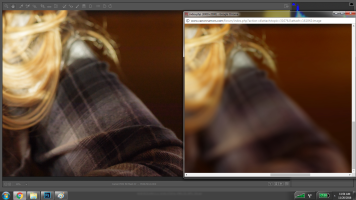
I'm a little confused - is there two almost identical shots in that gallery of the girl sitting there that I am missing? Because it looks to me like areas that are in focus when I open this in ACR are -obliterated- in the DXO screenshot you posted. So did I miss another copy of this image taken at a wider aperture, or is DXO just doing heavy heavy noise reduction to render without the banding?
 

Attachments

  • Untitled.png
    Untitled.png
    1.9 MB · Views: 127
Upvote 0
tr573 said:
Alex_M said:
I have very good news:

Stop the press
:)

Melbourne, Australia, 20.11.2016, 3:15pm. Canon Inc NYSE: CAJ value shoot through the roof following this announcement from Melbourne, Australia. buy!

Same image processed in DXO Optics Pro 11.3.0 at +3EV and +50 shadows, -100 highlights, standard (non-prime) rendering - comes out almost clear of banding!

i can see some barely visible faint meager streak to the right of the person's fist but that's nothing!!!

I start noticing banding more clearly if the image is pushed crazy +4EV, +100 shadows but it was unnecessary as even with such a serious level of underexposure and +3EV exposure compensation I had to pull back highlights by -100 to avoid clipping.

same image pushed +2EV and +50 shadows in LR resulted in some nasty banding as per original image posted.
so there we go.

You can push the same image 2EV further with DXO Optics Pro than with LR. :D what a crock :)


wilier said:
Photo taken from:

https://www.dpreview.com/samples/0574215952/canon-eos-5d-mark-iv-real-world-samples-gallery

Vignetting correction, + 1EV, + 100 shadow recovery.
Sorry, but this is not normal. My old 5dmk3 is way better.

I'm a little confused - is there two almost identical shots in that gallery of the girl sitting there that I am missing? Because it looks to me like areas that are in focus when I open this in ACR are -obliterated- in the DXO screenshot you posted. So did I miss another copy of this image taken at a wider aperture, or is DXO just doing heavy heavy noise reduction to render without the banding?

Just heard that DXO softens and adjusts the picture as default. When you disable those, the result is the same as from LR. Thanks Timo for testing this out.
 
Upvote 0
neuroanatomist said:
risc32 said:
I've been gone for a while. came back to look around and i see i haven't missed much. people who don't know what they are doing running around saying the sky is falling, but i guess that's the internet for ya'. at least we have moved on from photography with the lens cap on..... progress i suppose.

If only that were true....

PixelTrawler said:
The user Tally over on the potn forum has a good test to show the pattern.
Take an image with the body cap on and cover the viewfinder.

I clearly said it was a test to show the pattern, nothing more... hardly "photography"
 
Upvote 0
JukkaS said:
tr573 said:
Alex_M said:
I have very good news:

Stop the press
:)

Melbourne, Australia, 20.11.2016, 3:15pm. Canon Inc NYSE: CAJ value shoot through the roof following this announcement from Melbourne, Australia. buy!

Same image processed in DXO Optics Pro 11.3.0 at +3EV and +50 shadows, -100 highlights, standard (non-prime) rendering - comes out almost clear of banding!

i can see some barely visible faint meager streak to the right of the person's fist but that's nothing!!!

I start noticing banding more clearly if the image is pushed crazy +4EV, +100 shadows but it was unnecessary as even with such a serious level of underexposure and +3EV exposure compensation I had to pull back highlights by -100 to avoid clipping.

same image pushed +2EV and +50 shadows in LR resulted in some nasty banding as per original image posted.
so there we go.

You can push the same image 2EV further with DXO Optics Pro than with LR. :D what a crock :)


wilier said:
Photo taken from:

https://www.dpreview.com/samples/0574215952/canon-eos-5d-mark-iv-real-world-samples-gallery

Vignetting correction, + 1EV, + 100 shadow recovery.
Sorry, but this is not normal. My old 5dmk3 is way better.

I'm a little confused - is there two almost identical shots in that gallery of the girl sitting there that I am missing? Because it looks to me like areas that are in focus when I open this in ACR are -obliterated- in the DXO screenshot you posted. So did I miss another copy of this image taken at a wider aperture, or is DXO just doing heavy heavy noise reduction to render without the banding?

Just heard that DXO softens and adjusts the picture as default. When you disable those, the result is the same as from LR. Thanks Timo for testing this out.

Can you clarify what you mean there. The output was the same in terms of sharpness or the streaks appeared?
 
Upvote 0
PixelTrawler said:
JukkaS said:
tr573 said:
Alex_M said:
I have very good news:

Stop the press
:)

Melbourne, Australia, 20.11.2016, 3:15pm. Canon Inc NYSE: CAJ value shoot through the roof following this announcement from Melbourne, Australia. buy!

Same image processed in DXO Optics Pro 11.3.0 at +3EV and +50 shadows, -100 highlights, standard (non-prime) rendering - comes out almost clear of banding!

i can see some barely visible faint meager streak to the right of the person's fist but that's nothing!!!

I start noticing banding more clearly if the image is pushed crazy +4EV, +100 shadows but it was unnecessary as even with such a serious level of underexposure and +3EV exposure compensation I had to pull back highlights by -100 to avoid clipping.

same image pushed +2EV and +50 shadows in LR resulted in some nasty banding as per original image posted.
so there we go.

You can push the same image 2EV further with DXO Optics Pro than with LR. :D what a crock :)


wilier said:
Photo taken from:

https://www.dpreview.com/samples/0574215952/canon-eos-5d-mark-iv-real-world-samples-gallery

Vignetting correction, + 1EV, + 100 shadow recovery.
Sorry, but this is not normal. My old 5dmk3 is way better.

I'm a little confused - is there two almost identical shots in that gallery of the girl sitting there that I am missing? Because it looks to me like areas that are in focus when I open this in ACR are -obliterated- in the DXO screenshot you posted. So did I miss another copy of this image taken at a wider aperture, or is DXO just doing heavy heavy noise reduction to render without the banding?

Just heard that DXO softens and adjusts the picture as default. When you disable those, the result is the same as from LR. Thanks Timo for testing this out.

Can you clarify what you mean there. The output was the same in terms of sharpness or the streaks appeared?

A person from this forum tested it and first he said it looked like it was better, but it was because of some default settings of DXO which softens the picture. When he disabled those the picture is exactly the same with the striking. At least in his picture with a night sky.
 
Upvote 0
PixelTrawler said:
neuroanatomist said:
risc32 said:
I've been gone for a while. came back to look around and i see i haven't missed much. people who don't know what they are doing running around saying the sky is falling, but i guess that's the internet for ya'. at least we have moved on from photography with the lens cap on..... progress i suppose.

If only that were true....

PixelTrawler said:
The user Tally over on the potn forum has a good test to show the pattern.
Take an image with the body cap on and cover the viewfinder.

I clearly said it was a test to show the pattern, nothing more... hardly "photography"

You clearly missed the point, but that's ok.
 
Upvote 0
neuroanatomist said:
PixelTrawler said:
neuroanatomist said:
risc32 said:
I've been gone for a while. came back to look around and i see i haven't missed much. people who don't know what they are doing running around saying the sky is falling, but i guess that's the internet for ya'. at least we have moved on from photography with the lens cap on..... progress i suppose.

If only that were true....

PixelTrawler said:
The user Tally over on the potn forum has a good test to show the pattern.
Take an image with the body cap on and cover the viewfinder.

I clearly said it was a test to show the pattern, nothing more... hardly "photography"

You clearly missed the point, but that's ok.

You quoted me to make a point but I never stated what you suggested I did... but thats ok.
 
Upvote 0
Ive done two mornings this weekend doing real world shots. All long exposures down by the sea of between 10 seconds and 2.5 mins and Im relieved at the files. Pre and just after sunrise

Ive seen streaks in two of the images but theyd be a dark shoreline that Im then pushing very high (higher than a mark 3 file). So while this weird streaking is a real thing on my unit (that wasnt in the mark 3) I think its a a point beyond where I should be pushing.... (it was better in those images to simply crop out that part which with a 30 meg sensor was possible)

If you did balls up a shot but still wanted to use it, where on the mark 3 it would turn into a scratched pattern as the images washes out (you might get away with using it for some uses as its pretty even) once they appear on the mark iv file its unusable as they are clear strong wavy streaks).

The files from it are beautiful and its a great camera.

So initial real world use has been good here so far...
 
Upvote 0
PixelTrawler said:
I will post some images later but I can see the issues clearly in mine. And it impacts the exact type of images I do.
I tend to do a lot of 2-5 min landscape exposures. I hoped with the upgrade from the mark 3 to 4 that I could lift the foreground detail more.

Even a lift of a digital gradient filter of 3 stops and no shadow push shows the horizontal purpleish streaks.

I dont see it if I do similar with a fast exposure, underexposed to the same degree and apply similar.

It gets worse the longer the exposure which seems to indicate its hardware/read noise.

Its really horrible banding thats impossible to get rid of.

Update - I need to do more testing - I had the shadow slider up when I saw the streaks at their worst - the rest of the above is true, it seems to get worse with exposure length. The streaks are strongest on the left and there is a bright / dark pattern to them

So far... with the Mark 3
-- A fast exposure has no issue.
-- A long exposure with underexposed foreground - pushed to 3 stops and 20% shadow - no issue
-- A long exposure with underexposed foreground - pushed to 3 stops and 50% shadow - horrible streaks appear on the lower left side is strongest and they fade across the frame (but this a pretty extreme boost but it was something I was hoping to be able to do with the Mark IV as a 10ND filter tends to really darken foreground rocks and beach etc)

However, similar photos on my Mark 3
-- A long exposure with underexposed foreground - pushed to 3 stops and 0% shadow - the whole frame is covered in vertical streaks
-- A long exposure with underexposed foreground - pushed to 3 stops and 20% shadow - the whole frame is covered in vertical streaks and its a total mess
-- A long exposure with underexposed foreground - pushed to 3 stops and 50% shadow - the whole frame is covered in vertical streaks and it looks like someone drew the image in pencil its basically just vertical streaks!

So the Mark IV is definitely better than the 3 but maybe thats just the limits. I still have the mark 3 and I will attempt to get a side by side shot comparison to really see...

Mikehit said:
But the killer question is whether the 5D3 files would be usable.
It is one thing to be 'better' but another to still be 'useable'

According to this PixelTrawlers experience 5D4 would be quite a lot better.
 
Upvote 0
PixelTrawler said:
neuroanatomist said:
PixelTrawler said:
neuroanatomist said:
risc32 said:
I've been gone for a while. came back to look around and i see i haven't missed much. people who don't know what they are doing running around saying the sky is falling, but i guess that's the internet for ya'. at least we have moved on from photography with the lens cap on..... progress i suppose.

If only that were true....

PixelTrawler said:
The user Tally over on the potn forum has a good test to show the pattern.
Take an image with the body cap on and cover the viewfinder.

I clearly said it was a test to show the pattern, nothing more... hardly "photography"

You clearly missed the point, but that's ok.

You quoted me to make a point but I never stated what you suggested I did... but thats ok.

Since "photography" is, by definition, creating a durable image by recording light, there's no such thing as 'photography with the lens cap on'. Manifestly (except to you, apparently), both statements refer to 'tests'. So either you are being intentionally obtuse, or you actually believe there's a genre of 'lens cap photography'.
 
Upvote 0