5D4 Sensor Defect Discovered

ZachOly said:
TimoV said:
RAW file https://drive.google.com/open?id=0B1kKzKzpj3PianlHLTczYTl1c2M

Date information may be wrong in that file becoz I succesfully messy date settings in the dark, cold and windy place near to Baltic Sea ;)

I can see streaking/banding at as low as +1.5 exposure in Photoshop. Just look near the top left.

I can also see streaking at +1 exposure and +50 shadows.

Anyone who says this is acceptable is out to lunch. Sorry.

It's a defect, at least on this camera.

I'm not sure I'd be happy with that either. I do think the 5D4 has an issue with blooming. Everytime I shoot couple shots with sun cutting through trees I get linear sensor blooming.

I'd say this isn't so much a fault, but a design choice. An unwelcome one yes, but my 5DSr doesn't behave this way.

In the defense of the cam though, the image is right at the edge of the histogram.
 
Upvote 0
ZachOly said:
neuroanatomist said:
ZachOly said:
I can see streaking/banding at as low as +1.5 exposure in Photoshop. Just look near the top left.

I can also see streaking at +1 exposure and +50 shadows.

Anyone who says this is acceptable is out to lunch. Sorry.

It's a defect, at least on this camera.

Wait, you mean the sensor can't capture information where none exists and the software can't fabricate clean signal from noise? Crap, I guess my 1D X is defective too. Bummer. :(

Did you even open the file? There's almost nothing clipping.

And when pushed slightly (+1 exposure, +50 shadows), I'm seeing lots of horizontal lines right through the sky.

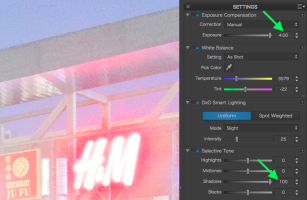
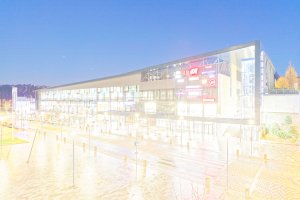
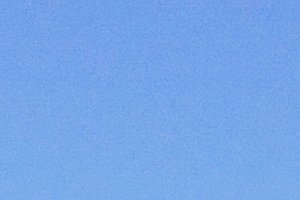
Sorry, I guess don't see what you're talking about with a slight push. So I tried a slightly more than slight push (+4 EV, +100 shadows). Can you please point out these 'lots of horizontal lines right through the sky' that I'm supposed to be seeing?

Edit: If I look at the downsampled image on a small, uncalibrated display like my iPhone, and scroll it up and down rapidly, and really squint, I think that I might be able imagine I see at least one very subtle line... +4 EV, +100 shadows, +squinting, +imagination...and maybe a subtle artifact. Quite the defect, apparently. ::)
 

Attachments

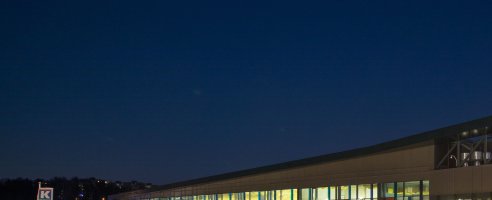
  • Original.jpg
    Original.jpg
    366.2 KB · Views: 132
  • Settings.png
    Settings.png
    467.4 KB · Views: 112
  • More than a slight push.jpg
    More than a slight push.jpg
    371.5 KB · Views: 123
  • Sky_100pct-crop +4EV +100shadows.jpg
    Sky_100pct-crop +4EV +100shadows.jpg
    343.4 KB · Views: 118
Upvote 0
ZachOly said:
I can see streaking/banding at as low as +1.5 exposure in Photoshop. Just look near the top left.

I can also see streaking at +1 exposure and +50 shadows.

Anyone who says this is acceptable is out to lunch. Sorry.

It's a defect, at least on this camera.

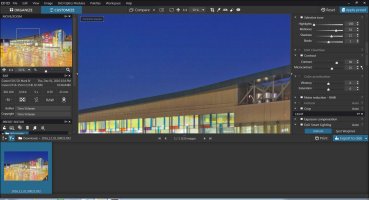
Given the same starting RAW file, my results with DxO Optics Pro, and yours with PS CC, do you stand by your original assertion that the camera is defective?
 
Upvote 0
TimoV said:
I have tested DxO Pro newest version and after disabling all fancy things there, result is the same than Lightroom or DPP... now I also learned that with iPhone this problem is solved ;-)

Sounds like you missed the point that I only (maybe sort of) saw a line when viewing the image on my iPhone. Banding isn't evident on my computer.

I do wonder what we're doing differently with your file in DxO. Do you see banding in the processed images I posted?
 
Upvote 0
Small files that edited by DxO and posted here, cannot see properly these streaks.

By default, DxO have many settings on that manipulate photos, it looks like it's softening dark sky portion and streaks are not so visible...
 
Upvote 0
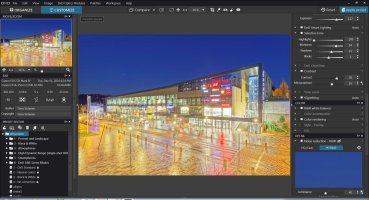
The thing with the specific DXO settings however is that the result is not useful.

I try to make something more view-able and the result is not nice. I didn't try prime yet though...

Edit: I tried prime but banding still shows...

Edit2: I have uploaded to drop box the preset settings I used in case someone is interested

https://www.dropbox.com/s/yi4hjs5x4th39kw/2016_12_01_00022.preset?dl=0
 

Attachments

  • different-settings.jpg
    different-settings.jpg
    395.8 KB · Views: 142
  • different-settings-details.jpg
    different-settings-details.jpg
    569.9 KB · Views: 133
Upvote 0
ZachOly said:
Who edits with DxO?

I'll give it a shot in CaptureOne if they support the 5D4

People who understand that not all raw converters are created equally, they all have there strengths and weaknesses depending on subject matter.

This 'testing' should be getting done with multiple raw converters to be valid so I'm delighted you have the latest version of c1 and can test, something I asked way back on p10.


Not as a direct reply but general question - if the default settings in any raw converter happens to remove unwanted artifacts, what's wrong with that? Doesn't invalidate it or somehow make it cheating, just means it's better at doing the job.
 
Upvote 0
Tron - what's clear is that you are using a completely different bunch of settings to neuro. Your setting everything you can to get artifacts with that exposure push he is doing everything he can to not get them at that exposure push. In the context of this test I'm not sure which is valid!
 
Upvote 0
zim said:
Tron - what's clear is that you are using a completely different bunch of settings to neuro. Your setting everything you can to get artifacts with that exposure push he is doing everything he can to not get them at that exposure push. In the context of this test I'm not sure which is valid!
Do you want an almost completely white picture or something that is viewable. You can download DxO Optics Pro trial edition to test yourself. I posted the prefix file so I am open to suggestions. But first and foremost the final picture should be viewable not something almost totally white. And since I do have a 5D4 too I really want this to work!
 
Upvote 0
tron said:
zim said:
Tron - what's clear is that you are using a completely different bunch of settings to neuro. Your setting everything you can to get artifacts with that exposure push he is doing everything he can to not get them at that exposure push. In the context of this test I'm not sure which is valid!
Do you want an almost completely white picture or something that is viewable. You can download DxO Optics Pro trial edition to test yourself. I posted the prefix file so I am open to suggestions. But first and foremost the final picture should be viewable not something almost totally white. And since I do have a 5D4 too I really want this to work!

Sorry tron not sure what you mean by completely white picture, neuro isn't doing that. Perhaps he would be good enough to post his preset. My interest in all this just that I'm thinking of getting one so I'm trying to get a resolution in my mind about what's going on here. I'm not criticising anyone's concerns.
 
Upvote 0