
Canon 5Diii viewfinder info missing

Hi Everyone

I have just got my camera back from the repair shop and all settings have been returned to factory default.

I now cannot get any information to come up in the viewfinder (shutter speed, ISO, exposure compensation level etc). The only thing that I can see is the selected focus point. Hopefully I am being stupid and I need to change a setting on the camera somewhere?! It's just that I have never come across this before.

Going on holiday in a few hours and worried that I might have a bigger issue than I think…….

Thanks so much for any replies.
 
You're referring to the green characters showing exposure info, etc.? There's no setting for those, AFAIK they're standard LED displays (vs. the AF points which are on the transmissive LCD). If they're dark, I'd suspect the repair facility botched something. What were they supposed to be doing?
 
Upvote 0
Neuro - Thanks so much for the reply.

Yes - it is the green characters to which I am referring. They are not just dark by the way (I have just tried the camera in complete darkness and there is isn't even a sniff of a green character)!

I had sent it in as the camera had been behaving a bit oddly. The errors I mailed to them at the time were:

1) The camera switched on and was being used. It suddenly became unresponsive to any button being pressed on the camera. The top LCD display was showing as off. (To clarify, the camera was switched on and was not asleep.)
I took the CF card out and then put back in. The top LCD display then came on but all buttons were still unresponsive.
The large battery was taken out and immediately put back in. All buttons were then responsive.

2) Focusing has been erratic:

a) On occasion the camera will not focus, becoming totally unresponsive to the focus button. When this happens, the focus button needs to be pressed a few times to get the camera to begin to focus.

b) At times focussing is pin point accurate. At other times the focus point is completely out of focus, although other areas of the photograph are then pin point accurate.

c) On occasion, the whole image is blurred.

d) On occasion, exposure is way off - very overexposed images. This can happen in the middle of a burst of exposures (where other images are correctly exposed) or on one shot.

Initial lens used Canon 24-105mm IS L. Results repeated with Canon 70-200mm mk II IS L f2.8 and Canon 16-35mm IS L f4.0

Until the above issues, the camera had been superb. Thankfully, it is under a repair warrantee.

So you think they have botched the repair……..? :-[ :-[ :'(
 
Upvote 0
I was hoping you wouldn't say that!!

Not to worry. I'll take it away with me this week anyway and see what happens. I have the 70D to fall back on if needed.

Let's hope the air in Anglesey (Wales) has a healing effect on the camara!

Thanks once again for the prompt reply.
 
Upvote 0
I sent my 7D in for repairs a month ago and it came back to me the same way. It required a return visit to Canon to get the viewfinder display working again. It is not a menu-selectable option. They said there was a loose circuit board connector.
 
Upvote 0
icassell said:
I sent my 7D in for repairs a month ago and it came back to me the same way. It required a return visit to Canon to get the viewfinder display working again. It is not a menu-selectable option. They said there was a loose circuit board connector.

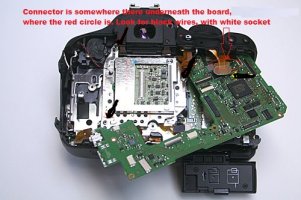
It happens to me, Rebel T3i, took it apart and fix it. there is a connector, that most likely they id not put it in all the way, I`ll attach a picture, you need to take the main board off, the loose connection in underneath, can only be seen if the board is taken off, it is a connector, the only one that has wires, black color, and the plug and socket are white, long about 7 mm, can not be placed back properly without tweezers or some similar tool, unplug it first, then place it back, must go in straight in, it will tend one side or the other to go in first, do not apply force, unless connector is flat with the socket and both sides are even inside the connector and push it all the way in.

Your connector is the only one with wires, black wires, all other connectors are with the flexible flat band connectors, just the speaker has 2 wires, white and red you will have to remove that one to get the board off.

Look for the one with black wires, maybe 8-10 wires in one white connector.


I am using a picture from web, I put my camera all apart and do not want to take it apart again to take pictures, I hope you can figure it out!


Sorry for my English! I come from a different planet. Daniel
 

Attachments

  • Canon-Rebel-T3i-infrared-conversion-tutorial-10.jpg
    Canon-Rebel-T3i-infrared-conversion-tutorial-10.jpg
    90.6 KB · Views: 300
Upvote 0